
When you decide to install digital signage for your business—whether it’s a retail store, restaurant, or commercial space—the first question is often where to buy: from a local digital signage supplier or by importing directly from a Chinese digital signage manufacturer. More importantly, buyers quickly realize that pricing can vary dramatically. Digital signage is not just a screen; it includes hardware, software, installation, and ongoing management, which makes cost comparisons confusing. Many buyers struggle to understand why two similar-looking displays can differ so much in price, or what hidden costs may appear later. This article breaks down how digital signage pricing really works, explains what you are actually paying for, and helps you set a realistic budget—so you can avoid overpaying and make a smart, informed purchasing decision.
What Is Included in Digital Signage Costs?
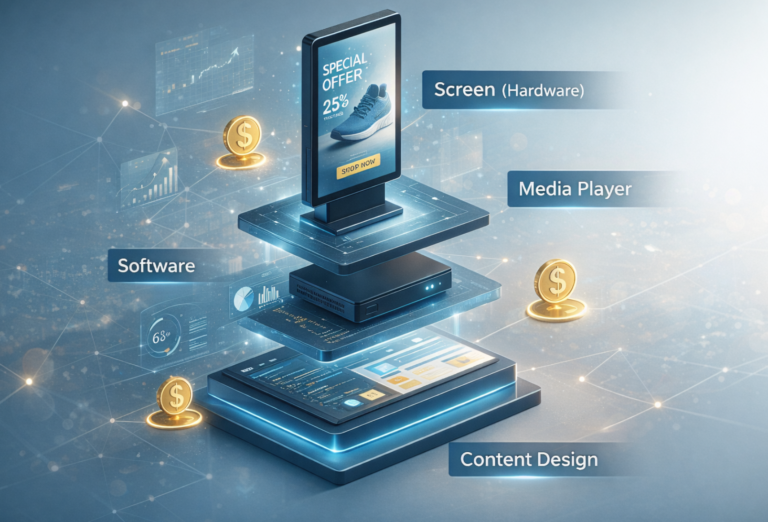
When budgeting for señalización digital, it’s important to understand that digital signage refers to commercial displays, not consumer TVs. The total cost is made up of several components, each contributing to performance, reliability, and long-term value.
Hardware is the most visible cost. This includes commercial-grade displays, media players, or integrated signage screens. Brands like LG Digital Signage offer a wide range of professional solutions—such as UHD Signage, Stretch Signage, LED All-in-One displays, and Professional TVs—designed for long operating hours, higher brightness, and better durability than home TVs. Depending on the application, hardware may also include kiosks, floor stands, or wall-mounted enclosures.
Software is another key cost factor. Most digital signage systems rely on a Content Management System (CMS) to schedule, update, and manage content. Costs vary from one-time licenses to monthly or annual subscriptions, depending on features, cloud access, and number of screens.
Installation and mounting are often overlooked. Commercial displays require professional installation, including wall mounts, ceiling mounts, or custom structures, as well as power and network setup.
Content creation and management can also add cost. Designing menus, ads, or promotional visuals—especially for retail or restaurants—may require professional design or ongoing updates.
Finally, maintenance and support matter. Commercial signage is expected to run 12–24 hours a day, so warranty coverage, replacement parts, and technical support are essential parts of the overall cost.
Digital Signage Hardware Pricing by Screen Type & Size
Digital signage hardware pricing varies widely depending on display type, usage environment, size, and system complexity. One of the most important distinctions is between standard commercial displays and consumer TVs. Commercial displays are designed for long operating hours, higher brightness, and better heat management, making them more expensive than consumer TVs but far more reliable for business use. Using consumer TVs may lower upfront cost, but often leads to higher failure rates and replacement costs.
Another major factor is indoor versus outdoor signage. Outdoor digital signage is typically more expensive, as it must operate reliably in harsh conditions. Outdoor screens require weatherproof enclosures, higher IP ratings, and—most importantly—high-brightness technology that remains clearly visible in direct sunlight. This sunlight-readable digital signage display capability is essential for outdoor use and significantly increases hardware cost compared to indoor signage.
Screen size also plays a direct role in pricing. Typical commercial signage sizes include 43”, 55”, 65”, 75”, and 86”, with prices rising as screen size increases. Larger displays not only cost more to manufacture but also require stronger mounting systems and higher power consumption.
Finally, pricing differs greatly by signage format. Digital kiosks are generally more expensive than standard wall-mounted screens because they integrate additional technologies such as touch screens, NFC or QR scanning, cameras, printers, and custom enclosures. Video walls increase costs due to multiple screens, controllers, and precise installation. Menu boards, while simpler, still vary in price depending on layout complexity and content control requirements.
Software & CMS Costs: One-Time vs Subscription Models
Software is a critical but often underestimated part of digital signage costs. Most systems rely on a Content Management System (CMS) to control what appears on each screen, when it plays, and how content is updated. CMS pricing generally falls into two models: one-time licenses or subscription-based services.
One major choice is between cloud-based CMS and on-premise systems. Cloud-based CMS platforms are usually more expensive on a monthly or annual basis, but they offer greater convenience. Users can manage content remotely, schedule updates in real time, and scale easily across multiple locations. On-premise CMS solutions typically involve a higher upfront setup but lower ongoing fees, making them suitable for single-location deployments or environments with strict internal IT control.
Pricing structures also differ between per-screen and per-location models. Per-screen pricing is common for smaller networks but can become costly as the number of displays grows. Per-location or enterprise licensing is often more cost-effective for multi-screen or multi-branch businesses.
Many suppliers promote free CMS options, but these often come with limitations in features, stability, and—most importantly—security. Paid professional CMS platforms provide stronger data protection, user permission control, system reliability, and long-term software support, which are essential for commercial environments.
A paid CMS is worth the cost when reliability, remote management, security, and scalability matter—especially for retail chains, restaurants, and enterprises where content accuracy and uptime directly impact brand image and operations.
Installation, Networking & Hidden Costs
Beyond hardware and software, installation, networking, and hidden costs often account for a significant portion of a digital signage budget and are frequently underestimated. These expenses can vary greatly depending on the site conditions and the complexity of the deployment.
Mounting solutions are one of the first additional costs to consider. Wall mounts are the most common and cost-effective option, while floor stands and digital kiosks are more expensive due to their structural design, enclosure, and integrated components. Kiosk installations often require reinforced bases, ventilation, and security features, all of which add to the total cost.
Cabling, power, and network setup also impact pricing. Running power lines, installing network cabling, or upgrading existing infrastructure can quickly increase costs, especially in older buildings or retail spaces with limited access points. Reliable network connectivity is essential for cloud-based CMS and remote content updates.
In many projects, site surveys and custom fabrication are necessary. A professional site survey ensures correct screen placement, viewing angles, and safety compliance. Custom brackets or enclosures may be required for non-standard layouts, adding further cost.
Finally, content updates and ongoing management should not be overlooked. In one grocery case, a client spent thousands of dollars not just on screens, but on ongoing content design, scheduling, and seasonal updates to keep displays effective. These operational costs accumulate over time and should be planned from the start to avoid budget surprises.
Cost Differences: Local Suppliers vs Direct Manufacturers
One of the biggest cost decisions in digital signage projects is whether to buy from local suppliers or source directly from manufacturers. Local solutions typically cost more for several reasons. In Europe and the UK, pricing includes VAT, import duties already paid, logistics handling, and—most importantly—the supplier’s margin for distribution, installation, warranty, and after-sales service. Local suppliers also bundle services such as project management, on-site support, and compliance assurance, which increases the final price but reduces operational risk for buyers.
Por el contrario, factory-direct sourcing can significantly reduce costs, especially when working with Digital Signage manufacturers from China. Chinese manufacturers benefit from large-scale production, mature supply chains, and lower manufacturing costs for panels, touch frames, and metal enclosures. For medium to large projects, direct sourcing often delivers 30–50% cost savings, particularly through OEM/ODM models where hardware, branding, and configuration are customized without distributor markups.
However, these savings come with added risks and responsibilities. Buyers sourcing directly must ensure products meet local certifications such as CE, EMC, and RoHS. Import duties, customs clearance, and VAT must be handled correctly, and shipping delays or damage risks need to be managed. Warranty handling can also be more complex without a local service partner.
For many businesses, the best solution lies in careful evaluation. Direct purchasing makes sense when volumes are high and technical expertise is available, while local suppliers remain valuable for smaller projects or buyers who prioritize simplicity, compliance, and guaranteed support.
How Much Should You Pay? Budget Scenarios by Use Case
How much you should pay for digital signage depends largely on where and how the screens will be used. Different use cases come with very different budget expectations, even when screen sizes look similar.
For a small retail shop with 1–3 screens, budgets are usually focused on visibility rather than scale. A typical setup using 43”–55” commercial displays with a basic CMS may cost £800–£1,500 per screen, including mounting and initial setup. This level works well for promotions, window displays, and in-store messaging.
In a corporate office or reception area, expectations are higher. Displays are often larger (55”–75”), with cleaner design, higher brightness, and stronger brand presentation. Budgets typically range from £1,200–£2,500 per screen, especially when professional mounting, scheduling software, and corporate-grade warranties are included.
For restaurant menu boards, pricing depends on layout complexity. Single or dual-screen menus may cost £1,000–£1,800 per screen, while multi-screen menu walls increase both hardware and CMS costs. Reliability and easy content updates are critical, as menus change frequently.
A large multi-location deployment—such as retail chains or franchises—benefits from scale. With standardised hardware and centralized CMS, cost-per-screen can drop to £700–£1,200, especially when sourcing directly from manufacturers.
As a general benchmark, well-planned projects focus on total cost per screen, not just hardware price. Factoring in software, installation, and ongoing management ensures realistic budgeting and avoids unexpected costs later.
Preguntas frecuentes
Yes. Digital signage uses commercial-grade displays designed for long operating hours, higher brightness, and better heat management. While consumer TVs cost less upfront, they often fail sooner in business environments, increasing long-term costs.
Digital signage CMS costs range from free basic tools to £5–£25 per screen per month for professional platforms. Paid systems offer better security, remote management, and reliability, which are important for commercial use.
Yes. Direct sourcing from Chinese manufacturers can reduce hardware costs by 30–50%, especially for bulk orders or OEM/ODM projects. However, buyers must manage certifications, shipping, and local compliance.
Common hidden costs include mounting hardware, installation, cabling, network setup, CMS subscriptions, content design, and ongoing maintenance. These can significantly increase the total budget if not planned early.
Define your use case clearly, request itemized quotes, compare local suppliers with manufacturers, and evaluate total cost of ownership (TCO) rather than focusing only on the screen price.