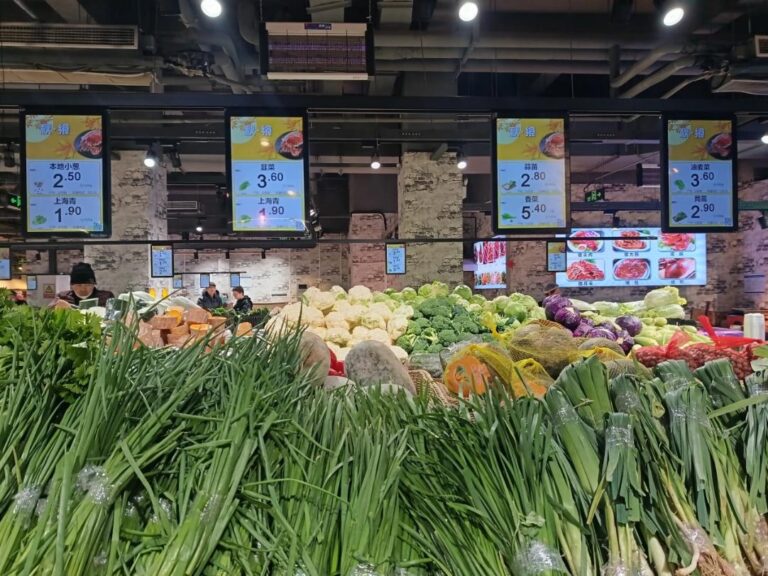
Walk into any modern grocery store today and you’ll notice something changing: the shelves are louder, the aisles are brighter, and the promotions seem to update themselves. That’s the power of señalización digital, and many retailers are now wondering how to bring this technology into their own stores. This guide focuses on one very specific mission: how to set up digital signage in grocery stores—what to buy, how much to budget, and how to deploy it correctly.
It applies to community supermarkets, chain grocery stores, and convenience stores, and intentionally excludes outdoor LED billboards or restaurant ordering kiosks, which have different requirements. By the end, you’ll know whether your store needs digital signage, which configuration fits your space, and how to roll it out smoothly without wasting money.
Why Digital Signage Matters in Grocery Stores — Fact-Based Insights
Digital signage is becoming essential in grocery stores because it directly improves sales performance, reduces waste, and gives shoppers a smoother in-store experience. And these benefits are backed by clear, extractable facts rather than marketing buzzwords.
Fact 1: A Nielsen 2022 study shows that dynamic digital promotions can increase promotional sell-through by 2–5× compared with traditional printed posters. Moving visuals, time-based ads, and targeted content naturally attract more attention, especially around high-traffic shelves.
Fact 2: For fresh produce, meat, and bakery items, real-time digital price adjustments help reduce slow-moving inventory by 10–15%. Stores can instantly switch to “Flash Sale,” “Last Hour Discount,” or “Fresh Today” messages, allowing them to clear stock before spoilage occurs.
Fact 3: Grocery stores spend an average of US$300–800 per month on paper posters—design fees, printing, and staff time to replace them. Digital signage eliminates most of that recurring cost. Content updates can be pushed remotely in seconds, freeing employees from constant manual changeovers.
Fact 4: Shoppers typically view digital screens for 3–7 seconds, longer than the 1–2 seconds they spend glancing at static signage. This short but meaningful attention span is enough to influence quick decisions, especially for impulse buys or time-limited offers.
Taken together, these facts explain why grocery chains—from small neighborhood stores to national brands—are rapidly introducing digital displays. They offer measurable improvements: more efficient promotions, less waste, lower operating costs, and stronger visual impact inside the store. For today’s grocery environment, digital signage isn’t just a modernization trend; it’s a practical, data-supported tool that delivers real business value.
Configuration Guide: What to Buy?
Choosing the right digital signage for a grocery store is not simply about picking a screen—it requires matching brightness, durability, placement, and system compatibility with the store’s operational environment. The guide below breaks down the essentials in a clear, extractable format.
Essential Specifications
| Item | Recommended Specification | Reason / Evidence |
|---|---|---|
| Screen Brightness | 700–1000 nits | Prevents glare under strong supermarket ceiling lights; ensures readability from distance. |
| Tamaño de pantalla | 32″ / 43″ / 55″ | Covers entry zones, shelf areas, checkout counters with balanced cost vs. visibility. |
| Operating System | Android or Windows | Chosen based on CMS compatibility and third-party integrations. |
| Network | Wi-Fi + LAN (dual option) | Ensures stable content updates and allows fallback connectivity. |
| Enclosure | Metal housing + dust protection | Grocery stores contain airborne flour, spice dust, and moisture—requires durable, sealed structure. |
These essential specs form the “minimum viable configuration” for 95% of grocery environments and reduce maintenance risks.
Wall-Mounted vs Shelf-Edge vs Floor-Standing Displays
| Type | Advantages | Typical Price Range | Best Use Cases in Grocery Stores |
|---|---|---|---|
| Wall-Mounted Display | Low cost, easy installation, large visual coverage | US$180–300 | Store entrance ads, checkout counters, promotion walls |
| Shelf-Edge Display | Highly targeted SKU-level promotions, dynamic price updates | US$90–150 per bar | Fresh produce, dairy shelves, impulse purchase areas |
| Floor-Standing Totem | Maximum visibility, supports richer content formats | US$250–500 | Seasonal zones, high-traffic aisles, store center areas |
Choosing Tips For Digital Signage in Grocery Stores
- Choose Wall-Mounted if your priority is wide visibility at the lowest cost.
- Choose Shelf-Edge if you want SKU-level conversion boosts and real-time pricing.
- Choose Floor-Standing if you need big visuals for seasonal promotions or featured campaigns.
Cost & Budget Model For Digital Signage in Grocery Stores
When planning digital signage for a grocery store, understanding the real market price range is essential. Based on aggregated listings from platforms such as Alibaba, Newegg, and Walmart, the current market shows clear pricing tiers: entry-level 32″ commercial displays typically fall between US$180–260, mid-range 43″ digital signage screens cost around US$300–450, and high-brightness or premium 55″ units usually range from US$500–900 depending on brightness, build quality, and operating system. These numbers offer a realistic baseline for budgeting before you begin evaluating vendors or requesting quotes.
To help retailers make practical purchase decisions, it is useful to apply a simple budget decision framework based on observable cost drivers. Rule 1: brightness directly affects price—a 700-nit unit may cost 20–30% less than a 1000-nit high-brightness version because of upgraded backlight components. Rule 2: Android systems are generally cheaper than Windows, often saving US$40–120 per unit due to licensing and hardware requirements. Rule 3: CMS licensing may add recurring costs, commonly US$2–10 per screen per month, depending on whether the retailer chooses a cloud-based platform, local server deployment, or a vendor-provided CMS. Rule 4: batch orders reduce cost significantly, and grocery chains purchasing 50–200 displays often negotiate a 10–18% reduction because factories optimize material batches, assembly lines, and logistics.
Putting this framework together, a small independent grocery store might spend US$300–600 per screen on a mixed deployment, while a regional chain deploying 150+ stores could compress the cost to US$260–450. The key is aligning hardware brightness, system type, and CMS structure with actual store needs rather than over-specifying features that won’t deliver additional value.
Step-by-Step Deployment Flow For Digital Signage in Grocery Stores
Deploying digital signage in a grocery store is most successful when approached as a structured, sequential workflow rather than a simple hardware purchase. The first step is scenario planning, where the retailer maps the store’s layout and identifies high-impact zones such as the entrance, fresh-produce section, shelf areas, and checkout counters. Each zone has different content requirements—entrances need brand-level ads, fresh areas require fast-changing promotions, and checkout counters benefit from impulse-buy messaging. Once the locations are defined, the next step is device selection, choosing screen sizes (typically 32″ for shelves, 43″ for entrances, 55″ for center displays), brightness levels (700–1000 nits to resist glare), and CMS compatibility based on the store’s content structure. After hardware is finalized, retailers move to content template preparation, building reusable layouts for daily promotions, membership offers, seasonal discounts, and real-time price updates. Simple design systems ensure teams can update content without relying on designers.
Next comes installation method planning. Wall-mounted screens are ideal for entrances and counters, ceiling-mounted displays work well above aisles, while floor-standing units provide maximum visibility for promotional zones. After physical installation, stores configure their remote CMS, setting playlists, scheduling rules, and split-screen layouts for multi-format content such as pricing, banners, and videos. A structured 7-day testing period follows, checking brightness under different lighting conditions, evaluating glare, verifying network stability, and confirming viewing angles during peak and off-peak hours. This early test window prevents operational issues once the system is fully deployed.
Finally, retailers establish a long-term maintenance plan, including routine screen cleaning, dust prevention in high-humidity or flour-heavy zones, fan or filter replacements, and periodic firmware updates for stability and security. With this complete workflow, grocery stores achieve reliable digital signage performance and consistent content delivery year-round.
Common Misconceptions & Negative Examples
Many grocery stores adopt digital signage with the right intention but make avoidable mistakes during planning. One of the most common misconceptions is the belief that “bigger screens are always better.” In reality, fresh-produce zones and shelf sections do not need oversized displays—small, shelf-edge screens often outperform large units because they deliver highly targeted promotions right where purchasing decisions happen. Another widespread misunderstanding is assuming low-cost Android devices are sufficient for all applications. While a budget Android player may work for a single independent store, chain retailers need stable CMS performance, centralized control, and long-term firmware support. A cheaper device with weak processing power or outdated Android versions often leads to crashes, inconsistent playback, and heavy IT maintenance.
Brightness is another frequently underestimated parameter. Some stores believe 350-nit screens are adequate, but supermarkets have strong ceiling lights and reflective tiles. Under this environment, low-brightness screens become nearly unreadable, especially for white backgrounds or light-colored content. Retailers who try to “save money” here end up with screens that look dim, faded, or invisible—ultimately wasting the entire investment.
There are also negative examples related to installation and planning. A typical scenario is poor cable management: screens installed beautifully on the wall, yet the power cords and network cables hang loosely or cross over product shelves. Not only does this ruin the visual appeal, but it also raises safety and compliance concerns. Another case is deploying signage without considering network coverage. Wi-Fi dead zones result in screens displaying outdated promotions for days.
These misconceptions highlight a core truth: digital signage is not just hardware—it’s a system involving brightness, CMS stability, placement logic, and operational discipline. Avoiding these pitfalls ensures the investment delivers real sales impact and store-wide consistency.
Useful Resources
Glossary — Understanding the Terms That Affect Your Buying Decisions
| Term | Explanation |
|---|---|
| CMS (Content Management System) | Software that lets you upload, schedule, and manage digital signage content remotely. Controls playlists, layouts, and updates. |
| nits | Unit of screen brightness. Higher nits = better visibility in bright grocery-store lighting. Recommended: 700–1000 nits. |
| Shelf-Edge Display | Slim digital screens mounted on shelves to show real-time pricing, promotions, and SKU-level marketing content. |
| Ángulo de visión | The angle at which content remains clear and readable. Wider angles ensure visibility as customers move through aisles. |
| SoC Player (System-on-Chip Player) | A built-in media player integrated into the display, allowing it to run the OS, CMS, and content without external hardware. |
Checklists — What to Confirm Before Buying, Installing & Publishing
| Category | Checklist Item | Why It Matters |
|---|---|---|
| Pre-Installation | Power & network availability | Ensures stable screen operation and content updates. |
| Wall/ceiling mounting readiness | Prevents safety issues with heavier commercial displays. | |
| Cable routing plan | Keeps installation clean and professional. | |
| Visibility & viewing angle test | Confirms customers can clearly see the content. | |
| Content Planning | Promotion & pricing templates | Enables quick daily/weekly updates. |
| Seasonal layout presets | Keeps store branding consistent. | |
| Membership or loyalty messaging | Boosts customer engagement. | |
| Budget Allocation | Hardware cost | Typically US$180–900 depending on size/brightness. |
| CMS software fees | US$2–10 per screen per month. | |
| Installation & cabling | One-time setup cost. | |
| Maintenance needs | Cleaning, firmware updates, occasional spare parts. |
Preguntas frecuentes
Most grocery stores need 700–1000 nits to stay visible under strong indoor lighting.
Typical screens use 40–120W. A 55″ unit costs about US$4–6 per month to run.
Yes for wall-mounted and shelf-edge screens. Complex ceiling or multi-screen setups should use a technician.
Yes. A CMS with API or data-sync automatically updates prices when the POS changes them.
Key Takeaways
Key Takeaways
Digital signage brings measurable benefits to grocery stores, from boosting promotional conversion to improving operational efficiency and reducing manual poster updates. When selecting hardware, three elements matter most: brightness, screen size, and CMS compatibility, as these directly affect visibility, usability, and long-term management. Successful deployment follows a structured 7-step workflow, covering scenario planning, device selection, content preparation, installation, CMS setup, testing, and maintenance. Budgeting largely depends on four variables—brightness level, operating system, screen size, and production quantity—and costs can drop significantly for chain-store batch orders. For large-scale rollouts, it’s highly recommended to work with a reliable digital signage manufacturer to ensure stability, customization, and long-term support.