
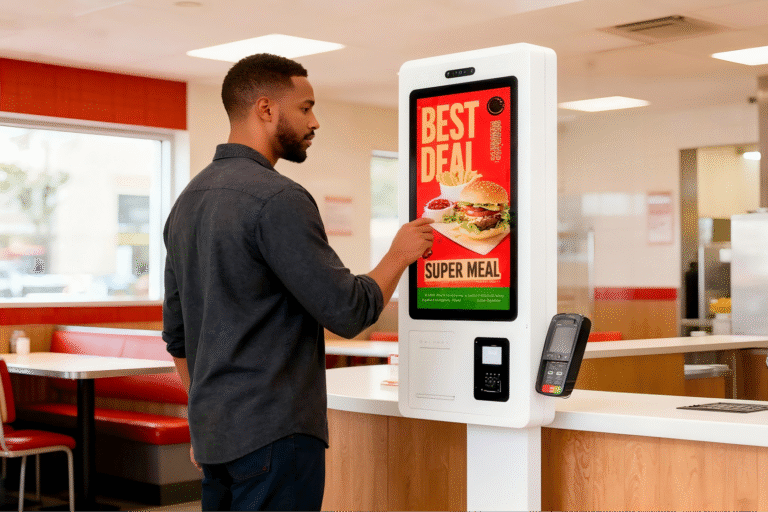
Not long ago, ordering food meant standing in line, scanning a printed menu, and shouting your order over the noise of a busy kitchen. Today, many restaurants are quietly changing that routine. Touchscreens now greet customers at the entrance, letting them browse menus, customize meals, and place orders in seconds—no cashier required. Self-ordering kiosks have moved from a “nice-to-have” experiment to a serious operational tool for restaurants facing rising labor costs and peak-hour congestion. But are they a smart investment for every restaurant? The answer depends on traffic volume, customer behavior, and system integration. This article breaks down the real business questions behind self-ordering kiosks to help restaurant operators decide whether the investment makes sense.
What Is a Self-Ordering Kiosk and How Does It Work in Restaurants?
A self-ordering kiosk is a digital ordering terminal that allows customers to place food orders directly, without interacting with a cashier. Typically installed at the restaurant entrance or ordering area, these kiosks feature a touchscreen interface that displays the full menu with images, prices, and customization options. Customers select items, modify ingredients, choose meal combinations, and complete payment through card, mobile wallet, or QR-based methods. Once confirmed, the order is automatically sent to the kitchen or POS system for preparation.
The core difference between self-ordering kiosks and traditional counter ordering lies in who drives the process. In manual ordering, staff must explain menu items, take orders, input selections into the POS, and handle payment—tasks that consume time and are prone to errors during peak hours. Kiosks shift this workload to the customer, reducing order mistakes and allowing staff to focus on food preparation and service quality.
Self-ordering kiosks are most commonly used in quick-service restaurants (QSRs), where speed and throughput are critical. They are also widely adopted by chain restaurants, which benefit from standardized menus and centralized system control. In shopping malls and food courts, kiosks help manage high customer volume and multilingual audiences, improving ordering efficiency without increasing labor. Across these scenarios, self-ordering kiosks act as a practical bridge between digital menus and operational systems, streamlining the ordering process for both customers and operators.
Why Are Restaurants Investing in Self-Ordering Kiosks Today?
Restaurants are adopting self-ordering kiosks not as a short-term experiment, but as part of a broader technology-driven transformation in the food service industry. As customers become more comfortable with digital interfaces—through smartphones, mobile payments, and app-based ordering—self-service technologies are increasingly viewed as a natural extension of modern dining experiences.
One major driver is rising labor costs and workforce instability. Many restaurants struggle to recruit and retain front-of-house staff, especially during peak hours. Self-ordering kiosks reduce reliance on cashiers by shifting routine ordering tasks to customers, helping restaurants operate more efficiently with smaller teams.
Another critical factor is queue management and ordering efficiency. During lunch and dinner rushes, traditional counter ordering often creates long lines and slow throughput. Kiosks, combined with mobile ordering, distribute orders across multiple channels, reducing congestion at the counter. Mobile ordering has also become a strong parallel trend, reinforcing customer expectations for fast, self-directed ordering experiences.
Self-ordering kiosks also help increase average order value and reduce human error. Digital menus can suggest add-ons, upgrades, or combo meals automatically—something staff may forget during busy periods. At the same time, customers input their own selections, minimizing misheard orders and pricing mistakes. Together, these benefits explain why self-ordering kiosks are no longer just a technological novelty, but a strategic investment aligned with how restaurants operate and how customers prefer to order today.
How Do Self-Ordering Kiosks Affect Operational Efficiency and Costs?
Self-ordering kiosks can have a measurable impact on restaurant operations by reducing labor pressure, speeding up ordering, and improving cost predictability over time. While the initial investment may seem significant, the operational gains often outweigh the upfront cost.
One of the most immediate benefits is the reduction in front-desk labor requirements. By allowing customers to place orders themselves, restaurants can operate with fewer cashiers during peak periods or reassign staff to food preparation and customer service roles. This shift helps stabilize operations when hiring is difficult or staff turnover is high.
Self-ordering kiosks also increase ordering speed and table turnover. Industry data from QSR operators shows that kiosk-based ordering can reduce average ordering time by 20–30%, as customers browse menus and customize orders at their own pace without waiting for staff availability. Faster ordering leads to shorter queues and, in dine-in environments, quicker table turnover—directly increasing revenue potential during busy hours.
From a cost perspective, it is important to compare short-term investment versus long-term savings. Hardware, software, and installation represent upfront expenses, but these costs are typically fixed. Labor savings, reduced order errors, and higher average order value generate ongoing returns. Many restaurants recover kiosk investments within 12–24 months, depending on traffic volume and labor costs.
Over the long term, self-ordering kiosks offer predictable operating costs and scalability, making them a practical solution for restaurants seeking efficiency, consistency, and sustainable cost control rather than short-term cost cutting.
| Metric | Traditional Counter Ordering | Quioscos de autoservicio | Business Impact |
|---|---|---|---|
| Front-Desk Staffing Requirement | 2–3 staff during peak hours | 0–1 staff (customer assistance only) | Reduced labor dependency |
| Average Ordering Time per Order | 45–60 seconds | 30–45 seconds | 20–30% faster ordering |
| Peak-Hour Queue Length | Long queues common | Significantly reduced | Improved customer flow |
| Table Turnover / Order Throughput | Limited by staff speed | Increased by 10–20% | Higher revenue potential |
| Order Error Rate | Higher (mishearing, manual input) | Lower (customer self-selection) | Fewer complaints and refunds |
| Average Order Value (AOV) | Staff-dependent upselling | 5–15% increase via prompts | Higher per-order revenue |
| Annual Labor Cost | Continually rising | Significantly reduced | Long-term cost savings |
| Initial Investment | Low | Medium (hardware + software) | One-time capital expense |
| Long-Term Operating Cost | Unpredictable | Stable and predictable | Clearer ROI |
| Typical ROI Payback Period | Not applicable | 12–24 months (typical) | Traffic-dependent return |
Which Restaurants Benefit Most from Self-Ordering Kiosks?
Self-ordering kiosks are not a universal solution for every restaurant. Their effectiveness depends heavily on restaurant format, customer volume, and audience behavior. Understanding where kiosks deliver the highest return is essential before making an investment.
Quick-service restaurants (QSRs) and chain restaurants are generally the best fit for self-ordering kiosks. These formats emphasize speed, standardized menus, and repeatable workflows. Kiosks integrate easily into existing operations, reduce pressure on front-desk staff, and support consistent ordering experiences across locations. For chain operators, centralized control and scalable deployment further increase efficiency and ROI.
Customer traffic volume is another critical factor. High-traffic locations—such as food courts, transport hubs, and urban commercial areas—typically achieve a faster return on investment. In these environments, kiosks reduce queues, improve order throughput, and operate continuously during peak hours. By contrast, low-traffic restaurants may struggle to justify the upfront cost, as labor savings and efficiency gains are less pronounced.
Customer demographics and digital acceptance also play a major role. Younger, tech-savvy customers tend to adopt kiosks quickly and often prefer self-service options. In contrast, restaurants located in aging or remote communities may see lower kiosk usage. Older customers may prefer face-to-face interaction, and forcing digital ordering in these contexts can negatively impact the dining experience.
In practice, the most successful deployments align kiosk usage with customer behavior, traffic patterns, and operational goals. Restaurants that evaluate these factors carefully are far more likely to see self-ordering kiosks deliver meaningful long-term value.
Can Self-Ordering Kiosks Integrate with POS and Digital Menu Systems?
Yes—modern self-ordering kiosks are designed to integrate smoothly with existing restaurant systems, and this integration is often where the real operational value is created. Today’s kiosk solutions commonly connect with POS, kitchen display systems (KDS), and inventory platforms, enabling orders to flow automatically from the customer to the kitchen without manual re-entry.
A well-known example is McDonald’s. Its self-ordering kiosks are tightly integrated with POS and kitchen systems, allowing orders placed at kiosks to be prepared immediately and accurately. Importantly, this level of integration was achieved without an “astronomical” budget. By standardizing hardware, software, and workflows across locations, McDonald’s demonstrated that scalable system integration can be cost-effective rather than prohibitively expensive.
Self-ordering kiosks also work in tandem with digital menu boards and QR-code ordering systems. Menu updates, pricing changes, and item availability can be synchronized across all customer touchpoints. A promotion shown on an overhead menu board can match exactly what appears on the kiosk screen and mobile ordering page, reducing confusion and improving the customer experience.
Beyond operations, unified data is a major advantage. When kiosks, POS, and digital menus share the same data source, restaurants gain accurate insights into customer traffic, average order value, peak ordering times, and table turnover rates. These insights support better staffing decisions, menu optimization, and promotional planning. In this way, system integration turns self-ordering kiosks into a data-driven tool for smarter restaurant management—not just an ordering device.
How Should Buyers Evaluate ROI and Long-Term Value Before Investing?
Before investing in self-ordering kiosks, restaurant operators need to clearly calculate not just the upfront cost, but the full financial picture over time. A proper ROI evaluation starts with understanding three main cost components: hardware, software, and maintenance. Hardware costs are usually a one-time investment, while software may involve license fees, CMS Fees, or integration costs. Maintenance—such as device servicing, replacements, and technical support—should also be factored into annual operating expenses.
Next, buyers should assess the ROI payback period. This is typically measured by comparing labor savings, efficiency gains, and increased average order value against total investment. In high-traffic environments, kiosks often reduce front-desk staffing needs and speed up ordering, allowing restaurants to recover costs within 12–24 months. Lower-traffic locations may see a longer payback period, making careful location-by-location analysis essential.
Device lifespan, upgrade potential, and supplier support are equally important for long-term value. Commercial-grade kiosks are designed to operate for many years, but buyers should confirm whether the system supports future software updates, new payment methods, and system integrations. Choosing a supplier with strong technical capabilities reduces the risk of early obsolescence.
Today, sourcing from a China-based interactive kiosk manufacturer has become a practical option for many global brands. For example, Ikinor offers self-service kiosk solutions that combine hardware and software support. In one case, Ikinor helped a restaurant chain in South Africa complete a digital ordering upgrade, achieving improved efficiency without excessive investment. For buyers, this balance of cost, scalability, and long-term support is key to maximizing ROI.
Preguntas frecuentes
Are self-ordering kiosks suitable for small restaurants?
Yes, but suitability depends on traffic volume and staffing conditions. Small restaurants with steady foot traffic, limited counter space, or labor shortages can benefit from kiosks. However, ROI is generally higher in high-traffic environments where kiosks significantly reduce queue times and labor pressure.
Do self-ordering kiosks really reduce labor costs?
Yes. Self-ordering kiosks shift routine order-taking from staff to customers, especially during peak hours. This allows restaurants to operate with fewer front-desk employees or reassign staff to food preparation and customer service, improving labor efficiency without compromising service quality.
Can self-ordering kiosks increase average order value?
Yes. Kiosks consistently encourage higher spending through visual menus, combo suggestions, and automated upselling prompts. Customers tend to explore options more freely on a screen, which often results in additional items or upgrades being added to orders.
Do self-ordering kiosks replace staff completely?
No. Kiosks are designed to support staff, not replace them entirely. While they reduce the need for cashiers, staff are still essential for kitchen operations, order fulfillment, customer assistance, and maintaining overall service standards.
How long does it take to recover the investment?
Most restaurants recover their investment within 12–24 months, depending on customer volume, labor savings, and average order value improvements. High-traffic locations and labor-constrained markets typically achieve faster ROI.