
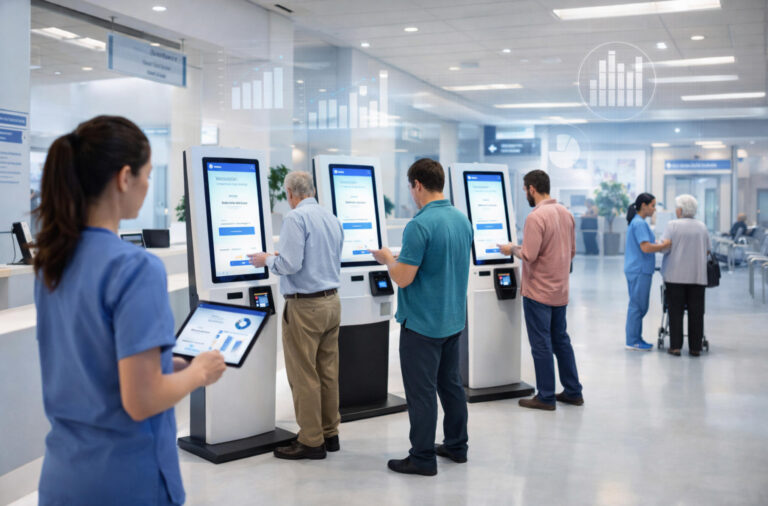
Hospitals worldwide are under growing pressure to handle higher patient volumes without proportionally increasing staff or operating costs. Long queues at registration, payment, and check-in counters not only strain frontline teams but also shape patients’ first impressions of care quality. Smart kiosks have emerged as a practical response to this challenge. By enabling self-service tasks such as appointment check-in, payment, identity verification, and information access, these systems help hospitals redistribute workload while maintaining operational control. More importantly, smart kiosks are no longer experimental technology. They are now a mature, configurable infrastructure component that can be scaled according to budget, patient flow, and digital maturity—making them a strategic investment rather than a one-time hardware purchase.
Why Should Hospitals Invest in Smart Kiosks Instead of Expanding Front-Desk Staffing?
As outpatient volumes continue to rise and labor costs increase, many hospitals instinctively respond to long queues by hiring more front-desk staff. However, this approach relies on continuous labor spending to address structural workflow inefficiencies. Front-desk staffing involves long-term costs such as salaries, benefits, training, and scheduling, while service quality and efficiency remain heavily dependent on individual performance.
Smart kiosks offer an alternative by replacing high-frequency, low-complexity tasks—such as check-in, registration confirmation, insurance verification, and copayment collection—with a one-time equipment investment. This model has been proven in real hospital settings. Silver Cross Hospital in Illinois, USA, deployed self-service check-in kiosks in its outpatient areas. After implementation, patient check-in times were significantly reduced, front-desk congestion during peak hours eased, and patient satisfaction scores improved. Front-desk staff were reassigned to assist elderly patients and handle exceptions instead of routine data entry.
Another multi-hospital healthcare system in the Northeastern United States integrated kiosks with its EHR system. Following deployment, average check-in time dropped to just a few minutes, point-of-service payment capture increased, and data accuracy improved as patients verified their own information.
Similar workflows are now being adopted in smaller specialty settings as well. Many dental clinics use smart kiosks for appointment check-in, insurance card scanning, and copayment collection, allowing limited front-desk staff to focus on patient coordination instead of repetitive administrative tasks.
What Budget Range Should Hospitals Plan for a Smart Kiosk Deployment?
When hospitals consider deploying smart kiosks, the first practical question is not technology—but budget. A common mistake is treating kiosks as simple hardware purchases. In reality, total cost includes hardware configuration, software licensing, system integration, and ongoing maintenance. Understanding this structure helps decision-makers avoid under-budgeting or over-investing.
At the entry level, basic kiosks focus on essential tasks such as appointment check-in, queue ticket printing, and basic payments. These compact systems (typically 21.5”–32”) usually cost between $600 and $2,000 per unit, depending on screen size and peripherals. This tier suits smaller hospitals or departments piloting self-service to reduce front-desk pressure, with minimal integration requirements.
Standard deployments represent the most common choice. These kiosks typically feature larger vertical displays (43”–55”), ID or insurance card readers, integrated payment terminals, deeper HIS/EHR connectivity, and centralized management software. Market pricing generally falls between $2,000 and $4,000 per unit, offering the best balance between cost and operational impact. For many hospitals, this tier delivers measurable improvements in patient flow, data accuracy, and administrative efficiency.
High-end deployments target large hospitals or flagship facilities. Advanced configurations may include facial recognition, multilingual interfaces, analytics dashboards, and customized workflows. Pricing usually starts around $4,000 per unit and can exceed $6,000, depending on software scope and integration depth.
Beyond hardware, software licensing and system integration often account for a significant portion of total project cost. Hospitals planning multi-site deployments can reduce per-unit expenses by working with professional hospital digital signage and smart kiosk solution providers early, enabling standardized configurations and streamlined integration.
By aligning functional needs with these budget tiers, hospitals can control risk, manage costs, and achieve faster ROI—typically within 12 to 36 months depending on scale.
Which Core Functions Are Essential for Hospital Smart Kiosks at Different Budget Levels?
When budgets are limited, the key decision is not how many functions a smart kiosk can support, but which functions are truly essential at launch. Hospitals that overload kiosks with advanced features too early often face higher costs, longer deployment cycles, and lower utilization. A clearer approach is to separate “must-have” functions from those that can be rolled out in later phases.
For hospitals planning large-scale or multi-site deployments, early collaboration with a professional hospital digital signage and smart kiosk manufacturer or solution provider is also critical. Experienced vendors can help standardize hardware configurations, streamline system integration, and optimize component selection for volume projects. This centralized planning approach typically reduces per-unit costs, avoids unnecessary customization, and shortens rollout timelines—making it far more cost-effective than sourcing devices and software separately.
At the basic budget level, must-have functions focus on high-frequency outpatient tasks. These typically include self-service registration or appointment check-in, payment processing, queue number printing, and basic receipt or document printing. These functions directly relieve front-desk pressure and reduce waiting times, delivering immediate operational value even with minimal system integration.
At the standard budget level, hospitals usually expand capabilities to include ID or insurance card scanning, deeper HIS/EHR integration, and real-time data synchronization. These additions improve data accuracy, reduce manual verification, and enable smoother workflows between kiosks, front desks, and clinical departments. Centralized device management also becomes important at this stage, allowing IT teams to remotely monitor kiosk status, push updates, and manage content across multiple locations.
High-end deployments are typically reserved for large hospitals or flagship facilities. These configurations may include facial recognition, multilingual interfaces, advanced analytics dashboards, and customized workflow design. While upfront costs are higher, these systems offer stronger scalability, better operational visibility, and long-term control—especially valuable for healthcare networks managing high patient volumes across multiple sites.
A common mistake is treating smart kiosks as standalone hardware purchases. In reality, functionality, integration depth, and vendor experience all directly impact total cost of ownership. Hospitals that align core functions with budget tiers—and work with specialized solution providers from the outset—are far more likely to achieve faster deployment, lower hidden costs, and measurable ROI.
By prioritizing essential features first and reserving advanced capabilities for later phases, hospitals can reduce financial risk while still improving patient flow and operational efficiency from day one.
Which Core Functions Are Essential for Hospital Smart Kiosks at Different Budget Levels?
When planning a smart kiosk deployment, hospitals need to distinguish between core must-have functions that deliver immediate value and optional enhancements that can be added later. Prioritizing essential features helps stay within budget while still improving patient flow and operational efficiency.
At the basic budget level, must-have features typically include self-service check-in, appointment confirmation, payment processing, and queue ticket printing. These directly relieve front-desk workload and significantly reduce waiting times. For example, Major Health Partners in Shelbyville, Indiana deployed self-service kiosks integrated with their MEDITECH EHR system. The kiosks handled patient registration and electronic signatures, replacing legacy manual processes and improving registration efficiency.
At a standard budget level, hospitals can add ID or insurance card readers, deeper HIS/EHR integration, and real-time data synchronization. These refine data accuracy and support smoother workflows. A case from Newark Beth Israel Medical Center (NBIMC) shows early adoption of kiosks not only for check-in but also for wayfinding and expanded registration tasks, reducing administrative burden across departments.
Advanced features such as facial recognition, multilingual interfaces, and intelligent triage modules are valuable but best positioned as optional future upgrades after core workflows are stable and widely adopted.
By mapping functions to budget tiers, hospitals can maximize quick wins while avoiding over-investment upfront.
How Should Hospitals Choose Hardware Configuration Based on Usage Scenarios?
Choosing the right hardware configuration for hospital smart kiosks is less about selecting the most advanced specifications and more about matching real-world usage scenarios. Over-configured kiosks increase costs without improving efficiency, while under-configured devices can cause bottlenecks and poor patient experience. The key is aligning hardware choices with patient flow, task complexity, and deployment location.
Screen size should be determined by environment and user demographics. Large outpatient lobbies with high traffic typically benefit from 21–27 inch vertical screens for better visibility and guidance, while department entrances with limited space may only require compact displays.
Interaction methods should prioritize simplicity. Touch interaction is essential for most workflows, while QR code scanning supports mobile appointments and payments. Facial recognition can improve speed but is best reserved for sites with high repeat visits and mature data governance.
Peripheral modules must follow actual tasks. ID or insurance card readers are critical where identity verification is mandatory, while printers are necessary only if paper receipts or slips are still required. Eliminating unnecessary modules reduces failure points and maintenance costs.
Finally, deployment location matters. Lobby kiosks should be robust and multi-functional, while department-level kiosks can be lighter and task-specific.
By designing hardware around scenarios—not assumptions—hospitals can achieve better ROI and smoother operations.
Can Smart Kiosks Integrate Smoothly with HIS, EMR, and Payment Systems Without Driving Up Costs?
One of the most critical decisions in deploying hospital smart kiosks is system integration. While kiosks provide immediate operational value, their benefits are maximized only when connected with the hospital information system (HIS), electronic medical records (EMR), and payment platforms. Poor integration can result in hidden costs, workflow disruption, and delayed ROI.
Standardized interfaces such as HL7, FHIR, or API-based protocols reduce complexity and facilitate smooth communication between kiosks and hospital systems. Hospitals with modern, modular HIS/EMR platforms typically face lower integration costs. Conversely, legacy or highly customized systems, especially some domestic platforms, may require additional middleware or second-phase development, driving up hidden expenses.
Payment system integration is another consideration. Direct POS or mobile payment connectivity streamlines patient transactions, but each payment provider may require unique development, testing, and certification, all of which carry costs that must be budgeted upfront.
Hospitals should evaluate integration feasibility, estimate development costs, and balance urgency against potential benefits. With careful planning, smart kiosks can integrate smoothly without unnecessary overspending.
How Can Hospitals Evaluate ROI and Payback Period for Smart Kiosk Projects?
When considering a smart kiosk deployment, hospital leadership often asks a simple question: “How long will it take for this investment to pay off?” Evaluating ROI and payback period requires moving beyond intuition to measurable metrics. Key factors include labor savings, front-desk workload reduction, patient flow efficiency, and patient distribution across departments.
Labor savings are the most direct metric. Each kiosk can handle repetitive tasks such as check-in, registration, insurance verification, and payment collection, reducing the need for additional staff. Hospitals can calculate annual salary and benefit savings versus kiosk costs to estimate payback time.
Front-desk congestion relief and patient flow efficiency also have indirect financial value. Shorter queues and faster registration can increase throughput, improve appointment adherence, and reduce patient complaints, translating into operational savings.
Finally, hospitals should consider patient segmentation and distribution. Smart kiosks free up staff to focus on complex cases while routine cases self-serve, optimizing resource allocation. Combining direct labor savings with operational improvements allows hospitals to model realistic ROI and project payback periods, typically ranging from 12 to 36 months depending on scale and patient volume.
Preguntas frecuentes
Depending on configuration and integration depth, hospital smart kiosks typically range from entry-level setups to fully integrated solutions, with costs driven mainly by hardware modules and system interfaces.
Core functions usually include self-registration, payment processing, appointment check-in, and receipt or ticket printing, while advanced features can be added later.
The number depends on daily outpatient volume, peak-hour traffic, and whether kiosks are used mainly for registration, payment, or full-service workflows.
Most modern kiosks can integrate via standard APIs, but integration depth and customization will affect both timeline and cost.
Many hospitals begin to see operational benefits once kiosks replace repetitive front-desk tasks, with ROI timelines influenced by patient volume and staffing costs.