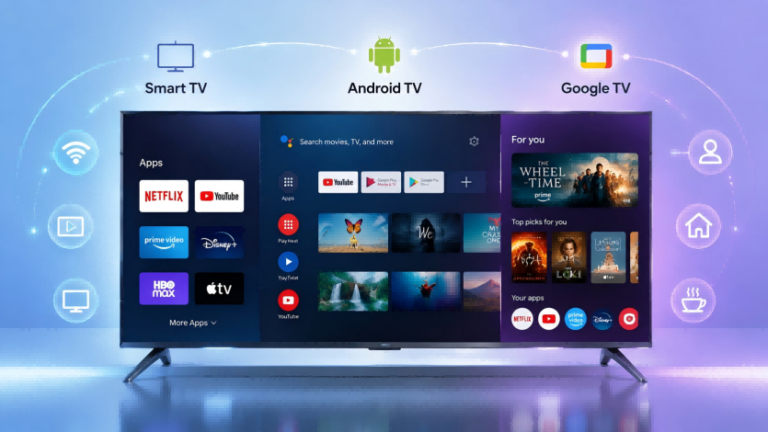
Choosing a smart TV has become more confusing than ever. Many buyers see terms like Smart TV, Android TV, and Google TV when comparing televisions, portable smart screens, and display devices, but these names do not represent the same thing.
Smart TV is a broad category, while Android TV and Google TV belong to Google’s smart TV ecosystem. Although they share many features, they provide different user experiences, levels of customization, and content management approaches.
Understanding the difference between Smart TV, Android TV, and Google TV can help consumers, businesses, and OEM buyers choose the right smart display solution for their needs.
Smart TV vs Android TV vs Google TV: Understanding the Relationship
The biggest reason people confuse these terms is that they describe different layers of a smart display system.
A Smart TV is a general term for televisions that can connect to the internet and provide smart features, such as streaming apps, online services, and voice control. It does not refer to one specific operating system. Different manufacturers use different smart TV platforms, including Samsung Tizen, LG webOS, Roku TV, and Google-based systems.
Android TV is a TV operating platform developed by Google based on the Android ecosystem. It is designed specifically for large screens and supports applications, streaming services, voice control, and Google services.
Google TV is a newer smart TV experience built on top of Google’s Android TV platform. Instead of focusing mainly on apps, Google TV emphasizes content discovery by organizing movies, shows, and recommendations from different streaming platforms in one interface.
The relationship can be understood as:
-
Brand Operating Systems
- Samsung Tizen
- LG webOS
- Roku TV
-
Google TV Ecosystem
- Android TV Platform
- Google TV Experience
In simple terms:
- Smart TV describes the overall category of connected televisions.
- Android TV describes Google’s TV platform.
- Google TV describes a newer interface and user experience built around Android TV.
| Smart TV | Android TV | Google TV | |
|---|---|---|---|
| Tipo | Categoria | Platform | Experience |
| Developer | Different brands | ||
| Main focus | Smart features | Apps and flexibility | Content discovery |
This distinction is important because many buyers assume Google TV and Android TV are completely different systems. In reality, they share much of the same foundation but provide different experiences.
What Is Android TV?
Android TV is Google’s operating system platform designed for smart televisions, media players, and other large-screen entertainment devices. It was introduced in 2014 as a TV-focused version of Android, bringing many familiar Android features into the television environment.
One of the main advantages of Android TV is access to the Google Play Store. Users can install streaming applications, games, media tools, and other compatible apps directly on their devices. Popular services such as Netflix, YouTube, and other streaming platforms are available through the Android TV ecosystem.
Android TV also supports Google Assistant voice control, allowing users to search for content, control playback, and interact with compatible smart home devices. Built-in Chromecast support enables users to cast videos, photos, or presentations from smartphones and computers to the larger screen.
For many users, Android TV provides a more traditional smart TV experience. The home screen is usually organized around installed applications, allowing users to quickly access their preferred apps.
Another reason Android TV remains popular is flexibility. Compared with more closed smart TV systems, Android-based platforms generally provide more customization options. Advanced users often prefer Android TV because they can manage applications, adjust the interface, and access a wider range of Android-based software options.
However, Android TV experiences can vary depending on the manufacturer, hardware configuration, and software optimization. A device with a stronger processor, more memory, and newer Android versions will usually provide a smoother experience than a lower-cost model with limited hardware resources.
What Is Google TV?
Google TV is Google’s newer smart TV experience introduced in 2020. It is built on the Android TV platform but focuses more on content discovery, personalization, and a modern user interface.
The biggest difference users notice is the way content is organized. Traditional Android TV interfaces are generally app-focused, meaning users open a specific application first and then browse content inside that app.
Google TV takes a content-first approach. Instead of starting with individual applications, it combines movies, TV shows, and recommendations from different streaming services into one unified interface.
For example, instead of opening Netflix, Disney+, or YouTube separately to search for something to watch, Google TV can display recommendations from multiple services on the home screen. This makes it easier for users to discover new content.
Google TV also provides stronger integration with Google services, including Google accounts, personalized profiles, Google Assistant, and smart home control through Google Home devices.
For families and general consumers who mainly use streaming services, Google TV offers a simpler experience because users can focus on finding content rather than managing applications.
However, Google TV is not automatically better in every situation. Users who prefer greater control, customization, or a more traditional Android experience may still prefer Android TV.
Similarities Between Android TV and Google TV
Although Android TV and Google TV provide different user experiences, they share many important features because Google TV is built on the Android TV foundation.
Both platforms support Google’s ecosystem and provide access to many of the same applications and services. For most everyday entertainment needs, users can enjoy similar streaming capabilities on both systems.
| Recurso | Android TV | Google TV |
|---|---|---|
| Google Play Store | Compatível | Compatível |
| Streaming apps | Compatível | Compatível |
| Netflix and YouTube access | Compatível | Compatível |
| Google Assistant voice control | Compatível | Compatível |
| Chromecast built-in | Compatível | Compatível |
| Google account integration | Compatível | Compatível |
The main difference is not whether users can watch content or install apps, but how the content and applications are presented.
Android TV and Google TV can both provide a complete smart entertainment experience. The choice mainly depends on whether users value a traditional app-based interface or a more personalized content-driven experience.
Android TV vs Google TV: Key Differences
While Android TV and Google TV share the same ecosystem, they are designed with different user experiences in mind. The differences are more noticeable in interface design, content discovery, customization, and overall usage scenarios.
| Recurso | Android TV | Google TV |
|---|---|---|
| Platform | Android TV platform | Google TV experience |
| Interface | App-focused | Content-focused |
| Recommendations | Basic | Advanced |
| Personalização | Higher | Simpler |
| Smart Home | Basic Google integration | Deeper Google Home integration |
| Ideal para | Advanced users | Streaming users |
User Interface and Content Discovery
The biggest difference between Android TV and Google TV is how users interact with the home screen.
Android TV typically uses an app-centric design. The home page focuses on installed applications, recommended content rows, and shortcuts. Users usually think in terms of applications: open Netflix, open YouTube, or open another streaming service.
Google TV changes this approach by making content the center of the experience. The interface combines recommendations from different streaming services and presents movies and shows directly on the home screen.
For users who want a simple experience and often browse for something to watch, Google TV can reduce the number of steps needed to discover content. For users who already know which apps they use regularly, Android TV’s traditional layout may feel more direct.
Customization, Apps, and User Control
Android TV is often preferred by users who want more flexibility and control over their devices.
Because it is closer to the traditional Android ecosystem, Android TV users often have more options for customizing the interface, managing applications, and adjusting their viewing environment.
Some advanced users prefer Android TV because of features such as alternative launchers, wider customization options, and greater control over installed applications.
Google TV focuses more on simplicity and a consistent user experience. It provides a cleaner interface for mainstream users but may offer fewer customization choices for users who enjoy modifying their devices.
For general consumers, Google TV’s simplicity can be an advantage. For technical users, developers, or businesses requiring more flexibility, Android-based solutions may provide more possibilities.
Performance Depends on Hardware, Not Only the System
A common misunderstanding is that Google TV is always faster than Android TV. In reality, overall performance depends heavily on the hardware configuration and software optimization.
Factors that influence smart TV performance include:
- Processor chipset
- RAM capacity
- Storage speed and capacity
- Versão do Android
- Manufacturer optimization
A well-designed Android TV device with powerful hardware can perform better than a lower-end Google TV device. Likewise, a modern Google TV product with strong hardware can provide a smoother experience than older Android TV models.
For consumers and businesses evaluating smart displays, the operating system is only one part of the decision. Hardware quality and product design are equally important.
Smart TV vs Android TV vs Google TV: Which One Should You Choose?
Choosing between Smart TV, Android TV, and Google TV depends on how you plan to use the device. There is no single option that is perfect for every user because different platforms are designed for different priorities.
For most home entertainment users, Google TV provides a simple and modern experience with content recommendations and better integration with Google services. For users who prefer more control and customization, Android TV remains a flexible option.
For businesses, retailers, educators, and brands developing customized smart display products, the decision is usually not only about the operating system. Factors such as hardware configuration, software customization, branding options, and application requirements are often more important.
For Home Entertainment Users
For families and everyday consumers who mainly use streaming platforms, Google TV is often a convenient choice.
Its content-focused interface makes it easier to discover movies and shows across multiple streaming services. Instead of opening different applications individually, users can browse recommendations from a single home screen.
Google TV is especially suitable for users who:
- Watch Netflix, YouTube, Disney+, or other streaming platforms frequently
- Prefer a simple and easy-to-use interface
- Want personalized recommendations
- Use Google Assistant or Google Home devices
For users who mainly want to turn on the TV and quickly find something to watch, Google TV provides a smoother entertainment experience.
However, users should also consider the actual device hardware. A TV with better processing power, sufficient memory, and optimized software will usually provide a better experience regardless of whether it uses Android TV or Google TV.
For Users Who Want More Flexibility
Android TV can be a better choice for users who value customization and greater control.
Compared with more closed smart TV systems, Android-based platforms provide more flexibility for managing applications and adjusting the user experience. This is one reason Android TV remains popular among advanced users and technology enthusiasts.
Android TV may be more suitable for users who:
- Prefer managing their own applications
- Need more customization options
- Want greater flexibility with Android-based software
- Prefer a traditional app-focused interface
For these users, the ability to control the device environment can be more important than having a simplified recommendation system.
For Businesses and OEM Smart Display Projects
For commercial applications, the choice between Android TV and Google TV is often different from a typical home entertainment decision.
Businesses usually care about more than watching content. They may need customized hardware, branded interfaces, specific applications, different screen sizes, and integration with their own solutions.
Aplicações como:
- Portable smart displays
- Education screens
- Meeting room displays
- Retail digital displays
- Interactive entertainment devices
often require more flexibility in hardware and software configuration.
For companies looking for customized Android-based smart display solutions, working with a Portable Android TV Manufacturer can provide more options for hardware selection, software customization, private labeling, and OEM/ODM development.
Android Smart Display Solutions Beyond Traditional TVs
Smart display technology is expanding beyond traditional televisions. Portable smart screens and Android-based displays are increasingly used in environments where mobility, flexibility, and interactive features are important. For commercial applications such as restaurants and retail environments, smart displays can also be used to present digital menus and promotional content. Learn more about how to display menu on TV for business applications.
Unlike traditional fixed televisions, portable smart displays can combine entertainment, communication, education, and business functions in one device. They can be moved between rooms, used for presentations, support online learning, or provide flexible entertainment solutions.
For OEM buyers and brands, Android-based smart display platforms provide opportunities to customize:
- Screen sizes and hardware configurations
- Operating system versions
- User interfaces
- Branding elements
- Packaging and product design
This makes Android smart displays suitable not only for consumers but also for companies developing their own smart device products.
Perguntas frequentes
No. Google TV is built on the Android TV platform but provides a newer content-focused user experience with improved recommendations and interface design.
It depends on your needs. Google TV is better for users who want simple content discovery, while Android TV may be better for users who prefer customization and flexibility.
Yes. Google TV supports many Android TV applications through the Google Play Store.
Yes. Android TV supports popular streaming applications including Netflix, YouTube, and many other services.
Android-based smart display solutions are often preferred for OEM projects because they provide more flexibility for hardware customization, software integration, and branding.