
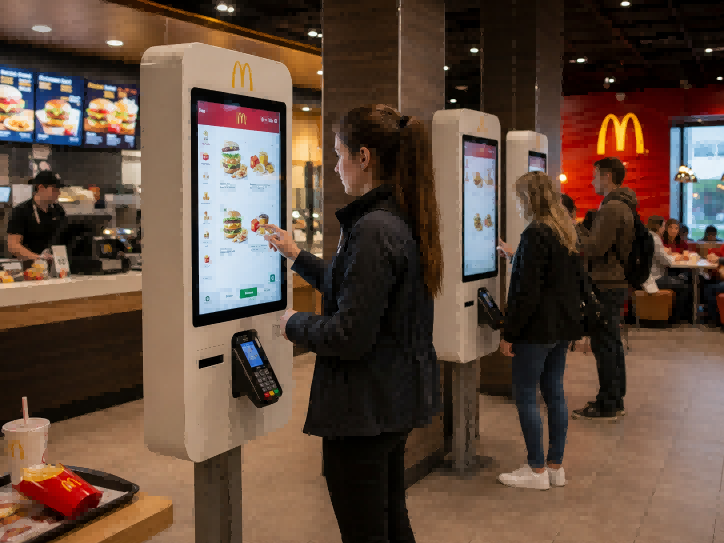
Киоск McDonald — это цифровая система самообслуживания, используемая в ресторанах быстрого питания, которая позволяет клиентам оформлять заказы без взаимодействия с кассиром. Это не просто сенсорный интерфейс; он функционирует как структурированный цифровой модуль обработки заказов в рамках системы ресторана. Вместо традиционного обслуживания у прилавка клиенты могут просматривать меню, настраивать блюда и оформлять оплату непосредственно через киоск. Этот переход меняет процесс обработки заказов в современных ресторанах быстрого обслуживания, повышая стабильность и оптимизируя рабочий процесс. Сегодня киоски McDonald's широко используются на мировых рынках и поддерживаются сложной экосистемой, состоящей из поставщиков оборудования, программных платформ и системных интеграторов.
В этой статье рассказывается, что такое киоски McDonald’s, почему они широко используются в сетях быстрого питания, как работает эта система с технической точки зрения, кто занимается разработкой и интеграцией таких систем, а также каковы текущие тенденции развития в этой отрасли.
Что такое «McDonald Kiosk»?
Киоск McDonald — это цифровая система самообслуживания, используемая в ресторанах быстрого питания, которая позволяет посетителям оформлять заказы, минуя кассу. Обычно он устанавливается в зоне обслуживания посетителей и служит отправной точкой для цифрового процесса оформления заказов в ресторане.
Киоск McDonald's следует рассматривать не как отдельное устройство, а как часть более широкой системы оформления заказов в ресторане. Он выступает в качестве цифрового посредника между клиентом и внутренним рабочим процессом ресторана, объединяя просмотр меню, выбор заказов и оформление заказа в рамках единого интерфейса.
В основном, киоск позволяет посетителям просматривать позиции меню, выбирать блюда и оформлять заказы через структурированный цифровой интерфейс. Это заменяет первоначальное взаимодействие, которое традиционно происходило у стойки, перенося процесс оформления заказа в самостоятельную цифровую среду внутри ресторана.
С операционной точки зрения киоски McDonald’s обычно ассоциируются с двумя заметными явлениями, наблюдаемыми внутри ресторанов: сокращение очереди и стандартизация заказов. В них описывается, как трафик заказов распределяется между несколькими цифровыми точками и как заказы фиксируются в более унифицированном формате через единый интерфейс.
При традиционном способе оформления заказа взаимодействие между персоналом и посетителями происходит непосредственно у стойки, тогда как при оформлении заказа через киоск это взаимодействие переносится в цифровой интерфейс самообслуживания, расположенный непосредственно в помещении ресторана.
Важно отметить, что киоск McDonald’s — это не просто аппаратное обеспечение, а структурированный цифровой интерфейс, встроенный в архитектуру системы оформления заказов ресторана.
Почему киоски McDonald Kiosk так широко используются в сетях быстрого питания
Рестораны внедряют киоски McDonald не потому, что они кардинально меняют характер заказов клиентов, а потому, что они повышают эффективность процесса оформления заказов в условиях реальной операционной нагрузки. Их ценность проявляется при работе в больших масштабах, особенно в часы пиковой нагрузки, когда скорость, стабильность и пропускная способность приобретают решающее значение.
Чтобы понять, почему киоски получили широкое распространение, целесообразно рассмотреть три аспекта: результаты для клиентов, влияние на бизнес и сравнение системы с существующими способами оформления заказов.
Преимущества для клиентов (результаты на уровне пользователя)
С точки зрения клиентов, внедрение киосков обусловлено рядом практических преимуществ, которые позволяют улучшить процесс оформления заказа.
Одним из наиболее непосредственных последствий является более быстрый процесс оформления заказа. Посетители больше не зависят от очередей у стоек или наличия персонала, поскольку в помещении ресторана параллельно работают несколько точек приема заказов.
Еще одним важным результатом является меньше человеческих ошибок. Поскольку заказы вводятся в систему непосредственно клиентами, риск неверного передачи устных инструкций при вводе данных персоналом значительно снижается. Это способствует более стабильной точности выполнения заказов.
Киоски также поддерживают большая свобода настройки, что позволяет клиентам вносить изменения в заказ и изучать варианты в удобном для них темпе, не испытывая давления со стороны очереди.
Преимущества для бизнеса (влияние на уровень ресторана)
С операционной точки зрения киоски широко используются, поскольку они позволяют повысить эффективность работы в условиях высокого спроса.
Одним из ключевых последствий является более высокая средняя стоимость заказа, поскольку цифровые интерфейсы естественным образом побуждают клиентов знакомиться с дополнительными товарами или вариантами улучшений в ходе оформления заказа.
Ещё одним важным фактором является улучшение пропускной способности в часы пик, где обработка заказов распределена между несколькими киосками, а не сосредоточена в одной кассе.
Кроме того, киоски помогают добиться сниженное давление на передней стороне контрпресса, что позволяет сотрудникам перенести основное внимание с приема заказов на их подготовку и координацию обслуживания в магазине.
Сравнение с традиционными методами оформления заказов
Внедрение киосков также объясняется путем сравнения с существующими каналами оформления заказов.
против «обратного заказа»
- Speed: kiosks reduce bottlenecks by enabling parallel ordering
- Accuracy: digital input reduces variation caused by verbal communication
The key difference lies in removing dependency on a single physical queue.
vs Mobile App Ordering
- In-store immediacy: kiosks operate directly inside the restaurant environment
- No login friction: customers can order without app installation or authentication
This makes kiosks more suitable for spontaneous, in-store purchasing behavior.
Реальный опыт использования киоска McDonald's
Using a McDonald kiosk feels different from ordering at the counter, mainly because the whole process is quieter, more self-directed, and less dependent on interaction with staff.
Опыт в часы пик: больше не нужно стоять в одной длинной очереди
During busy hours, the biggest change is simple—you don’t have to stand in a single long queue anymore.
Instead of waiting behind other customers at the counter, people naturally spread out to different kiosks and start ordering on their own. The restaurant still feels busy, but the pressure of “waiting in line” is much less obvious.
What replaces the queue is a more individual moment of decision. You’re no longer thinking about “how long is the line,” but more about “what should I choose on the screen.”
Покупательское поведение: люди тратят больше времени на осмотр товаров
Once people start using the kiosk, they usually behave differently compared to ordering at the counter.
At the counter, most people try to decide quickly because there are others waiting behind them. But at the kiosk, there is no one rushing you, so you naturally take a bit more time looking through the menu.
You may scroll more, compare options, or adjust your order before confirming. It doesn’t feel like you are being slow—it just feels like you finally have time to look properly.
Торможение против управления: проще настраивать, поначалу требуется небольшое освоение
One clear difference is control.
At the kiosk, it’s easier to change your order—add items, remove ingredients, or review everything before paying. You feel more in control because you can see everything clearly on screen.
At the same time, for first-time users, it might take a few extra seconds to figure out where everything is. But this usually goes away quickly after one or two uses.
Незаметное изменение восприятия бренда: опыт превращается в воспоминание
Beyond the ordering process itself, there is another subtle effect that often goes unnoticed.
When the ordering experience feels smoother, more controlled, and less stressful, it quietly shapes how customers feel about the restaurant as a whole. Most people will not consciously analyze it, but they often leave with a more positive impression simply because the interaction felt easy and organized.
Over time, this creates a form of invisible brand value. It does not look like traditional advertising, but it works in a similar way—each interaction becomes a small reinforcement of how the brand is perceived. The restaurant feels more modern, more structured, and more user-friendly without any explicit messaging.
Технологии, лежащие в основе киоска McDonald's (архитектура системы)
A McDonald kiosk operates as part of a structured digital ordering system, where multiple layers of hardware and software work together to process customer orders and transmit them into the restaurant’s internal service flow. Instead of being viewed as a single device, it is more accurately understood as a connected system that handles input, processing, and output across different functional components.
Аппаратный уровень: интерфейс ввода и взаимодействия
The hardware layer is responsible for capturing customer input and enabling physical interaction with the ordering system.
The primary component is the сенсорный интерфейс, which acts as the main interaction surface. It allows users to browse menu items, make selections, and confirm orders through direct touch input.
Connected to this interface is the платежный терминал, which processes different types of transactions such as card payments or contactless payments. This component bridges the ordering process with the financial transaction layer.
In many configurations, a receipt or order printer is also included. This component generates physical order confirmation or pickup information, ensuring that customers receive a tangible reference for their order status.
Together, these hardware components form the front-end input and output layer of the system.
Программный уровень: обработка заказов и координация работы системы
Above the hardware layer sits the software layer, which is responsible for interpreting user input and coordinating order data across restaurant systems.
A key component in this layer is the POS (Point of Sale) system integration, which acts as the central processing hub for order information. Once an order is confirmed on the kiosk, it is transmitted into the POS system for validation and processing.
Connected to this is the menu management system, which controls how products, prices, and configurations are displayed on the kiosk interface. This system ensures that the ordering interface reflects current menu structure and availability.
Another important element is the order routing system, which determines where and how each order is sent within the restaurant workflow. This includes assigning orders to preparation stations based on predefined rules and operational structure.
Together, these software components ensure that customer input is translated into structured order data and distributed correctly within the restaurant system.
Логика обработки потока ордеров: сквозное перемещение данных
At the core of the system is the order flow logic, which describes how information moves through the entire kiosk ecosystem.
The process can be understood as a sequential data flow:
user → kiosk → POS system → kitchen display system → pickup stage
In this structure, the kiosk serves as the initial data capture point. The POS system acts as the central processing layer, where order information is validated and organized. From there, the data is transmitted to the kitchen display system, where preparation begins. Finally, the completed order is directed to the pickup stage for customer collection.
This flow is designed to ensure that information moves consistently from input to execution without relying on manual interpretation between each stage.
Кто производит киоски McDonald’s? Производители и экосистема
McDonald kiosks are not produced by a single manufacturer or sourced as a complete off-the-shelf product. In reality, they are deployed through a coordinated ecosystem made up of multiple specialized vendors working under a set of system standards defined by McDonald’s.
Rather than purchasing a finished kiosk solution, McDonald’s typically defines the overall requirements of its digital ordering system and then works with approved technology partners to implement it across different regions. This means the kiosk experience you see in one country may be assembled from a different combination of hardware and software providers than in another, even though the end-user experience remains consistent.
At the physical level, the system relies on industrial hardware suppliers that provide core components such as touchscreen displays and kiosk enclosures. These components are designed for continuous commercial use and are often customized to fit specific store layouts and operational environments. For buyers evaluating similar self-service deployments, comparing interactive kiosk manufacturers can help clarify differences in touchscreen integration, enclosure design, customization, and commercial-duty hardware. However, these hardware providers are only responsible for the physical interface and do not control how the ordering system functions.
On top of the hardware layer, software providers define how the system behaves. This includes the POS systems that handle transactions and order processing, as well as ordering platforms that determine how menus are structured and how customers interact with the interface. These software layers are what turn a physical terminal into a functional ordering system connected to restaurant operations.
Between these two layers and the final deployment, system integrators play a crucial role in bringing everything together. They are responsible for installation, configuration, and ensuring that hardware and software work seamlessly within each restaurant environment. In many cases, regional partners also adapt the system to local requirements such as language, payment methods, and operational standards, which allows the same kiosk concept to function across very different markets.
What makes this structure important is that McDonald kiosks are not built or owned by any single supplier. Instead, they are the result of a controlled, multi-vendor deployment model where different companies contribute to different layers of the system under a unified operational standard. This allows the company to maintain consistency at scale while still relying on a flexible global supply ecosystem.
Будущее киосков самообслуживания (на основе реальных данных о внедрении)
Self-ordering kiosks are no longer an experimental feature in fast food restaurants. In many global QSR chains, they have already become a standard part of in-store ordering infrastructure, working alongside counter service and mobile ordering as a permanent channel rather than a supplementary option.
One of the most visible trends is that kiosks are increasingly operating as part of a multi-channel ordering system, where in-store kiosks, mobile apps, and traditional counters are no longer isolated but connected within a shared ordering environment. In many restaurants, this ecosystem also works together with цифровые меню-табло to create a more consistent customer journey. This allows customers to move between channels depending on context, rather than being locked into a single ordering method.
Another established direction is the continued expansion of cashless-first ordering environments. In most kiosk deployments today, digital payments are the default option, reflecting a broader industry shift toward reducing reliance on cash handling in high-volume restaurant operations.
At the same time, kiosks are becoming more deeply embedded in standard restaurant workflows rather than standalone stations. Instead of being treated as separate ordering devices, they are now integrated into the overall service structure, working in parallel with kitchen and pickup operations.
From an operational perspective, there is also a clear move toward more system-driven ordering behavior, where customer interactions are increasingly structured through digital interfaces rather than direct staff communication. This is not a future concept but a continuation of changes already implemented across major fast food chains.
In parallel, existing systems are gradually enabling more personalized ordering experiences, such as repeat order suggestions and menu adaptation based on previous interactions within the ordering system. These developments are incremental rather than disruptive, but they indicate a steady shift toward more data-informed ordering environments.
Overall, the direction of self-ordering kiosks is defined less by transformation and more by expansion. The system is becoming more widely adopted, more tightly integrated, and more consistently embedded into everyday restaurant operations across different markets.
Часто задаваемые вопросы
Не существует единого производителя, отвечающего за киоски McDonald’s. Вместо этого в этом процессе задействованы различные типы компаний, в том числе поставщики оборудования, разработчики программного обеспечения для точек продаж и системные интеграторы, которые совместно занимаются внедрением системы по всему миру.
Система киосков McDonald's, как правило, включает в себя сенсорные экраны, платежные терминалы, программное обеспечение для интеграции с POS-системами, интерфейсы для приема заказов, а также серверные модули маршрутизации заказов, обеспечивающие связь с кухонными подразделениями.
К основным преимуществам киосков McDonald's относятся более быстрый процесс оформления заказа, повышенная точность выполнения заказов и более удобный самообслуживающийся формат, который позволяет сократить зависимость от очередей у касс.
Да, киоски, как правило, упрощают клиентам процесс индивидуальной настройки блюд, например, изменение ингредиентов или добавление дополнительных опций, поскольку все варианты выбора четко отображаются в интерфейсе.




