عندما تبدأ شاشة LCD في إظهار مشاكل مثل الوميض، أو ظهور الشاشة باللون الأسود، أو تفاوت السطوع، أو تشوهات في الصورة، غالبًا ما تكون الأعراض الظاهرة مجرد جزء من المشكلة. فقد يكون السبب الفعلي ناجمًا عن لوحة LCD، أو نظام الإضاءة الخلفية، أو مكونات برنامج التشغيل، أو بيئة التشغيل، أو حتى اختيار المنتج غير المناسب.
بالنسبة للتطبيقات التجارية، يُعد فهم المشكلات الشائعة التي تصيب شاشات LCD أمرًا بالغ الأهمية، لأن أعطال الشاشات قد تؤثر على تجربة المستخدم، وتؤدي إلى ارتفاع تكاليف الصيانة، وتقلل من موثوقية المشروع. فالشاشة المستخدمة في غرفة الاجتماعات،, نظام اللافتات الرقمية, ، أو في كشك، أو في بيئة صناعية، قد تواجه تحديات مختلفة تمامًا فيما يتعلق بالموثوقية.
يشرح هذا الدليل المشكلات الأكثر شيوعًا في شاشات LCD، وأسباب حدوثها، وكيفية معالجتها، وما يجب على المشترين أخذه في الاعتبار عند اختيار حلول شاشات LCD موثوقة للاستخدام التجاري على المدى الطويل.
المشكلات الشائعة في شاشات LCD وأسبابها وحلولها
تُستخدم شاشات LCD على نطاق واسع في التطبيقات التجارية والصناعية لأنها توفر جودة صورة موثوقة، وأحجامًا مرنة، وأداءً فعالاً من حيث التكلفة. ومع ذلك، وكما هو الحال مع أي مكون إلكتروني، قد تتعرض أنظمة LCD لأعطال ناجمة عن تقادم المكونات، أو الضغوط البيئية، أو جودة التصنيع، أو اختيار التطبيق غير المناسب.
فيما يلي بعض المشكلات الأكثر شيوعًا التي تصيب شاشات LCD وأسبابها المحتملة.
| مشكلة في شاشة LCD | الأعراض الشائعة | الأسباب المحتملة | الحلول الشائعة |
|---|---|---|---|
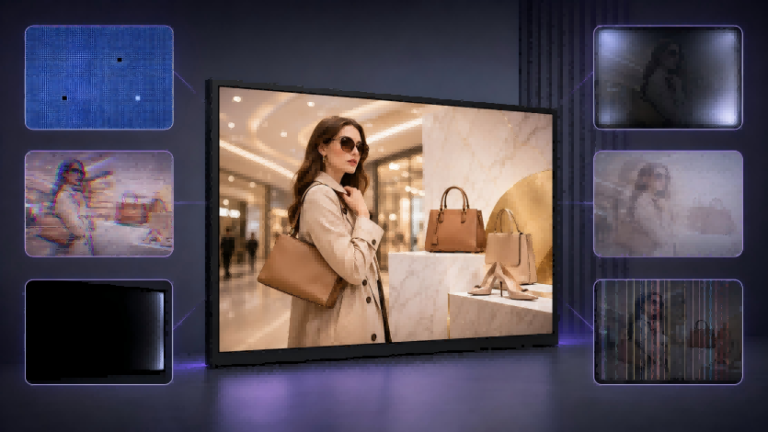
| البيكسلات الميتة والبيكسلات العالقة | النقاط السوداء، أو النقاط الساطعة، أو وحدات البكسل التي تعرض ألوانًا غير صحيحة | تعطل ترانزستور البكسل، عيوب التصنيع، تقادم الشاشة | تقييم ما إذا كانت الشاشة تستوفي معايير البكسل المقبولة؛ واستبدال الشاشة إذا لزم الأمر |
| وميض الشاشة أو عدم استقرارها | وميض الشاشة، وتغيرات في السطوع، وإخراج الصورة بشكل متقطع | عدم استقرار الطاقة، ومشاكل في وحدة تشغيل الإضاءة الخلفية، وتداخل الإشارات، وسوء الاتصال | تحقق من مصدر الطاقة، وتوصيلات الإشارة، ونظام التحكم في الشاشة |
| شاشة سوداء أو عطل في الإضاءة الخلفية | تظهر الشاشة مظلمة تمامًا أو تكون الصورة بالكاد مرئية | تدهور الإضاءة الخلفية LED، تعطل دائرة التشغيل، مشاكل في الإمداد بالطاقة | افحص نظام الإضاءة الخلفية والمكونات الإلكترونية ذات الصلة |
| تفاوت السطوع وتسرب الإضاءة الخلفية | المناطق الساطعة، أو الزوايا المظلمة، أو تسرب الضوء حول الحواف | التوزيع غير المتساوي لمصابيح LED، ومشاكل في البنية البصرية، وضغط التجميع | تحسين مراقبة جودة اللوحة أو استبدال المكونات المتضررة |
| احتباس الصورة والظلال | تظل الصور السابقة مرئية بعد تغيير المحتوى | عرض المحتوى الثابت على المدى الطويل، قيود استجابة شاشات LCD | استخدم استراتيجيات تبديل المحتوى واختر شاشات مصممة للعمل المستمر |
| خطوط أو خلل في العرض | خطوط عمودية، خطوط أفقية، مناطق مفقودة في الصورة | عطل في دارة التحكم في السائق، ومشاكل في توصيل اللوحة المرنة (FPC)، ومشاكل في نقل الإشارات | افحص التوصيلات الداخلية ومكونات التحكم في الشاشة |
البيكسلات الميتة والبيكسلات العالقة
تعد النقاط الميتة من أكثر مشاكل شاشات LCD شيوعًا. وتظهر على شكل نقاط صغيرة سوداء أو بيضاء أو ملونة تظل ثابتة بغض النظر عن المحتوى المعروض.
ترتبط هذه العيوب عادةً بفشل عناصر البكسل الفردية داخل لوحة شاشة LCD. ونظرًا لأن كل بكسل يحتوي على عدة بكسلات فرعية يتم التحكم فيها بواسطة ترانزستورات الأغشية الرقيقة (TFT)، فإن أي عطل على هذا المستوى قد يمنع البكسل من عرض اللون الصحيح.
بالنسبة للتطبيقات التجارية، قد يُعتبر وجود عدد قليل من عيوب البكسل ضمن المعايير الصناعية المقبولة. ومع ذلك، بالنسبة لتطبيقات مثل شاشات العرض الطبية، أو أنظمة المراقبة الاحترافية، أو اللافتات الرقمية الفاخرة، قد يكون من الضروري تطبيق متطلبات أكثر صرامة فيما يتعلق بجودة البكسل.
أفضل طريقة للحد من هذا الخطر لا تكمن في الإصلاح، بل في تطبيق رقابة جودة مناسبة على الموردين، بما في ذلك فحص وحدات البكسل أثناء الإنتاج.
وميض الشاشة أو عدم استقرارها
يُعد وميض الشاشة مشكلة شائعة تؤثر على تجربة المستخدم وجودة المنتج المتصورة. فقد يلاحظ المستخدمون وميض الشاشة، أو تغير السطوع بشكل غير متوقع، أو عدم استقرار الصورة.
تشمل الأسباب الشائعة ما يلي:
- مدخلات طاقة غير مستقرة؛;
- تصميم سيئ لمشغل الإضاءة الخلفية؛;
- إعدادات توقيت العرض غير الصحيحة؛;
- تداخل الإشارات؛;
- وصلات داخلية غير محكمة.
في البيئات التجارية، قد يصبح الوميض مشكلة أكثر خطورة لأن العديد من شاشات العرض تعمل لفترات طويلة. فقد تتعرض الشاشة التي تعمل بشكل طبيعي خلال الاختبارات القصيرة إلى عدم استقرار بعد التشغيل المتواصل.
تتضمن الحلول عادةً فحص نظام الطاقة، والتحقق من معلمات الشاشة، والتأكد من أن وحدة شاشة LCD متوافقة بشكل صحيح مع نظام التحكم.
شاشة سوداء أو عطل في الإضاءة الخلفية
لا تعني الشاشة السوداء دائمًا أن لوحة LCD نفسها تالفة. ففي كثير من الحالات، لا تزال شاشة LCD قادرة على عرض الصورة، لكن نظام الإضاءة الخلفية لم يعد يعمل بشكل صحيح.
نظرًا لأن معظم شاشات LCD تعتمد على الإضاءة الخلفية بتقنية LED، فإن الأعطال الشائعة تشمل ما يلي:
- تقادم مصابيح LED؛;
- عطل في وحدة التحكم في الإضاءة الخلفية؛;
- التعرض المفرط للحرارة؛;
- مشاكل في دائرة الطاقة.
بالنسبة لشاشات العرض التجارية، ولا سيما المنتجات الخارجية عالية السطوع، تُعد إدارة الحرارة أمرًا بالغ الأهمية؛ لأن الحرارة الزائدة قد تؤدي إلى تسريع تدهور مصابيح LED وتقليص العمر الافتراضي للشاشة.
تفاوت السطوع وتسرب الإضاءة الخلفية
يُعد اتساق السطوع عاملاً مهمًا في شاشات العرض التجارية. فقد يلاحظ المستخدمون تفاوتًا في الإضاءة، أو وجود مناطق أكثر سطوعًا بالقرب من الحواف، أو تسربًا مرئيًا للضوء عند عرض محتوى داكن.
قد تنجم هذه المشكلات عن:
- ترتيب غير متساوٍ لمصابيح LED؛;
- مشاكل الأفلام البصرية؛;
- الضغط الميكانيكي أثناء التجميع؛;
- التباينات في عملية التصنيع.
على الرغم من احتمال حدوث اختلافات طفيفة في تقنية شاشات LCD، فإن الشاشات التجارية الاحترافية تتطلب عادةً ضوابط أكثر صرامةً لضمان توحيد السطوع، وذلك لأنها تُشاهد من قبل العديد من المستخدمين وغالبًا ما تعمل بشكل مستمر.
احتباس الصورة والظلال
يحدث «احتفاظ الصورة» عندما يظل المحتوى السابق مرئيًا مؤقتًا بعد تغيير الصورة المعروضة.
تكتسب هذه المسألة أهمية خاصة في تطبيقات مثل:
- شاشات عرض معلومات المطار؛;
- لوحات القوائم الرقمية؛;
- شاشات المراقبة الصناعية؛;
- محطات المعلومات العامة.
على سبيل المثال، قد تقوم شاشة عرض معلومات الرحلات في المطار بتحديث أرقام الرحلات ومواعيد الإقلاع بشكل متكرر، لكن بعض العناصر مثل الشعارات أو تسميات المسارات أو تخطيطات الواجهة قد تظل دون تغيير لفترات طويلة. وفي حال استخدام شاشة عرض غير مناسبة، فقد تصبح بعض العناصر الثابتة أكثر بروزًا بشكل تدريجي.
يمكن الحد من المخاطر من خلال:
- الإدارة السليمة للمحتوى؛;
- استراتيجيات الحفاظ على الشاشة؛;
- اختيار شاشات مصممة للعمل لساعات طويلة.
خطوط أو خلل في العرض
عادةً ما تشير الخطوط الرأسية أو الأفقية أو المناطق المفقودة في الصورة إلى وجود مشاكل في نظام نقل الإشارة أو نظام التحكم في العرض.
تشمل الأسباب المحتملة ما يلي:
- عطل في دارة التحكم في السائق؛;
- تلف كابل FPC؛;
- مشاكل في الاتصال؛;
- مشاكل في لوحة التحكم.
نظرًا لأن وحدات شاشات LCD تحتوي على العديد من المكونات المترابطة، فإن تشخيص هذه المشكلات يتطلب فحص نظام العرض بالكامل بدلاً من الاكتفاء باستبدال لوحة LCD فقط.
فهم أعطال شاشات LCD: المكونات وآليات الأعطال
يفترض العديد من المستخدمين أن مشاكل شاشات LCD تنجم عن اللوحة الزجاجية للشاشة نفسها. غير أن شاشة LCD التجارية ليست مكونًا واحدًا، بل هي نظام كامل يتألف من أجزاء متعددة تعمل معًا لإنتاج صور مستقرة وأداء موثوق.
قد يؤثر أي خلل في أي من هذه المكونات على النتيجة النهائية للعرض.
| مكونات شاشات LCD | الوظيفة الرئيسية | مخاطر الفشل المحتملة |
|---|---|---|
| لوحة زجاجية لشاشة LCD | يتحكم في تكوين الصورة من خلال طبقات الكريستال السائل | البيكسلات الميتة، والخطوط، والخلل في الألوان |
| وحدة الإضاءة الخلفية | يوفر إضاءة خلف شاشة LCD | انخفاض السطوع، إضاءة غير متساوية، تعطل الإضاءة الخلفية تمامًا |
| دائرة متكاملة للتحكم في المحرك | يتحكم في إشارات الصورة وعمل البكسلات | عدم استقرار الشاشة، وإخراج صورة غير طبيعي |
| توصيل FPC / COF | ينقل الإشارات الكهربائية بين المكونات | فقدان الإشارة، عرض متقطع |
| مُستقطبات وأغشية بصرية | التحكم في نفاذية الضوء وجودة الصورة | تغير اللون، تدهور السطوع |
| طبقة اللمس (لشاشات اللمس) | يتيح التفاعل مع المستخدم | فشل اللمس، إدخال غير دقيق |
إن فهم هذه المكونات يساعد في تفسير السبب الذي يجعل شاشتين بمواصفات متشابهة تختلفان اختلافًا كبيرًا من حيث الموثوقية في الاستخدامات العملية.
على سبيل المثال، قد لا يكون سبب وميض الشاشة هو لوحة LCD نفسها. فقد تكون المشكلة الفعلية ناجمة عن عدم استقرار مصدر الطاقة، أو محرك إضاءة خلفية غير مناسب، أو سوء إدارة الحرارة. وبالمثل، قد يكون انخفاض السطوع ناتجًا عن تقادم مصابيح LED وليس عن عطل في زجاج شاشة LCD.
من منظور الموثوقية، يعتمد أداء شاشات LCD على تصميم النظام بأكمله، بما في ذلك اختيار المكونات، وعمليات التصنيع، والتكامل الكهربائي، وظروف التشغيل.
ولهذا السبب، لا ينبغي أن يقتصر اختيار شاشة LCD على المواصفات الظاهرة فقط، مثل الدقة أو حجم الشاشة. بل يجب على المشترين أيضًا مراعاة جودة الحل الشامل للشاشة، وما إذا كان مصممًا لبيئة الاستخدام المقصودة.
ما العوامل التي تؤثر على العمر الافتراضي لشاشات LCD وموثوقيتها على المدى الطويل؟
في حين أن فهم آليات تعطل شاشات LCD يساعد في تحديد أماكن حدوث المشكلات، فإن هناك سؤالًا مهمًا آخر يطرحه المشترون وهو:
لماذا تظل بعض شاشات LCD مستقرة لسنوات، في حين أن أداء شاشات أخرى يتدهور في وقت أبكر بكثير؟
عادةً ما ترتبط الإجابة بظروف التشغيل واختيار المكونات وتصميم النظام. ولا تتحدد مدة حياة شاشات LCD بجودة لوحة العرض نفسها فحسب. فهناك عوامل خارجية، مثل درجة الحرارة وساعات التشغيل والرطوبة والاستقرار الكهربائي، يمكن أن تؤثر بشكل كبير على موثوقية الشاشة على المدى الطويل.
بالنسبة لشاشات العرض التجارية التي تعمل في الأماكن العامة أو المصانع أو البيئات الخارجية أو في تطبيقات تعمل على مدار الساعة طوال أيام الأسبوع، فإن تقييم هذه العوامل قبل الشراء أمر ضروري.
1. Operating Temperature and Heat Management
تعد درجة الحرارة أحد أهم العوامل التي تؤثر على العمر الافتراضي لشاشات LCD.
تؤدي درجات الحرارة المرتفعة إلى تسريع عملية تقادم العديد من مكونات الشاشة، ومن بينها:
- إضاءة خلفية LED؛;
- دوائر متكاملة للتحكم في المحركات؛;
- الأغشية البصرية؛;
- المواد اللاصقة.
على سبيل المثال، شاشة LCD عالية السطوع مصممة للاستخدام في اللافتات الرقمية الخارجية تولد مزيدًا من الحرارة لأن الإضاءة الخلفية تتطلب طاقة خرج أعلى. وبدون إدارة حرارية مناسبة، يمكن أن يؤدي التعرض المستمر للحرارة إلى انخفاض أداء السطوع وتقليل العمر الافتراضي للمكونات.
غالبًا ما تتطلب حلول شاشات LCD التجارية مراعاة عوامل إضافية مثل:
- هياكل تبديد الحرارة؛;
- تصميم محسّن للتهوية؛;
- مكونات ذات جودة صناعية؛;
- اختبار درجة الحرارة أثناء مرحلة التطوير.
قد لا توفر الشاشة التي تعمل بشكل جيد في بيئة داخلية خاضعة للرقابة نفس المستوى من الموثوقية عند تركيبها في الهواء الطلق أو داخل معدات معرضة للحرارة.
2. Operating Hours and Continuous Usage
كما أن جدول التشغيل المتوقع له تأثير مباشر على موثوقية شاشات LCD.
تتعرض الشاشة التي تُستخدم لعدة ساعات يوميًا في البيئة المنزلية لضغوط مختلفة تمامًا مقارنةً بشاشة تجارية تعمل:
- 16 ساعة في اليوم؛;
- 24 ساعة في اليوم؛;
- التشغيل المستمر في الأماكن العامة.
تؤدي ساعات العمل الطويلة إلى زيادة الضغط على:
- إضاءة خلفية LED؛;
- دوائر الطاقة؛;
- عرض مكونات التحكم.
ولهذا السبب، غالبًا ما تُصمم شاشات العرض التجارية وفقًا لمعايير موثوقية تختلف عن تلك المطبقة على شاشات العرض الاستهلاكية. فقد لا يكون المنتج المخصص للاستخدام المنزلي العرضي مناسبًا للتطبيقات التي تتطلب تشغيلًا مستمرًا على المدى الطويل.
تعد الرطوبة عاملاً آخر يمكن أن يؤثر تدريجيًا على أداء شاشات LCD.
قد يؤثر التعرض الطويل الأمد للرطوبة على:
- أداء الفيلم البصري؛;
- جودة ربط الألواح؛;
- التوصيلات الكهربائية؛;
- استقرار مستشعر اللمس.
ويعد هذا الأمر مهمًا بشكل خاص بالنسبة لتطبيقات مثل:
- أكشاك خارجية؛;
- المعدات البحرية؛;
- أنظمة التحكم الصناعية؛;
- المحطات العامة.
في هذه البيئات، ينبغي على المشترين ألا يقتصر اهتمامهم على شاشة LCD نفسها فحسب، بل أن يأخذوا في الاعتبار أيضًا تصميم الحماية الشامل، بما في ذلك هيكل الإحكام ودرجات تصنيف IP المناسبة.
4. UV Exposure and Outdoor Installation
تواجه شاشات العرض الخارجية تحديات إضافية لأن أشعة الشمس المباشرة تحتوي على أشعة فوق بنفسجية يمكن أن تسرع من شيخوخة المواد.
قد يؤثر التعرض للأشعة فوق البنفسجية على:
- طبقات المُستقطب؛;
- الأغشية البصرية؛;
- مواد التشطيب الخارجي.
وقد يؤدي ذلك تدريجيًا إلى:
- تغيرات الألوان؛;
- انخفاض الأداء البصري؛;
- تدهور السطح.
بالنسبة للاستخدامات الخارجية، من المهم اختيار شاشة مصممة خصيصًا للبيئات الخارجية. وينبغي تقييم عوامل مثل مستوى السطوع، ومقاومة الأشعة فوق البنفسجية، والتصميم الحراري، والهيكل الواقي بشكل متكامل.
5. Vibration and Mechanical Stress
غالبًا ما يتم تجاهل الإجهاد الميكانيكي عند اختيار شاشات العرض، لا سيما في التطبيقات الصناعية.
قد يؤثر الاهتزاز المستمر أو الصدمات الميكانيكية المتكررة على:
- وصلات FPC؛;
- الهياكل الداخلية الملتصقة؛;
- استقرار مجموعة الشاشة.
تطبيقات مثل:
- معدات المصنع؛;
- أنظمة النقل؛;
- شاشات عرض المركبات؛;
تتطلب تصميمًا ميكانيكيًا أكثر متانة مقارنةً بشاشات العرض الداخلية القياسية.
لماذا تعتمد متطلبات العرض على بيئة التطبيق؟
أحد الأسباب الأكثر شيوعًا لمشاكل شاشات LCD لا يكمن بالضرورة في رداءة جودة المنتج، بل في اختيار شاشة لا تتناسب مع بيئة الاستخدام.
تختلف متطلبات الموثوقية باختلاف التطبيقات. فعلى سبيل المثال، تواجه شاشة العرض المستخدمة في غرفة الاجتماعات تحديات مختلفة تمامًا مقارنةً بمحطة المعلومات العامة أو شاشة الإعلانات الخارجية.
قد توفر شاشة العرض الاستهلاكية جودة صورة ممتازة في البيئة المنزلية، لكنها قد تواجه مشكلات في الموثوقية عند استخدامها لأغراض تجارية تتطلب ساعات تشغيل أطول، أو سطوعًا أعلى، أو حماية بيئية أقوى.
شاشات LCD الاستهلاكية مقابل شاشات LCD التجارية: أولويات تصميمية مختلفة
| شاشات LCD الاستهلاكية | شاشات LCD التجارية | |
|---|---|---|
| الاستخدام النموذجي | الترفيه المنزلي، الأجهزة الشخصية | اللافتات الرقمية، وأكشاك الخدمة، والمعدات الصناعية |
| مدة التشغيل | استخدام يومي محدود | التشغيل المطول أو المستمر |
| البيئة | ظروف داخلية خاضعة للرقابة | البيئات العامة أو الخارجية أو الصناعية |
| متطلبات السطوع | السطوع القياسي | سطوع أعلى لضمان الرؤية |
| التصميم الحراري | الإدارة الأساسية للحرارة | الاعتبارات الحرارية المعززة |
| اختبار الموثوقية | الاختبارات العامة | اختبارات إضافية للتحقق من العمر التشغيلي والموثوقية |
الشاشة التجارية ليست مجرد شاشة استهلاكية أكبر حجمًا. بل إنها مصممة لتلبية توقعات استخدام مختلفة.
مثال: لماذا تُعد شاشات العرض التجارية عنصراً مهماً في أنظمة المعلومات العامة
لنتخيل شاشة عرض معلومات الرحلات في المطار.
قد يتم تحديث الشاشة:
- أرقام الرحلات؛;
- أوقات المغادرة؛;
- معلومات عن البوابة؛;
- تفاصيل الوجهة.
ومع ذلك، قد تظل بعض عناصر الواجهة دون تغيير لفترات طويلة، مثل:
- شعارات شركات الطيران؛;
- مناطق التنقل الثابتة؛;
- الرسومات الخلفية.
في حال استخدام شاشة LCD مخصصة للاستخدام الاستهلاكي في هذه البيئة، فإن عرض محتوى ثابت على المدى الطويل قد يزيد من خطر حدوث ظاهرة «احتباس الصورة» أو التآكل غير المتساوي.
تم تصميم شاشة العرض ذات الجودة التجارية مع مراعاة ظروف التشغيل التالية، بما في ذلك:
- ساعات عمل أطول؛;
- موثوقية أفضل في ظل الاستخدام المستمر؛;
- قدرات أكثر ملاءمة لإدارة الصور؛;
- أداء حراري محسّن.
لا ينطبق هذا المبدأ على المطارات فحسب، بل ينطبق أيضًا على:
- قوائم الطعام الرقمية;
- واجهات عرض إعلانية لمتاجر البيع بالتجزئة؛;
- أكشاك الخدمة الذاتية;
- أنظمة المراقبة الصناعية.
يُعد اختيار نوع الشاشة المناسب وفقًا لبيئة الاستخدام إحدى أكثر الطرق فعالية للحد من مشكلات الموثوقية في المستقبل.
كيفية تقييم موثوقية شاشات LCD قبل الشراء
لا تبدأ العديد من مشكلات شاشات LCD بعد التركيب. ففي كثير من الحالات، يكون خطر حدوث عطل قد نشأ بالفعل خلال مرحلة اختيار المنتج.
من الأخطاء الشائعة بين المشترين تقييم شاشات العرض بناءً على المواصفات الظاهرة فقط، مثل:
- حجم الشاشة؛;
- القرار؛;
- السطوع؛;
- السعر.
ومع ذلك، فإن هذه المواصفات لا تصف سوى جزء من قدرات المنتج. فهي لا توضح دائمًا ما إذا كانت الشاشة قادرة على الحفاظ على أداء مستقر في ظل ظروف التشغيل الفعلية.
على سبيل المثال، قد يقدم موردان شاشة LCD مقاس 55 بوصة بنفس مواصفات الدقة والسطوع. وقد تستمر إحدى الشاشتين في العمل بشكل موثوق لسنوات، في حين قد تتعرض الأخرى لانخفاض في السطوع أو وميض أو أداء غير مستقر بعد الاستخدام لفترات طويلة.
وغالبًا ما ينبع الاختلاف من عوامل لا تظهر للعيان على الفور:
- ما إذا كانت درجة جودة الشاشة تتناسب مع الاستخدام المقصود؛;
- ما إذا كان التصميم الحراري كافياً؛;
- سواء تم اختيار المكونات للتشغيل على المدى الطويل؛;
- ما إذا كان المورد يجري اختبارات الموثوقية أم لا.
لذلك، ينبغي على المشترين تقييم شاشات LCD من منظور الموثوقية بدلاً من الاكتفاء بمقارنة مواصفات المنتج.
1. هل تتوافق مواصفات الشاشة مع ظروف التشغيل الفعلية؟
يُعد اختيار شاشة العرض بناءً على المواصفات وحدها دون مراعاة كيفية أداء تلك المواصفات في بيئة الاستخدام الفعلية أحد أكثر أخطاء الشراء شيوعًا.
على سبيل المثال، قد يزود أحد الموردين شاشة LCD بما يلي:
- سطوع يبلغ 1500 نيت؛;
- دقة 4K؛;
- المظهر التجاري.
للوهلة الأولى، قد تبدو هذه المواصفات مناسبة لمشروع لافتات رقمية خارجية.
ومع ذلك، ينبغي على المشترين طرح أسئلة إضافية:
- هل يتم الحفاظ على مستوى السطوع أثناء التشغيل لفترات طويلة؟
- في أي ظروف درجة حرارة تم اختبار الشاشة؟
- هل يستطيع نظام الإضاءة الخلفية تحمل التشغيل المستمر بدرجة سطوع عالية؟
- هل تم تصميم الغلاف بحيث يتيح التحكم في الحرارة؟
لا تكون مواصفات الشاشة ذات مغزى إلا عندما تتوافق مع بيئة العمل الفعلية.
قبل الشراء، ينبغي على المشترين تقييم ما يلي:
| مواصفة | الأسئلة التي ينبغي على المشترين أخذها في الاعتبار |
|---|---|
| سطوع | هل هذه البيئة كافية للتثبيت، وهل يمكن أن تظل مستقرة على المدى الطويل؟ |
| عمر | في ظل أي مستوى سطوع ودرجة حرارة وساعات تشغيل يتم قياس العمر الافتراضي؟ |
| درجة حرارة التشغيل | هل يمكن للشاشة أن تحافظ على أداء موثوق به في البيئة المتوقعة؟ |
| درجة الحماية | هل يتناسب مستوى الحماية مع درجة التعرض للغبار أو الماء أو ظروف التنظيف؟ |
| زاوية الرؤية | هل يمكن للمستخدمين رؤية المحتوى بوضوح من المواقع المتوقعة؟ |
الهدف ليس اختيار الشاشة ذات الأرقام الأعلى، بل اختيار الشاشة التي تتوافق مواصفاتها مع متطلبات المشروع.
2. تحقق مما إذا كانت الشاشة مصممة للعمل لفترات طويلة
تتعرض الشاشة التي تُستخدم من حين لآخر في بيئة خاضعة للرقابة لضغوط مختلفة تمامًا مقارنةً بالشاشة التجارية التي تعمل لعدة ساعات يوميًا.
ولهذا السبب، فإن أحد أهم الأسئلة التي تُطرح أثناء عملية الشراء هو:
هل تم تصميم هذه الشاشة لتتوافق مع جدول التشغيل المتوقع؟
على سبيل المثال:
يمكن لمتجر بيع بالتجزئة تركيب لوحة قائمة رقمية تعمل من الصباح وحتى موعد الإغلاق كل يوم.
قد تبدو شاشة العرض الاستهلاكية مقبولة أثناء الاختبارات الأولية، لكن التشغيل على المدى الطويل قد يؤدي إلى تسريع:
- تقادم الإضاءة الخلفية؛;
- تراكم الحرارة؛;
- إجهاد المكونات الإلكترونية؛;
- تفاوت في السطوع.
بالنسبة للتطبيقات التي تتطلب تشغيلًا لفترات طويلة، ينبغي على المشترين التأكد مما إذا كان نظام العرض مصممًا من أجل:
- ساعات العمل الطويلة؛;
- التشغيل المستمر؛;
- أداء ثابت في مستوى السطوع؛;
- مكونات داخلية موثوقة.
لا ينبغي أن يقتصر دور الشاشة التجارية على العمل عند تركيبها فحسب، بل يجب أن تحافظ على أداء ثابت طوال عمرها التشغيلي المتوقع.
3. تقييم عملية اختبار موثوقية المورد
لا يمكن لمواصفات المنتج وحدها أن تتنبأ بشكل كامل بموثوقية الشاشة.
Product specifications alone cannot fully predict display reliability. A reliable LCD supplier should have quality control processes that help identify potential failures before products reach customers. When comparing digital signage manufacturers, buyers should look beyond product specifications and review how each supplier handles reliability testing and quality control.
على سبيل المثال، قد يقدم أحد الموردين شاشتين بمواصفات متطابقة:
المورد أ:
- يقدم معلمات المنتج فقط؛;
- يقوم بإجراء الاختبارات الوظيفية الأساسية.
المورد ب:
- إجراء اختبارات التحلل؛;
- يتحقق من تناسق السطوع؛;
- يختبر أداء جهاز قياس درجة الحرارة؛;
- تقوم بفحص البكسلات قبل الشحن.
أما بالنسبة للمشاريع التجارية، فإن المورد الثاني يقدم أدلة إضافية على أن المنتج قد خضع لتقييم يثبت موثوقيته على المدى الطويل.
قد تشمل عمليات الاختبار المهمة ما يلي:
| عملية الاختبار | غاية |
|---|---|
| اختبار الشيخوخة | التحقق من استقرار الشاشة أثناء التشغيل لفترات طويلة |
| اختبار الاحتراق | الكشف عن الأعطال المبكرة قبل الشحن |
| فحص البكسلات | الحد من مشاكل الألواح المعيبة |
| اختبار درجة الحرارة | تقييم الأداء في بيئات مختلفة |
| اختبار تناسق السطوع | ضمان جودة صورة ثابتة |
| اختبار موثوقية اللمس | التحقق من صحة التفاعلات المتكررة في المنتجات المزودة بشاشة تعمل باللمس |
لا ينبغي أن يقتصر دور المورد الموثوق عليه تصنيع شاشات العرض فحسب، بل يجب أن يكون لديه أيضًا إجراءات لضمان الجودة طوال مراحل الإنتاج.
4. النظر في مدى ملاءمة المنتج القياسي للمشروع
ومن الأخطاء الشائعة الأخرى في مجال المشتريات الافتراض بأن أي منتج قياسي من شاشات LCD يمكنه تلبية جميع متطلبات الاستخدامات المختلفة.
في العديد من المشاريع التجارية، لا يمثل شاشة العرض سوى جزء واحد من نظام أكبر.
على سبيل المثال، قد يتطلب كشك الخدمة الذاتية في الهواء الطلق ما يلي:
- رؤية واضحة في ضوء الشمس؛;
- التشغيل باللمس؛;
- الحماية من الظروف الجوية؛;
- تشغيل مستقر في درجات حرارة مختلفة.
قد توفر شاشة العرض الداخلية العادية جودة صورة جيدة، لكنها قد لا تكون مناسبة لهذه البيئة.
في هذه الحالات، قد يحتاج المشترون إلى مراعاة بعض الجوانب التصميمية الإضافية، مثل:
- الربط البصري لتحسين قابلية القراءة والمتانة؛;
- حلول ذات سطوع أعلى لضمان الرؤية في الأماكن المفتوحة؛;
- تكامل مخصص مع شاشة اللمس؛;
- تحسين إدارة الحرارة؛;
- الهياكل الوقائية.
الغرض من التخصيص لا يقتصر على مجرد إضافة ميزات، بل يتمثل في الحد من مخاطر الأعطال المحتملة الناجمة عن عدم التوافق بين الشاشة والتطبيق.
5. ضع في اعتبارك التكلفة الإجمالية للملكية بدلاً من سعر الشراء الأولي
ليست شاشة LCD الأقل سعراً هي الحل الأكثر فعالية من حيث التكلفة دائمًا.
قد يقلل المنتج الأرخص ثمناً من الاستثمار الأولي، لكن مشاكل الموثوقية قد تؤدي إلى تكاليف إضافية في وقت لاحق، ومن بينها:
- تكاليف الاستبدال؛;
- أجور الصيانة؛;
- فترة توقف المشروع؛;
- شكاوى العملاء.
على سبيل المثال:
يختار مشغل لافتات رقمية شاشة أقل تكلفة لتوفير تكاليف الشراء الأولية. وبعد مرور عام واحد، تعاني عدة وحدات من انخفاض في مستوى السطوع بسبب التشغيل المستمر في بيئة ذات درجة حرارة عالية.
قد تتجاوز تكاليف الاستبدال والصيانة الوفورات الأولية.
قد تكون الشاشة الأكثر موثوقية، التي تتميز بتصميم حراري أفضل ومراقبة جودة أعلى، أعلى تكلفة في البداية، لكنها توفر قيمة أفضل على المدى الطويل.
بالنسبة للتطبيقات التجارية، ينبغي على المشترين تقييم ما يلي:
- تكلفة الشراء الأولية؛;
- العمر التشغيلي المتوقع؛;
- متطلبات الصيانة؛;
- مخاطر الاستبدال؛;
- قدرة دعم الموردين.
أفضل حل لشاشات LCD ليس بالضرورة الخيار الأرخص، بل هو الحل الذي يوفر أداءً موثوقًا به طوال دورة حياة المشروع.
نهج تقييم أفضل قبل الشراء
قبل اختيار شاشة LCD، يمكن للمشترين تقليل مخاطر التعطل من خلال اتباع عملية تقييم تركز على الموثوقية:
- فهم بيئة التشغيل الفعلية؛;
- تحديد المخاطر المحتملة التي قد تؤدي إلى الفشل؛;
- تحقق مما إذا كانت المواصفات تتوافق مع تلك المخاطر؛;
- مراجعة اختبارات الموردين ومراقبة الجودة؛;
- فكر فيما إذا كان التخصيص ضروريًّا؛;
- تقييم تكاليف الملكية على المدى الطويل.
من خلال إجراء هذه التقييمات قبل الشراء، يمكن للمشترين تجنب العديد من المشكلات الشائعة التي تصيب شاشات LCD واختيار الحلول التي توفر أداءً مستقرًا للاستخدام التجاري على المدى الطويل.
كيفية صيانة شاشات LCD لضمان عمر خدمة أطول
يُعد اختيار شاشة LCD المناسبة الخطوة الأولى نحو الحد من الأعطال، لكن الصيانة السليمة بعد التركيب لا تقل أهمية عن ذلك. فحتى الشاشات المخصصة للاستخدام التجاري قد تتعرض لانخفاض في الأداء إذا تم تشغيلها في ظروف غير ملائمة أو إذا لم تخضع لإدارة منتظمة.
بالنسبة للتطبيقات مثل اللافتات الرقمية، وأكشاك الخدمة التفاعلية، وشاشات العرض الصناعية، وأنظمة المعلومات العامة، تساعد الصيانة في الوقاية من المشكلات الشائعة مثل ارتفاع درجة الحرارة، وانخفاض السطوع، وظهور آثار الصور، والأضرار البيئية.
1. Manage Operating Temperature and Heat Dissipation
تعد الحرارة أحد العوامل الرئيسية التي تسرع من شيخوخة شاشات LCD.
أثناء التشغيل اليومي، يجب على المستخدمين التأكد من ما يلي:
- فتحات التهوية غير مسدودة؛;
- تعمل أنظمة التبريد بشكل سليم؛;
- يجب ألا يتم تركيب الشاشة بالقرب من مصادر حرارة شديدة؛;
- تتمتع شاشات العرض الخارجية بحماية حرارية مناسبة.
بالنسبة لشاشات العرض عالية السطوع، لا سيما تلك المستخدمة في الأماكن المفتوحة، تكتسب إدارة الحرارة أهمية خاصة لأن زيادة خرج طاقة الإضاءة الخلفية قد تؤدي إلى ضغط حراري إضافي.
يمكن أن يساعد الفحص المنتظم لبيئة التركيب في تحديد المخاطر المحتملة لارتفاع درجة الحرارة قبل أن تؤثر على أداء الشاشة.
2. Avoid Long-Term Static Content Display
في تطبيقات مثل:
- اللافتات الرقمية؛;
- لوحات القوائم؛;
- محطات المعلومات؛;
- العروض العامة؛;
يمكن أن يظل المحتوى الثابت معروضًا على الشاشة لفترات طويلة.
على الرغم من أن شاشات LCD الحديثة أكثر مقاومة لظاهرة «احتباس الصورة» مقارنة بالتقنيات القديمة، إلا أن عرض عناصر الصورة نفسها بشكل مستمر قد يسهم مع مرور الوقت في حدوث تآكل غير متساوٍ للشاشة.
تشمل الممارسات الموصى بها ما يلي:
- تغيير المحتوى المعروض بانتظام؛;
- استخدام استراتيجيات تدوير الشاشة؛;
- تجنب استخدام العناصر الثابتة ذات التباين العالي غير الضرورية؛;
- تكوين إعدادات إدارة العرض المناسبة.
وهذا أمر مهم بشكل خاص بالنسبة للشاشات التي تعرض:
- الشعارات؛;
- مناطق التنقل الثابتة؛;
- واجهات لوحة التحكم؛;
- أقسام القائمة الدائمة.
3. Protect Displays From Moisture, Dust, and Environmental Damage
قد يؤدي التعرض للعوامل البيئية إلى انخفاض تدريجي في موثوقية شاشات LCD.
بالنسبة للشاشات المثبتة في بيئات صعبة، يجب على المستخدمين الانتباه إلى ما يلي:
- التعرض للماء؛;
- تراكم الغبار؛;
- الرطوبة؛;
- المواد الكيميائية المستخدمة في التنظيف؛;
- أشعة الشمس المباشرة.
للاستخدامات الخارجية أو الصناعية:
- التحقق من استمرار فعالية هياكل الإحكام؛;
- قم بتنظيف الأسطح الواقية بانتظام؛;
- تجنب استخدام مواد التنظيف غير المناسبة؛;
- افحص المكان بحثًا عن أي علامات تدل على تسرب الرطوبة.
قد تؤثر الرطوبة والتلوث ليس فقط على شاشة LCD، بل أيضًا على مستشعرات اللمس والموصلات والمكونات الإلكترونية الداخلية.
4. Use Proper Cleaning Methods
يُعد التنظيف غير السليم سببًا شائعًا لتلف الشاشة، ولكنه يمكن تجنبه.
يجب على المستخدمين تجنب ما يلي:
- المنظفات الكيميائية القوية؛;
- الضغط المفرط على سطح الشاشة؛;
- المواد الخشنة التي قد تتسبب في خدش الطبقات الواقية.
تشمل ممارسات التنظيف الموصى بها ما يلي:
- باستخدام قطعة قماش ناعمة من الألياف الدقيقة؛;
- استخدام محاليل تنظيف الشاشات المناسبة؛;
- التنظيف وفقًا لتوصيات المورد.
بالنسبة لشاشات اللمس، يجب أن تراعي طرق التنظيف أيضًا متانة:
- زجاج الغطاء؛;
- طلاءات مقاومة التوهج؛;
- طبقات مستشعرات اللمس.
5. Monitor Early Signs of Display Degradation
تتطور العديد من أعطال شاشات LCD تدريجيًّا قبل أن تتحول إلى أعطال كاملة.
يمكن أن تساعد عمليات الفحص المنتظمة في الكشف عن علامات الإنذار المبكر، ومنها:
| علامة مبكرة | المخاطر المحتملة |
|---|---|
| انخفاض السطوع | تقادم الإضاءة الخلفية أو الإجهاد الحراري |
| صورة متلألئة | مشاكل تتعلق بالطاقة أو المحرك أو التوصيل |
| ظهور خطوط جديدة | مشاكل في اللوحة أو دارة التحكم أو التوصيلات |
| تفاوت في السطوع | مشاكل الإضاءة الخلفية أو المشاكل البصرية |
| تغييرات في استجابة اللمس | جهاز التحكم باللمس أو التداخل البيئي |
يتيح الكشف المبكر للمستخدمين معالجة المشكلات قبل أن تتسبب في توقف الشاشة عن العمل تمامًا.
6. Follow Supplier Maintenance Recommendations
قد تختلف متطلبات الصيانة بين حلول شاشات LCD المختلفة اعتمادًا على:
- نوع الشاشة؛;
- بيئة التثبيت؛;
- ساعات العمل؛;
- تصميم الحماية.
بالنسبة للتطبيقات التجارية، فإن التعامل مع مورد على دراية بنظام العرض بأكمله يمكن أن يساعد في ضمان التركيب والتشغيل السليمين، فضلاً عن توفير الدعم على المدى الطويل.
لا يتوقف اختيار حل عرض موثوق به على اختيار المنتج في البداية فحسب، بل يتوقف أيضًا على مدى جودة إدارة الشاشة طوال فترة خدمتها.
الأسئلة الشائعة
تشمل المشكلات الشائعة في شاشات LCD النقاط الميتة، ووميض الشاشة، وتعطل الإضاءة الخلفية، وتفاوت السطوع، وظهور آثار الصور، وظهور خطوط غير طبيعية على الشاشة.
قد يكون سبب وميض شاشة LCD هو عدم استقرار مصدر الطاقة، أو مشاكل في وحدة تشغيل الإضاءة الخلفية، أو تداخل الإشارات، أو مشاكل في التوصيلات الداخلية.
لا يمكن إصلاح معظم وحدات البكسل الميتة لأنها مرتبطة بتلف داخلي في لوحة شاشة LCD. وإذا تجاوز عدد وحدات البكسل المعيبة المعايير المقبولة، فقد يتطلب الأمر استبدال اللوحة.
غالبًا ما يرتبط انخفاض السطوع بتقادم الإضاءة الخلفية LED، أو التعرض للحرارة، أو ساعات التشغيل الطويلة، أو تدهور المكونات البصرية.
صُممت شاشات LCD التجارية لتعمل لساعات أطول، وفي بيئات أكثر صعوبة، ولتلبية متطلبات موثوقية أعلى. ومع ذلك، لا يزال من الضروري اختيار نوع الشاشة المناسب وفقًا للتطبيق المحدد.
يمكن للمشترين تقليل المخاطر من خلال اختيار شاشات تتناسب مع بيئة الاستخدام، والتحقق من المواصفات المهمة، ومراجعة إجراءات مراقبة الجودة لدى المورد، واختيار مورد يتمتع بقدرات الدعم الهندسي.