
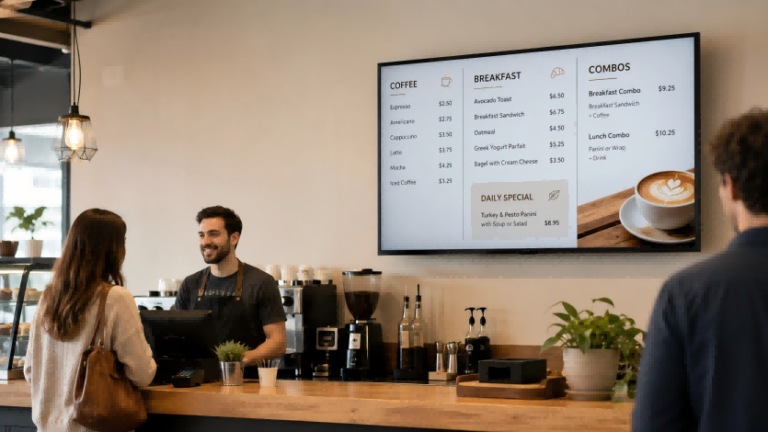
If you run a café, restaurant, bakery, or quick-service food business, you may need to update prices, promote seasonal items, or change breakfast and lunch menus quickly. A TV menu board offers a flexible alternative to printed menus.
Displaying a menu on a TV does not have to be expensive. A small café can start with a USB flash drive and JPEG menu images. A modern coffee shop may use smart TV apps or casting. A restaurant with multiple locations can use cloud-based digital signage to update menus, promotions, and schedules from one platform.
This guide explains the main ways to use a TV as a digital menu board, from simple DIY setup to professional restaurant signage.
Why Transition Your Café or Restaurant to Digital Menus?
Imagine this: you just printed a new set of menus, only to realize a price was wrong, or a seasonal drink isn’t highlighted. For small cafés and busy restaurants, constantly updating printed menus is time-consuming and costly. Every reprint means extra expense, wasted paper, and lost opportunities to showcase new products or promotions.
Digital menus on a TV solve these problems by allowing instant updates. Prices, daily specials, or limited-time offers can be changed in seconds without any printing. You can schedule content for different times of the day—breakfast, lunch, or happy hour—ensuring that customers always see the most relevant options. Beyond convenience, this flexibility directly affects revenue: a well-timed promotion or a visually highlighted new item can increase sales and encourage repeat visits. For cafés or quick-service restaurants that also need to attract customers before they enter the store, a digital sandwich board can display menus, daily specials, and sidewalk promotions at the entrance, but the right size should be chosen based on viewing distance, foot traffic, and message density.
Moreover, digital menus help maintain a professional and modern appearance. Customers perceive restaurants with dynamic screens as more organized and tech-savvy. Compared with static paper menus, digital signage communicates freshness, innovation, and attentiveness to detail. This combination of operational efficiency and improved customer experience makes digital menu boards a high-return investment, especially for cafés aiming to scale or test new offerings without committing to recurring print costs.
By understanding these benefits, café and restaurant owners can make informed choices about which technology solution—USB plug-and-play, smart TV apps, or cloud-based digital signage—best fits their business needs.
The Quickest Path: USB Flash Drive “Plug & Play”
For small cafés or bakeries just starting out, using a USB flash drive to display your menu on a TV is the simplest and most cost-effective solution. No additional hardware or monthly subscriptions are required, and you can update your content in minutes.
1. Preparing Your Menu Images
Create your menu as static JPEG images. The recommended resolution depends on your TV size: for 32–43 inch screens, 1920×1080 pixels works well; for 50–55 inch screens, 3840×2160 pixels ensures clarity. Keep a consistent aspect ratio—most TVs use 16:9—to avoid distortion. Highlight specials with bold text or contrasting colors, but avoid overcrowding the layout. Save each menu page as a separate JPEG file so you can easily reorder or replace them.
2. Formatting the USB Flash Drive
Use a USB drive formatted to FAT32 or exFAT for maximum compatibility with most commercial and consumer TVs. Name your files clearly, for example: 01_Breakfast.jpg, 02_Coffee_Specials.jpg, 03_Lunch_Menu.jpg. Insert the drive into the TV’s USB port, and select the photo or slideshow mode using the remote control. Most TVs allow auto-play and loop settings so your menu cycles continuously without manual intervention.
3. Updating Your Menu
Whenever prices change or new items are added, replace the relevant JPEGs on the USB drive. This method ensures updates are immediate without reprinting menus. For daily specials, you can maintain a dedicated folder for the day’s offers and swap it easily in the morning.
4. Practical Example
A community café with limited seating uses a single 43-inch TV above the counter. Every morning, staff copies the day’s menu and specials to the USB drive. The TV loops through three JPEG images: breakfast, coffee drinks, and lunch specials. This approach costs nothing beyond the initial TV and USB investment, yet gives the café a professional, modern look.
5. Tips for Smooth Operation
- Use high-quality images to prevent pixelation.
- Keep text readable from 2–3 meters away; avoid small fonts.
- Test the slideshow timing to allow customers enough time to read each page.
- Ensure the USB port is easily accessible for staff to update content.
While this method is simple, it has limitations: it lacks scheduling, remote updates, and integration with POS systems. However, for single-location cafés or bakeries, it provides an immediate, low-cost entry into digital menu boards and allows owners to experiment with layout and promotions before investing in more advanced solutions. For owners who want to move beyond a single TV menu board, this broader guide to اللافتات الرقمية للشركات الصغيرة explains how cafés, restaurants, and retail shops can compare product types, budgets, CMS needs, and long-term ROI.
The Modern Upgrade: Using Smart TV Apps & Casting
For cafés or small restaurant chains that want more flexibility without investing in additional hardware, smart TVs offer a convenient upgrade. Modern smart TVs support apps and casting features that let you update your menu from a computer, tablet, or even a phone—eliminating the need to swap USB drives constantly.
1. Using Smart TV Apps
Many smart TVs come with app stores, such as Roku, Fire TV, or Samsung Tizen. You can download simple slideshow or digital signage apps to display your menu. Canva, Google Slides, or PowerPoint can also be used via apps that support presentation playback. Upload your menu images or PDFs to these apps, and the TV will cycle through them automatically. Some apps even allow remote control via a companion smartphone app, so staff can update prices or daily specials in real time.
2. Casting From Devices
Casting is another easy method. Using AirPlay, Chromecast, or Miracast, you can mirror a laptop, tablet, or smartphone screen directly to the TV. For example, a café can prepare a Google Slides presentation of the day’s menu on a tablet and cast it to the counter display. Any updates made on the source device appear instantly on the TV, giving you dynamic control over content without touching the display itself.
3. Scheduling and Automation
Certain apps and casting solutions support scheduling. You can set breakfast menus to appear automatically in the morning, lunch specials at noon, and promotional drinks in the afternoon. While not as comprehensive as cloud-based SaaS platforms, these methods provide time-based content management for a single location or a few TVs within one venue.
4. Practical Example
A modern coffee shop with a 55-inch smart TV above the counter uses Canva to design its weekly menu. Staff updates the slides on their laptop, and the smart TV app automatically reflects the changes. For daily promotions, they use Chromecast to cast specials from a tablet, ensuring customers see the latest offers without manual intervention.
5. Key Benefits
- No USB swapping needed, reducing operational friction.
- Remote updates possible from a laptop or mobile device.
- Supports richer media formats, including animated graphics or short video loops.
- Enables scheduling for time-sensitive promotions.
This approach is ideal for cafés or small restaurants that want a professional-looking digital menu without investing in full cloud-based signage. It balances ease of use, flexibility, and cost, bridging the gap between DIY USB setups and enterprise-grade systems.
Professional Management: Cloud-Based Digital Signage
For restaurants or cafés with multiple locations, managing menus individually on each TV becomes time-consuming and prone to errors. Cloud-based digital signage systems offer a professional solution, allowing centralized control of all displays from a single platform. This approach not only saves operational time but also ensures consistency across every branch, helping maintain brand standards and optimize customer experience.
1. Centralized Content Management
A cloud-based system enables you to update menus, promotions, or pricing in real time across all locations. For example, if your chain launches a new seasonal beverage, a single change in the cloud dashboard updates every connected TV instantly. This eliminates the need for staff at each location to manually update USB drives or manage smart TV apps individually.
2. Automated Scheduling and Time-Based Menus
Most cloud platforms support automated scheduling. You can configure breakfast menus to appear in the morning, lunch specials at noon, and happy hour promotions later in the day. Time-sensitive offers are displayed accurately, increasing customer engagement and sales without additional staff effort. Some systems also allow weekday or weekend variations, perfect for tailoring offerings to traffic patterns.
3. Integration With POS and Inventory Systems
Professional cloud signage can integrate with your POS system, displaying items that are in stock or highlighting items with the highest margin. For instance, if a café runs out of a popular pastry, the cloud dashboard can remove it from the digital menu immediately, preventing customer frustration. If your restaurant also wants to reduce counter pressure or support self-ordering, a countertop self-service kiosk can work together with digital menu boards to create a smoother ordering experience.This integration also enables dynamic pricing strategies and supports promotional campaigns across multiple locations simultaneously.
4. Media Player Setup
Each TV connects to a compact media player that communicates with the cloud. This setup supports 24/7 operation and ensures smooth playback of high-resolution images, videos, and animations. Cloud dashboards often provide analytics, showing which items are most viewed or promoted, helping management optimize menu layout and content strategy over time.
5. Practical Example
A chain with three café locations uses Ikinor’s cloud-based digital signage platform. Staff update the lunch specials on the central dashboard each morning. All three TVs automatically display the updated menu, and the system highlights a featured drink for the day. During weekends, the breakfast menu appears until 11 a.m., then switches to brunch items, all without manual intervention. The dashboards also track which promotions attract the most attention, allowing marketing decisions to be data-driven.
6. Benefits of Cloud-Based Management
- Real-time updates across multiple locations.
- Automated scheduling reduces manual work.
- Integration with POS or inventory systems ensures accurate menus.
- Supports rich media including videos and animations.
- Provides analytics for menu optimization.
- Enhances brand consistency and professional appearance.
For restaurants aiming to scale or maintain multiple outlets efficiently, cloud-based digital signage is the most reliable and future-proof solution. If you are still comparing different restaurant display systems, you can also review this guide to restaurant digital signage solutions to understand common solution types, cost structures, and supplier selection factors.
Design Secrets for Readable Menu Boards
A digital menu is only effective if customers can quickly read and understand it. Even the most advanced signage system will fail to drive sales if the content is cluttered, illegible, or poorly organized. Applying design principles ensures your menu communicates clearly and encourages orders.
1. Typography and Font Size
Text should be legible from at least three meters away. For most TV sizes, a font size of 24pt or higher is recommended. Use clean, sans-serif fonts for clarity and avoid overly decorative styles. Headings for categories—such as “Coffee,” “Breakfast,” or “Desserts”—should be slightly larger or bolded to help customers scan the menu quickly.
2. Color and Contrast
High contrast between text and background is essential. Dark backgrounds with light-colored text generally provide the best readability, especially in environments with varying lighting conditions. Reserve bright colors to highlight specials or new items, but avoid overusing them, which can cause visual clutter.
3. Layout and Spacing
Group menu items into clear categories and maintain consistent spacing between lines and sections. Adequate white space helps the eye navigate the menu, preventing customers from feeling overwhelmed. Align prices consistently, either to the right or directly next to the item name, to make totals easier to interpret.
4. Highlighting Promotions and Specials
Draw attention to high-margin items, seasonal promotions, or daily specials using visual cues. This can include colored boxes, subtle icons, or contrasting text. Highlighting items strategically influences ordering behavior without distracting from the overall readability.
5. Visual Hierarchy
Organize content so that the most important items appear first or are visually prominent. Categories, popular items, and featured combos should stand out, while less critical items can occupy secondary positions. Visual hierarchy guides the customer’s gaze naturally through the menu.
6. Practical Tips
- Limit each screen to 3–5 categories to avoid overcrowding.
- Test the menu at the intended viewing distance to ensure readability.
- Keep updates consistent with your brand style—colors, fonts, and imagery should align with your café’s overall aesthetic.
- Use subtle animation or transitions sparingly; excessive motion can distract rather than engage.
By thoughtfully applying typography, color, spacing, and visual hierarchy, your digital menu board becomes more than a display—it becomes a tool for guiding customer decisions and increasing sales. A well-designed menu not only communicates information efficiently but also reinforces your brand identity and creates a polished, professional atmosphere.
Choosing the Right Hardware for Your Menu TV
While any modern TV can technically display a menu, not all screens are built for continuous commercial use. Cafés and restaurants often run their displays 10–12 hours a day, which can quickly expose the limitations of standard home TVs. Using the wrong hardware can lead to screen burn-in, premature failure, and poor visibility, ultimately increasing costs instead of saving them.
1. Longevity and Continuous Use
Home televisions are designed for occasional viewing, typically 4–6 hours per day. Commercial displays are engineered for extended operation, often rated for 16–24 hours daily. Industrial-grade screens use higher-quality panels and cooling mechanisms to prevent overheating and ensure consistent performance over years.
2. Brightness and Visibility
Ambient lighting in a café or restaurant varies throughout the day. Commercial monitors offer higher brightness levels than most home TVs, making menus readable even in brightly lit environments or near windows. Proper brightness ensures that text and images remain crisp, which is crucial for highlighting specials and prices.
3. Burn-In Prevention
Static content, like menu items, can cause permanent image retention on standard TVs, especially OLED models. Commercial displays include features such as pixel-shifting, screensavers, and specialized anti-burn technologies to protect against long-term static image damage.
4. Design and Installation
Narrow bezels and slim profiles help integrate displays seamlessly into your space. Industrial screens often offer flexible mounting options—wall-mounted, ceiling-hung, or embedded in kiosks—providing a polished look while ensuring safety and durability.
5. Practical Recommendation
For restaurants seeking reliable, long-term performance, investing in a commercial-grade LCD or LED display is advisable. These monitors are designed to handle extended daily operation, maintain brightness uniformity, and resist image burn-in. [Choosing Commercial LCD Monitors] offers a detailed guide for selecting the right size, resolution, and panel type for your space.
For businesses aiming for high uptime and consistent visual quality, consulting with providers like Ikinor can help tailor an industrial-grade solution that fits your menu display needs, maximizes readability, and ensures your investment lasts for years.
الأسئلة الشائعة
Home TVs can work for short-term or low-traffic usage, but they are not designed for 10–12 hours of daily operation. Commercial displays are more durable, prevent burn-in, and maintain brightness under bright ambient lighting.
For USB setups, replace JPEG images on the flash drive. Smart TV apps or casting allow remote updates via a laptop or tablet. Cloud-based systems let you update all locations instantly from a central dashboard, including time-based menus.
Small independent cafés often benefit from USB plug-and-play or smart TV apps. These methods are low-cost, easy to implement, and sufficient for a single screen without additional hardware investment.
Cloud-based digital signage is ideal for chains. It allows centralized control, automatic scheduling, integration with POS or inventory systems, and consistent branding across all locations, saving staff time and reducing errors.
Yes. Digital menu boards let you emphasize specials with color, boxes, or subtle icons. Cloud or app solutions can schedule promotions dynamically, while USB setups require manual image updates.
Use fonts at least 24pt, high-contrast colors (dark background, light text), clear spacing, and simple layout. Highlight important categories and specials, and test visibility at the typical customer distance (around 3 meters).




