
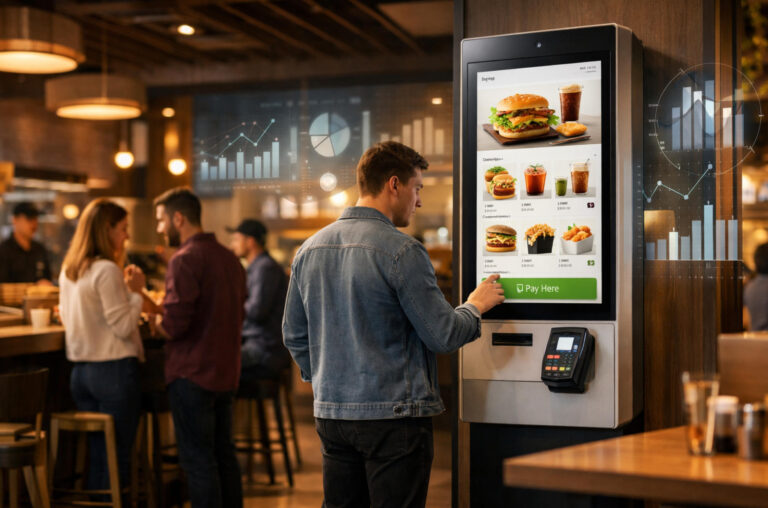
In today’s fast-paced restaurant industry, smart kiosks are transforming the way customers place orders, pay, and interact with dining establishments. By combining intuitive touchscreens, integrated payment systems, and real-time order management, these kiosks streamline operations, reduce wait times, and enhance the overall customer experience. For restaurants, smart kiosks are more than a convenience—they represent a strategic investment that can cut labor costs, minimize errors, and provide valuable insights through data analytics. From quick-service chains to casual dining outlets, adopting the right kiosk solution can significantly impact efficiency and revenue. Understanding cost, configuration, and integration options is essential for making an informed deployment decision that aligns with operational goals.
What Factors Determine the Total Cost of a Restaurant Smart Kiosk?
When evaluating the total cost of a restaurant smart kiosk, businesses need to consider multiple factors beyond the upfront purchase price. Hardware costs are the first and most visible component, including touchscreens, receipt printers, and payment modules. The choice of high-quality screens and multifunctional devices can significantly affect initial investment.
Software licensing and subscription fees are another critical factor. Many kiosks rely on cloud-based POS systems or specialized kiosk software that may charge monthly or annual subscriptions. These recurring costs must be included in long-term budget planning.
Installation, staff training, and maintenance also contribute to total cost. Proper installation, operator training, and ongoing maintenance not only require additional spending but also impact system stability and operational efficiency.
Finally, supporting services such as cloud management, remote monitoring, and technical support play a significant role. Reliable remote assistance and regular software updates ensure the kiosk operates efficiently over time, but they also need to be accounted for in the budget.
In summary, understanding the total cost requires a comprehensive view of hardware, software, installation, training, and support services. Only by considering all these factors can restaurants make informed investment decisions and ensure long-term returns.

How Can a Restaurant Choose the Right Kiosk Hardware Configuration?
Choosing the right hardware configuration for a restaurant smart kiosk is critical to maximizing operational efficiency and customer experience. Screen size and touch technology are primary considerations. Larger screens improve visibility and order accuracy, while responsive touch technology ensures smooth operation even in high-traffic environments.
Enclosure materials and protection levels also play a vital role. Durable materials and appropriate IP ratings protect the kiosk from spills, dust, and frequent use, extending its lifespan.
Peripheral combinations such as receipt printers, barcode scanners, and payment terminals should align with operational needs. For example, McDonald’s locations often use high-speed printers and multiple payment options to handle large orders quickly. Starbucks kiosks typically feature compact designs and mobile payment support for fast, convenient service. High-volume restaurants like Shake Shack install robust hardware with large touchscreens to manage multiple simultaneous orders efficiently.
Finally, customer traffic and order types influence hardware decisions. High-volume restaurants may need robust hardware and larger screens, whereas low-traffic venues can opt for simpler, cost-effective configurations.
In summary, selecting the right kiosk hardware involves balancing durability, usability, peripheral needs, and traffic demands to optimize both operational efficiency and the customer experience.
Which Software Features Are Essential for Restaurant Operations?
Effective software is the backbone of any restaurant smart kiosk deployment. POS system integration is critical for all types of restaurants, especially fast-food chains and high-volume locations, ensuring kiosk orders flow seamlessly into the main system, reducing errors, and simplifying order processing.
Menu management and personalized recommendations are particularly valuable for casual dining and cafes, where menus change frequently. Dynamic menu updates allow adjustments based on availability, seasonal items, or promotions, and personalized suggestions help increase average order value.
Loyalty programs, coupons, and membership systems are ideal for chain restaurants or establishments with regular customers. Integrating these features into kiosks encourages repeat visits, improves customer retention, and boosts long-term engagement.
Data analytics and reporting benefit all restaurant types but are especially important for multi-branch operations or high-traffic venues. Detailed dashboards allow managers to track sales trends, monitor popular items, evaluate staff performance, and make data-driven decisions to optimize efficiency and profitability.
In summary, selecting software with POS integration, menu flexibility, loyalty management, and analytics tailored to restaurant type ensures kiosks streamline operations, enhance customer engagement, and drive revenue growth.
Why Should Restaurants Consider ROI and Payback Period Before Deployment?
Evaluating ROI and payback period is essential before deploying restaurant smart kiosks to ensure financial viability. Labor savings and front-counter relief can be quantified by comparing reduced staff hours and lower peak-time congestion. For instance, a busy McDonald’s outlet reported cutting cashier staffing by 20% after kiosk installation, reducing labor costs significantly.
Average order processing efficiency also improves. Kiosks can handle multiple simultaneous orders without delays, increasing throughput. Fast-casual chains like Chipotle observed that kiosk orders reduced average queue time from 6 minutes to 3 minutes, improving customer satisfaction.
Payback period examples help restaurants plan budgets. In many cases, the initial investment in kiosks can be recovered within 12–18 months, depending on traffic and order volume. Tracking key performance indicators (KPIs) such as order accuracy, average ticket size, and repeat customer rate helps evaluate long-term returns.
Finally, assessing ROI ensures kiosks deliver sustainable benefits, from cost reduction to enhanced revenue. Restaurants can make informed deployment decisions by quantifying both operational improvements and financial impact.
Can Smart Kiosks Integrate Smoothly with Existing Restaurant Systems?
Integration with existing systems is a critical factor when deploying smart kiosks in restaurants. Compatibility with POS platforms, inventory systems, and kitchen printers ensures orders flow seamlessly from the kiosk to the backend—eliminating manual input, reducing errors, and accelerating service speed. For example, McDonald’s self-ordering kiosks are fully integrated with their POS and kitchen display systems, allowing orders to be automatically routed and prepared without staff intervention.
This is where selecting a professional restaurant kiosk solution provider becomes essential. Manufacturers with real deployment experience can handle not only hardware delivery but also system integration, API connectivity, and workflow customization.
For instance, Ikinor previously supported a restaurant chain in Indonesia by deploying a unified smart kiosk system across multiple outlets. The project involved integrating the new kiosks with the client’s existing POS software, kitchen printers, and order management platform—allowing the chain to retain its original backend while upgrading customer-facing ordering terminals. Through customized middleware and API connections, menu data, pricing, and order statuses were synchronized in real time, enabling a smooth transition without disrupting daily operations.
Cloud data synchronization and open API capabilities are equally important. Kiosks that support real-time cloud updates allow restaurant operators to instantly push menu changes, promotions, and pricing adjustments across all locations. API integration also enables seamless connectivity with loyalty programs, mobile apps, and third-party delivery platforms—greatly improving operational flexibility.
Centralized management becomes especially critical for multi-branch restaurants. Brands such as Starbucks and Shake Shack remotely manage hundreds of kiosks through unified dashboards, monitoring device status, deploying software updates, and analyzing sales performance across locations. This centralized approach minimizes maintenance workload while maintaining consistent service standards.
In summary, smooth integration with POS, inventory systems, kitchen equipment, cloud synchronization, API connectivity, and centralized multi-store management is what separates basic kiosks from true enterprise-grade solutions. Partnering with an experienced provider ensures your smart kiosk deployment delivers measurable ROI—reducing operational complexity while creating a consistent, scalable customer experience.
How Do Location and Customer Demographics Affect Kiosk Selection?
Location and customer demographics play a crucial role in selecting the right smart kiosk for a restaurant. High-traffic versus low-traffic locations require different approaches. High-volume outlets, such as Panda Express in busy urban areas, often need large, robust kiosks with fast processors to handle multiple simultaneous orders. Low-traffic boutique cafes may opt for compact, cost-effective kiosks that prioritize space efficiency.
Restaurant type also influences configuration. Fast-food chains prioritize speed and durability, casual dining restaurants focus on flexible menu displays and upselling features, while high-end establishments may prefer sleek designs and premium touchscreen interfaces to maintain brand aesthetics. For example, Shake Shack emphasizes large screens for quick throughput, whereas smaller artisanal coffee shops use smaller, minimalist kiosks to complement interior design.
Customer habits must also be considered. In regions where mobile payments dominate, kiosks should support digital wallets and QR codes. Younger, tech-savvy customers may prefer self-service interfaces with personalization options, whereas older demographics may need simpler, intuitive navigation.
In summary, understanding location, restaurant type, and customer behavior helps restaurants select kiosks that optimize operational efficiency, enhance user experience, and align with brand positioning.
Which Vendor and After-Sales Support Factors Ensure Long-Term Success?
Selecting the right vendor and evaluating after-sales support are crucial for the long-term success of restaurant smart kiosks. Vendor reliability and long-term partnership capability are key considerations. Choosing a vendor with proven experience ensures hardware and software continue to perform reliably over time.
Software updates, remote maintenance, and issue response speed are equally important. Kiosks require regular software patches, menu updates, and fast troubleshooting to minimize downtime. Vendors offering 24/7 remote support can resolve issues quickly, ensuring operational continuity and protecting revenue.
Customization versus standardized delivery is another critical decision. Standard kiosks offer faster deployment and lower costs, while custom solutions allow restaurants to match branding, integrate unique features, or optimize workflows. Some restaurants may prioritize premium customer experience with tailored interfaces, whereas high-volume locations may prefer standardized configurations to maximize efficiency.
In summary, long-term kiosk success depends on choosing vendors who are reliable, provide rapid and continuous support, and balance customization with standardization. Careful vendor selection reduces operational risk, ensures consistent performance, and maximizes ROI over the kiosk lifecycle.
FAQs
ROI generally ranges from 12 to 18 months, depending on traffic, order volume, and labor savings. High-volume locations may recover costs faster due to reduced staffing and increased throughput, while low-traffic sites may take longer.
Screen size, touch responsiveness, peripheral devices, and durability directly affect order speed, accuracy, and uptime. Choosing hardware suited to traffic and order complexity ensures faster throughput and fewer errors.
Yes. Modern kiosks can process cash, card, mobile wallets, and QR code payments concurrently, ensuring smooth transactions for diverse customer preferences.
POS, inventory, kitchen printers, loyalty programs, and cloud analytics are critical. Integration ensures orders, stock, and reporting remain synchronized across locations.
Total cost includes hardware purchase, software licenses, installation, training, maintenance, and subscription fees. Estimating recurring costs is critical for accurate ROI projections.
Key factors are reliability, proven track record, software update frequency, remote support, response time, and balance between customization and standardized solutions.



