
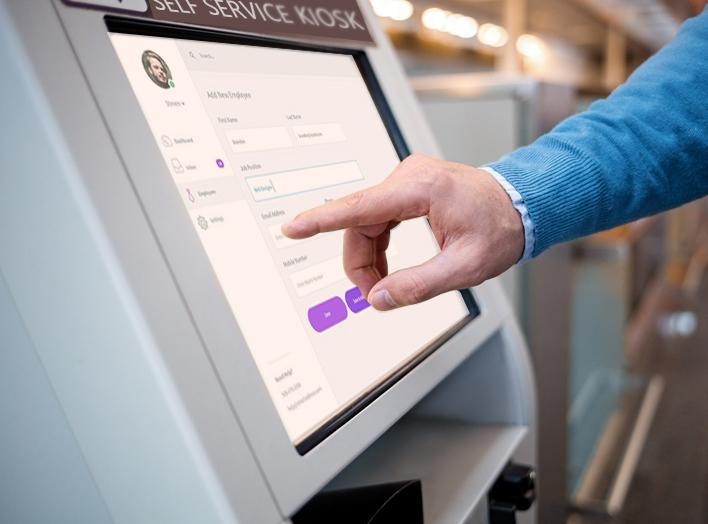
Un quiosco de RR. HH. puede considerarse un "cajero automático de RR. HH." interno para las organizaciones modernas, ya que proporciona a los empleados acceso instantáneo y de autoservicio a las tareas cotidianas de RR. HH. sin depender de asistencia manual. En sectores como la manufactura, el almacenamiento y la logística, las cadenas minoristas, la banca o el gobierno, donde las estructuras laborales y los entornos operativos varían significativamente, un punto de acceso a RR. HH. estandarizado y disponible en las instalaciones se vuelve esencial.
Este artículo se centra en cómo los quioscos de RR. HH. crean un valor operativo real en estos sectores, por qué las aplicaciones móviles por sí solas a menudo no son suficientes y cómo las empresas pueden elegir la solución adecuada en función de las necesidades de hardware, software e implementación. Por último, también presentaremos una lista seleccionada de Proveedores de quioscos de recursos humanos, ayudándote a comprender mejor las opciones disponibles en el mercado e identificar al socio adecuado para tu negocio.
¿Qué funciones tiene un quiosco de recursos humanos?
A Quiosco de Recursos Humanos (quiosco de RR. HH.) es un terminal de autoservicio con pantalla táctil implementado dentro de una organización para permitir que los empleados completen tareas relacionadas con RR. HH. de forma independiente, sin necesidad de asistencia directa del personal de RR. HH. En términos sencillos, transforma el proceso tradicional de "ir a RR. HH. para obtener ayuda" en un experiencia digital de autoservicio.
Un quiosco de RR. HH. estándar normalmente incluye varios módulos funcionales principales. En primer lugar, permite: Acceso a la información de los empleados, Esto permite a los usuarios ver sus nóminas, consultar los registros de asistencia (como fichajes, permisos y horas extras) y revisar los detalles de sus beneficios o seguros. De esta forma, los empleados pueden acceder rápidamente a sus datos personales de recursos humanos cuando los necesiten.
En segundo lugar, es compatible transacciones de autoservicio. Los empleados pueden enviar solicitudes de vacaciones, actualizar información personal como la dirección o los datos de contacto, y descargar o imprimir documentos como certificados de empleo. Estas funciones reducen significativamente la carga de trabajo administrativo rutinario de los equipos de recursos humanos.
En tercer lugar, los quioscos de RRHH a menudo integran Sistemas de control de asistencia e identidad. Los empleados pueden fichar utilizando tarjetas de identificación, huellas dactilares o reconocimiento facial, mientras que los horarios de turnos y los registros de asistencia se controlan y registran automáticamente.
Finalmente, los quioscos de RRHH sirven como canal para comunicación interna, que muestra anuncios de la empresa, materiales de capacitación y actualizaciones de políticas en un formato coherente y accesible.
Compared to traditional HR management methods, the difference is clear. Manual processes are replaced by employee self-service, reducing queues and delays. Operational efficiency improves, labor costs decrease, and services become available 24/7. Most importantly, data is centralized and digitized, enabling more accurate and streamlined HR management across the organization.
Beneficios de los quioscos de recursos humanos en diferentes sectores (y por qué las aplicaciones no son suficientes)
Fabricación: Estandarización de operaciones de alto volumen basadas en turnos
Los entornos de fabricación a menudo implican Sistemas de turnos complejos (incluidas rotaciones de 24 horas al día, 7 días a la semana) y grandes plantillas. Gestionar con precisión la asistencia, las horas extras y la nómina a esta escala resulta difícil cuando se depende de procesos manuales o sistemas fragmentados.
Las aplicaciones móviles tienen limitaciones en este contexto porque el uso del teléfono suele estar restringido en las plantas de producción, y los empleados tienden a acceder a los servicios de recursos humanos en horarios fijos (por ejemplo, antes o después de sus turnos).
Los quioscos de RRHH introducen una flujo de trabajo estandarizado Para todos los empleados, garantizando que los registros de asistencia, las solicitudes de horas extras y los datos de nómina sigan formatos y procesos uniformes.
Valor primario: mayor precisión de los datos y estandarización de las operaciones de RRHH en equipos grandes
Almacenamiento y logística: Gestión de la constante rotación de personal
En los entornos logísticos, el desafío clave no es la complejidad, sino velocidad y volumen de los cambios en la fuerza laboral. Los trabajadores temporales y de temporada se incorporan y se marchan con frecuencia, lo que dificulta la adopción de un sistema estable.
Las aplicaciones móviles fracasan en este caso porque es poco probable que los trabajadores descarguen o interactúen con un sistema para empleos a corto plazo.
Los quioscos de RRHH actúan como un Interfaz de fuerza laboral plug-and-play, lo que permite a los empleados completar la incorporación, consultar los turnos y registrar las horas trabajadas al instante sin necesidad de configuración.
Valor primario: Gestión más rápida de la rotación de personal y continuidad operativa más fluida
Cadenas minoristas: Tiendas distribuidas sin soporte de recursos humanos en el sitio.
Las cadenas minoristas y los grupos de restaurantes suelen operar en múltiples ubicaciones, con el apoyo de un equipo centralizado de recursos humanos en la sede central. Sin embargo, Por lo general, las tiendas individuales no cuentan con personal de recursos humanos dedicado en sus instalaciones..
Como consecuencia, los gerentes de tienda a menudo deben encargarse de tareas básicas de recursos humanos, como el control de asistencia, la coordinación de horarios, las solicitudes de vacaciones y la comunicación interna. Esto no solo aumenta su carga de trabajo, sino que también puede generar inconsistencias entre las distintas sucursales.
Si bien las aplicaciones móviles facilitan la comunicación, dependen en gran medida de la participación de los empleados. En la práctica, el personal a tiempo parcial o por turnos puede no consultar ni usar estas aplicaciones con regularidad, lo que provoca que se pierdan actualizaciones y que los procesos se fragmenten.
Los quioscos de RRHH instalados en las áreas traseras de la tienda proporcionan una punto de acceso fijo y estandarizado Para los empleados. El personal puede consultar sus horarios, enviar solicitudes y acceder a las novedades de la empresa directamente durante sus turnos, sin necesidad de utilizar dispositivos personales.
Valor primarioProcesos de recursos humanos más consistentes en todas las tiendas y una carga administrativa significativamente reducida para los gerentes de tienda.
Banca y Gobierno: Seguridad, Cumplimiento Normativo y Control de Acceso
In banking and government institutions, HR management is not only about efficiency but also deeply connected to security and regulatory compliance. Access to employee data and internal systems must be tightly controlled, and every interaction often needs to be traceable.
Los quioscos de RRHH asumen un rol que va más allá de la funcionalidad de autoservicio. Pueden actuar eficazmente como un portero de seguridad, Garantizando que solo el personal autorizado pueda acceder a los servicios y datos confidenciales de RR. HH. Al integrar tecnologías de verificación de identidad, como la autenticación mediante tarjeta de identificación, el reconocimiento facial o los sistemas biométricos, el quiosco se convierte en un punto de acceso controlado en lugar de una simple interfaz de servicio.
Este enfoque permite a las organizaciones gestionar no solo el acceso digital, sino también, en algunos casos, el acceso físico a áreas restringidas. Cada interacción se registra en el sistema, creando un registro de auditoría completo que respalda los requisitos de cumplimiento y los estándares de gobernanza interna. En comparación con las aplicaciones móviles, que dependen de dispositivos personales y redes externas, los quioscos de RR. HH. ofrecen un entorno más seguro y estandarizado, más fácil de supervisar y controlar.
Valor primarioOperaciones de recursos humanos seguras, conformes a la normativa y totalmente rastreables.
Aplicaciones y quioscos de RR. HH.: un enfoque complementario, no un reemplazo.
En estos sectores, la limitación de las aplicaciones de recursos humanos no reside en su funcionalidad, sino en su adaptación a las condiciones laborales reales. Factores como los entornos restringidos, el comportamiento de los empleados y los requisitos de seguridad suelen hacer que las soluciones exclusivamente móviles resulten insuficientes.
Las aplicaciones de RRHH están diseñadas para acceso personal y flexible, lo que los hace ideales para el personal de oficina y el uso remoto. Por el contrario, los quioscos de RR. HH. están diseñados para entornos compartidos, presenciales y controlados, donde la coherencia, la visibilidad y el cumplimiento son fundamentales.
Por esta razón, la mayoría de las organizaciones no las tratan como alternativas. En cambio, adoptan una Enfoque complementario: combinación de aplicaciones de RR. HH. con quioscos de RR. HH.—para equilibrar la comodidad individual con la fiabilidad operativa.
Cómo elegir el quiosco de RR. HH. adecuado (hardware, software e implementación)
Elegir el quiosco de recursos humanos adecuado no se trata solo de seleccionar un dispositivo, sino que requiere alinear el hardware, el software y la estrategia de implementación con escenarios operativos reales.
Desde la perspectiva del hardware, la configuración debe reflejar cómo los empleados realmente usarán el sistema. En entornos de fabricación con grandes plantillas y cambios de turno, una Pantalla de 21,5 pulgadas o de 32 pulgadas Mejora la visibilidad durante las horas pico, mientras que las carcasas de grado industrial garantizan la durabilidad en condiciones exigentes. Los métodos de verificación de identidad, como el reconocimiento de huellas dactilares o facial, se utilizan habitualmente para un control de asistencia preciso. En cambio, las tiendas minoristas o los centros logísticos pueden priorizar diseños compactos, como los quioscos de 15,6 pulgadas, donde el espacio es limitado pero aún se requieren lectores de tarjetas o autenticación sencilla. Las impresoras son especialmente útiles en fábricas donde los empleados pueden necesitar recibos de nómina físicos o documentos justificativos.
En cuanto al software, el quiosco debe integrarse sin problemas en los sistemas existentes. Por ejemplo, en operaciones logísticas con alta rotación de personal, una integración rápida con Sistemas HRMS allows new workers to be onboarded and managed efficiently. Retail chains benefit from multi-language interfaces and centralized cloud systems that synchronize schedules and updates across locations. In more regulated sectors like banking or government, software must support strict permission control and secure data access within internal systems.
Deployment strategy is equally scenario-driven. Factories often place kiosks at entrances or dormitory areas to match shift-based workflows, while warehouses position them near check-in points to streamline onboarding. Retail businesses typically install kiosks in staff-only areas to provide a consistent access point across stores. Network requirements also vary, with secure intranet systems preferred in high-compliance sectors, while cloud-based solutions are more suitable for distributed operations.
En última instancia, un quiosco de RRHH debe abordarse como un Solución a nivel de sistema diseñada en función de las condiciones reales del lugar de trabajo., No se trata simplemente de un dispositivo independiente.
Proveedores recomendados de quioscos de recursos humanos
Aquí encontrará varios proveedores de quioscos de recursos humanos para su referencia. La lista no está ordenada de ninguna manera en particular y la información proviene de datos públicos disponibles en línea.
1. Quioscos Meridian
| Artículo | Detalles |
|---|---|
| nombre de empresa | Quioscos Meridian |
| Biografía de la empresa | Meridian Kiosks se especializa en soluciones de quioscos de autoservicio y señalización digital, ofreciendo diseño, ingeniería, fabricación, integración y soporte desde la concepción hasta la finalización del proyecto. La empresa afirma que sus soluciones se diseñan, fabrican y ensamblan en Norteamérica. |
| Gama de productos | Quioscos de recursos humanos; quioscos de autoservicio; señalización digital; taquillas inteligentes; soluciones de quioscos para la gestión de personal. |
| Ubicación | EE.UU |
| Contacto | https://www.meridiankiosks.com/hr-kiosk/ |
2. DynaTouch
| Artículo | Detalles |
|---|---|
| nombre de empresa | DynaTouch |
| Biografía de la empresa | DynaTouch es un integrador y desarrollador de tecnología centrado en soluciones seguras de quioscos de autoservicio, pantallas interactivas, dispositivos móviles, estaciones de trabajo y señalización digital, impulsados por su software propietario de gestión de quioscos TIPS™. |
| Gama de productos | Quioscos de autoservicio de RR. HH.; quioscos de autoservicio para empleados; solución de quiosco TIPS HR Express™; software seguro para quioscos |
| Ubicación | EE.UU |
| Contacto | https://www.dynatouch.com/self-service-solutions/human-resources-hr-kiosk/ |
3. Quioscos avanzados
| Artículo | Detalles |
|---|---|
| nombre de empresa | Quioscos avanzados |
| Biografía de la empresa | Advanced Kiosks ofrece soluciones de quioscos de autoservicio para entornos corporativos y gubernamentales. Sus soluciones de quioscos de recursos humanos están diseñadas para empleados sin escritorio que necesitan acceso las 24 horas del día, los 7 días de la semana, a servicios, aplicaciones e información de recursos humanos. |
| Gama de productos | Quioscos de autoservicio de RR. HH.; quioscos para empleados; quioscos de documentos; hardware y software para quioscos seguros. |
| Ubicación | EE.UU |
| Contacto | https://advancedkiosks.com/solutions/hr-self-service-kiosks/ |
4. Quioscos Olea
| Artículo | Detalles |
|---|---|
| nombre de empresa | Quioscos Olea Inc. |
| Biografía de la empresa | Olea Kiosks es un fabricante de quioscos que ofrece soluciones de autoservicio para diversos sectores. Su contenido sobre quioscos de recursos humanos destaca implementaciones para empresas como Morgan Stanley, MGM Resorts, Ahold y Procter & Gamble. |
| Gama de productos | Quioscos de autoservicio de RR. HH.; Quiosco modelo Boston; Quioscos para comercios; Soluciones de quioscos de registro y autenticación |
| Ubicación | EE.UU |
| Contacto | https://www.olea.com/news/human-resource-kiosk/ |
5. Panashi
| Artículo | Detalles |
|---|---|
| nombre de empresa | Panashi |
| Biografía de la empresa | Panashi ofrece soluciones de quioscos de autoservicio de recursos humanos diseñadas para que los empleados accedan a servicios de RR. HH. como solicitudes de vacaciones, escaneo de documentos, solicitudes de reembolso e impresión de certificados de RR. HH. |
| Gama de productos | Quioscos de RR. HH.; impresión de certificados de RR. HH.; solicitud de vacaciones; escaneo de documentos; funciones del quiosco de solicitud de reembolso |
| Ubicación | Emiratos Árabes Unidos |
| Contacto | https://panashi.ae/hr-kiosk-solution.html |
6. Tecnologías de software XIPHIAS
| Artículo | Detalles |
|---|---|
| nombre de empresa | XIPHIAS Software Technologies Private Limited |
| Biografía de la empresa | XIPHIAS ofrece soluciones de quioscos con pantalla táctil, incluidos quioscos táctiles de recursos humanos que ayudan a los empleados a acceder a servicios de RR. HH. como solicitudes de permisos, actualizaciones de información personal y políticas de la empresa. |
| Gama de productos | Quioscos táctiles de RR. HH.; quioscos de información; quioscos de autoservicio para empleados; soluciones de quioscos con pantalla táctil |
| Ubicación | India |
| Contacto | https://www.xiphiastec.com/blogs/how-hr-kiosks-are-revolutionizing-employee-self-service/ |
Además de estos proveedores, las empresas que requieren soluciones más flexibles y personalizables también pueden considerar trabajar con fabricantes como Ikinor. En comparación con los quioscos estandarizados, estos proveedores suelen ofrecer servicios OEM/ODM, lo que permite a las empresas adaptar el diseño del hardware, la integración del software y los módulos funcionales según las necesidades específicas de su sector.




