
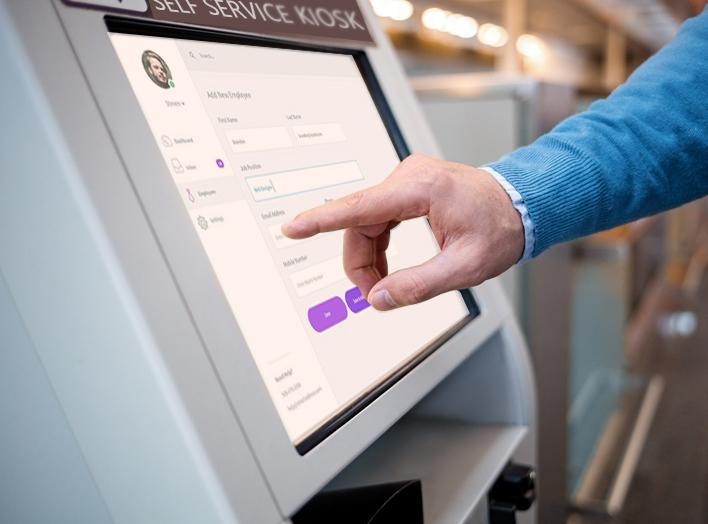
An HR kiosk can be seen as an internal “HR ATM” for modern organizations—providing employees with instant, self-service access to everyday HR tasks without relying on manual support. In industries such as manufacturing, warehousing & logistics, retail chains, and banking or government, where workforce structures and operational environments vary significantly, a standardized and on-site HR access point becomes essential.
This article focuses on how HR kiosks create real operational value across these sectors, why mobile apps alone are often not enough, and how businesses can choose the right solution based on hardware, software, and deployment needs. Finally, we will also introduce a curated list of HR kiosk providers, helping you better understand the available options in the market and identify the right partner for your business.
What Does a Human Resource Kiosk Do?
A Human Resource Kiosk (HR kiosk) is a touchscreen self-service terminal deployed within an organization to allow employees to complete HR-related tasks independently, without needing direct assistance from HR staff. In simple terms, it transforms the traditional “go to HR for help” process into a digital, self-service experience.
A standard HR kiosk typically includes several core functional modules. First, it enables employee information access, allowing users to view payslips, check attendance records such as clock-ins, leave, and overtime, and review benefits or insurance details. This ensures that employees can quickly retrieve personal HR data whenever needed.
Second, it supports self-service transactions. Employees can submit leave requests, update personal information like address or contact details, and download or print documents such as employment certificates. These functions significantly reduce routine administrative workload for HR teams.
Third, HR kiosks often integrate attendance and identity verification systems. Employees can clock in using ID cards, fingerprints, or facial recognition, while shift schedules and attendance records are automatically tracked and recorded.
Finally, HR kiosks serve as a channel for internal communication, displaying company announcements, training materials, and policy updates in a consistent and accessible format.
Compared to traditional HR management methods, the difference is clear. Manual processes are replaced by employee self-service, reducing queues and delays. Operational efficiency improves, labor costs decrease, and services become available 24/7. Most importantly, data is centralized and digitized, enabling more accurate and streamlined HR management across the organization.
Benefits of HR Kiosks Across Different Industries (and Why Apps Are Not Enough)
Manufacturing: Standardizing High-Volume, Shift-Based Operations
Manufacturing environments often involve complex shift systems (including 24/7 rotations) and large workforces. Managing attendance, overtime, and payroll accurately at this scale is difficult when relying on manual processes or fragmented systems.
Mobile apps are limited in this context because phone usage is often restricted on production floors, and employees tend to access HR services at fixed times (e.g., before/after shifts).
HR kiosks introduce a standardized workflow for all employees—ensuring that attendance records, overtime submissions, and payroll data follow consistent formats and processes.
Primary Value: improved data accuracy and standardized HR operations across large teams
Warehousing & Logistics: Managing Constant Workforce Turnover
In logistics environments, the key challenge is not complexity, but speed and volume of workforce changes. Temporary and seasonal workers frequently join and leave, making stable system adoption difficult.
Mobile apps fail here because workers are unlikely to download or engage with a system for short-term employment.
HR kiosks act as a plug-and-play workforce interface, allowing employees to complete onboarding, check shifts, and track hours instantly without setup.
Primary Value: faster workforce turnover handling and smoother operational continuity
Retail Chains: Distributed Stores Without On-Site HR Support
Retail chains and restaurant groups often operate across multiple locations, supported by a centralized HR team at the headquarters level. However, individual stores typically do not have dedicated on-site HR staff.
As a result, store managers are often required to handle basic HR-related tasks, such as attendance tracking, schedule coordination, leave requests, and internal communication. This not only increases their workload but can also lead to inconsistencies across locations.
While mobile apps can support communication, they rely heavily on employee engagement. In practice, part-time and shift-based staff may not consistently check or use these apps, leading to missed updates and fragmented processes.
HR kiosks installed in back-of-store areas provide a fixed and standardized access point for employees. Staff can check schedules, submit requests, and access company updates directly during their shifts, without relying on personal devices.
Primary Value: more consistent HR processes across stores and significantly reduced administrative burden on store managers
Banking & Government: Security, Compliance, and Access Control
In banking and government institutions, HR management is not only about efficiency but also deeply connected to security and regulatory compliance. Access to employee data and internal systems must be tightly controlled, and every interaction often needs to be traceable.
HR kiosks take on a role that goes beyond self-service functionality. They can effectively act as a security gatekeeper, ensuring that only authorized personnel are able to access sensitive HR services and data. By integrating identity verification technologies such as ID card authentication, facial recognition, or biometric systems, the kiosk becomes a controlled access point rather than just a service interface.
This approach allows organizations to manage not only digital access but also, in some cases, physical access to restricted areas. Every interaction can be recorded within the system, creating a complete audit trail that supports compliance requirements and internal governance standards. Compared to mobile apps, which rely on personal devices and external networks, HR kiosks provide a more secure and standardized environment that is easier to monitor and control.
Primary Value: secure, compliant, and fully traceable HR operations
HR Apps and HR Kiosks: A Complementary Approach, Not a Replacement
Across these industries, the limitation of HR apps is not their functionality, but their fit with real-world working conditions. Factors such as restricted environments, workforce behavior, and security requirements often make mobile-only solutions insufficient.
HR apps are designed for personal, flexible access, making them ideal for office staff and remote use. In contrast, HR kiosks are built for shared, on-site, and controlled environments, where consistency, visibility, and compliance are critical.
For this reason, most organizations do not treat them as alternatives. Instead, they adopt a complementary approach—combining HR apps with HR kiosks—to balance individual convenience with operational reliability.
How to Choose the Right HR Kiosk (Hardware, Software & Deployment)
Choosing the right HR kiosk is not just about selecting a device—it requires aligning hardware, software, and deployment strategy with real operational scenarios.
From a hardware perspective, configuration should reflect how employees will actually use the system. In manufacturing environments with large workforces and shift changes, a 21.5-inch or 32-inch screen improves visibility during peak hours, while industrial-grade enclosures ensure durability in demanding conditions. Identity verification methods such as fingerprint or facial recognition are commonly used to support accurate attendance tracking. In contrast, retail stores or logistics sites may prioritize compact designs, such as 15.6-inch kiosks, where space is limited but still require card readers or simple authentication. Printers are especially useful in factories where employees may need physical payslips or proof documents.
On the software side, the kiosk must integrate seamlessly into existing systems. For example, in logistics operations with high employee turnover, fast integration with HRMS systems allows new workers to be onboarded and managed efficiently. Retail chains benefit from multi-language interfaces and centralized cloud systems that synchronize schedules and updates across locations. In more regulated sectors like banking or government, software must support strict permission control and secure data access within internal systems.
Deployment strategy is equally scenario-driven. Factories often place kiosks at entrances or dormitory areas to match shift-based workflows, while warehouses position them near check-in points to streamline onboarding. Retail businesses typically install kiosks in staff-only areas to provide a consistent access point across stores. Network requirements also vary, with secure intranet systems preferred in high-compliance sectors, while cloud-based solutions are more suitable for distributed operations.
Ultimately, an HR kiosk should be approached as a system-level solution designed around real workplace conditions, not just a standalone device.
Recommended Human Resource Kiosk Providers
Here are several Human Resource Kiosk providers for your reference. The list is not ranked in any particular order, and the information is sourced from publicly available online data.
1. Meridian Kiosks
| Item | Details |
|---|---|
| Company Name | Meridian Kiosks |
| Company Bio | Meridian Kiosks specializes in self-service kiosk and digital signage solutions, offering design, engineering, manufacturing, integration, and support from concept to completion. The company states that its solutions are designed, manufactured, and assembled in North America. |
| Product Range | HR kiosks; self-service kiosks; digital signage; smart lockers; personnel management kiosk solutions |
| Location | USA |
| Contact | https://www.meridiankiosks.com/hr-kiosk/ |
2. DynaTouch
| Item | Details |
|---|---|
| Company Name | DynaTouch |
| Company Bio | DynaTouch is a technology integrator and developer focused on secure self-service kiosk solutions, interactive displays, mobile devices, workstations, and digital signage, powered by its proprietary TIPS™ Kiosk Management Software. |
| Product Range | HR self-service kiosks; employee self-service kiosks; TIPS HR Express™ kiosk solution; secure kiosk software |
| Location | USA |
| Contact | https://www.dynatouch.com/self-service-solutions/human-resources-hr-kiosk/ |
3. Advanced Kiosks
| Item | Details |
|---|---|
| Company Name | Advanced Kiosks |
| Company Bio | Advanced Kiosks provides self-service kiosk solutions for corporate and government environments. Its HR kiosk solutions are positioned for deskless workforces needing 24/7 access to HR services, applications, and information. |
| Product Range | HR self-service kiosks; employee kiosks; document kiosks; secure kiosk hardware and software |
| Location | USA |
| Contact | https://advancedkiosks.com/solutions/hr-self-service-kiosks/ |
4. Olea Kiosks
| Item | Details |
|---|---|
| Company Name | Olea Kiosks Inc. |
| Company Bio | Olea Kiosks is a kiosk manufacturer offering self-service kiosk solutions across multiple industries. Its HR kiosk content highlights deployments for companies including Morgan Stanley, MGM Resorts, Ahold, and Procter & Gamble. |
| Product Range | HR self-service kiosks; Boston Model kiosk; retail kiosks; check-in and authentication kiosk solutions |
| Location | USA |
| Contact | https://www.olea.com/news/human-resource-kiosk/ |
5. Panashi
| Item | Details |
|---|---|
| Company Name | Panashi |
| Company Bio | Panashi provides HR self-service kiosk solutions designed for employee access to HR services such as leave requests, document scanning, reimbursement requests, and HR certificate printing. |
| Product Range | HR kiosks; HR certificate printing; leave application; document scanning; reimbursement request kiosk functions |
| Location | UAE |
| Contact | https://panashi.ae/hr-kiosk-solution.html |
6. XIPHIAS Software Technologies
| Item | Details |
|---|---|
| Company Name | XIPHIAS Software Technologies Private Limited |
| Company Bio | XIPHIAS provides touch screen kiosk solutions, including HR touch kiosks that help employees access HR services such as time-off requests, personal information updates, and company policies. |
| Product Range | HR touch kiosks; information kiosks; employee self-service kiosks; touch screen kiosk solutions |
| Location | India |
| Contact | https://www.xiphiastec.com/blogs/how-hr-kiosks-are-revolutionizing-employee-self-service/ |
In addition to these providers, companies that require more flexible and customizable solutions may also consider working with manufacturers like Ikinor. Compared to standardized kiosk products, such suppliers typically offer OEM/ODM services, allowing businesses to tailor hardware design, software integration, and functional modules based on their specific industry requirements.




