
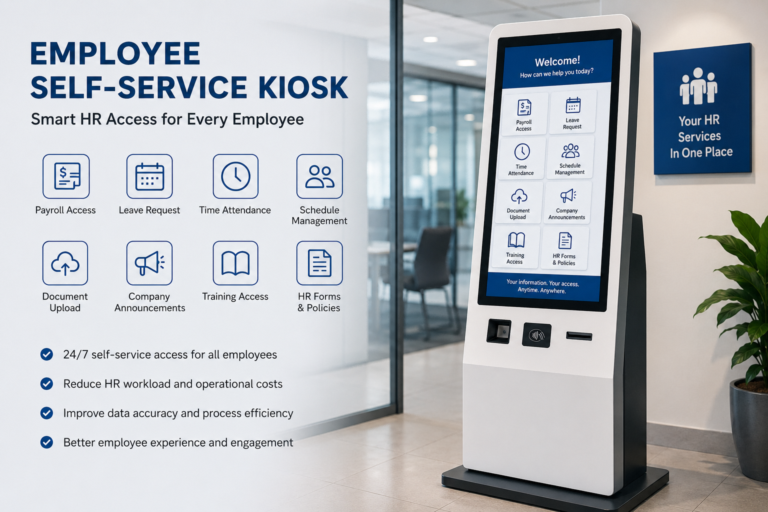
Many companies have employees who do not sit in front of a computer every day, such as factory workers, warehouse staff, hotel employees, retail store teams, hospital support workers, and remote worksite employees. For these workers, checking payslips, viewing schedules, submitting leave requests, updating personal information, or reading company notices often means asking HR, filling out paper forms, or waiting for manual processing.
An Employee Self-Service Kiosk is designed to solve this problem. It brings HR services, employee information access, and internal workflows into one self-service terminal, allowing employees to complete routine tasks directly at the workplace. This article explains what an Employee Self-Service Kiosk is, its key benefits, common features, use cases, buying tips, and suppliers to consider.
What Is an Employee Self-Service Kiosk?
An Employee Self-Service Kiosk, also known as an ESS Kiosk, is a self-service digital terminal designed for employees to access workplace and HR-related services without needing direct support from HR staff. It usually comes with a touchscreen interface and can be connected to HR software, payroll systems, attendance platforms, workforce management systems, or internal company portals.
Through an Employee Self-Service Kiosk, employees can complete many routine tasks by themselves, such as:
- Checking work schedules
- Viewing payslips or salary records
- Confirming attendance records
- Submitting leave requests
- Updating personal information
- Accessing benefits details
- Reading company announcements
- Completing onboarding steps
- Opening training materials
For companies with many deskless workers, shift-based employees, or distributed teams, an ESS Kiosk provides a shared and controlled access point for HR services. Instead of asking HR staff for every basic request, employees can use the kiosk to complete standard tasks quickly and independently.
Employee Self-Service Kiosk and HR Kiosk are closely related terms, but they are not always exactly the same. An Employee Self-Service Kiosk focuses more on the employee-side experience, while an HR Kiosk usually refers to a broader HR service automation terminal.
| Term | Main Focus | Typical Functions |
|---|---|---|
| Employee Self-Service Kiosk / ESS Kiosk | Employee-side self-service access | Payslip checking, schedule viewing, leave requests, personal information updates, training access |
| HR Kiosk / HR Self-Service Kiosk | HR service automation and workforce process management | Onboarding, document submission, attendance management, benefits enrollment, employee service workflows |
Key Benefits of Employee Self-Service Kiosks for Businesses
The value of an Employee Self-Service Kiosk is not simply adding another screen to the workplace. Its real purpose is to help companies turn repetitive HR tasks into standardized, self-service, and traceable digital processes. For businesses with many deskless workers, shift-based employees, or multiple locations, an ESS Kiosk can bring several practical benefits.
- Reduce HR Administrative Workload
Employees can check payslips, view schedules, submit leave requests, update contact details, download forms, or read policy documents by themselves. This reduces the number of repeated questions HR teams need to answer every day. Instead of spending time on basic inquiries, HR staff can focus more on recruitment, employee relations, training, and workforce planning. - Improve Access for Deskless Workers
Many workers in factories, warehouses, hotels, hospitals, retail stores, and logistics centers do not have fixed office computers. An Employee Self-Service Kiosk can be placed near an employee entrance, break room, workshop, staff corridor, or back-office area. This gives employees a shared and convenient way to access HR services without relying on an office desk or personal device. - Support Shift-Based and 24/7 Operations
In companies with night shifts, weekend shifts, or continuous operations, employees may need HR support outside normal office hours. An ESS Kiosk allows them to complete standard tasks at any time, such as checking schedules, confirming attendance, or submitting leave requests. This reduces waiting time and lowers pressure on HR service counters. - Improve Data Accuracy
When employees submit or confirm information directly through the kiosk, companies can reduce manual entry errors. This is useful for attendance records, leave applications, personal details, emergency contacts, and document submission. Digital workflows also make approvals, records, and audits easier to track. - Reduce Paperwork and Manual Processes
Many HR processes that once required printed forms can be moved to digital self-service. Examples include onboarding documents, employee certificates, benefits enrollment, training confirmation, and internal application forms. This helps companies reduce printing costs, filing work, and document handling time. - Improve Internal Communication
Companies can use the kiosk to publish announcements, safety reminders, policy updates, training notices, and employee alerts. This is especially useful for frontline employees who may not check company email regularly. - Lower Long-Term Operating Costs
Over time, Employee Self-Service Kiosks can reduce front-desk service, repeated communication, manual data entry, paper printing, and process delays. The benefit is more obvious for companies with large teams, complex shifts, or multiple work locations. - Improve Employee Experience
Employees usually care most about pay, schedules, leave, benefits, and company notices. When they can quickly access this information by themselves, they feel more informed, independent, and supported. This creates a better workplace experience while helping HR teams work more efficiently.
Common Features of an Employee Self-Service Kiosk
Different companies use an Employee Self-Service Kiosk in different ways, but most projects are built around a few core functions: HR access, attendance, scheduling, payroll, document handling, training, and employee communication. For B2B buyers, the best configuration depends on how employees will actually use the kiosk in daily work.
| Feature | What It Does |
|---|---|
| Touchscreen Interface | Provides a simple self-service interface, allowing employees to access HR services without needing a desktop computer or HR staff support. |
| Secure Employee Login | Supports employee ID, password, QR code, RFID card, facial recognition, fingerprint verification, or other login methods to protect employee data. |
| Time Attendance | Enables clock-in, clock-out, attendance checking, late arrival records, overtime confirmation, and shift verification. |
| Payroll Access | Allows employees to view or print payslips, salary records, tax forms, payment details, bonus information, or deduction records. |
| Leave Request | Supports vacation requests, sick leave, time-off applications, approval tracking, and leave balance checking. |
| Schedule Management | Helps employees check work shifts, rota updates, overtime arrangements, shift changes, and upcoming work schedules. |
| Document Scanner | Allows employees to upload ID documents, signed forms, certificates, medical notes, tax forms, or other HR-related documents. |
| Printer Module | Can print payslips, employee certificates, HR forms, application receipts, internal notices, or approval records. |
| Company Announcements | Displays company news, safety reminders, policy updates, HR notices, training schedules, and emergency alerts. |
| Training Access | Provides access to onboarding content, compliance training, safety instructions, internal learning materials, or simple quizzes. |
| HRIS Integration | Connects with HRIS, payroll systems, attendance platforms, ERP, access control systems, or workforce management software. |
| Multilingual Interface | Supports international teams, migrant workers, multilingual factories, hotels, logistics centers, and cross-border companies. |
| Custom Branding | Allows companies to customize the UI, cabinet design, logo, color, boot screen, language flow, and service workflow. |
Not every Employee Self-Service Kiosk needs all of these features. A factory may care more about time attendance, shift management, RFID login, and document submission. A hotel may need multilingual support, employee notices, training access, and leave request functions. A government office or large enterprise may focus more on secure login, identity verification, document printing, audit records, and system integration.
For this reason, buyers should not choose an ESS Kiosk only by screen size or cabinet appearance. The more important question is: Which employee tasks should the kiosk handle? Once the workflow is clear, it becomes easier to decide whether the kiosk needs a printer, scanner, camera, RFID reader, biometric module, HRIS integration, or custom software interface. This helps companies avoid overpaying for unnecessary modules while still building a practical and scalable employee self-service solution.
Common Use Cases for Employee Self-Service Kiosks
An Employee Self-Service Kiosk is especially useful for businesses with large employee teams, complex shifts, offline work environments, or staff who do not have fixed office computers. Instead of depending only on an HR desk, email system, or personal mobile device, employees can use a shared kiosk to complete routine HR-related tasks on site.
| Use Case | Typical Application |
|---|---|
| Manufacturing Plants | Used for clock-in, shift checking, safety notices, payroll access, leave requests, and HR form submission. Factory workers often work in different shifts, so a kiosk placed near the entrance, workshop, or staff area can make HR access much easier. |
| Warehouses & Logistics Centers | Supports schedule updates, attendance records, HR announcements, training reminders, and document uploads. This is useful for fast-moving teams where employees may not sit at a desk during the workday. |
| Retail Chains | Helps store employees access staff training, policy updates, payroll information, shift confirmation, and internal communication. For multi-location retail businesses, kiosks can also help standardize employee service across branches. |
| Hotels & Hospitality | Used for shift management, leave requests, employee notices, multilingual HR services, and onboarding support. Hotels often employ staff from different language backgrounds, so a multilingual kiosk interface can improve communication. |
| Hospitals & Healthcare Facilities | Supports staff scheduling, compliance training, HR access, document submission, and internal notices. In hospitals, where shifts are frequent and departments are distributed, kiosks can provide a convenient service point for employees. |
| Government Offices | Can be used for employee document requests, HR services, internal forms, policy updates, and controlled access points. Security and audit records are often important in this environment. |
| Schools and Universities | Helps with staff check-in, HR forms, announcements, training access, and employee service requests for teachers, administrators, and campus workers. |
| Remote Worksites | Useful for construction workers, field teams, energy sites, and employees without office computers. It gives workers a stable way to access HR services even outside traditional office settings. |
How to Choose the Right Employee Self-Service Kiosk
Choosing the right Employee Self-Service Kiosk is not only about screen size, cabinet style, or unit price. For B2B buyers, system integrators, HR software providers, and corporate procurement teams, the more important question is whether the kiosk can support daily employee use, protect sensitive data, integrate with existing systems, and remain stable after deployment.
| What to Check | Why It Matters |
|---|---|
| Hardware Durability | The kiosk may be used by many employees every day, so cabinet quality, screen protection, touch panel durability, and internal component stability are important. |
| Touchscreen Quality | A clear, responsive touchscreen improves operation speed and reduces employee frustration, especially in high-traffic workplaces. |
| Login Security | Employee data is sensitive. The kiosk should support secure authentication, access control, user permission settings, and safe logout design. |
| HRIS Compatibility | The kiosk should integrate with HR, payroll, attendance, ERP, access control, or workforce management systems. Without proper integration, it may become only a display terminal instead of a real HR service point. |
| Printer and Scanner Options | Printers and scanners are useful for payslips, certificates, HR forms, ID documents, signed papers, and employee records. Buyers should confirm whether these modules are required before ordering. |
| Multilingual Support | This is important for factories, hotels, logistics companies, international teams, and workplaces with migrant workers. A multilingual interface can reduce misunderstanding and improve employee adoption. |
| Custom Branding | Customized UI, logo, cabinet color, boot screen, and service workflow can help match the company’s identity and create a more professional employee service experience. |
| Deployment Environment | Indoor offices, factories, warehouses, semi-outdoor areas, and remote worksites may require different cabinet designs, protection levels, mounting methods, and ventilation solutions. |
| Maintenance Support | Reliable after-sales support, spare parts, remote troubleshooting, and warranty service help reduce downtime and long-term operating risk. |
| OEM/ODM Capability | This is especially important for system integrators, HR software providers, and buyers who need customized hardware, private label branding, or market-specific configurations. |
| Production and Delivery Capacity | B2B buyers should check whether the supplier can support sample testing, pilot projects, batch production, packaging requirements, and stable delivery schedules. |
| Data and System Security | The solution should protect employee records, login information, payroll data, attendance history, and internal company documents. Security should be considered from both hardware and software levels. |
Before choosing a supplier, buyers should first define the actual employee workflow. For example, will the kiosk mainly be used for attendance and shift checking? Does it need payroll access and document printing? Should it connect with an existing HRIS platform? Will employees use ID cards, QR codes, facial recognition, or passwords to log in? These questions help avoid unnecessary configurations and make the final solution more practical.
For B2B projects, the supplier’s customization ability is also important. A standard kiosk may be enough for simple HR access, but larger projects may require customized cabinet design, screen size, embedded printer, scanner, camera, RFID reader, branded interface, or special software integration.
For buyers who need customized employee self-service kiosk hardware, OEM/ODM manufacturers such as Ikinor can support flexible configuration, branding, display selection, hardware integration, and batch production for HR service, workplace self-service, visitor management, and enterprise kiosk projects.
Top Employee Self-Service Kiosk Suppliers to Consider
The following list is based on publicly available online information and is presented for buyer reference, not as an official ranking.
1. Advanced Kiosks
| Category | Information |
|---|---|
| Company Name | Advanced Kiosks |
| Company History & Biography | U.S.-based self-service kiosk manufacturer with more than 25 years of experience. Business focus covers government agencies, courts, law enforcement, housing authorities, healthcare facilities, education, and other self-service environments. Headquarters information listed as Concord, New Hampshire, USA. |
| Product Range | Self-service kiosk systems, HR self-service kiosks, employee service kiosks, tablet kiosks, outdoor kiosks, computer kiosks, wall-mounted kiosks, large-screen kiosks, printing kiosks, custom kiosk solutions, and kiosk software. HR kiosk content mentions compatibility/integration with major HR platforms such as Workday, PeopleSoft, Kronos Workforce, Oracle Taleo, SAP, Oracle, and Kronos. |
| Location | Concord, New Hampshire, USA. |
| Contact | https://advancedkiosks.com |
2. DynaTouch
| Category | Information |
|---|---|
| Company Name | DynaTouch |
| Company History & Biography | Established in 1988. IT solutions company specializing in interactive self-service systems for kiosks, public-access workstations, interactive displays, mobile devices, and digital signage. More than 35 years of experience in government, healthcare, HR, education, utilities, and commercial self-service projects. |
| Product Range | Employee Self-Service Kiosk solutions, HR Express™ Kiosk, TIPS™ Kiosk Management Software, document handling kiosks, queue management, recruiting/job application kiosks, resident self-service, secure web access, survey/customer feedback, payment kiosks, vendor check-in, wayfinding/directory, floor-standing kiosks, sit-down kiosks, countertop kiosks, wall-mount kiosks, outdoor kiosks, tablet/mobile kiosks, and peripheral devices. |
| Location | 9901 Broadway, San Antonio, Texas 78217, USA. |
| Contact | https://www.dynatouch.com |
3. SiteKiosk / PROVISIO
| Category | Information |
|---|---|
| Company Name | SiteKiosk / PROVISIO |
| Company History & Biography | PROVISIO was founded in 1996 and specializes in secure kiosk applications and digital signage. SiteKiosk came to market in 1998 as software for protecting publicly accessible computers from unwanted manipulation. Today, SiteKiosk Online is positioned as a kiosk, digital signage, remote management, and secure public-access device solution. |
| Product Range | SiteKiosk Online, secure kiosk software, digital signage CMS, device protection, operational safety, remote management, monitoring, content control, whitelisting, custom kiosk apps, interactive digital signage, HR and employee self-service terminals, employee information screens, visitor guidance, and secure workstation/employee information use cases. |
| Location | PROVISIO LLC office: Aventura, Florida, USA. Company page also notes an office in Miami, USA. |
| Contact | https://www.sitekiosk.com |
4. Technik Manufacturing
| Category | Information |
|---|---|
| Company Name | Technik Manufacturing / Technik Mfg. Inc. |
| Company History & Biography | U.S. manufacturer of kiosks, custom vending machines, prepaid card vending machines, pull tab vending machines, PIN number vending machines, and card dispensing mechanisms. Company information states more than 45,000 units sold in over 45 countries. |
| Product Range | Employee self-service kiosks, custom kiosk machines, healthcare kiosks, automatic ticket dispensers, prepaid card vending machines, pull tab vending machines, PIN machines, dispensing mechanisms, barcode mechanisms, CD mechanisms, CR80 mechanisms, custom touchscreen kiosks, cameras, microphones, speakers, pushbuttons, and custom graphics. |
| Location | 1005 17th Street, Columbus, Nebraska 68601, USA. |
| Contact | https://technikmfg.com |
5. Meridian Kiosks
| Category | Information |
|---|---|
| Company Name | Meridian Kiosks |
| Company History & Biography | Founded in 1999. Fully integrated self-service kiosk manufacturer designing, engineering, fabricating, and assembling solutions from a 13-acre headquarters in North Carolina. Credentials include ISO 9001:2015 certification, SOC 2 compliance, and UL self-certify facility status. |
| Product Range | HR kiosks, indoor kiosks, outdoor kiosks, interactive digital signage, smart lockers, self-service software, custom kiosk solutions, and end-to-end self-service deployments. HR kiosk content positions the product as a platform for employee access to HR resources. |
| Location | Aberdeen, North Carolina, USA. |
| Contact | https://www.meridiankiosks.com |
FAQs
An Employee Self-Service Kiosk is a touchscreen terminal that allows employees to access HR services, view schedules, check payslips, submit leave requests, update personal information, complete training, and read company notices without direct HR assistance.
They are closely related. Employee Self-Service Kiosk focuses more on employee-side access and daily self-service tasks. HR Kiosk is a broader term that emphasizes HR service automation, workforce management, and HR process delivery.
Common features include touchscreen operation, secure login, time attendance, payroll access, leave requests, schedule checking, document scanning, printing, company announcements, multilingual interface, and HR system integration.
You should check hardware quality, customization ability, HR software compatibility, security features, printer and scanner options, multilingual support, production capacity, after-sales support, and whether the supplier can support OEM/ODM requirements.




