
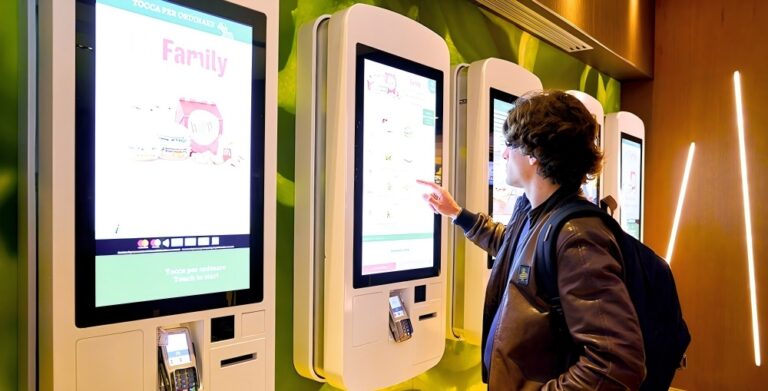
Do you know how to deploy your kiosks in a systematic and efficient way? Behind every successful deployment lies a series of practical insights that are often learned through real-world experience—not just theory. From choosing the right location to ensuring stable operation and scaling across multiple sites, each step plays a critical role in overall performance. Many businesses focus only on hardware, but overlook planning, installation strategy, and long-term management—leading to unnecessary costs and missed opportunities. In this guide, we’ll walk you through how to properly plan, install, maintain, and scale your kiosk deployment, helping you avoid common mistakes and maximize both efficiency and return on investment.
Key Considerations Before Kiosk Deployment
A successful kiosk deployment always starts with smart planning. Taking time to evaluate key factors upfront helps avoid costly adjustments, downtime, and poor user experience later.
The first step is site analysis—understanding where your kiosk should be placed. Consider foot traffic, dwell time, and user flow. High-traffic areas naturally increase visibility and usage, while locations where users spend more time are ideal for interactive content. For example, in a retail store, placing a kiosk near the entrance or promotional “hot zone” can attract attention and boost conversions. In restaurants, kiosks should be positioned along a clear ordering path to prevent congestion during peak hours. In healthcare settings, kiosks are best placed in lobbies or registration areas to streamline patient flow while maintaining privacy. The right placement directly impacts kiosk usage and overall performance.
Next, ensure your infrastructure is ready. Stable power supply is critical to prevent unexpected shutdowns, while reliable WiFi or LAN connectivity ensures smooth system operation. Many businesses also adopt 4G/5G backup connections to reduce the risk of network failure. Poor infrastructure planning often leads to expensive rework and service interruptions.
You should also adapt your kiosk to the environment. Indoor deployments typically require standard brightness (350–500 nits), while outdoor or semi-outdoor kiosks need high-brightness displays (1000+ nits), weatherproof protection (IP65), and temperature control systems to ensure stable performance.
Finally, don’t overlook compliance and safety requirements. This includes payment security standards, data privacy protection, and industry-specific regulations—especially in sectors like healthcare and government.
Installation Best Practices for Efficiency and Cost Control
Once your planning and site strategy are clearly defined, the next step is installation—where smart decisions can significantly reduce both upfront investment and long-term operating costs. In fact, a well-executed deployment means lower initial expenses and easier maintenance over time.
One of the most effective approaches is modular installation. By using pre-assembled components and standardized mounting systems, businesses can shorten installation time and reduce labor costs. This is especially valuable for multi-location projects, where speed and consistency are critical.
In addition, adopting standardized hardware configurations makes future scaling much easier. Using the same screen sizes, system setups, and peripheral integrations across locations allows for faster deployment, simpler troubleshooting, and more efficient bulk procurement.
Another key factor is cable management and structural design. Clean, hidden wiring not only improves the appearance of your kiosk but also minimizes the risk of damage and simplifies maintenance. Poorly organized cables often lead to higher repair costs and longer downtime.
Equally important is pre-planning your power and network infrastructure. Ensuring that power outlets and network connections are correctly positioned before installation helps avoid costly modifications later. Many businesses underestimate this step and end up facing unnecessary delays and additional expenses.
Finally, never skip pre-launch testing. Before going live, verify touchscreen responsiveness, payment functionality, and overall system stability. Identifying and resolving issues early ensures a smoother user experience and prevents operational disruptions from day one.
In short, thoughtful installation is not just about setup—it’s about building a foundation for long-term efficiency and cost control.
Maintenance, Security, and Remote Management at Scale
After installation, keeping your kiosks running smoothly requires a combination of routine maintenance, system monitoring, and strong security practices. A well-managed system not only reduces downtime but also extends the lifespan of your equipment.
Start with daily and weekly maintenance. Regularly clean the touchscreen to ensure responsiveness and check key hardware components such as printers, scanners, and payment terminals. Dust buildup or loose connections are common causes of performance issues. For example, if a receipt printer stops working, a quick check of the paper roll, cable connection, and device status can often resolve the issue without technical support.
On the system side, schedule regular software updates and monitor system logs. Logs can reveal recurring errors, network instability, or failed transactions—helping you identify issues before they escalate.
To manage multiple devices efficiently, use remote management tools such as CMS or MDM platforms. These allow you to monitor device status, push updates, and control content across all kiosks from a central dashboard, saving time and operational costs.
When issues occur, follow a simple troubleshooting process: restart the device, verify network connectivity, and check peripheral connections. If the problem persists, remote diagnostics can help your IT team pinpoint the cause quickly and reduce downtime.
Security should never be overlooked. Use strong passwords, encrypted connections, and firewall protection to prevent unauthorized access. Additionally, ensure electrical safety (overload protection), data security (especially for payments and personal information), and anti-vandalism design in public areas. Finally, prepare for emergencies with backup power options or recovery plans to maintain service continuity.
Scaling Kiosk Deployment Across Multiple Locations
Once your kiosks are running smoothly in a single location, the next step is scaling—replicating that success across multiple stores or sites. This is where a structured approach becomes essential, because scalability directly impacts how fast your business can grow.
The foundation of scaling is standardization. By creating unified templates for hardware, software, and UI design, you can ensure that every kiosk delivers the same performance and user experience. This not only strengthens your brand image but also simplifies training and maintenance.
Next comes batch deployment and automated configuration. Instead of setting up each kiosk manually, businesses can pre-configure systems and deploy them in large quantities. For example, a retail chain opening 20 new stores can install kiosks with identical settings, apps, and interfaces in a fraction of the time compared to manual setup.
A key enabler here is cloud-based centralized management. Through a CMS or device management platform, operators can monitor and control all kiosks remotely. For instance, a fast-food brand can update menus, prices, or promotions across hundreds of locations simultaneously—without sending technicians on-site. This dramatically reduces operational costs and ensures consistency.
Scaling should also be data-driven. By analyzing usage patterns, businesses can identify high-traffic locations and deploy additional kiosks where demand is highest, improving efficiency and customer satisfaction.
Finally, maintaining brand consistency is critical. A unified interface and experience across all locations builds trust and familiarity for users.
In short, strong scalability doesn’t just support expansion—it defines how efficiently and sustainably your business can grow.
How to Measure and Improve Kiosk Performance Over Time
To ensure your kiosks deliver real business value, performance must be continuously measured and optimized. It starts with tracking the right metrics. Key indicators include uptime (system stability), user engagement (usage frequency and session duration), transaction success rate (directly tied to revenue), and error logs (to identify system issues). For example, improving uptime from 95% to 99% can significantly reduce service interruptions, while even a 3–5% increase in transaction success rate can lead to noticeable revenue growth.
Beyond raw data, use analytics to understand user behavior. Analyze click paths to see where users drop off, identify peak usage times, and compare popular versus underused features. In many real-world cases, businesses discover that overly complex menus or too many steps in the checkout process cause abandonment. Adjusting kiosk placement—such as moving a unit closer to a store entrance—can also increase usage by 10–20%.
Next, focus on optimization. Streamline UI/UX by reducing steps and improving response speed. Update content with dynamic promotions or localized messaging to increase engagement. Simplifying workflows, especially payment processes, can shorten transaction time and improve throughput during busy hours.
Continuous improvement is key. Use A/B testing to compare different layouts or workflows, and evaluate performance across multiple locations. Small changes—like reorganizing menu options—can improve conversion rates by 5–15%.
Ultimately, these insights should drive business growth. Better placement, higher conversion rates, and fewer system errors all contribute to increased revenue and lower operational costs. At Ikinor, we help businesses go beyond deployment—leveraging data-driven insights, remote management, and tailored kiosk solutions to continuously improve kiosk performance at scale.
FAQs
Begin by verifying site readiness (power, network access, space), then assemble hardware components, connect peripherals, install software, and perform system calibration and connectivity tests before going live.
Regularly update firmware and software, enable firewalls, set strong admin credentials, and use encrypted connections. Consider remote monitoring tools to detect unauthorized access or system anomalies.
Clean touchscreens and input devices weekly, check connectivity logs and transaction reports, inspect for hardware wear, and schedule quarterly updates for operating systems and applications.
Use the kiosk management dashboard to check system health. Restart the kiosk, verify network connectivity, and ensure peripherals are plugged in correctly. If issues persist, escalate to IT support with diagnostic logs.
Standardize your configuration templates, automate setup through a centralized deployment system, and maintain consistent branding and user interface. Monitor performance remotely to identify high‑traffic areas that may need additional units.
Track metrics such as uptime, user engagement, transaction success rate, and error logs. Use analytics to adjust content, improve workflows, and optimize kiosk placements for maximum customer impact.




