
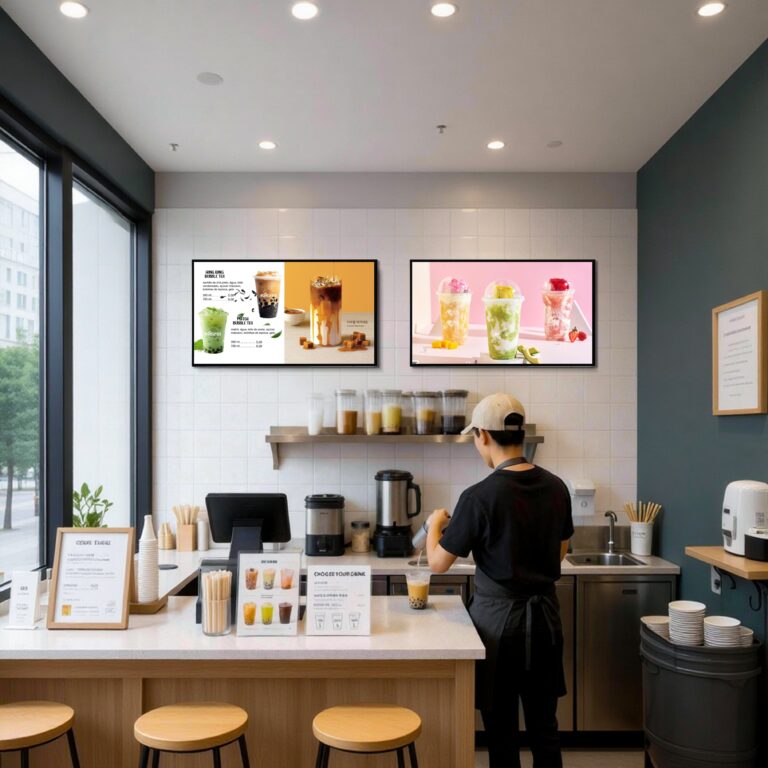
Buying digital signage is not just about choosing a screen with a good price. For B2B buyers, it means selecting a complete display solution that fits the application scenario, content management method, installation environment, and long-term operation needs. A retail store may need commercial displays for promotions, while a restaurant may need a Digital Menu Display for menus, prices, and combo meals. A shopping mall may require multi-screen control, remote updates, and installation support. If buyers only compare screen size and quotation, they may overlook CMS compatibility, mounting conditions, service support, or future expansion. This guide introduces the top digital signage suppliers in Brazil and explains how to evaluate them from a practical procurement perspective.
What Is a Digital Signage Supplier?
A digital signage supplier is a company that provides products, software, installation services, or complete solutions for digital signage projects. In this industry, the word “supplier” does not always mean a hardware factory. A supplier may be a Digital Signage Display provider, LED display manufacturer, Commercial Display supplier, CMS software platform, system integrator, installation service provider, or a company that offers a complete digital signage solution.
In simple terms, digital signage uses electronic display screens to show advertising content, menus, wayfinding information, brand messages, real-time notices, videos, or interactive content. It is commonly used in retail stores, restaurants, shopping malls, hotels, airports, office buildings, schools, public spaces, and transportation environments. Because these projects vary widely, different buyers may need different types of suppliers.
| Supplier Type | What They Usually Provide | Suitable Scenario |
|---|---|---|
| Hardware Supplier | Digital Signage Display, Commercial Display, LCD/LED screens, media players | Retail stores, restaurants, and offices that need commercial display screens |
| LED Display Supplier | Indoor LED screens, outdoor LED displays, video walls, large-format displays | Shopping malls, outdoor advertising, events, and large commercial spaces |
| Software / CMS Provider | Digital signage software, cloud CMS, content scheduling, remote screen management | Businesses that already have screens but need centralized content updates |
| System Integrator | Screens, media players, network setup, wiring, installation, testing, and system connection | Shopping malls, hotels, corporate offices, and multi-screen projects |
| Full Solution Provider | Hardware, software, content management, installation support, and after-sales service | Chain stores, restaurant brands, commercial complexes, and larger projects |
For example, a retail store may only need several Commercial Displays to show promotions. A restaurant may care more about a Digital Menu Display or Electronic Menu Board for menu items, prices, and combo meals. A shopping mall may need multi-screen control, remote content management, and on-site installation support. All these projects belong to digital signage, but they require different supplier capabilities.
Therefore, before searching for a digital signage supplier in Brazil, buyers should first confirm whether they need hardware, software, installation service, or a complete solution. This helps avoid comparing software platforms, LED display suppliers, and system integrators as if they were the same type of provider.
How Does a Digital Signage System Work?
A digital signage system works by combining display hardware, a media player or built-in operating system, content management software, network connection, and scheduled content delivery. For buyers, this means digital signage is not just a single screen on a wall. It is a complete digital signage solution that allows businesses to create, manage, update, and display content across one or multiple screens.
The basic workflow is straightforward. First, images, videos, menus, advertisements, notices, or brand content are uploaded into a digital signage CMS. Then, the content is arranged into playlists or screen layouts and scheduled by time, location, screen group, or campaign need. After that, the system sends the content to each digital signage display through cloud management, local network, USB playback, or a media player. Finally, the screen displays the right content to the right audience.
For example, a shopping mall may use digital signage displays to show store promotions, wayfinding maps, event information, and advertising videos across different floors. A restaurant may use a digital menu display to show breakfast items in the morning, lunch combos at noon, and dinner promotions in the evening. If the business has several locations, one CMS can often manage multiple screens remotely, helping the team keep content consistent across different branches.
| System Component | Function | Buyer Check |
|---|---|---|
| Digital Signage Display | Shows videos, images, menus, notices, advertisements, or interactive content | Check screen size, brightness, resolution, viewing angle, and indoor or outdoor suitability |
| Media Player or Built-in System | Plays content and connects the screen with the CMS or local storage | Confirm whether the display uses an external player, Android system, Windows system, or SoC solution |
| Digital Signage CMS | Manages content uploads, playlists, layouts, screen groups, and schedules | Check whether it supports remote updates, multi-screen control, user permissions, and easy editing |
| Network Connection | Sends content from the CMS to screens | Confirm whether the system uses WiFi, LAN, cloud connection, local network, or offline USB playback |
| Content Scheduling | Displays different content at different times or locations | Check support for daily schedules, campaigns, restaurant menus, promotions, and multi-branch updates |
| Installation Environment | Affects screen visibility, safety, and long-term stability | Confirm mounting method, power access, cable routing, ventilation, and lighting conditions |
A digital signage system does not always require the internet. Some simple projects can use USB playback or a local media player. However, internet access is useful when businesses need cloud CMS control, remote updates, real-time content changes, or centralized management for multiple locations.
For beginner buyers, the key point is clear: a digital signage system should be evaluated as a full communication and display platform, not only as a screen purchase. The display decides how content looks, while the CMS, player, network, and installation setup decide how easily the business can manage and scale the system.
Top 10 Digital Signage Suppliers In Brazil
The following list is based on publicly available online information and is presented for buyer reference, not as an official ranking.
1. Imply
| Category | Information |
|---|---|
| Company Name | Imply / Imply Tecnologia |
| Company History & Biography | Brazilian technology company founded in 2003, headquartered in Santa Cruz do Sul, Rio Grande do Sul. Strong focus on access control, ticketing, self-service, bowling systems, LED panels, and OOH media technologies. Public company information states that Imply develops both software and hardware and operates in more than 125 countries. |
| Product Range | Outdoor LED digital signage, OOH LED panels, digital clocks for urban furniture, self-service terminals, access control systems, ticketing platforms, facial recognition, cashless systems, bowling systems, and customized technology projects. |
| Location | Santa Cruz do Sul, Rio Grande do Sul, Brazil; São Paulo office also listed in public company profile. |
| Contact | https://imply.com |
2. 4YouSee
| Category | Information |
|---|---|
| Company Name | 4YouSee |
| Company History & Biography | Brazil-based digital signage software and CMS provider founded in 2006. Public industry reporting describes 4YouSee as a leading CMS provider in Brazil’s digital signage market, serving retailers, QSR operators, gas stations, and DOOH networks. |
| Product Range | Digital signage software, cloud CMS, campaign management for digital screens, DOOH network management, Android player support, audience monitoring, data analysis, content scheduling, and multi-format media playback. |
| Location | Brazil-based; public profile references Belo Horizonte, Minas Gerais as a key company location. |
| Contact | https://www.4yousee.com.br |
3. Digital Signage Brasil
| Category | Information |
|---|---|
| Company Name | Digital Signage Brasil / ADS Serviços em Comunicação |
| Company History & Biography | Brazilian digital signage brand founded in 2007. The official website presents Digital Signage Brasil as a provider of digital signage solutions for companies, hospitals, stores, and public institutions. LinkedIn describes Digital Signage Brasil® as a registered brand of ADS Serviços em Comunicação, focused on customized digital signage for corporate and retail applications. |
| Product Range | Customized digital signage solutions, corporate communication screens, retail digital signage, institutional communication displays, hardware and software-based signage projects, and digital media services. |
| Location | Salvador, Bahia, Brazil, based on public company registry information for ADS Serviços em Comunicação Ltda. |
| Contact | https://www.digitalsignagebrasil.com.br |
4. GM7 Digital Experience
| Category | Information |
|---|---|
| Company Name | GM7 Digital Experience / Grupo GM7 |
| Company History & Biography | Brazilian digital signage and DOOH company with more than 17 years in the market. Public sources describe Grupo GM7 as a specialist in Digital Signage, DOOH media, and specialized content production. Additional public information states that Grupo GM7 was founded in 2004 and was one of the pioneers in bringing digital signage technology to Brazil. |
| Product Range | Digital signage solutions, DOOH media, corporate TV, digital banners, customized content production, 3D graphic animation, touch screen applications, templates, professional LED panels, monitors, and content management support. |
| Location | Campinas, São Paulo, Brazil. Official company information lists Av. José de Souza Campos, 753, Cambuí, Campinas. |
| Contact | https://www.gm7digitalexperience.com.br |
5. SignoSinal
| Category | Information |
|---|---|
| Company Name | SignoSinal |
| Company History & Biography | Brazilian corporate signage company focused on surveys, production, and installation for partner companies and corporate projects. Public profile information describes SignoSinal as a signage specialist able to manufacture and install custom signs across Brazil for hospitals, hotels, clinics, shopping centers, buildings, banks, schools, and universities. |
| Product Range | Corporate signage, custom signs, surveys for signage projects, signage installation, wayfinding signs, architectural signage, visual communication products, and partner support for foreign signage companies entering Brazil. |
| Location | Brazil; public company profile indicates operations supporting signage projects throughout Brazil. |
| Contact | https://signosinal.com.br |
6. Ricoh Latin America / Ricoh Brasil
| Category | Information |
|---|---|
| Company Name | Ricoh Latin America / Ricoh Brasil |
| Company History & Biography | Ricoh is a Japanese-origin global technology group founded in 1936, with operations across approximately 200 countries and regions. In Brazil, Ricoh has been present for more than 50 years and inaugurated a new headquarters in Alphaville, Barueri, São Paulo in 2024. |
| Product Range | Digital signage solution consulting, hardware and software, IT service management, cloud hosting, installation, configuration, ongoing support, managed services, Pro AV, printing, IT, digital workflows, and electronic security solutions. |
| Location | Barueri, São Paulo, Brazil. Ricoh’s global directory lists Ricoh Brasil S.A. at Avenida Ceci, 286, Centro Empresarial Tamboré, Barueri, São Paulo. |
| Contact | https://www.ricoh-americalatina.com |
7. Convergint Brasil
| Category | Information |
|---|---|
| Company Name | Convergint Brasil |
| Company History & Biography | Brazil operation of Convergint, a global service-based systems integrator focused on security, safety, technology, and integrated business systems. In Brazil, digital signage appears under audio and video / communication technology topics rather than as a standalone manufacturing business. |
| Product Range | Digital signage, corporate TV management, audio and video solutions, security systems integration, safety technology, multimedia environments, videowalls, automation, and managed technology services. |
| Location | Brazil / LATAM operations; exact Brazilian office details should be verified directly through Convergint’s Brazil contact channel before publication. |
| Contact | https://convergint.com.br |
8. adMooH
| Category | Information |
|---|---|
| Company Name | adMooH |
| Company History & Biography | Brazilian programmatic DOOH and digital signage technology platform. Public company information describes adMooH as an online platform for DOOH and programmatic DOOH advertising, also developing digital signage software. |
| Product Range | adMooH Signage CMS, DOOH screen management, indoor media management, programmatic DOOH connection, campaign planning, activation and optimization tools, content management, reporting, monetization tools, and digital screen advertising infrastructure. |
| Location | Brazil; exact office address was not clearly confirmed from the official pages reviewed. |
| Contact | https://site.admooh.com |
9. JBTEC / uSign
| Category | Information |
|---|---|
| Company Name | JBTEC / uSign |
| Company History & Biography | Brazilian software and cloud computing company focused on digital signage. Public profile information states that JBTEC has more than 17 years of experience in the Brazilian market and was founded in 2000. The uSign platform is operated by JBTEC Digital Signage Ltda. |
| Product Range | uSign digital signage software, corporate TV, internal communication screens, retail and point-of-sale displays, DOOH solutions, digital menus, LED panel content management, interactive totems, queue control displays, uFlicks, cropComposer, services, and equipment. |
| Location | São Paulo, São Paulo, Brazil. Public profile lists Avenida Nicolas Boer 399, Sala 118, São Paulo; uSign terms also identify JBTEC Digital Signage Ltda. in São Paulo. |
| Contact | https://jbtec.com.br |
10. Vitrinemedia Brasil
| Category | Information |
|---|---|
| Company Name | Vitrinemedia Brasil / VitrineMedia Brasil |
| Company History & Biography | International visual communication and digital signage brand with operations in Brazil. Vitrinemedia positions itself as an expert in outdoor communication and digital display solutions, specializing in LED window display solutions, high-brightness screens, and visual communication media. The Brazil profile describes VitrineMedia as a pioneer and global leader in LED displays for companies, with a focus on window communication, interior display solutions, and mobile solutions for trade shows and events. |
| Product Range | LED window displays, high-brightness screens, LCD digital displays, dynamic screens, LED poster holders, displays and totems, backlit paper displays, wall-mounted screens, shop window display systems, interior display solutions, mobile event displays, and Visibble Display content management software for dynamic screen content. |
| Location | Brazil. Public LinkedIn information lists Porto Alegre, Rio Grande do Sul, Brazil as the Brazil profile location. |
| Contact | https://www.vitrinemedia.com |
Common Applications of Digital Signage Displays in Brazil
Digital signage displays can be used in many commercial environments in Brazil, from retail stores and shopping malls to restaurants, hotels, transportation hubs, healthcare facilities, and outdoor advertising spaces. They are not only used for advertising. In many projects, digital signage also supports wayfinding, menu display, customer communication, internal announcements, brand storytelling, and real-time information updates.
Different application scenarios require different display setups. A restaurant may need a Digital Menu Display that is easy to update every day. A shopping mall may need multiple screens for advertising, tenant promotion, and visitor guidance. A corporate office may care more about internal communication, meeting room information, and brand messages. That is why buyers should match the digital signage display with the actual usage environment.
| Application | Display Content | Buyer Consideration |
|---|---|---|
| Retail Stores | Product promotions, discounts, new arrivals, brand videos, seasonal campaigns | Screens should support clear visuals, easy content updates, and strong in-store visibility |
| Shopping Malls | Advertising, store directory, event information, wayfinding maps, tenant promotions | Multi-screen management, remote updates, and installation planning are important |
| Restaurants and Cafés | Menu items, prices, food photos, QR codes, combo meals, daily specials | A Digital Menu Display should be easy to edit and readable from the customer ordering area |
| QSR and Fast-Food Chains | Digital Restaurant Menu Board, breakfast/lunch/dinner menus, promotions, order status | Centralized content control and daypart scheduling are useful for multi-location operations |
| Hotels | Lobby messages, event schedules, meeting room information, restaurant menus, guest guidance | Display design should match the hotel brand and provide clear guest-facing information |
| Corporate Offices | Internal announcements, KPI dashboards, visitor welcome screens, meeting room signage | CMS control, user permissions, and stable screen management may matter more than advertising features |
| Transportation Hubs | Schedules, directions, safety notices, service updates, advertising | High visibility, reliability, and real-time content update capability are important |
| Healthcare Facilities | Queue information, department guidance, health education, notices, waiting room content | Content should be clear, easy to read, and suitable for public information communication |
| Education | Campus notices, event updates, classroom information, emergency alerts, digital bulletin boards | Schools may need simple content management and scheduled announcements |
| Outdoor Advertising | Brand campaigns, public ads, LED billboards, street media, video advertising | Outdoor projects may require higher brightness, weather resistance, and stronger installation planning |
Restaurant digital signage is one of the most common commercial uses. A small café can use an Electronic Menu Board to show drinks, desserts, and seasonal offers. A fast-food chain can use multiple screens to show combo meals, limited-time promotions, and order-related information. Compared with printed menus, digital menu boards make it easier to update prices, switch menus by time of day, and keep branding consistent across branches.
In retail and mall environments, digital signage displays can help attract attention and guide customers. A commercial display near the entrance can show promotions, while screens inside the store can highlight product features or seasonal campaigns. For larger venues, digital signage can also work as part of a wayfinding or visitor communication system.
For buyers, the key point is to match the screen type, software function, installation method, and content management style with the real application. A single indoor advertising screen, a restaurant menu board, and an outdoor LED display may all belong to digital signage, but they require very different product choices.
What Should Buyers Compare Before Choosing a Digital Signage Supplier?
After reviewing different digital signage suppliers, buyers should not make a decision based only on company name, product photos, or the lowest quotation. A digital signage project may involve display hardware, software, installation, content management, network setup, and long-term technical support. If one part does not match the project needs, the whole system may become difficult to operate later.
For B2B buyers, the better question is not simply “Which supplier is cheaper?” but “Which digital signage supplier can support my actual application, display environment, content update needs, and future expansion?”
| Comparison Item | Why It Matters | What Buyers Should Check |
|---|---|---|
| Hardware Quality | Digital signage displays may run for long hours in commercial environments | Check panel quality, heat control, operating stability, housing design, and commercial-grade suitability |
| Screen Brightness | Content must remain visible under different lighting conditions | Confirm brightness level, viewing angle, anti-glare options, and whether the screen is suitable for indoor or outdoor use |
| Indoor / Outdoor Suitability | A retail store, restaurant, mall, and outdoor advertising project have different display requirements | Check waterproofing, dust protection, temperature resistance, installation environment, and maintenance access |
| Screen Size and Format | Different spaces need different display dimensions | Confirm whether the supplier offers wall-mounted, floor-standing, video wall, LED display, or custom display options |
| CMS Usability | Staff need to update content without complex technical skills | Ask whether the CMS supports templates, drag-and-drop editing, remote updates, user permissions, and multi-language operation |
| Content Scheduling | Many businesses need different content at different times | Check support for daily schedules, promotional campaigns, restaurant menus, event content, and branch-specific content |
| Multi-Screen Management | Chains, malls, offices, and transport networks may need centralized control | Confirm whether one platform can manage multiple screens, locations, and user roles |
| Installation Support | Poor installation can affect appearance, safety, and maintenance | Ask about mounting guidance, cable layout, site requirements, and whether local installation support is available |
| Technical Support | Digital signage problems may affect daily business communication | Confirm support channels, response process, troubleshooting method, warranty terms, and spare parts availability |
| Customization Ability | Some projects require special branding or hardware configuration | Check logo customization, system UI, screen size, enclosure design, packaging, and software compatibility |
| Local Service or Project Experience | Brazil-based projects may involve language, installation, and local support needs | Ask whether the supplier has local partners, Portuguese support, or experience with similar commercial projects |
| Export or International Project Experience | Overseas buyers may need stable documentation and delivery coordination | Confirm packaging, shipping support, product documentation, voltage options, and after-sales process |
Different projects should prioritize different comparison points. A retail store may focus on screen clarity, content updates, and promotional display quality. A restaurant or café may need a Digital Menu Display that supports easy price changes, scheduled menus, and attractive food visuals. A shopping mall may care more about multi-screen control, wayfinding content, advertising scheduling, and installation planning. A corporate office may value CMS permissions, internal communication layouts, and stable long-term operation.
Buyers should also decide whether the project is hardware-led or software-led. If the company already has suitable screens, the main priority may be digital signage CMS software. If the project starts from zero, the buyer should evaluate the full digital signage solution, including commercial display hardware, media player, CMS, installation method, and support.
Before requesting a quote, prepare basic information such as screen size, installation location, indoor or outdoor environment, content type, update frequency, number of screens, and whether remote management is required. This helps the digital signage display supplier recommend a more suitable solution instead of giving a generic price.
If the project requires customized display hardware, buyers should confirm screen size, mounting method, operating system, CMS compatibility, branding requirements, and packaging details before moving forward.
Common Sourcing Mistakes to Avoid When Buying Digital Signage Displays
Even when buyers already know what to compare, sourcing mistakes can still happen during communication, sampling, installation planning, and final ordering. These mistakes often appear when a digital signage project is treated as a simple screen purchase instead of a complete display, software, and deployment solution. The goal is not to make the process complicated, but to reduce avoidable problems before the project starts.
| Mistake | Possible Problem | Better Approach |
|---|---|---|
| Choosing only by the lowest price | The selected product may not match long-hour commercial use, future updates, or service needs | Compare the total project value, including hardware suitability, software use, installation support, and maintenance |
| Using a consumer TV without checking project conditions | A normal TV may not be suitable for long operation, strong lighting, wall mounting, or commercial control | Confirm whether a commercial display is needed based on daily usage time, location, brightness, and installation method |
| Ignoring real viewing conditions | Content may look unclear if the screen is too dim, too small, or installed too far from viewers | Test the screen layout, text size, viewing distance, and lighting conditions before final approval |
| Not confirming CMS compatibility | The screen may not support the required content update method, file format, or remote management function | Check the operating system, media player, CMS access, supported formats, and update method before ordering |
| Preparing content after installation | Menus, ads, or brand visuals may look crowded or poorly arranged on the screen | Prepare sample layouts, image sizes, video formats, and content zones before confirming the display setup |
| Overlooking mounting and wiring | The final installation may look messy, unsafe, or difficult to maintain | Confirm wall structure, bracket type, power access, cable routing, ventilation, and maintenance space in advance |
| Assuming all suppliers provide the same support | Some suppliers may only sell hardware, while others may provide software, installation, or project service | Clarify the supplier’s exact responsibility before purchase: hardware only, software only, integration, or full solution |
| Forgetting local environment requirements | Language, voltage, climate, installation habits, or local service expectations may create extra work later | For Brazil projects, confirm Portuguese interface needs, voltage compatibility, indoor/outdoor conditions, and local support options |
| Skipping technical confirmation before bulk order | Products may arrive with mismatched configuration, wrong mounting accessories, or unsuitable software setup | Request specifications, photos, system details, installation drawings, or sample testing before placing a larger order |
For example, a restaurant buyer may purchase several low-cost screens for a digital menu display project, only to find later that the text is too small, the CMS is difficult to update, and the mounting position does not match the counter layout. The problem is not only the screen itself. It comes from missing technical confirmation before purchase.
A shopping mall project may face a different issue. If the buyer chooses screens first and plans the content network later, the team may struggle with multi-screen scheduling, different screen resolutions, or unclear installation responsibilities. In this case, early planning is more valuable than fixing problems after deployment.
Before moving to bulk purchase, buyers should request technical confirmation and, when possible, test a sample or demo setup. A basic check of display clarity, content playback, mounting method, CMS operation, and language settings can prevent many sourcing mistakes before they become project costs.
How to Choose the Right Digital Signage Supplier in Brazil: A Step-by-Step Buying Process
Choosing the right digital signage supplier in Brazil should be treated as a project decision, not just a product purchase. A buyer may need screens, media players, CMS software, installation support, local service, or a complete digital signage solution. The best supplier is not always the largest company or the lowest-cost option. It is the one that can match the project scope, display environment, content update needs, and long-term operation plan.
The following step-by-step process can help overseas buyers prepare a clearer inquiry and reduce misunderstandings before placing an order.
| Step | What to Do | Why It Matters |
|---|---|---|
| 1. Define the project scope | Confirm whether the project is for a retail store, restaurant, shopping mall, hotel, corporate office, transportation site, or outdoor advertising space. Also list the number of screens and locations. | Different scenarios require different digital signage displays, software functions, installation methods, and service support. |
| 2. List your screen requirements | Prepare basic details such as screen size, installation position, indoor or outdoor use, viewing distance, brightness needs, and whether a wall-mounted, floor-standing, LED, or video wall solution is required. | Clear display requirements help the supplier recommend the right commercial display instead of a generic screen. |
| 3. Separate hardware and software needs | Decide whether you need only display hardware, only CMS software, or a complete hardware + software + installation solution. | Some suppliers focus on digital signage software, while others provide LED displays, commercial screens, or full project integration. |
| 4. Confirm the CMS and update method | Ask whether content can be updated by cloud CMS, local network, USB, media player, or built-in system. Also confirm whether one platform can manage multiple screens. | This affects daily operation. A single store may need simple updates, while a chain or mall may need centralized content control. |
| 5. Prepare content samples | Send sample images, videos, menu layouts, logo files, brand colors, language needs, QR code content, or advertising templates before asking for a quote. | Suppliers can give better advice when they know what type of content will actually appear on the screen. |
| 6. Ask supplier-specific questions | Ask whether the supplier provides hardware, software, installation, technical support, local service, content design, or only one part of the system. | This prevents confusion between manufacturers, software platforms, integrators, and installation service providers. |
| 7. Request technical materials | Ask for product specifications, screen photos, CMS screenshots, interface videos, installation drawings, mounting details, and supported file formats. | These materials help buyers check whether the digital signage solution matches the project before purchase. |
| 8. Test a sample or demo when possible | For bulk orders, franchise projects, or long-term deployments, request a sample screen, demo account, or content playback test. | Sample testing helps verify display clarity, CMS operation, content playback, mounting method, and system compatibility. |
| 9. Confirm packaging, shipping, and support | Before ordering, confirm packaging method, shipping documents, warranty terms, spare parts, technical support channels, and after-sales process. | Overseas buyers need clear delivery and support details, especially when the project involves different regions or long-distance shipping. |
| 10. Choose based on project fit | Select the supplier that best fits your project stage, not simply the one with the lowest price. | A small restaurant, a retail chain, and an outdoor LED advertising project may need completely different supplier capabilities. |
For Brazil-related projects, buyers should also pay attention to local requirements. These may include Portuguese interface needs, voltage compatibility, installation habits, local service availability, indoor or outdoor climate conditions, and whether the supplier has experience with similar commercial display projects. For outdoor or semi-outdoor digital signage, brightness, protection level, heat control, and installation stability should be confirmed early.
A clear inquiry can make supplier communication much faster. Instead of asking only, “How much is a digital signage display?”, a buyer can write:
“We need five wall-mounted 43-inch commercial displays for a restaurant digital signage project in Brazil. The screens will be used indoors to show menus, promotions, and videos. We need remote content updates, Portuguese content support, logo customization, and export packaging. Please recommend a suitable hardware and CMS option.”
This type of inquiry gives the digital signage supplier enough context to recommend a practical solution.
For buyers who need customized commercial display hardware, Ikinor can support discussions around screen size, system configuration, branding, mounting style, and project deployment requirements. The key is to prepare clear technical and content needs before requesting a quote.
Should Brazilian Digital Signage Buyers Consider Chinese Manufacturers? A Complete Analysis
For businesses searching for the top digital signage suppliers in Brazil, a common dilemma arises: should you source locally or partner directly with a manufacturer in China? The short answer is yes—incorporating a Chinese supplier into your strategy is highly advantageous, particularly for large-scale deployments or projects requiring extensive hardware customization on a controlled budget. It is well known that due to Brazil’s complex tax structure (including import duties and IPI) and relatively high local electronics assembly costs, purchasing directly from domestic trading companies often comes with steep intermediary markups. By collaborating directly with a factory in China, even after accounting for logistics and customs, Brazilian buyers can typically achieve significant cost savings while gaining direct access to cutting-edge display technology. To help you weigh the pros and cons and deeply understand the pricing structures and capabilities of overseas hubs, we highly recommend reading our detailed china digital signage manufacturers analysis.
Ultimately, the decision often comes down to the specific nature of your commercial project. For standard information screens or public video walls, generic local hardware might suffice. However, if you are deploying more advanced systems—such as intelligent retail signage solutions tailored for large shopping malls, fashion and beauty flagship stores, or supermarket chains—the requirements change. These scenarios demand screens with exceptional color accuracy and ultra-slim, modern designs, alongside hardware that syncs perfectly with sensors, audience analytics software, or centralized Content Management Systems (CMS). While most standard distributors in Brazil only offer off-the-shelf screens that lack deep hardware-software integration, premier Chinese factories provide full end-to-end customization tailored to your brand’s unique visual identity and store workflows. By partnering directly with a source manufacturer capable of robust hardware-software synergy, Brazilian buyers can achieve efficient remote device management and create highly immersive digital shopping experiences at a much lower total cost of ownership.
FAQs
A digital signage supplier is a company that provides display hardware, software, installation service, or a complete digital signage solution. Some suppliers focus on digital signage displays and commercial display hardware, while others provide CMS software, media players, content management, or system integration. Buyers should first confirm what type of supplier they are contacting.
You may need digital signage software if you want to update content remotely, manage multiple screens, schedule campaigns, control screen groups, or allow different users to manage content. A simple single-screen project may use USB playback, but multi-location retail, restaurant, corporate, or mall projects usually benefit from a CMS platform.
Before bulk purchase, check screen size, brightness, operating system, CMS compatibility, mounting method, content playback, packaging, warranty, spare parts, and technical support. If the project involves restaurants or retail chains, also confirm whether the supplier can support consistent configuration, remote content updates, and future repeat orders.
Yes. Many digital signage displays can be customized depending on the supplier and order requirements. Common options may include screen size, logo, system interface, Android or Windows configuration, enclosure design, mounting method, packaging, and content layout. Buyers should confirm customization details before quotation and avoid assuming every supplier offers the same options.
Compare suppliers based on project fit, not only price. Check whether they provide hardware, software, installation, CMS support, local service, customization, or complete digital signage solutions. A restaurant may need menu scheduling, a mall may need multi-screen management, and an outdoor advertising project may need high-brightness LED displays and installation support.




