
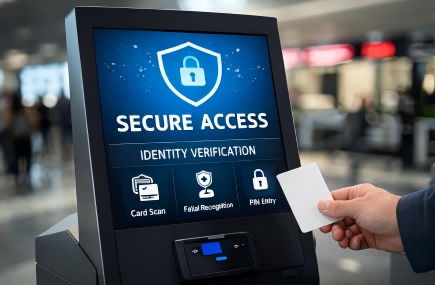
In today’s rapidly evolving self-service landscape, where digital transactions and identity verification are becoming the norm, security has never been more critical. From retail payments to hospital check-ins and government services, kiosks are now handling increasingly sensitive data, making them attractive targets for cyber and physical threats. As businesses continue to adopt kiosk solutions to improve efficiency and user experience, the need to protect user data and control system access is more important than ever. This is where security kiosks play a vital role—offering a secure, controlled environment that ensures every interaction is verified and protected. Understanding how these systems work, the risks they face, and how to secure them effectively is essential for any organization deploying self-service technology today.
What Is a Security Kiosk and Why It Matters
A security kiosk is a self-service terminal designed not only for convenience, but more importantly for protecting data and controlling who can access the system. It can be simply understood as: A “secure digital entry point” that checks identity, manages permissions, and protects sensitive information.
Unlike normal self-service kiosks used for ordering, payments, or browsing information, a security kiosk is built with a security-first design. It focuses less on speed of service and more on making sure only authorized users can access specific functions and data.
This is important because kiosks today often deal with sensitive information such as personal ID details, payment data, or internal business records. In real use cases, for example, hospitals use them for patient check-in and record access, where privacy must be strictly protected. Retail or payment terminals use them to ensure secure transactions and prevent card data from being stolen. Government service systems rely on them for identity verification and document handling. Even in airports or transport hubs, they help confirm passenger identity and control access to services in a safe way.
Without strong security, these systems can be exposed to risks like data leakage, unauthorized access, or system misuse.
In short, a security kiosk is not just a self-service machine—it is a controlled and protected access point between users and sensitive systems.
Key Security Risks in Kiosk Systems
Even advanced kiosks face multiple security threats that businesses must consider during deployment.
One major risk is user data interception, where attackers attempt to capture sensitive information such as payment details, personal identity data, or login credentials. This often occurs when systems rely on weak encryption, insecure networks, or poorly protected software layers, allowing data to be intercepted during transmission.
Another common risk is unauthorized system access. If a kiosk is not properly locked down, users may exit kiosk mode, access system settings, or reach administrator interfaces. In more severe cases, attackers can exploit these weaknesses to install unauthorized applications or modify system behavior, leading to full device compromise.
Network-based attacks also represent a serious threat. These include man-in-the-middle attacks, fake Wi-Fi hotspots, and malicious network injection. In these scenarios, attackers secretly intercept or manipulate data as it moves between the kiosk and backend servers, often without any visible signs to users or operators.
A particularly important category is physical tampering risks, especially in unattended outdoor kiosks. Security researchers have demonstrated that when hardware protection is insufficient, exposed USB ports or maintenance interfaces can be exploited using malicious external devices. For example, in controlled security simulations on poorly secured public terminals, attackers have been able to connect USB devices that mimic keyboards or input tools, allowing them to bypass interface restrictions or execute unauthorized system commands. These types of demonstrations highlight how a single exposed hardware port can become an entry point for deeper system compromise, especially when combined with weak kiosk lockdown settings.
These risks clearly show that kiosk security must address not only software and network protection, but also physical access control and hardware-level hardening.
Core Security Measures for Kiosk Protection
To reduce risks, modern security kiosks integrate multiple layers of protection rather than relying on a single defense method.
One major risk is user data interception, where attackers attempt to capture sensitive information such as payment details, personal identity data, or login credentials. This often occurs when systems rely on weak encryption, insecure networks, or poorly protected software layers—especially when kiosk connectivity is not properly secured—allowing data to be intercepted during transmission.
Another critical layer is kiosk mode or system lockdown, which restricts the device to approved applications only. Users cannot exit to the operating system or access system settings, which significantly reduces the risk of unauthorized manipulation or software installation. This keeps the kiosk operating in a controlled and predictable environment at all times.
Security also depends on a protected network architecture. Many systems use VPN connections, private networks, and firewall rules to isolate kiosk traffic from open or public internet exposure. Secure API communication further ensures that data exchange between the kiosk and backend systems is not easily intercepted or altered.
In addition, identity verification mechanisms help ensure that only authorized users can access specific functions. Depending on the use case, this may include PIN codes, QR scanning, RFID cards, employee badges, or biometric recognition such as facial authentication. These methods add an extra layer of user-level control before any sensitive operation is allowed.
Finally, remote monitoring and centralized management allow operators to track device status in real time, detect abnormal behavior, and apply updates or security patches remotely. In some cases, systems can even be shut down instantly if a threat is detected, helping prevent small issues from escalating into larger security incidents.Together, these layered measures create a comprehensive protection system that secures both user data and kiosk operations from multiple angles.
Essential Security Features Every Kiosk Should Have
To reduce risks, modern security kiosks integrate multiple layers of protection rather than relying on a single defense method.
At the system level, security kiosks are built with integrated security mechanisms that protect data, control access, and ensure stable operation across different environments. These protections work together to reduce vulnerabilities across both user interaction and backend communication.
A fundamental layer is data encryption, which secures information during transmission and storage. By using protocols such as HTTPS and TLS, kiosks ensure that sensitive data like personal identity details, payment information, or login credentials cannot be read even if intercepted. In addition, encrypted local or cloud storage prevents unauthorized access to stored records, adding another layer of protection beyond network security.
Another core mechanism is kiosk mode or system lockdown, which restricts users to a controlled interface. This prevents access to the operating system, system settings, or background applications. By locking the environment, kiosks eliminate the risk of users installing unauthorized software or modifying system behavior, ensuring consistent and predictable operation.
Security also depends heavily on network protection architecture. Most secure kiosks operate within VPN tunnels, private networks, or segmented network environments. Combined with firewall rules and secure API communication, this structure reduces exposure to external threats and ensures that data exchange between the kiosk and backend systems remains protected.
In addition, identity verification systems provide user-level access control. Depending on the use case, this may include PIN codes, QR scanning, RFID cards, employee badges, or biometric authentication such as facial recognition. These methods ensure that only authorized users can trigger sensitive actions or access restricted functions.
Finally, remote monitoring and centralized management allow operators to track kiosk status in real time. They can detect abnormal behavior, push security updates, and even shut down devices remotely when necessary, improving response speed and reducing operational risk.
How to Deploy and Manage Kiosks Securely
Beyond built-in security technologies, the real-world deployment and management of kiosks play a critical role in maintaining long-term system security. Even the most secure device can become vulnerable if it is poorly deployed or improperly maintained in its operating environment.
One of the most important practices is network isolation. In secure deployments, kiosks are placed on separate or segmented networks instead of being directly connected to internal enterprise systems. This reduces the risk of cross-system intrusion, ensuring that even if a kiosk is compromised, the threat cannot easily spread to other critical infrastructure such as corporate databases or internal servers.
Another essential practice is regular updates and patch management. Security vulnerabilities are constantly discovered in operating systems and applications, so timely updates are necessary to close potential attack paths. Automated patching systems and centralized update management help ensure that all kiosks remain protected against known exploits without requiring manual intervention for each device.
Physical security reinforcement is equally important, especially in public or unattended environments. Measures such as anti-tamper enclosures, locked service panels, and secure mounting systems help prevent unauthorized physical access. These protections reduce risks such as hardware tampering, port exploitation, or even device theft.
Finally, role-based access control ensures that different users have clearly defined permission levels. Administrators, operators, and end users are all restricted to specific functions based on their roles. This minimizes internal misuse risks and ensures operational discipline across the system.
In practice, effective kiosk security relies on a combination of system design, deployment strategy, and ongoing operational control.
Choosing a Secure Kiosk Solution for Your Business
When selecting a security kiosk solution, businesses should evaluate it as a complete ecosystem rather than a standalone device. A reliable solution should integrate hardware, software, and management tools into one unified security framework.
One of the most important factors is end-to-end security architecture. This ensures that both hardware and software are designed to work together securely, including encrypted communication, secure operating systems, and controlled user access. Without this integration, vulnerabilities can emerge between system layers.
Another key consideration is remote monitoring and centralized management. Businesses need to track device status in real time, detect abnormal behavior, and deploy updates efficiently. This not only strengthens security but also simplifies large-scale kiosk operations.
Compliance readiness is where many solutions differ significantly. Depending on the industry, kiosks may need to meet strict standards such as PCI DSS for payment security, HIPAA for healthcare data protection, or GDPR for user privacy in global markets. Compliance is not just about certification—it involves how data is collected, stored, transmitted, and accessed throughout the system lifecycle. Features such as data encryption, access logging, user consent mechanisms, and audit trails all play a role in meeting these requirements. A compliant kiosk solution helps businesses reduce legal risks, pass regulatory audits more easily, and build stronger trust with users and partners.
In addition, customization capability (OEM/ODM) allows kiosks to be adapted to specific operational and security needs, from authentication methods to software integration.
For businesses seeking a dependable partner, manufacturers like Ikinor provide security-focused designs combined with flexible customization and scalable deployment support.
This approach helps ensure kiosk solutions are not only secure, but also compliant, adaptable, and ready for real-world business environments.
FAQs
A security kiosk is a self-service device designed to handle tasks like check-ins, access control, or information collection while protecting sensitive user data and system functions. It often includes security features such as encryption, restricted access, and tamper-resistant hardware.
A kiosk can protect user data by encrypting information in transit and at rest, avoiding local storage of sensitive details, and clearing session data after each use. These steps reduce the risk of data theft or exposure between users.
Role-based access controls, strong admin authentication, secure boot, and remote monitoring help prevent unauthorized access. Limiting who can change settings or install software keeps the kiosk system more secure.
Physical security matters because attackers may try to open the device, attach skimming hardware, or access USB ports. Tamper-proof enclosures, locked cabinets, and restricted ports help protect the kiosk from direct interference.
Kiosk software should be updated regularly, ideally through automated patching and remote management. Frequent updates help close known vulnerabilities and reduce the chances of malware or system compromise.
Important features include encrypted communication, session timeouts, secure authentication, device lockdown, audit logs, and remote wipe or disable capabilities. These features help protect both user information and the kiosk environment.




