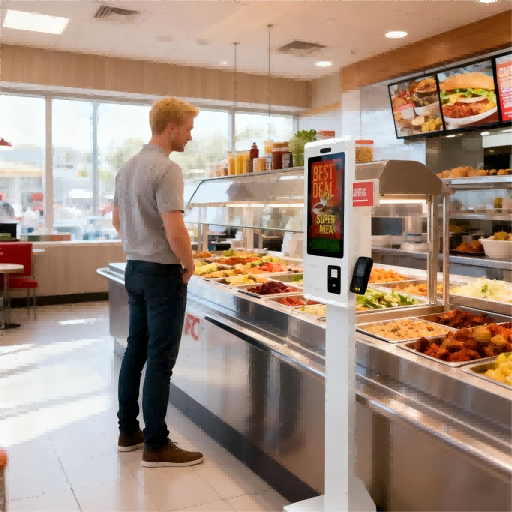
Purchasing a Menú digital is not simply about buying a few screens. It is about choosing a complete display solution that fits your restaurant environment, content management method, installation conditions, and long-term operation needs. A small café may only need one digital menu display with simple menu updates, while a fast-food chain may require multiple commercial screens, centralized CMS control, scheduled promotions, and consistent branding across locations. That is why choosing the right digital menu board manufacturer matters. Buyers need to understand the difference between hardware suppliers, software providers, solution companies, and system integrators. This guide introduces the top digital menu board manufacturers and explains how to compare them from a practical restaurant procurement perspective.

¿Qué es un fabricante de pantallas de menú digitales?
Un fabricante de pantallas digitales para menús es una empresa que proporciona el hardware, el software o la solución de visualización completa para mostrar los menús de los restaurantes en pantallas digitales. En un restaurante, cafetería, patio de comidas o cadena de comida rápida, una pantalla digital para menús puede mostrar los platos, los precios, los menús combinados, las promociones, vídeos de comida, códigos QR y contenido programado para diferentes momentos del día.
However, the word “manufacturer” can be confusing in this industry. Not every digital menu board provider is an actual display factory. Some companies manufacture commercial screens. Some provide digital menu board software or CMS platforms. Others sell media players, installation services, or complete restaurant digital signage solutions. For buyers, this distinction is important because different provider types solve different problems.
| Tipo de proveedor | Lo que suelen proporcionar | Escenario de comprador adecuado |
|---|---|---|
| Fabricante de hardware | Pantallas comerciales, sistemas integrados, opciones de montaje, personalización OEM/ODM. | Una cadena de restaurantes o un distribuidor necesita un sistema de exhibición estable para múltiples tiendas. |
| Proveedor de software/CMS | Software para menús digitales, plantillas, programación, actualizaciones de contenido remotas. | Una cadena de cafeterías ya tiene pantallas, pero necesita una gestión de menús más sencilla. |
| Proveedor de soluciones | Hardware, software, reproductores multimedia, guía de configuración y soporte para proyectos. | Un proyecto de patio de comidas o franquicia necesita un sistema completo de exhibición de menús de restaurante. |
| Integrador de sistemas | Instalación, cableado, despliegue local y conexión con otros sistemas. | Un proyecto de centro comercial, hotel o restaurante grande requiere montaje y coordinación in situ. |
Un fabricante de menús digitales no siempre es lo mismo que una empresa de señalización digital en general. La señalización digital se puede usar en muchos lugares, como tiendas, hoteles, escuelas, hospitales y centros de transporte. Un menú digital para restaurantes se centra más en las necesidades del sector de la restauración, como precios claros, imágenes de los platos, menús por franjas horarias, combos promocionales y actualizaciones rápidas de contenido.
Antes de contactar a un proveedor, los compradores deben confirmar sus necesidades específicas. Por ejemplo, una pequeña cafetería podría necesitar únicamente un software sencillo para actualizar los precios de las bebidas mediante pantallas digitales. Una franquicia, en cambio, podría requerir pantallas de calidad profesional, una configuración de hardware uniforme, asistencia técnica para la instalación y control remoto de contenido en múltiples sucursales. Al comprender primero el tipo de proveedor, los compradores pueden evitar comparar diferentes empresas como si ofrecieran el mismo servicio.
¿Cómo funciona un sistema de menú digital?
Un sistema de menú digital funciona combinando hardware de visualización, software de gestión de contenido, conexión de red y entrega programada de contenido. Para los compradores de restaurantes, esto significa que un menú digital no es solo una pantalla montada detrás del mostrador. Es un sistema completo de visualización de menús para restaurantes que permite crear, actualizar, programar y mostrar menús, precios, imágenes, videos, promociones y códigos QR en una o varias pantallas.
El flujo de trabajo básico es sencillo. Primero, se crea o carga el contenido del menú en un CMS, también conocido como software para menús digitales. Este contenido puede incluir nombres de productos, precios, fotos de comida, menús combinados, ofertas por tiempo limitado o videos de la marca. Luego, el contenido se organiza en diseños de pantalla y se programa por hora, ubicación o sucursal del restaurante. Posteriormente, el sistema envía el contenido a cada pantalla a través de un reproductor multimedia, el sistema Android integrado u otro dispositivo conectado. Finalmente, el menú digital del restaurante muestra el contenido correcto en el momento adecuado.
Por ejemplo, un restaurante puede mostrar el menú de desayuno por la mañana, cambiar a menús combinados para el almuerzo al mediodía y promocionar postres o especiales de cena por la noche. Si el restaurante tiene varias sucursales, la oficina central puede actualizar todas las pantallas de menú de forma remota en lugar de pedirle a cada tienda que cambie los carteles impresos manualmente.
| Componente del sistema | Función | Verificación del comprador |
|---|---|---|
| Pantalla de exhibición comercial | Muestra menús, precios, imágenes, vídeos y promociones. | Compruebe el tamaño de la pantalla, el brillo, la resolución y el método de instalación. |
| Reproductor multimedia or Built-in System | Reproduce y envía contenido a la pantalla. | Confirme si el sistema es externo o está integrado en la pantalla. |
| Software CMS | Gestiona el diseño de los menús, las actualizaciones de contenido y la programación. | Comprueba si es fácil de usar y si admite actualizaciones remotas. |
| Conexión de red | Ayuda a enviar contenido desde el CMS a las pantallas. | Confirma si el sistema necesita WiFi, LAN o reproducción sin conexión. |
| Programación de contenido | Muestra menús diferentes en diferentes momentos. | Consulte la disponibilidad para desayunos, almuerzos, cenas y horarios promocionales. |
| Integración opcional con el punto de venta | Sincroniza precios, disponibilidad de artículos o datos relacionados con pedidos. | Confirme la compatibilidad con el sistema POS del restaurante. |
Algunos sistemas de visualización de menús digitales también admiten códigos QR, promociones animadas, pantallas de estado de pedidos e integración con el punto de venta. Sin embargo, no todos los proyectos requieren todas estas funciones. Una pequeña cafetería puede necesitar simplemente actualizaciones remotas del menú, mientras que una cadena de comida rápida con múltiples sucursales puede requerir control centralizado, programación por franjas horarias y contenido uniforme en todos sus establecimientos.
Para los compradores principiantes, la clave es la siguiente: un sistema de menú digital debe evaluarse como una solución integral, no solo como la compra de una pantalla. El hardware determina la calidad de la imagen, mientras que el software y la configuración de red determinan la facilidad con la que el restaurante puede gestionar los cambios diarios en el menú.
Los 10 principales fabricantes de menús digitales y sus soluciones.
La siguiente lista se basa en información disponible públicamente en línea y se presenta como referencia para el comprador, no como una clasificación oficial.
1. La Compañía Howard
| Categoría | Información |
|---|---|
| nombre de empresa | La compañía Howard |
| Historia y biografía de la empresa | Fundada en 1950, es una empresa estadounidense especializada en señalización de marca y menús, enfocada en servicios de alimentación, restaurantes de comida rápida, autoservicios, comercialización minorista y proyectos de implementación de menús. La información pública describe a la empresa como un fabricante de señalización de marca con sede en Brookfield, Wisconsin. |
| Gama de productos | Paneles digitales para menús interiores, paneles digitales para menús en autoservicio, paneles de menús estáticos, paneles de menús iluminados y no iluminados, pantallas para autoservicio, pantallas de confirmación de pedidos, expositores para puntos de venta/merchandising, señalización de marca, gestión de contenido y soporte para la instalación. |
| Ubicación | Brookfield, Wisconsin, Estados Unidos. |
| Contacto | https://www.howardcompany.com |
2. Daktronics
| Categoría | Información |
|---|---|
| nombre de empresa | Daktronics |
| Historia y biografía de la empresa | Fundada en 1968 por los profesores de ingeniería de la Universidad Estatal de Dakota del Sur, Aelred Kurtenbach y Duane Sander. Fabricante global de pantallas de vídeo LED, marcadores deportivos, pantallas de mensajes, vallas publicitarias digitales, sistemas de audio y soluciones de control. |
| Gama de productos | Paneles de menú digitales, paneles de menú LCD, pantallas LED para restaurantes y establecimientos de comida rápida, pantallas de vídeo LED de gran formato, marcadores deportivos, vallas publicitarias digitales, centros de mensajes, sistemas de sonido y sistemas de control. |
| Ubicación | Brookings, Dakota del Sur, Estados Unidos. |
| Contacto | https://www.daktronics.com |
3. Grupo Reddie
| Categoría | Información |
|---|---|
| nombre de empresa | Grupo de tecnología Reddie / Grupo Reddie |
| Historia y biografía de la empresa | Fundada en 2011, anteriormente conocida como Studio HMG Advertising, es un fabricante y proveedor de pantallas de señalización digital LCD/LED para interiores y exteriores, con opciones táctiles y no táctiles. Además, desarrolla software basado en la nube para señalización y gestión de pedidos. |
| Gama de productos | Pantallas de señalización digital para interiores, pantallas de señalización digital para exteriores, pantallas LCD, pantallas LED, pantallas táctiles, pantallas no táctiles, menús digitales para interiores, señalización para autoservicios, CMS Reddie Portal y software basado en la nube Jumbilin para la integración de señalización digital y pedidos. |
| Ubicación | Nueva York, Estados Unidos. |
| Contacto | https://reddiegroup.com |
4. Armagard
| Categoría | Información |
|---|---|
| nombre de empresa | Armamento |
| Historia y biografía de la empresa | Especialistas internacionales en carcasas y protección para señalización digital con más de 30 años de experiencia. Nos especializamos en carcasas protectoras para pantallas de señalización digital, hardware informático, ordenadores industriales, impresoras y aplicaciones de visualización en entornos exigentes. |
| Gama de productos | Sistemas de señalización digital para autoservicios, carcasas para señalización digital exterior, pantallas de alto brillo, reproductores multimedia, carcasas LCD, carcasas impermeables, carcasas para PC industriales, carcasas para impresoras, carcasas para pantallas táctiles, señalización digital para surtidores de gasolina y pantallas publicitarias para interiores. |
| Ubicación | Empresa con sede en el Reino Unido; opera internacionalmente y sus productos se utilizan en muchos países. |
| Contacto | https://www.armagard.com |
5. EvergreenHQ
| Categoría | Información |
|---|---|
| nombre de empresa | EvergreenHQ |
| Historia y biografía de la empresa | Plataforma digital de gestión de menús para restaurantes, bares, cervecerías y negocios locales. Anteriormente vinculada a la marca TapHunter, la información pública de Evergreen, antes TapHunter for Business, la describe como una empresa activa desde 2012 en el desarrollo de software de gestión y marketing para bares, restaurantes y negocios locales. |
| Gama de productos | Software para menús digitales, gestión de menús de bebidas, gestión de listas de cervezas de barril, menús de cócteles, listas de botellas, menús QR, sincronización de menús de TV, widgets de menú para sitios web, impresión de menús, actualizaciones de menús en redes sociales, herramientas de menú relacionadas con el inventario y soporte para la integración. |
| Ubicación | Estados Unidos. |
| Contacto | https://www.evergreenhq.com |
6. Nento
| Categoría | Información |
|---|---|
| nombre de empresa | Nento |
| Historia y biografía de la empresa | Proveedor de soluciones de señalización digital y menús digitales, especializado en software de señalización asequible y accesible para empresas. Su posicionamiento se centra en la señalización digital basada en la nube, menús digitales para restaurantes y una gestión de contenido sencilla para operaciones con una o varias ubicaciones. |
| Gama de productos | Paneles de menú digitales, plataforma de paneles de menú digitales para restaurantes, software de señalización digital, CMS Studio, widgets de señalización, herramientas de programación, panel de control/informes, compatibilidad con reproductores multimedia Android/Chrome OS/Windows, contenido interactivo para quioscos y plantillas. |
| Ubicación | Estados Unidos; su perfil público en redes sociales indica que reside en Henderson, Nevada. |
| Contacto | https://nento.com |
7. STRATACACHE
| Categoría | Información |
|---|---|
| nombre de empresa | STRATACACHE |
| Historia y biografía de la empresa | Empresa de tecnología para el sector minorista y señalización digital inteligente que ofrece soluciones de merchandising digital, habilitación móvil, rich media y participación del cliente. Dirigida por su fundador y CEO, Chris Riegel, cuenta con operaciones globales y una sólida presencia en el mercado de menús digitales para restaurantes de comida rápida. |
| Gama de productos | Paneles de menú digitales inteligentes, señalización digital para restaurantes de comida rápida, señalización digital para autoservicios y mostradores, sistemas de sensores, personalización basada en IA, quioscos, interacción móvil, señalización digital en los estantes, tecnología interactiva para el comercio minorista, servicios gestionados y redes de señalización empresarial a gran escala. |
| Ubicación | Sede corporativa: STRATACACHE Tower, 40 N Main St, Dayton, Ohio, Estados Unidos. |
| Contacto | https://stratacache.com |
8. Señalización digital Mvix
| Categoría | Información |
|---|---|
| nombre de empresa | Señalización digital Mvix |
| Historia y biografía de la empresa | Fundada en 2005, Mvix es una empresa especializada en señalización digital que ofrece soluciones integrales llave en mano, incluyendo hardware, software, contenido y servicios de implementación. Los perfiles públicos de la empresa y los materiales de Mvix describen a más de 15 000 clientes que utilizan la plataforma. |
| Gama de productos | Paneles de menú digitales, Mvix CMS, reproductores de señalización digital, pantallas de calidad comercial, plantillas, diseño de contenido, servicios de instalación, funciones de actualización de menú conectadas al punto de venta, pantallas de vídeo y soluciones de señalización empresarial para restaurantes, campus universitarios, oficinas, centros sanitarios y comercios minoristas. |
| Ubicación | Sterling, Virginia, Estados Unidos. |
| Contacto | https://www.mvix.com |
9. SmarterSign
| Categoría | Información |
|---|---|
| nombre de empresa | SmarterSign |
| Historia y biografía de la empresa | Fundada en 2006. Proveedor de software para señalización digital y menús digitales, especializado en restaurantes, empresas de gestión de servicios de alimentación, hostelería, comercio minorista, comunicaciones corporativas y operadores con múltiples ubicaciones. |
| Gama de productos | Software para menús digitales, menús digitales para restaurantes, gestión de menús empresariales, actualizaciones de contenido en tiempo real, plataforma de señalización digital en la nube, programación, control de contenido para múltiples ubicaciones, soporte de primera línea y servicios de señalización digital. |
| Ubicación | Estados Unidos. |
| Contacto | https://smartersign.com |
10. Spectrio
| Categoría | Información |
|---|---|
| nombre de empresa | Spectrio |
| Historia y biografía de la empresa | Fundada en 1986 como Conquest Communications, ahora opera como proveedor de soluciones de interacción con el cliente y señalización digital, abarcando audio, video, señalización digital, experiencias interactivas y aplicaciones para menús digitales. |
| Gama de productos | Sistemas de señalización digital, menús digitales, aplicaciones/software para menús, reproductores multimedia, portal de gestión de contenido, creación de contenido para señalización digital, sistemas de orientación y pantallas interactivas, música ambiental y mensajes, marketing en espera, televisores para salas de espera y soluciones para la interacción con el cliente. |
| Ubicación | Sede central: 7624 Bald Cypress Place, Tampa, Florida, Estados Unidos. |
| Contacto | https://www.spectrio.com |
¿Qué deben comparar los compradores antes de elegir un proveedor de pantallas de menú digitales?
After reviewing different digital menu board suppliers, buyers should not make a decision based only on brand name or screen price. A restaurant digital menu board is used every day in a commercial environment, so the real value depends on display quality, software usability, installation support, content control, and long-term service. A low-cost screen may look attractive at first, but if it is difficult to update, too dim for the restaurant environment, or not suitable for multi-location management, it can create extra work later.
Para los compradores extranjeros, la primera pregunta no siempre es "¿Qué proveedor es el más barato?". Una pregunta mejor sería: "¿Qué proveedor se adapta mejor a las necesidades de mi restaurante, a mis requisitos de actualización de contenido y a la escala de implementación?".“
| Elemento de comparación | Por qué es importante | Qué deben comprobar los compradores |
|---|---|---|
| Calidad del hardware | La pantalla puede estar encendida durante largas horas todos los días. | Compruebe la calidad de la pantalla de grado comercial, el control de calor, la durabilidad del panel y la estabilidad operativa. |
| Brillo de la pantalla | El contenido del menú debe permanecer legible bajo la iluminación interior o cerca de las ventanas. | Confirme el nivel de brillo, las opciones antirreflejo y el ángulo de visión. |
| Opciones de tamaño de pantalla | Los diferentes diseños de restaurantes requieren diferentes tamaños de pantalla. | Verifique si el proveedor ofrece tamaños adecuados para mostradores, paredes, carriles de servicio para autos o patios de comidas. |
| Resolución y calidad visual | Las imágenes, los precios y las promociones de los alimentos deben verse impecables. | Confirme la resolución, el rendimiento del color y si los vídeos se reproducen sin problemas. |
| Usabilidad del CMS | El personal necesita actualizar los menús sin tener conocimientos técnicos complejos. | Pregunte si el CMS admite la edición mediante arrastrar y soltar, plantillas y actualizaciones remotas. |
| Programación de contenido | Los restaurantes suelen mostrar menús diferentes en diferentes momentos. | Consulta la disponibilidad para desayunos, almuerzos, cenas, happy hour y promociones de temporada. |
| Integración de punto de venta | Algunos restaurantes necesitan actualizaciones automáticas de precios o disponibilidad de productos. | Confirme si la integración con el sistema de punto de venta (POS) está disponible y si se requiere desarrollo adicional. |
| Soporte de instalación | Una mala instalación afecta a la seguridad, la apariencia y el mantenimiento. | Verifique las opciones de montaje, la compatibilidad con el trazado de cables y las instrucciones de instalación. |
| Servicio posventa | Los problemas pueden afectar las operaciones diarias del restaurante. | Confirme los términos de la garantía, los canales de soporte técnico, las piezas de repuesto y el proceso de respuesta. |
| Capacidad de personalización | Las cadenas y los propietarios de marcas pueden necesitar marcas privadas o diseños especiales. | Verifique el logotipo, la interfaz de usuario del sistema, el embalaje, la configuración de la pantalla y la personalización del montaje. |
| Apoyo regional | Sudamérica, Oriente Medio y el Sudeste Asiático pueden tener diferentes necesidades de energía, clima y servicios. | Confirme la experiencia en exportación, la compatibilidad de voltaje, las opciones de idioma y la disponibilidad de socios locales. |
| Experiencia en exportación | Los pedidos internacionales requieren documentación y una coordinación de entrega estable. | Pregunte sobre el soporte de envío, la documentación del producto, el embalaje y los requisitos de cumplimiento. |
Los distintos tipos de compradores deben centrarse en prioridades diferentes. Un café individual puede valorar principalmente la sencillez del sistema de gestión de contenidos (CMS), un hardware asequible y una fácil instalación. Una cadena de restaurantes de comida rápida con múltiples sucursales puede necesitar una gestión de contenido centralizada, compatibilidad con sistemas de punto de venta (POS) y un rendimiento uniforme de las pantallas en todos sus establecimientos. Un patio de comidas puede requerir varias pantallas con diseños sincronizados, mientras que un bufé de hotel puede priorizar la calidad visual superior y un diseño elegante de las pantallas. Para una cadena de franquicias, la estabilidad del proveedor, la personalización y la fidelidad de los pedidos repetidos pueden ser más importantes que el precio inicial más bajo.
Los compradores también deben decidir si su proyecto se basa en software o en hardware. Si el restaurante ya cuenta con pantallas comerciales adecuadas, la prioridad principal podría ser el software para la pantalla digital de menús y la gestión del CMS. Si el proyecto parte de cero, se deben considerar conjuntamente la calidad del hardware, el sistema operativo, el método de montaje, la compatibilidad con el CMS y la planificación de la instalación.
Antes de realizar un pedido, los compradores internacionales deben confirmar varios detalles básicos: tamaño de la pantalla, brillo, entorno de instalación, sistema operativo, requisitos del CMS, método de actualización de contenido, necesidades de integración con el punto de venta, condiciones de garantía, embalaje y soporte para la exportación. Estos detalles ayudan a evitar malentendidos entre el comprador y el proveedor de pantallas de menú digital.
Si su proyecto requiere hardware de visualización personalizado, confirme el tamaño de la pantalla, el sistema operativo, el método de montaje y la compatibilidad con el CMS antes de solicitar un presupuesto.
Errores comunes al comprar pantallas de menú digitales
Comprar una pantalla de menú digital puede parecer sencillo al principio: elegir una pantalla, cargar el menú e instalarla en el restaurante. Sin embargo, en proyectos reales, muchos problemas surgen de una mala planificación previa a la compra. Una pantalla que se ve bien en una sala de exposición puede no funcionar bien en un restaurante concurrido, un patio de comidas o un autoservicio. Para evitar costos adicionales de mantenimiento y dificultades en la operación diaria, los compradores deben prestar atención a los siguientes errores.
- Uso de televisores de consumo en entornos comerciales
A regular TV may work for simple indoor display needs, but it is not always suitable for long operating hours, high-traffic restaurants, or professional restaurant menu display system projects. Consumer TVs may have limited brightness, weaker heat management, and fewer commercial control options. A better approach is to confirm whether the screen is designed for commercial use and whether it can support the required daily running time.
- Ignorando el brillo de la pantalla y las condiciones de visualización.
Algunos compradores solo comparan el tamaño de la pantalla y el precio, pero el brillo es igual de importante. Si la pantalla del menú digital se instala cerca de ventanas, bajo una iluminación intensa o en una zona semiabierta, un brillo bajo puede dificultar la lectura de precios e imágenes de los alimentos. Los compradores deben comprobar primero el entorno de instalación y elegir el brillo, el ángulo de visión y las opciones antirreflejo adecuadas.
- Elegir software sin comprobar la compatibilidad del hardware
El software para menús digitales debe funcionar correctamente con la pantalla, el reproductor multimedia o el sistema operativo integrado. Si el CMS no es compatible con el hardware, el restaurante podría experimentar errores de reproducción, actualizaciones lentas o un control de contenido limitado. Antes de realizar el pedido, los compradores deben confirmar la compatibilidad con el sistema operativo, los formatos de archivo admitidos, las funciones de actualización remota y si el proveedor ofrece asistencia técnica.
- No planificar las plantillas de contenido con antelación
Un menú digital solo es efectivo cuando el diseño del contenido es claro. Algunos restaurantes compran pantallas primero, pero luego descubren que el texto del menú es demasiado pequeño, las fotos de los platos son inconsistentes o las promociones se ven amontonadas. Los compradores deben preparar diseños de menú de muestra antes de la instalación y verificar si el sistema admite plantillas para desayuno, almuerzo, cena, ofertas de temporada y diferentes ubicaciones.
- Supervisar los detalles de montaje, cableado e instalación.
La planificación de la instalación influye tanto en la seguridad como en la estética. Las pantallas de pared, las pantallas de techo, las pantallas de mostrador y las pantallas para autoservicio requieren diferentes métodos de montaje. Si los compradores no tienen en cuenta el tendido de cables, el acceso a la alimentación eléctrica, la ventilación o el espacio para el mantenimiento, la instalación final puede resultar desordenada o difícil de reparar. Lo más recomendable es confirmar los planos de instalación, los accesorios de montaje y las condiciones del lugar antes del envío.
- Ignorar el soporte posventa y los términos de la garantía.
Un proveedor de menús digitales no solo debe ofrecer hardware o software, sino también un soporte claro en caso de problemas. Los compradores deben preguntar sobre la cobertura de la garantía, las piezas de repuesto, los canales de soporte técnico y el proceso de respuesta. Esto es especialmente importante para los compradores internacionales, ya que el mantenimiento puede depender de zonas horarias, envíos o socios de servicio locales.
- Comprar únicamente en función del precio más bajo.
Un precio inicial bajo puede resultar caro si la calidad de la pantalla es inestable, el CMS es difícil de usar o el proveedor no ofrece soporte para futuras ampliaciones. Para una sola cafetería, las funciones básicas pueden ser suficientes. Para una cadena de franquicias o un restaurante con varias sucursales, la fiabilidad, la gestión remota, la personalización y la fidelización de clientes suelen ser más importantes.
Antes de realizar una compra al por mayor, solicite confirmación técnica y, si es posible, una prueba de muestra. Esto permite a los compradores comprobar la calidad de la pantalla, el funcionamiento del CMS, el método de montaje y la reproducción del contenido antes de comprometerse con un proyecto de menú digital de mayor envergadura.
Cómo elegir el fabricante adecuado de pantallas de menú digitales: un proceso de compra paso a paso
Elegir el fabricante adecuado de pantallas digitales para menús no se trata solo de encontrar un proveedor con pantallas atractivas. Para los compradores internacionales, lo más recomendable es abordar la compra como un proyecto pequeño: definir los requisitos, confirmar los detalles técnicos, probar la solución y, posteriormente, realizar un pedido al por mayor. Este proceso ayuda a reducir los malentendidos y agiliza la comunicación con los proveedores.
| Paso | Qué hacer | Por qué es importante |
|---|---|---|
| 1. Define el alcance de tu proyecto. | Confirme el tipo de restaurante, el número de pantallas, las ubicaciones de instalación y si el proyecto es para una sola tienda o para varias sucursales. | Una sola cafetería, un bufé de hotel, un patio de comidas y una cadena de franquicias pueden necesitar configuraciones de visualización de menús digitales muy diferentes. |
| 2. Prepare sus requisitos básicos de pantalla | Enumere el tamaño de pantalla requerido, el método de instalación, la distancia de visualización, los requisitos de brillo y el entorno (interior o semi-exterior). | Unos requisitos de hardware claros ayudan al proveedor a recomendar una pantalla comercial adecuada en lugar de una pantalla genérica. |
| 3. Separar las necesidades de hardware de las necesidades de software. | Decida si solo necesita hardware de visualización, software para menús digitales o una solución completa de hardware + CMS. | Algunos proveedores se centran en el software, mientras que otros ofrecen hardware para pantallas de señalización digital OEM o soporte integral para proyectos. |
| 4. Confirme el sistema operativo y el método de actualización de contenido. | Pregunte si la pantalla utiliza Android, Windows, un reproductor multimedia externo u otro sistema. Confirme también si el contenido se puede actualizar mediante USB, LAN, Wi-Fi o un sistema de gestión de contenido en la nube. | Esto afecta al funcionamiento diario. Un restaurante que cambia de menú con frecuencia puede necesitar actualizaciones remotas, mientras que una pequeña tienda puede aceptar una gestión de contenido más sencilla. |
| 5. Prepare contenido de muestra antes de solicitar un presupuesto. | Envíe imágenes de muestra del menú, listas de precios, archivos de logotipo, colores de la marca, necesidades de vídeo, requisitos de códigos QR o referencias de diseño. | Los proveedores pueden ofrecer un asesoramiento más preciso cuando comprenden lo que realmente aparecerá en la pantalla. |
| 6. Haz las preguntas adecuadas al proveedor. | Pregunte sobre la configuración de la pantalla, la compatibilidad con CMS, los accesorios de montaje, el embalaje, la garantía, los documentos de exportación y el soporte técnico. | Las preguntas bien formuladas ayudan a los compradores a comparar proveedores en función de la adecuación al proyecto, y no solo del precio del presupuesto. |
| 7. Solicitar material técnico o una demostración. | Solicite las especificaciones del producto, fotos de la pantalla, capturas de pantalla de la interfaz, vídeos de demostración del CMS, planos de instalación o vistas previas de diseño de muestra, cuando estén disponibles. | Estos materiales ayudan a los compradores a comprobar si la solución del proveedor se ajusta al escenario de uso previsto antes de realizar el pedido. |
| 8. Pruebe una muestra antes de realizar una compra al por mayor. | Si el pedido es para una cadena de tiendas, un distribuidor o el lanzamiento de un proyecto, pruebe primero una unidad de muestra o una configuración de demostración. | Las pruebas de muestra ayudan a confirmar la nitidez de la pantalla, la reproducción del contenido, el funcionamiento del sistema, el método de montaje y la calidad del embalaje. |
| 9. Confirmar los detalles de entrega y posventa. | Antes de realizar el pedido final, confirme el embalaje, el método de envío, los términos de la garantía, las piezas de repuesto, el proceso de soporte y los canales de comunicación. | Los proyectos en el extranjero pueden implicar rutas de entrega más largas y condiciones de servicio diferentes, por lo que estos detalles deben quedar claros antes del envío. |
| 10. Elija el proveedor que mejor se adapte a la etapa de su proyecto. | Seleccione el proveedor en función de sus necesidades reales: compra de pantallas sencillas, gestión de menús mediante software, personalización de hardware OEM/ODM o implementación completa de señalización para restaurantes. | El fabricante "adecuado" no siempre es el más grande. Es el que mejor se adapta al tamaño de tu proyecto, tu presupuesto, tus necesidades técnicas y tu plan a largo plazo. |
Para los compradores de Sudamérica, Oriente Medio y el Sudeste Asiático, es especialmente útil confirmar los detalles regionales con antelación. Estos pueden incluir los requisitos de voltaje, la configuración de idioma, la resistencia del embalaje, la documentación de envío, el entorno de instalación y la experiencia del proveedor en proyectos internacionales. En restaurantes con altas temperaturas o mucho tránsito, los compradores también deben analizar la estabilidad del funcionamiento de la pantalla y las condiciones de instalación antes de confirmar la configuración final.
Un proceso de compra práctico también puede agilizar la comunicación con los proveedores. En lugar de preguntar simplemente "¿Cuánto cuesta una pantalla de menú digital?", los compradores pueden enviar una consulta más clara, como por ejemplo: "Necesitamos cuatro pantallas de menú digitales de 43 pulgadas para montaje en pared para un restaurante de comida rápida, con actualizaciones de contenido remotas, personalización del logotipo y embalaje para exportación". Este tipo de solicitud ayuda al proveedor de pantallas de menú digitales a comprender el proyecto y a ofrecer opciones más relevantes.
Para los compradores que necesitan hardware de visualización comercial personalizado para proyectos de restaurantes o establecimientos de comida rápida, Ikinor puede brindar apoyo en las conversaciones sobre el tamaño de la pantalla, la configuración del sistema, la imagen de marca y los requisitos de implementación.
Preguntas frecuentes
Un fabricante de pantallas digitales para menús es una empresa que ofrece hardware, software o soluciones completas de visualización de menús digitales para restaurantes y negocios de servicios de alimentos. Algunos proveedores se especializan en pantallas comerciales, mientras que otros ofrecen software CMS, reproductores multimedia o sistemas completos de señalización para restaurantes. Los compradores deben confirmar si el proveedor es un fabricante de hardware, un proveedor de software o un integrador de soluciones.
Algunos sistemas de menús digitales pueden conectarse con sistemas de punto de venta (TPV), pero esto depende del software, el hardware y los requisitos de integración. La integración con el TPV puede ayudar a actualizar precios, disponibilidad de artículos o información relacionada con los pedidos. Antes de comprar, los compradores deben confirmar si el proveedor admite la integración con el TPV y si se requiere desarrollo personalizado o software de terceros.
Sí, muchos menús digitales se pueden personalizar según las necesidades del proyecto. Las opciones de personalización más comunes incluyen el tamaño de la pantalla, el sistema operativo, el método de montaje, la visualización del logotipo, la pantalla de inicio, el diseño de la interfaz de usuario, el embalaje y las plantillas de contenido. Para proyectos OEM o de marca, los compradores deben consultar los detalles de personalización con el proveedor del menú digital antes de solicitar un presupuesto.
Antes de realizar una compra al por mayor, verifique la calidad de la pantalla, el brillo, la compatibilidad con el CMS, el sistema operativo, la reproducción de contenido, el método de montaje, el embalaje, la garantía y el servicio posventa. Si es posible, solicite primero una muestra o una demostración. Esto ayuda a los compradores a confirmar si la pantalla digital para menús se ajusta al entorno del restaurante, a las necesidades de imagen de marca y a los requisitos operativos diarios.
Compara proveedores según la adecuación al proyecto, no solo el precio. Factores importantes incluyen la calidad del hardware, la facilidad de uso del software, la programación de contenido, la compatibilidad con el punto de venta, la capacidad de personalización, el soporte para exportación, la garantía y el servicio técnico. Una pequeña cafetería puede necesitar una configuración sencilla, mientras que una cadena de franquicias puede requerir un control centralizado del CMS, una configuración de hardware consistente y soporte a largo plazo del proveedor.




