
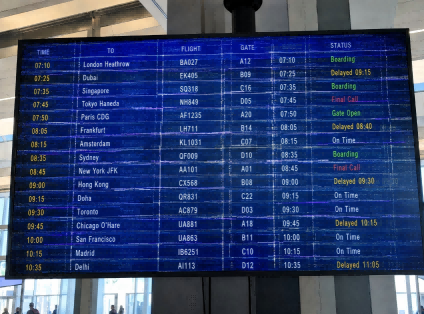
When a digital signage display in a transit hub or retail window develops dark patches or faint ghost images, the issue goes straight to your bottom line. For B2B buyers and system integrators, screen degradation means unexpected maintenance costs, broken service level agreements (SLAs), and immediate brand damage.
The reality is simple: consumer TVs and standard office monitors are engineered for roughly 6 to 8 hours of daily use. They cannot handle 24/7 continuous cycles, static layouts, or high ambient heat without failing.
Preventing these hardware failures requires looking past generic product brochures. To build a reliable commercial display network, you need to understand how heavy-duty industrial panels manage thermal stress and how intelligent firmware algorithms actively neutralize image persistence. This guide breaks down the specific hardware metrics and operational strategies required to keep your displays running clean under punishing commercial conditions.
Why 24/7 Operations Demand More Than Just Standard Displays
When delivering a commercial display network, project sign-off is merely the baseline. The true performance of your hardware is revealed only after deployment, where the distinction between standard office monitors and industrial-grade equipment directly impacts your operating budget.
The Operational Divide: Standard vs. Industrial Duty Cycles
Standard displays are engineered for intermittent use—typically 6 to 8 hours daily. Using these in a 24/7 environment is a common procurement error that leads to exponential wear. Think of this as the difference between a commuter car and an endurance racing engine: a standard panel running around the clock under constant electrical load will experience rapid component fatigue and premature failure.
Environmental Stressors: Beyond Standard Climate Control
Geographical location is a primary driver of hardware longevity. Your hardware must be specified to survive the specific stressors of your deployment site:
- High-Humidity Zones (e.g., Coastal South America): Displays must fight persistent moisture, which risks board-level corrosion and electrical shorts.
- Extreme Heat (e.g., Middle East): Screens face punishing ambient temperatures that demand superior thermal management.
- Tropical Storm Corridors (e.g., Southeast Asia): Displays here face a lethal combination: intense solar heat during the day and severe typhoon seasons. In these regions, hardware must manage internal thermal dissipation while simultaneously resisting high wind pressures that can force driving rain into poorly sealed enclosures.
When standard monitors are forced into these environments—especially when trapped inside unventilated outdoor kiosks or behind sun-exposed storefront windows—excessive heat and moisture trigger rapid structural degradation.
The Financial Impact: Understanding Total Cost of Ownership (TCO)
Premature aging is not just a hardware issue; it is a financial one. Replacing a degraded backlight module or a failed open-cell panel typically consumes up to 45% of the original unit’s capital expenditure. This figure does not even account for the true cost of unplanned downtime: broken advertising contracts, lost engagement, and the recurring logistical expense of dispatching field technicians for emergency repairs.
For B2B network operators, selecting hardware with a verified industrial-grade rating is the only way to lock in operational stability and protect your long-term capital investment. For retailers looking to minimize these operational risks, we recommend exploring our specialized digital signage solutions for retail that integrate both industrial-grade durability and intelligent content management.
Why Screen Architecture Dictates Long-Term Display Stability
Before exploring screen damage, you must understand the core physical differences between the two dominant display technologies on the market: Liquid Crystal Displays (LCD) and Organic Light-Emitting Diodes (OLED). These panels manage light, continuous workloads, and operating heat in completely opposite ways, which explains why both technologies exist and why they serve entirely different application needs.
LCD: The Blinds and Backlight System
An LCD panel does not create its own light. Instead, it operates exactly like a giant wall of motorized window blinds backed by a uniform array of high-intensity light bulbs.
- The LED Backlight: This is a uniform, heavy-duty light source at the rear of the monitor that stays turned on at a constant intensity across the entire screen.
- The Liquid Crystals (The Blinds): Located directly in front of the backlight. These crystal molecules act as microscopic window blinds. When electrical voltage is applied, they twist or untwist to block the background light or let it pass through color filters to create an image.
Because the light generator (backlight) is entirely separated from the image-forming layer (liquid crystals), every part of the backlight ages at the exact same rate. Even if the front liquid crystals are showing a static graphic, the backlights behind them are glowing together as a single, uniform unit.
Best Application Fit: LCD was born for continuous endurance and cost-efficiency. It is the practical choice for long-term public signage networks that display fixed content frameworks or restaurant menus, and for outdoor window displays that require massive brightness output to fight direct sunlight without risking rapid material burnout.
OLED: The Independent Miniature Bulb System
OLED technology entirely removes the separate background light bulb concept. Instead, an OLED panel is a self-emissive matrix made of millions of independent, microscopic organic sub-pixels. Each individual pixel acts as its own self-contained light generator.
To visualize this, imagine a massive display wall built from millions of independent miniature candles. Each candle lights up, dims, or shuts off entirely on its own based on the content. When a section of the screen needs to show pure black, those specific candles simply blow themselves out completely, creating perfect contrast.
Best Application Fit: OLED was engineered to achieve ultimate visual aesthetics, vivid color gamuts, and paper-thin product designs. It is ideal for premium retail video walls showcasing high-end luxury advertisements, corporate boardrooms for short-session dynamic presentations, or digital art galleries where the imagery is constantly moving and changing.
Why Static Graphics Destroy OLED Pixels Faster
While OLED is perfect for shifting cinematic content, its “independent candle” structure becomes unstable under a fixed commercial layout.
Consider an airport flight schedule display network. While the text data and flight rows change every few minutes, the graphical frame—the permanent gridlines separating columns, the top headers like “DEPARTURES,” and the company logo in the corner—remains completely frozen in place for days or weeks.
In an OLED setup, the specific miniature candles forming those fixed gridlines and headers are forced to burn at maximum power continuously without a break. Meanwhile, the surrounding candles displaying the rolling flight text get to blink on and off, resting frequently.
Over time, these hard-working, static pixels burn through their organic material and lose their light-emitting capacity much faster than their neighbors. They simply grow exhausted and dim from an uneven individual workload.
When you eventually clear the screen or switch the monitor to a new background, those worn-out pixels can no longer match the peak brightness of the surrounding area. Because that specific gridline path is now permanently dimmer, it leaves a faint, irreversible “ghost image” or outline locked into the glass.
Because an industrial LCD monitor relies on a single, uniform backlight that treats the entire panel equally, it avoids this localized pixel fatigue entirely, making it the structurally stable baseline choice for 24/7 continuous commercial operations.
Selecting the Right Hardware Specs for Harsh Environments
Once you understand how heat and static electricity cause screen damage, choosing the right hardware becomes a matter of checking specific technical data sheets. To prevent panel blackening and permanent graphic burn-in, you must ignore generic marketing brochures and look for a few critical industrial metrics built to withstand your project’s real-world environment.
1. The 24/7 Duty Cycle Rating
The first line of defense against temporary image sticking and permanent screen degradation is the display’s daily running rating. Standard office monitors and home TVs are engineered for intermittent workloads, usually capped at 6 to 8 hours of daily use.
For continuous public information displays, the specification sheet must explicitly state a 24/7 continuous operation rating. Monitors built to this standard use heavy-duty Thin-Film Transistor (TFT) LCD modules. These modules feature robust matrix circuitry and reinforced components designed to handle constant, unchanging electrical fields without causing permanent material polarization or degrading the panel’s internal alignment layers.
2. High-Tni Liquid Crystals (Preventing Black Spots)
When installing displays in sun-exposed storefront windows or high-temperature regions, the most important hardware metric is the liquid crystal clearing point, known as the Tni value.
Standard LCD panels use standard liquid crystal mixtures with a low clearing point, meaning the liquid crystal layer will destabilize and turn into a dead black patch if internal temperatures hit 70°C to 80°C. To stop this from happening, you need to specify panels built with High-Tni liquid crystal technology.
High-Tni panels use a specialized molecular formula with a thermal clearing threshold of 105°C or higher. This high thermal limit ensures that even if the screen is locked inside an unventilated kiosk under intense summer sun, the liquid crystals keep their shape and light control, completely preventing heat-driven black spots.
3. Matching Nit Brightness to the Installation Site
Choosing the correct hardware requires picking a brightness level (measured in nits) that perfectly fits the specific location. Buying the highest brightness number available without a clear application plan just creates unnecessary internal heat and shortens the display’s lifespan. Use these two standard industry benchmarks:
- Indoor Transit Hubs and Retail Signage (450 to 500 nits): This range ensures high contrast and sharp readability under bright indoor ceiling lights, while keeping the background LEDs running at a cool, sustainable temperature.
- Storefront Windows and Outdoor Kiosks (2,000 to 2,500 nits): This extreme luminance is mandatory to cut through intense outdoor glare, reflection, and direct sunlight. However, forcing the LED backlights to output at this extreme level introduces a secondary engineering challenge: rapid backlight degradation.
4. Quantum Dot (QLED) Tech: Fighting High-Brightness Light Decay
If your project dictates the high-luminance tier (2,000+ nits) established above, you must ensure the panel integrates Quantum Dot (QLED) enhancement films.
To generate white light, standard high-brightness LCDs rely on heavy chemical phosphor coatings over the LED backlights. Under non-stop 24/7 loads at maximum output, the intense thermal energy rapidly degrades these phosphors. As a result, the monitor will typically lose a significant percentage of its peak luminance and turn an unrecoverable yellow color within the first year of operation.
QLED modules solve this bottleneck by replacing the organic phosphor layer with a highly stable, inorganic Quantum Dot film targeted by pure blue LEDs. These inorganic nano-crystals convert light with near-zero energy loss and are exceptionally resistant to thermal degradation. Specifying QLED tech guarantees that your high-nit storefront network maintains its crisp, peak luminance and color accuracy across years of heavy duty cycles without premature light decay.
5. Enclosure Integrity: The Interlocking Challenge of Waterproofing and Heat
For deployments in coastal, high-humidity regions or storm corridors like Southeast Asia, hardware selection must extend beyond the panel to the physical chassis engineering. While rain and humidity do not directly cause black spots or burn-in, they act as dangerous catalysts that accelerate total hardware failure.
When equipment is exposed to severe monsoon or typhoon seasons, you must specify enclosure protection ratings of at least IP65 or IP66. Standard monitors fail because intense wind pressures during tropical storms literally push driving rain through microscopic perimeter seals, leading to immediate backboard short-circuits.
However, achieving a watertight seal creates a severe engineering contradiction: sealing the chassis keeps water out, but it traps the immense heat generated by that 2,000-nit backlight inside. To solve this, industrial outdoor displays must split the enclosure into two sealed chambers paired with an internal convection airflow loop. Internal automated fans run a high-speed internal air cycle that vacuums heat away from the sensitive open-cell layers and transfers it to the heavy-duty metal chassis walls. This allows the thermal energy to radiate outward through the metal skin while keeping the high-voltage backlight compartment completely bone-dry and sealed against monsoons.
If you are uncertain which protection level your specific environment requires, refer to our comprehensive guide on IP65 vs. IP66 vs. IP67 ratings for outdoor displays to ensure your hardware is specified correctly for its target location.
By prioritizing 24/7-rated TFT modules with High-Tni liquid crystals, matching nits to the site, integrating QLED anti-decay films, and enforcing IP65/66 enclosure defense with internal thermal loops, you secure the core foundations needed to reach a 50,000-hour operational life. Because off-the-shelf monitors cannot meet these overlapping environmental demands, complex rollouts require deep manufacturing customizability. Powerhouses like Ikinor integrate these specific engineering choices directly into the automated production line, utilizing controlled environmental testing chambers to verify both thermal dissipation and watertight integrity before global shipment.
How to Prevent Screen Burn-in Through Content and CMS Settings
Beyond choosing the right hardware, your display’s long-term health depends on how you manage content. Even the most robust commercial TFT module will suffer from permanent image ghosting if static assets remain locked at the same coordinates for days on end. You can eliminate this risk automatically by applying these three network-wide operational standards. Beyond hardware protection, the CMS is the command center of your signage network. To better understand how these systems drive operational efficiency beyond just burn-in prevention, see our analysis on why CMS is critical for digital signage success.
1. Identify the Real Threat: Stationary Graphic Skeletons
In transit hubs, retail signage, or command centers, managers often assume a display is safe as long as the text data (like flight times or menu prices) updates periodically.
However, the text data is harmless. The true threat comes from the unchanging graphic skeletons—the permanent vertical gridlines, fixed menu borders, or static corporate logos in the corner. If these boundaries are displayed over a 12-hour cycle daily, the constant voltage applied to those exact sub-pixel zones will cause localized electrostatic charge accumulation, leading to irreversible image ghosting on the gridline path.
2. Use Pixel Shifting to “Wash” the Pixels
To counteract this without disrupting the readability of your information, your Content Management System (CMS) or media player firmware must be set to trigger automated Pixel Shifting.
Instead of keeping the layout frozen, the system shifts the entire content—including gridlines and headers—by 1 to 3 pixels along a programmed trajectory at regular intervals (e.g., every 10–15 minutes). This movement is invisible to the human eye, but on a sub-pixel level, it constantly disperses the electrical load across neighboring liquid crystal cells. By ensuring that no single crystal molecule remains locked under a maximum charge for extended hours, the algorithm effectively “washes” the screen, preventing static images from settling into the panel.
3. Engineering Your UI for 24/7 Stability
Prevention begins at the design stage. Your content creation teams should follow these three engineering rules to reduce pixel fatigue:
- Cap Background Brightness at 40%: Pure peak white (R:255, G:255, B:255) forces sub-pixels to maintain maximum voltage and peak thermal output. All permanent layout assets, such as schedule gridlines or navigation boxes, must be designed using neutral grays or off-whites, throttling their luminance to 40% or less of the panel’s maximum peak white output.
- Use Alpha-Channel Transparency: Fixed logos and permanent widgets should incorporate semi-transparent alpha masks (minimum 30% transparency). This allows varying background color data to pass through the asset, preventing the liquid crystals underneath from freezing into a single polarization state.
- Avoid High-Contrast “Voltage Traps”: Do not stack high-saturation complementary colors—such as vibrant yellow directly adjacent to deep blue—within permanent graphic zones. These combinations create severe voltage gradients between neighboring sub-pixels, which dramatically accelerates localized electrochemical polarization and alignment layer wear.
How to Tell if Your Screen Can Be Saved or Needs Replacement
Even with professional hardware and proactive CMS settings, some environments—due to legacy content or extreme thermal stress—may still encounter early signs of image sticking (ghosting). This does not always mean the screen is ruined. Before you incur the logistical cost of replacing a heavy display, your maintenance team should follow this field-recovery protocol to determine if the panel can be “revived.”
1. The “Revival” Protocol: How to Reset Sticking Pixels
If you notice a faint ghost image or a shadowy outline of a gridline, do not immediately request a replacement. The liquid crystal molecules may simply be stuck in a polarized state due to residual electrical charge. You can attempt to “wash” the panel using these three steps:
- The White Screen Reset: Display a full-screen, pure white image (R:255, G:255, B:255) at maximum brightness for 2 to 4 hours. The uniform, high-voltage state forces the liquid crystals to re-orient completely, effectively “resetting” molecules that were previously trapped by a static graphic.
- The Rapid RGB Cycle: If a static white screen fails, run a high-refresh, rapid-cycling video file that alternates between full-screen Red, Green, and Blue (RGB) at 2-second intervals. This rapid switching forces the alignment layer to alternate states quickly, breaking up localized electrostatic charges.
- The Thermal Idle-Reset: If the issue persists, turn off the backlight and allow the panel to sit in a room-temperature, well-ventilated space for 12 hours. This eliminates the thermal energy that was likely accelerating the polarization, allowing the molecules to drift back to their natural, relaxed state.
2. When Is the Screen Truly Irreparable?
It is vital to distinguish between reversible ghosting and permanent physical failure. If the ghosting remains visible after 24 hours of total power-off and 8 hours of the White Screen Reset protocol, you are likely dealing with permanent liquid crystal breakdown or layer deformation.
At this stage, the panel’s internal structure has likely warped under prolonged heat, or the chemical mixture has physically broken down. There is no software fix for this level of damage; the display uniformity is permanently compromised and the module must be replaced.
3. Quarterly Maintenance to Prevent Future Failures
To keep your network running without these emergency recoveries, standardize a simple quarterly maintenance check:
- Check Firmware Heat Logs: Periodically pull the display’s internal temperature logs. If a unit is frequently hitting internal temperatures above 85°C, your physical installation site needs urgent thermal mitigation (such as better external airflow or added shading).
- Schedule a “Zero-Content” Cycle: Once a month, schedule a 30-minute “no-signal” or solid-black image cycle. This allows the backlight to cool down entirely and prevents any single sub-pixel from sustaining a constant voltage load for the entire month.
By treating ghosting as a manageable electrical state rather than an immediate terminal failure, your technical team can significantly lower the total cost of ownership (TCO) for your display network. For project-wide rollouts, relying on an experienced OEM partner like Ikinor ensures that you have direct access to these diagnostic firmware tools and factory-level support, allowing your maintenance crews to resolve issues in the field rather than incurring the massive logistical cost of shipping heavy displays back for service.
FAQs
Commercial displays are built for industrial-grade endurance, not just occasional use. Unlike consumer TVs rated for 6-8 hours, Ikinor’s commercial monitors feature 24/7 duty-cycle ratings, high-heat resistant liquid crystals (Tni 105°C+), and reinforced circuitry. These components ensure stability under constant voltage and high-brightness loads, preventing image retention (ghosting), circuit board corrosion, and enclosure failure that would quickly destroy a consumer-grade unit.
These issues have different origins. Black spots (isotropic failure) are physical damage to the liquid crystal layer caused by localized overheating. Conversely, a short circuit is usually caused by moisture intrusion due to poor enclosure sealing, leading to board-level corrosion, screen flickering, or dead lines. For coastal or typhoon-prone regions, always verify that your display meets IP65/IP66 standards to prevent moisture-related hardware failure.
Yes, pixel shifting is an industry-standard safeguard. For fixed content like flight schedules, it periodically shifts the layout by a few pixels along a programmed trajectory. This movement is invisible to the human eye but prevents any single pixel from sustaining a constant electrical charge for too long. By dispersing the electrical load, it effectively neutralizes charge accumulation before permanent “electrostatic memory” or ghosting can set in.
Standard high-brightness displays (2,000+ nits) use organic phosphor coatings over LEDs, which degrade rapidly under intense heat, causing the screen to dim and turn yellow within a year. QLED modules replace these fragile materials with stable, inorganic Quantum Dot films. They maintain peak luminance and color accuracy across years of 24/7 operation without suffering from light decay, making them essential for high-nit outdoor reliability.
Ghosting is often a temporary electrical polarization rather than permanent damage. Try a recovery protocol: run a full-screen white image (R:255, G:255, B:255) at max brightness for 4 hours to reset the liquid crystals, or use a high-refresh RGB cycling video to “wash” the pixels. If the ghost image remains after 24 hours of rest and recovery attempts, the internal alignment layer may be permanently deformed.
Off-the-shelf displays fail here. You need custom hardware: in humid/typhoon zones, require IP65/IP66 chassis protection and isolated dual-chamber cooling to keep moisture away from electronics while venting heat. In high-heat zones, specify panels with Tni 105°C+ liquid crystals to prevent black spots. Ikinor specializes in these OEM/ODM services, utilizing environmental testing chambers to ensure each unit withstands the specific thermal and moisture stressors of your installation site.




