
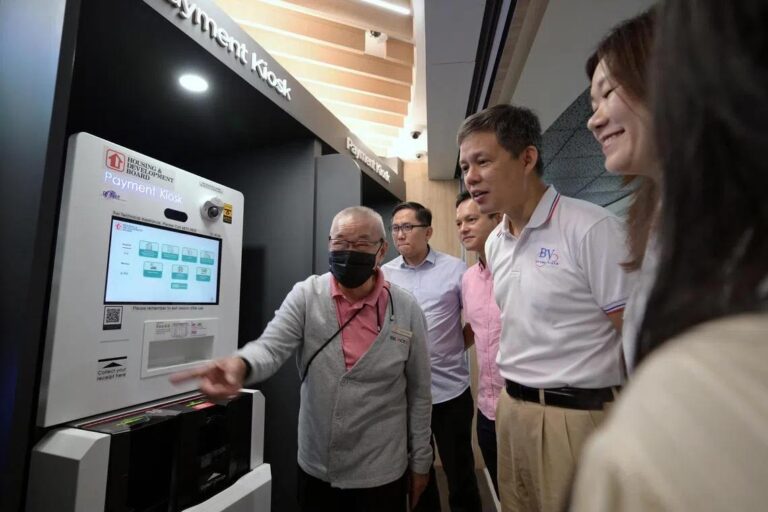
Los quioscos de autoservicio del gobierno de Singapur son ampliamente reconocidos como un referente para Diseño orientado a la precisión y altas tasas de adopción. En lugar de centrarse únicamente en el hardware, Singapur ha desarrollado un sistema altamente integrado donde los quioscos funcionan como extensiones perfectas de su infraestructura de gobierno digital. Este artículo toma a Singapur como ejemplo práctico para analizar cómo los quioscos gubernamentales aportan valor real, desde escenarios de servicio de alta frecuencia hasta la arquitectura e integración del sistema.
Al analizar cómo se implementan estos quioscos, qué servicios priorizan y cómo se conectan con los sistemas de back-end, podemos comprender mejor qué factores contribuyen al éxito de un proyecto de quioscos gubernamentales. Además, este artículo ofrece la perspectiva de un comprador B2B sobre cómo evaluar proveedores, gestionar la complejidad de la integración y seleccionar la solución idónea para garantizar el rendimiento y la escalabilidad a largo plazo.
¿Qué son los quioscos de autoservicio del gobierno?
Los quioscos de autoservicio del gobierno se entienden mejor como Puntos de acceso digital sin conexión para servicios públicos, Estas plataformas, que sirven de puente entre las oficinas de atención al público tradicionales y las plataformas totalmente digitales, en lugar de sustituir a las oficinas gubernamentales, amplían la disponibilidad de servicios al permitir que los ciudadanos realicen trámites esenciales de forma independiente a través de un terminal interactivo.
Su función principal radica en tres áreas. Primero, permiten operaciones de autoservicio, lo que permite a los usuarios verificar su identidad, enviar solicitudes o realizar pagos sin la ayuda del personal. En segundo lugar, facilitan significativamente la vida de los usuarios. reducir las colas y la carga de trabajo administrativa, especialmente en entornos de mucho tránsito, como ayuntamientos o centros comunitarios. En tercer lugar, mejoran la inclusividad de los servicios al reducir las barreras digitales, brindar soporte a diversos grupos de usuarios y ofrecer una puerta de enlace segura y sin conexión a internet para acceder a los servicios públicos digitales.
Un ejemplo práctico se puede ver en Singapur, donde los quioscos gubernamentales no son máquinas independientes, sino parte de un ecosistema de servicios unificado construido en torno a SingPass. Los ciudadanos utilizan la misma identidad digital para acceder a los servicios tanto en línea como en los quioscos físicos, lo que crea una experiencia fluida en todos los canales.
En la práctica, un quiosco no se trata tanto del dispositivo en sí, sino de cómo conecta a las personas con los servicios gubernamentales.
Dónde los quioscos gubernamentales aportan valor real (Análisis de casos prácticos)
Los quioscos de autoservicio gubernamentales ofrecen el mayor valor cuando están diseñados en torno a necesidades de servicio de alta frecuencia y del mundo real, en lugar de funciones aisladas o de baja demanda. En los entornos de servicio público modernos, estos quioscos no se limitan a un solo propósito, sino que cada vez más actúan como Puntos de acceso multiservicio dentro de ecosistemas de ciudades inteligentes más amplios..
En el núcleo están servicios administrativos de alta frecuencia, como la verificación de identidad y el procesamiento de documentos. Estas son interacciones esenciales que los ciudadanos necesitan regularmente, lo que las hace ideales para la automatización del autoservicio. Paralelamente, los quioscos se utilizan ampliamente para servicios de pago urbanos, incluyendo impuestos, multas y facturas de servicios públicos: tareas que son sencillas, repetitivas y muy adecuadas para su gestión digital.
Más allá de estos, los quioscos gubernamentales están evolucionando hacia terminales integradas de ciudad inteligente, donde múltiples servicios, que van desde el acceso a información pública hasta aplicaciones de servicio, están disponibles a través de una única interfaz. Si bien funciones como gestión de colas y registro Si bien suelen incluirse, representan solo una pequeña parte del valor total. La verdadera ventaja reside en consolidar múltiples servicios en un único punto de acceso.
Los quioscos de Singapur se centran en servicios de alta demanda, como trámites de vivienda de la HDB, pago de facturas y consultas gubernamentales. Estos terminales están estratégicamente ubicados en centros comunitarios y oficinas de servicios públicos, integrándose así en la rutina diaria de los ciudadanos.
Qué incluye realmente un sistema de quioscos gubernamentales
Un quiosco de autoservicio gubernamental no es un solo dispositivo, sino un sistema multicapa Está compuesto por hardware, software e infraestructura de backend que trabajan conjuntamente.
En el extremo frontal está el la unidad de quiosco en sí, incluyendo la pantalla, la interfaz táctil y la carcasa. Esto es con lo que los usuarios interactúan directamente. A esto están conectados varios dispositivos periféricos, como ID or QR scanners, receipt printers, and payment modules, enabling tasks like identity verification, document processing, and transactions.
Detrás de la interfaz se encuentra el capa de software, que incluye la interfaz de usuario (UI) y un sistema de gestión de contenido o dispositivos (CMS). Esta capa controla cómo se presentan los servicios, garantiza la usabilidad y permite actualizaciones o monitorización remotas.
Más importante aún, el quiosco debe conectarse a sistemas gubernamentales de backend, tales como bases de datos de ciudadanos, pasarelas de pago o plataformas de servicios. Aquí es donde se produce el procesamiento real: recuperar datos de usuario, validar solicitudes y completar transacciones en tiempo real. Todo esto está respaldado por la capa de red y seguridad, lo que garantiza una conectividad estable, una transmisión de datos cifrada y una autenticación segura.
Como se observa en Singapur, el buen funcionamiento depende de una estrecha integración del sistema. Los servicios están conectados a través de un backend unificado, la identidad del usuario se gestiona mediante SingPass—Los flujos se producen a través de diferentes procesos y los datos se comparten sin problemas entre los departamentos.
Los 5 principales proveedores de quioscos de autoservicio gubernamentales
Las empresas se presentan sin ningún orden en particular, y toda la información proviene de datos disponibles públicamente en línea.
1. Tecnologías de origen
| Categoría | Detalles |
|---|---|
| nombre de empresa | Tecnologías de origen |
| Historia y biografía de la empresa | Source Technologies ofrece servicios de quioscos para el gobierno, centrados en transacciones seguras, impresión de documentos, pagos, programación y gestión de colas. La empresa es reconocida por sus tecnologías seguras de MICR y pago utilizadas en los procesos financieros gubernamentales. |
| Gama de productos | Quioscos gubernamentales, quioscos de impresión segura de documentos, quioscos de pago, sistemas de cupones WIC, soluciones de impresión de cheques |
| Ubicación | Estados Unidos |
| Contacto | https://www.sourcetech.com/government |
2. Tecnología Huabiao / GovCred
| Categoría | Detalles |
|---|---|
| nombre de empresa | Tecnología Huabiao / GovCred |
| Historia y biografía de la empresa | Huabiao Technology ofrece soluciones inteligentes de autoservicio para el sector público, incluyendo quioscos de atención al público, terminales biométricas, verificación inteligente de identidad, sistemas de fotografía para documentos de identidad y pasaportes, y terminales de emisión y recogida de documentos. Sus soluciones están diseñadas para ayudar a las dependencias gubernamentales a reducir el papeleo, acortar el tiempo de procesamiento manual y mejorar la eficiencia en la atención al ciudadano. |
| Gama de productos | Quioscos de servicio gubernamental, terminales biométricas, cabinas fotográficas para documentos de identidad/pasaportes, terminales de verificación de identidad, sistemas de emisión y recogida de documentos. |
| Ubicación | Porcelana |
| Contacto | https://www.govcred.com/ |
3. Soluciones Empresariales Infinitas (IBS)
| Categoría | Detalles |
|---|---|
| nombre de empresa | Infinite Business Solutions DMCC (IBS) |
| Historia y biografía de la empresa | IBS proporciona quioscos inteligentes de autoservicio para la administración electrónica y otros sectores, lo que permite la prestación segura de servicios digitales, reduce los costes operativos y mejora el acceso de los ciudadanos a los servicios. |
| Gama de productos | Quioscos gubernamentales, quioscos multiservicio, quioscos KYC, quioscos de pago, quioscos bancarios y de telecomunicaciones. |
| Ubicación | Dubái, Emiratos Árabes Unidos |
| Contacto | https://www.infinitebs.net/egov-digital-gov.html |
4. TouchWo
| Categoría | Detalles |
|---|---|
| nombre de empresa | TouchWo |
| Historia y biografía de la empresa | TouchWo es un fabricante de pantallas táctiles y quioscos que ofrece soluciones táctiles personalizables, incluyendo quioscos, PC industriales y pantallas interactivas para múltiples sectores. |
| Gama de productos | Quioscos con pantalla táctil, quioscos de autoservicio, quioscos de pago, monitores táctiles, ordenadores todo en uno Android |
| Ubicación | Guangzhou, China |
| Contacto | https://touchwo.com/ |
5. Geeks del RSI
| Categoría | Detalles |
|---|---|
| nombre de empresa | Geeks del RSI |
| Historia y biografía de la empresa | RSI Geeks es un proveedor con sede en Dubái de quioscos interactivos y soluciones de señalización digital, que ofrece sistemas de quioscos personalizados para los sectores gubernamental, sanitario y empresarial. |
| Gama de productos | Quioscos interactivos, quioscos de autoservicio, quioscos para iPad, sistemas de gestión de colas, sistemas de comentarios de los clientes |
| Ubicación | Dubái, Emiratos Árabes Unidos |
| Contacto | https://www.rsigeeks.com/ |
Cómo elegir la solución de quiosco gubernamental adecuada
Desde una perspectiva B2B, seleccionar una solución de quiosco gubernamental no es simplemente una comparación de productos, sino una decisión que impacta directamente en la prestación de servicios, el rendimiento del sistema y la estabilidad operativa a largo plazo. El primer paso es definir claramente la Alcance del servicio y responsabilidades del proyecto. Los compradores deben determinar si el quiosco gestionará una sola función o múltiples servicios, y cómo se distribuyen las responsabilidades entre hardware, software, integración y mantenimiento. En los modelos de servicio integrados, un único terminal puede admitir varios flujos de trabajo, pero esto también aumenta la complejidad de la interfaz y exige mayores capacidades del sistema.
Igualmente importante es la necesidad de evaluar la complejidad de la integración y la compatibilidad de la API. Los quioscos gubernamentales deben conectarse a sistemas de identidad, bases de datos y plataformas de pago. Una API compatible garantiza que los quioscos se integren sin problemas con los sistemas existentes, lo que reduce el esfuerzo de desarrollo, acorta el tiempo de implementación y minimiza el riesgo técnico. En ecosistemas digitales más avanzados, los sistemas de identidad desempeñan un papel fundamental, requiriendo una autenticación estable y la sincronización de datos en tiempo real entre los servicios.
Al mismo tiempo, system security must be treated as a core requirement rather than an afterthought. Dado que los quioscos manejan datos confidenciales, como información de identidad y registros de pago, la seguridad debe integrarse en cada capa del sistema. Esto incluye un cifrado de datos robusto durante la transmisión y el almacenamiento, mecanismos de autenticación fiables y una arquitectura de red segura con un estricto control de acceso. El cumplimiento de las normas gubernamentales y del sector pertinentes también es esencial para garantizar tanto el cumplimiento legal como la fiabilidad a largo plazo.
Más allá de las consideraciones técnicas, los compradores deben evaluar condiciones de despliegue y operativas. Los entornos interiores de alto tráfico suelen priorizar la usabilidad y el flujo de usuarios fluido, mientras que las implementaciones en exteriores o las que funcionan las 24 horas del día, los 7 días de la semana, requieren una mayor durabilidad y protección ambiental. Al mismo tiempo, La experiencia del usuario afecta directamente a la adopción.. Los quioscos deben ser lo suficientemente intuitivos para los usuarios principiantes, con flujos de trabajo simplificados, soporte multilingüe y un diseño de interfaz accesible.
Desde el punto de vista financiero, es fundamental centrarse en el costo total de propiedad (TCO) En lugar de limitarse a los costes iniciales de adquisición, los sistemas que carecen de estabilidad o capacidades de gestión remota pueden parecer rentables al principio, pero a menudo conllevan mayores costes de mantenimiento con el tiempo, especialmente en entornos de uso intensivo.
Finalmente, elegir la estrategia de proveedores adecuada es clave para el éxito del proyecto. Si bien los productos estándar pueden ser suficientes para casos de uso básicos, los proyectos gubernamentales más complejos suelen requerir personalización para adaptarse a flujos de trabajo y requisitos de integración específicos. En estos casos, trabajar con un fabricante OEM/ODM como Ikinor ofrece mayor flexibilidad, permitiendo adaptar las soluciones a las necesidades operativas reales, a la vez que garantiza la escalabilidad y el soporte a largo plazo.




