
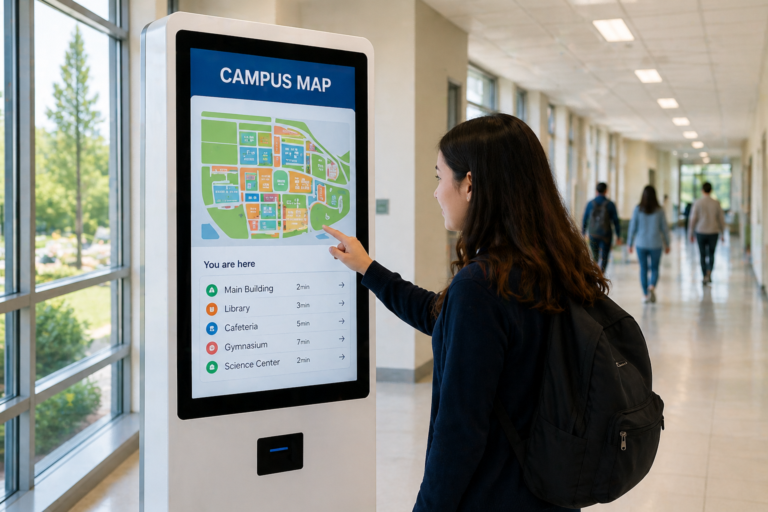
A medida que los quioscos de autoservicio se vuelven más comunes en restaurantes, aeropuertos y hoteles, tecnologías similares se están abriendo paso en los entornos educativos. Las escuelas se enfrentan a una creciente demanda de mejorar la eficiencia, enriquecer la experiencia estudiantil y gestionar las operaciones diarias de manera más eficaz. En este contexto, los quioscos educativos se presentan como una solución práctica que conecta la interacción digital con las necesidades reales del campus.
Desde la optimización registros de visitantes Situados en las entradas de los centros educativos para que los alumnos puedan consultar sus horarios, realizar pagos o explorar contenidos didácticos interactivos, estos quioscos están transformando el funcionamiento de los campus. A diferencia de los sistemas tradicionales, ofrecen un enfoque más intuitivo y de autoservicio que reduce la dependencia del personal administrativo, al tiempo que mejora la accesibilidad para los alumnos y los visitantes.
Este artículo explora qué son los quioscos educativos, cómo se utilizan en diferentes entornos escolares y cómo las instituciones pueden planificarlos e implementarlos eficazmente para dar soporte a entornos universitarios modernos y conectados.
¿Qué es un quiosco educativo?
Un quiosco educativo Es una terminal digital interactiva de autoservicio diseñada para funcionar en diversas áreas de un campus escolar. Sirve como punto de acceso centralizado donde estudiantes, profesores y visitantes pueden interactuar con contenido digital, obtener información y completar tareas de forma independiente sin necesidad de asistencia del personal.
Estos quioscos se instalan habitualmente en lugares de mucho tránsito, como entradas de colegios, bibliotecas, aulas y comedores, lo que facilita el acceso para el uso diario. Según su implementación, pueden ofrecer una amplia gama de funciones, desde mostrar horarios y anuncios hasta facilitar el aprendizaje interactivo y el autoservicio.
Las características definitorias de un quiosco educativo radican en su capacidades interactivas y de autoservicio. A diferencia de los sistemas pasivos, los usuarios pueden interactuar activamente con la pantalla a través del tacto, la voz o interfaces guiadas. Además, actúa como un plataforma multiusos, que combina herramientas de aprendizaje, canales de comunicación y funciones operativas en un único dispositivo.
Es importante diferenciar los quioscos educativos de la señalización digital tradicional y los mostradores administrativos. Mientras que la señalización digital se centra principalmente en la visualización de contenido unidireccional, los quioscos permiten la interacción bidireccional. Asimismo, a diferencia de los mostradores de recepción tradicionales que dependen del servicio manual, los quioscos automatizan procesos como la búsqueda de información, el registro y la navegación.
En el contexto actual de transformación de campus inteligente, Los quioscos educativos se han vuelto cada vez más importantes. Permiten la automatización, reducen la fricción operativa y mejoran la eficiencia, lo que los convierte en un componente clave para la creación de entornos educativos modernos, conectados y escalables.
Casos de uso clave y beneficios de los quioscos educativos en las escuelas
1. Aprendizaje inteligente y educación interactiva
| Caso de uso | Función | Valor |
|---|---|---|
| Aprendizaje multimedia | Visualiza conceptos complejos (vídeo, simulación). | Mejorar la comprensión |
| Aprendizaje gamificado | Cuestionarios, sistemas de puntuación, recompensas | Aumentar la participación |
| aprendizaje asistido por IA | Dificultad adaptativa basada en el rendimiento | Aprendizaje personalizado |
| Quiosco en modo examen | Bloquear en una sola aplicación | Evitar las trampas |
| Control de múltiples aplicaciones | Restringir las aplicaciones que no sean educativas | Mantén la concentración |
Por ejemplo, en una clase de biología de secundaria, los alumnos pueden usar una pantalla táctil para rotar un modelo 3D del cuerpo humano, tocar los órganos para explorar sus funciones y simular procesos como la circulación sanguínea o la respiración. Esta interacción práctica fomenta la exploración activa en lugar de la memorización pasiva.
En las actividades grupales, los estudiantes colaboran en la resolución de problemas que se muestran en el quiosco. Los equipos interactúan por turnos con la pantalla mientras ganan puntos en conjunto, creando un entorno de aprendizaje colaborativo y atractivo con una dinámica similar a la de un juego.
2. Automatización administrativa y autoservicio
| Caso de uso 使用场景 | Función | Valor |
|---|---|---|
| Registro de identificación de estudiante | Inscripción y configuración de la tarjeta mediante autoservicio | Reducir la carga de trabajo administrativa |
| Colegio quiosco de pago | Pagos de matrícula/libros de texto | Procesamiento más rápido |
| Pedidos y pagos en la cafetería | Consulta del menú, selección de comidas, autopago | Reduzca las colas y mejore la precisión. |
| Gestión de visitantes | Registro de visitantes, verificación de identidad | Mejorar la eficiencia |
| Acceso a la información | Preguntas frecuentes, horarios, avisos | Reduzca las consultas repetitivas. |
Por ejemplo, los estudiantes pueden usar el quiosco para consultar sus horarios de clase seleccionando su grado o escaneando su identificación estudiantil. El sistema muestra al instante la ubicación de las aulas, los nombres de los profesores y cualquier actualización del horario. Esto permite a los estudiantes acceder rápidamente a información precisa sin depender del personal administrativo.
Los estudiantes y visitantes también pueden consultar información sobre los servicios del campus a través del quiosco. Navegando por una interfaz categorizada, pueden encontrar respuestas a preguntas frecuentes, como el horario de la biblioteca, el menú de la cafetería o las normas escolares. Esto mejora el acceso a la información y reduce las consultas repetitivas dirigidas al personal.
En la cafetería, los quioscos permiten realizar pedidos y pagos de forma autónoma. Los estudiantes pueden consultar los menús, seleccionar sus comidas y pagar con su tarjeta estudiantil o mediante pago móvil. Los pedidos se envían automáticamente a la cocina, lo que ayuda a reducir las colas y a mejorar la precisión de los pedidos durante las horas punta.
3. Comunicación, participación y reconocimiento en el campus
| Caso de uso | Función | Valor |
|---|---|---|
| Anuncios y actualizaciones | Noticias escolares, eventos, horarios | Comunicación en tiempo real |
| alertas de emergencia | Alertas de seguridad, cierres por mal tiempo | Respuesta inmediata |
| Campus navegación | Mapas, direcciones, búsqueda de instalaciones | Mejor experiencia para el visitante |
| Logros de los estudiantes | Deportes, artes, reconocimiento académico | Aumentar la motivación |
| Cultura del campus y exalumnos | Historias, antecedentes, perfiles de exalumnos | Fortalecer la identidad y el compromiso. |
Por ejemplo, el quiosco permite a los usuarios filtrar ubicaciones (como aulas, laboratorios u oficinas), lo que facilita una navegación más rápida e intuitiva en comparación con los mapas estáticos. Los estudiantes o visitantes recibirán una ruta generada dinámicamente, con instrucciones paso a paso que se actualizan según el acceso a los edificios o los cierres temporales.
Los estudiantes pueden explorar las categorías de logros, acceder a perfiles individuales y ver historias detalladas sobre los premios, en lugar de una simple presentación de diapositivas. Pueden interactuar con una cronología de la historia escolar, tocando los hitos para explorar fotos, videos e historias en profundidad, lo que crea una experiencia más inmersiva.
Cómo planificar e implementar quioscos escolares
Los colegios deberían abordar implantación de quioscos centrándose en escenarios específicos del campus donde la fricción es visible. Por ejemplo, si los visitantes frecuentemente hacen cola en la recepción durante las horas de la mañana, un quiosco en el entrada principal puede gestionar el registro de entrada automático y la verificación básica, reduciendo la congestión. Si los estudiantes preguntan direcciones con regularidad, colocar quioscos en vestíbulos o intersecciones Les permite registrar aulas u oficinas al instante, en lugar de depender del personal.
Antes del despliegue, las escuelas deberían elaborar un mapa. Flujo de usuario claro e intuitivo basado en el comportamiento real.. En una cafetería, el proceso debería ser tan sencillo como consultar el menú, seleccionar los productos y realizar el pago sin confusiones. En edificios académicos, consultar horarios o la asignación de aulas debería requerir solo unos pocos toques. Si los usuarios dudan o necesitan ayuda, el flujo de trabajo debe simplificarse.
En lugar de desplegar quioscos en todas partes a la vez, las escuelas deberían Comience con una ubicación de alto impacto., como la entrada, la cafetería o la biblioteca. Un pequeño proyecto piloto ayuda a observar cómo interactúan realmente los estudiantes y visitantes con el sistema: si lo usan de forma natural, dónde se detienen y qué los retrasa.
La ubicación es fundamental. Los quioscos deben instalarse donde la gente se detiene naturalmente, como por ejemplo: puntos de acceso, zonas de espera o pasillos de mucho tránsito, No se trata de rincones ocultos. Finalmente, los quioscos deben conectarse con los sistemas existentes, como los registros estudiantiles o las plataformas de pago, y actualizarse periódicamente con contenido relevante. Esto garantiza que sigan siendo útiles en las operaciones diarias del campus, en lugar de convertirse en dispositivos de visualización infrautilizados.
Los 5 principales proveedores de soluciones de quioscos educativos (2026)
La siguiente lista, elaborada a partir de nuestra investigación de mercado, destaca a fabricantes de quioscos educativos de renombre. Las empresas se presentan sin un orden específico y toda la información proviene de datos públicos disponibles en línea.
1. MetroClick
| Categoría | Detalles |
|---|---|
| nombre de empresa | MetroClick |
| Historia y biografía de la empresa | MetroClick ofrece soluciones de quioscos interactivos, señalización digital y directorios interactivos, con ofertas específicas para escuelas y campus que incluyen sistemas de orientación, registro de entrada y quioscos con capacidad de pago. |
| Gama de productos | Quioscos con pantalla táctil, quioscos de autoservicio, directorios interactivos, señalización digital, quioscos de orientación. |
| Ubicación | Nueva York, Estados Unidos |
| Lo mejor para | Escuelas y campus que necesitan quioscos interactivos personalizados y soluciones de autoservicio. |
| Contacto | https://www.metroclick.com |
2. ViewSonic
| Categoría | Detalles |
|---|---|
| nombre de empresa | ViewSonic |
| Historia y biografía de la empresa | ViewSonic es un proveedor global de soluciones visuales que ofrece pantallas interactivas, pantallas para quioscos y señalización digital para entornos educativos, como directorios, anuncios y comunicación en el campus. |
| Gama de productos | Pantallas interactivas, señalización digital, pantallas para quioscos, proyectores, software educativo |
| Ubicación | California, Estados Unidos (Operaciones globales) |
| Lo mejor para | Escuelas que necesitan soluciones de quioscos interactivos de alta calidad y con su propia marca |
| Contacto | https://www.viewsonic.com |
3. Quioscos avanzados
| Categoría | Detalles |
|---|---|
| nombre de empresa | Quioscos avanzados |
| Historia y biografía de la empresa | Advanced Kiosks es un fabricante de quioscos con sede en EE. UU. con más de 20 años de experiencia, que ofrece soluciones para escuelas de primaria y secundaria, incluyendo gestión de visitantes, señalización y quioscos administrativos. |
| Gama de productos | Quioscos para visitantes, quioscos de orientación, quioscos para enviar formularios, software de autoservicio |
| Ubicación | Nuevo Hampshire, Estados Unidos |
| Lo mejor para | Escuelas que requieren sistemas de quiosco llave en mano y automatización administrativa. |
| Contacto | https://advancedkiosks.com |
4. Ikinor
| Categoría | Detalles |
|---|---|
| nombre de empresa | Tecnología Ikinor |
| Historia y biografía de la empresa | Ikinor es un fabricante con sede en China especializado en quioscos interactivos, pizarras inteligentes y pantallas táctiles, que ofrece soluciones OEM/ODM para aplicaciones educativas y comerciales. |
| Gama de productos | Quioscos interactivos, pizarras inteligentes, pantallas táctiles, módulos OPS |
| Ubicación | Dongguan, Cantón, China |
| Lo mejor para | Escuelas, distribuidores e integradores que necesitan soluciones personalizadas para quioscos y pantallas. |
| Contacto | https://www.ikinor-tech.com |
5. Beten Smart
| Categoría | Detalles |
|---|---|
| nombre de empresa | Beten Smart |
| Historia y biografía de la empresa | Beten Smart ofrece quioscos interactivos y soluciones de señalización digital OEM/ODM, compatibles con aplicaciones en los sectores educativo, minorista y público, gracias a su hardware personalizable. |
| Gama de productos | Quioscos interactivos, señalización digital, paneles táctiles, videowalls |
| Ubicación | Shenzhen, China |
| Lo mejor para | Compradores que buscan fabricación de quioscos OEM/ODM rentable |
| Contacto | https://betensmart.com |
Preguntas frecuentes
Un quiosco educativo es una terminal digital interactiva de autoservicio que se utiliza en diversos entornos del campus, como entradas, bibliotecas, cafeterías y edificios académicos. Permite a estudiantes, personal y visitantes acceder a información, realizar tareas e interactuar con sistemas digitales de forma independiente, sin depender del personal administrativo.
Los quioscos educativos ayudan a las escuelas automatizando procesos rutinarios, mejorando la eficiencia y optimizando la experiencia del usuario. Reducen la carga administrativa (por ejemplo, registros de asistencia, consultas), proporcionan información en tiempo real, facilitan el aprendizaje interactivo y agilizan servicios como pagos y navegación. Esto permite que el personal se centre en tareas de mayor valor, a la vez que mejora el funcionamiento general del campus.
Las escuelas pueden colocar quioscos en áreas de mucho tránsito y puntos de decisión, incluyendo:
Entradas principales (registro de visitantes)
Vestíbulos y pasillos (información y orientación)
Cafeterías (pedidos y pagos)
Bibliotecas (acceso de autoservicio)
Edificios académicos (aprendizaje y horarios)
La clave está en instalarlas donde los usuarios se detienen de forma natural o necesitan realizar alguna acción.
Las características típicas incluyen:
Funciones de autoservicio (registro, inscripción, pagos)
Acceso a la información (horarios, preguntas frecuentes, anuncios)
Navegación interactiva (mapas, indicaciones)
Herramientas de aprendizaje (contenido multimedia, cuestionarios, aprendizaje asistido por IA)
Integración de sistemas (sistemas estudiantiles, sistemas de pago)
Controles de seguridad (acceso restringido, modo examen)
Sí. Los quioscos educativos se utilizan habitualmente para el registro de visitantes y la verificación de identidad. Los visitantes pueden registrar sus datos, escanear códigos QR o verificar su identidad en el quiosco, lo que ayuda a reducir la carga de trabajo en recepción, mejorar la eficiencia y reforzar la seguridad del campus.




