
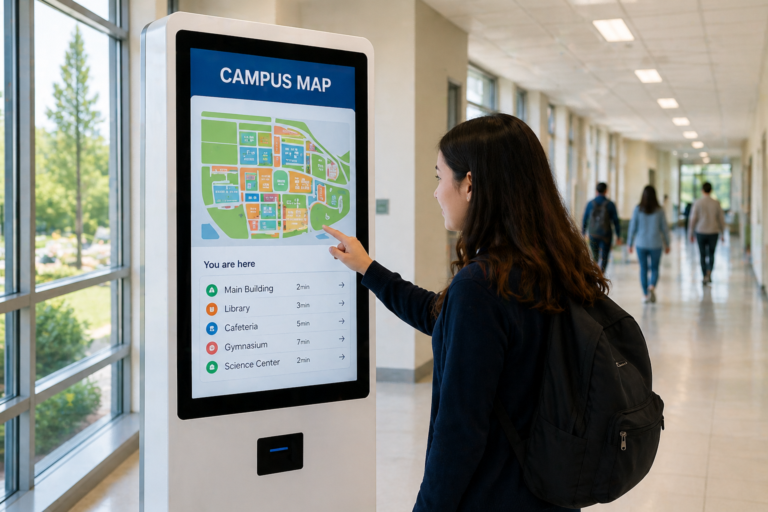
As self-service kiosks become increasingly common in restaurants, airports, and hotels, similar technologies are now making their way into educational environments. Schools are facing growing demands to improve efficiency, enhance student experiences, and manage daily operations more effectively. In this context, education kiosks are emerging as a practical solution that bridges digital interaction with real-world campus needs.
From streamlining visitor check-ins at school entrances to enabling students to access schedules, make payments, or explore interactive learning content, these kiosks are transforming how campuses operate. Unlike traditional systems, they introduce a more intuitive, self-service approach that reduces reliance on administrative staff while improving accessibility for students and visitors.
This article explores what education kiosks are, how they are used across different school scenarios, and how institutions can effectively plan and deploy them to support modern, connected campus environments.
What Is an Education Kiosk?
An education kiosk is an interactive, self-service digital terminal designed to operate across various areas of a school campus. It serves as a centralized access point where students, teachers, and visitors can interact with digital content, retrieve information, and complete tasks independently without relying on staff assistance.
These kiosks are commonly installed in high-traffic locations such as school entrances, libraries, classrooms, and cafeterias, ensuring easy access for daily use. Depending on the deployment, they can support a wide range of functions—from displaying schedules and announcements to enabling interactive learning and self-service operations.
The defining features of an education kiosk lie in its interactive and self-service capabilities. Unlike passive systems, users can actively engage with the screen through touch, voice, or guided interfaces. In addition, it acts as a multi-purpose platform, combining learning tools, communication channels, and operational functions into a single device.
It is important to distinguish education kiosks from traditional digital signage and administrative desks. While digital signage focuses primarily on one-way content display, kiosks enable two-way interaction. Similarly, unlike traditional front desks that rely on manual service, kiosks automate processes such as information lookup, registration, and navigation.
In today’s context of smart campus transformation, education kiosks have become increasingly important. They support automation, reduce operational friction, and improve efficiency, making them a key component in building modern, connected, and scalable educational environments.
Key Use Cases and Benefits of Education Kiosks in Schools
1. Smart Learning & Interactive Education
| Use Case | Function | Value |
|---|---|---|
| Multimedia learning | Visualize complex concepts (video, simulation) | Improve comprehension |
| Gamified learning | Quizzes, scoring systems, rewards | Increase engagement |
| AI-assisted learning | Adaptive difficulty based on performance | Personalized learning |
| Exam mode kiosk | Lock into single application | Prevent cheating |
| Multi-app control | Restrict non-learning apps | Maintain focus |
For example, in a middle school biology class, students can use a touchscreen interface to rotate a 3D model of the human body, tap on organs to explore their functions, and simulate processes such as blood circulation or respiration. This hands-on interaction encourages active exploration rather than passive memorization.
In group activities, students collaborate on problem-solving challenges displayed on the kiosk. Teams take turns interacting with the screen while earning points collectively, creating a collaborative and engaging learning environment with a game-like dynamic.
2. Administrative Automation & Self-Service
| Use Case 使用场景 | Function 功能 | Value 价值 |
|---|---|---|
| Student ID registration | Self-service enrollment & card setup | Reduce admin workload |
| School payment kiosk | Tuition / textbook payments | Faster processing |
| Cafeteria ordering & payment | Menu browsing, meal selection, self-payment | Reduce queues & improve accuracy |
| Visitor management | Visitor check-in, ID verification | Improve efficiency |
| Information access | FAQs, schedules, notices | Reduce repetitive inquiries |
For example, students can use the kiosk to check their class schedules by selecting their grade or scanning their student ID. The system instantly displays classroom locations, teacher names, and any timetable updates. This allows students to quickly access accurate information without relying on administrative staff.
Students and visitors can also browse campus service information through the kiosk. By navigating a categorized interface, they can find answers to common questions such as library hours, cafeteria menus, or school policies. This improves access to information while reducing repetitive inquiries directed to staff.
In the cafeteria, kiosks enable a self-ordering and payment process. Students can browse menus, select meals, and complete payments using a student card or mobile payment. Orders are automatically sent to the kitchen, helping reduce queues and improve order accuracy during peak hours.
3. Campus Communication, Engagement & Recognition
| Use Case | Function | Value |
|---|---|---|
| Announcements & updates | School news, events, schedules | Real-time communication |
| Emergency alerts | Safety alerts, weather closures | Immediate response |
| Campus navigation | Maps, directions, facility search | Better visitor experience |
| Student achievements | Sports, arts, academic recognition | Boost motivation |
| Campus culture & alumni | Stories, history, alumni profiles | Strengthen identity & engagement |
For example, the kiosk allows users to filter locations (e.g., classrooms, labs, offices), making navigation faster and more intuitive compared to static maps. Students or visitors will receive a dynamically generated route, with step-by-step navigation that updates based on building access or temporary closures.
Students can browse achievement categories, tap to explore individual profiles, and view detailed stories behind awards, rather than just seeing a fixed slideshow. They can interact with a timeline of school history, tapping on milestones to explore photos, videos, and stories in depth, creating a more immersive experience.
How to Plan and Deploy School Kiosks
chools should approach kiosk deployment by targeting specific campus scenarios where friction is visible. For example, if visitors frequently queue at the front desk during morning hours, a kiosk at the main entrance can handle self check-in and basic verification, reducing congestion. If students regularly ask for directions, placing kiosks in lobbies or intersections allows them to search classrooms or offices instantly instead of relying on staff.
Before deployment, schools should map a clear, intuitive user flow based on real behavior. In a cafeteria setting, the process should be as simple as browsing menus, selecting items, and completing payment without confusion. In academic buildings, checking schedules or room assignments should take only a few taps. If users hesitate or need assistance, the workflow needs to be simplified.
Rather than deploying kiosks everywhere at once, schools should start with one high-impact location, such as the entrance, cafeteria, or library. A small pilot helps observe how students and visitors actually interact with the system—whether they use it naturally, where they drop off, and what slows them down.
Placement is critical. Kiosks should be installed where people naturally pause, such as entry points, waiting areas, or high-traffic corridors, not hidden corners. Finally, kiosks should connect with existing systems like student records or payment platforms, while being regularly updated with relevant content. This ensures they remain useful in daily campus operations rather than becoming underused display devices.
Top 5 Education Kiosk Solution Providers (2026)
The following list is compiled from our market research and highlights reputable education kiosk manufacturers. The companies are presented in no particular order, and all information is sourced from publicly available online data.
1. MetroClick
| Category | Details |
|---|---|
| Company Name | MetroClick |
| Company History & Biography | MetroClick provides interactive kiosk, digital signage, and interactive directory solutions, with dedicated offerings for schools and campuses including wayfinding, check-in, and payment-enabled kiosks. |
| Product Range | Touch screen kiosks, self-service kiosks, interactive directories, digital signage, wayfinding kiosks |
| Location | New York, United States |
| Best For | Schools and campuses needing custom interactive kiosks and self-service solutions |
| Contact | https://www.metroclick.com |
2. ViewSonic
| Category | Details |
|---|---|
| Company Name | ViewSonic |
| Company History & Biography | ViewSonic is a global visual solutions provider offering interactive displays, kiosk displays, and digital signage for education environments such as directories, announcements, and campus communication. |
| Product Range | Interactive displays, digital signage, kiosk displays, projectors, education software |
| Location | California, United States (Global operations) |
| Best For | Schools needing branded, high-quality display-based kiosk solutions |
| Contact | https://www.viewsonic.com |
3. Advanced Kiosks
| Category | Details |
|---|---|
| Company Name | Advanced Kiosks |
| Company History & Biography | Advanced Kiosks is a U.S.-based kiosk manufacturer with over 20 years of experience, providing solutions for K-12 schools including visitor management, wayfinding, and administrative kiosks. |
| Product Range | Visitor kiosks, wayfinding kiosks, form submission kiosks, self-service software |
| Location | New Hampshire, United States |
| Best For | Schools requiring turnkey kiosk systems and administrative automation |
| Contact | https://advancedkiosks.com |
4. Ikinor
| Category | Details |
|---|---|
| Company Name | Ikinor Technology |
| Company History & Biography | Ikinor is a China-based manufacturer specializing in interactive kiosks, smart boards, and touch displays, offering OEM/ODM solutions for education and commercial applications. |
| Product Range | Interactive kiosks, smart boards, touch displays, OPS modules |
| Location | Dongguan, Guangdong, China |
| Best For | Schools, distributors, and integrators needing customized kiosk and display solutions |
| Contact | https://www.ikinor-tech.com |
5. Beten Smart
| Category | Details |
|---|---|
| Company Name | Beten Smart |
| Company History & Biography | Beten Smart provides OEM/ODM interactive kiosks and digital signage solutions, supporting education, retail, and public sector applications with customizable hardware. |
| Product Range | Interactive kiosks, digital signage, touch panels, video walls |
| Location | Shenzhen, China |
| Best For | Buyers looking for cost-effective OEM/ODM kiosk manufacturing |
| Contact | https://betensmart.com |
FAQs
An education kiosk is an interactive, self-service digital terminal used across campus environments such as entrances, libraries, cafeterias, and academic buildings. It allows students, staff, and visitors to access information, complete tasks, and interact with digital systems independently without relying on administrative staff.
Education kiosks help schools by automating routine processes, improving efficiency, and enhancing user experience. They reduce administrative workload (e.g., check-ins, inquiries), provide real-time information, support interactive learning, and streamline services like payments and navigation. This allows staff to focus on higher-value tasks while improving overall campus operations.
Schools can place kiosks in high-traffic and decision-point areas, including:
Main entrances (visitor check-in)
Lobbies and hallways (information & navigation)
Cafeterias (ordering & payment)
Libraries (self-service access)
Academic buildings (learning & schedules)
The key is to install them where users naturally stop or need to take action.
Typical features include:
Self-service functions (check-in, registration, payments)
Information access (schedules, FAQs, announcements)
Interactive navigation (maps, directions)
Learning tools (multimedia content, quizzes, AI-assisted learning)
System integration (student systems, payment systems)
Security controls (restricted access, exam mode)
Yes. Education kiosks are commonly used for visitor check-in and identity verification. Visitors can register their details, scan QR codes, or verify identity at the kiosk, which helps reduce front desk workload, improve efficiency, and enhance campus security.




