
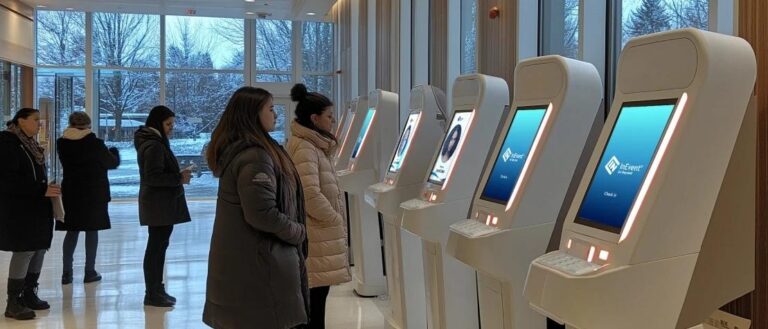
At the entrance of a busy office building during the morning rush, visitors simply walks up to a kiosk, scans a QR code, and completes check-in within seconds before heading upstairs.
This shift highlights a broader change in how organizations manage visitor flow. A visitor management kiosk is more than just a digital sign-in tool—it replaces manual, inconsistent processes with a structured and automated system. From registering visitors to guiding them through the building, everything becomes faster and more organized.
In this article, we’ll explore how visitor management kiosks work, how they improve efficiency and security, and how they are evolving into a connected experience across different environments.
What Is a Visitor Management Kiosk? (Beyond the Front Desk)
A visitor management kiosk can be simply understood as a digital replacement for the traditional visitor sign-in desk. Instead of speaking to a receptionist or filling out a paper log, visitors use a touchscreen device to check themselves in. The process is straightforward: they enter their details, scan a QR code or ID if needed, and follow on-screen instructions to complete registration.
In many traditional setups, visitor check-in still relies on handwritten records and manual coordination. A visitor arrives, provides information, and waits while staff record the details and notify the host. This approach may seem manageable at first, but it often depends heavily on people, which makes the process less consistent and harder to standardize.
A visitor management kiosk changes how this interaction happens. It turns a person-to-person process into a guided, step-by-step digital interaction. Every visitor follows the same structured flow, ensuring that information is captured in a consistent format and stored digitally for later use.
Visitor Management Kiosk vs Traditional Check-In (Key Differences)
| Aspect | Visitor Management Kiosk | Traditional Check-In |
|---|---|---|
| Speed & Efficiency | Self-service, fast, no queues (30–60s) | Manual process, often slow with waiting |
| Data & Accuracy | Digital input, complete and traceable | Handwritten, error-prone, hard to track |
| Security Control | ID verification, access permissions | Limited or no real security control |
| Scalability | Multiple kiosks handle high traffic | Limited by staff capacity |
| User Experience | Smooth, contactless, consistent | Depends on staff, often inconsistent |
More importantly, these kiosks are not limited to office environments. They are used in hospitals, factories, campuses, and commercial spaces, anywhere that needs a clear and organized way to manage incoming visitors. Whether it’s registering guests at a facility entrance or guiding people through a controlled access point, the kiosk acts as a simple, reliable entry interface.
How Visitor Management Kiosks Improve Check-In Efficiency at Scale
In environments where visitor volume can change rapidly—such as hospitals, exhibitions, and large campuses—check-in efficiency is not just about speed, but about handling scale consistently. A system that works well for a small number of visitors may quickly become overwhelmed when traffic increases.
Visitor management kiosks are designed to operate effectively under these conditions. By enabling self-service interaction, they distribute the workload across multiple touchpoints instead of concentrating it in a single location. Several kiosks can run simultaneously, allowing visitors to check in at the same time rather than waiting in sequence.
Efficiency is further improved through streamlined workflows. Pre-registered visitors can complete check-in quickly, while structured input steps reduce unnecessary repetition. Many systems also support QR code check-in or mobile-based access, enabling visitors to move through the process with minimal friction.
This impact is especially visible in real-world settings. In hospital environments, where visitor numbers fluctuate throughout the day, similar systems have reduced waiting time by up to 40%, as shown in this patient check-in kiosk case study.
Rather than focusing only on speed, visitor management kiosks improve efficiency by creating a system that can scale smoothly with demand.
How Do Visitor Check-In Kiosks Work? (Behind the System Logic)
Entering Information: A Simple Start for Visitors
When visitors arrive, they interact with the kiosk through simple steps such as scanning a QR code, tapping an ID, or entering basic details. The screen clearly shows what to do next, so even first-time users can complete the process without confusion.
Behind the scenes, the system is already turning this information into digital data that can be used in the next steps.
System Checking: Making Sure Everything Is Valid
Once the information is submitted, the system quickly checks it in the background. It looks at whether the visitor has an appointment, verifies their identity, and compares it with any security lists if needed.
Based on these checks, the system decides whether the visitor should be allowed to enter and what level of access they should have.
Automatic Actions: No Waiting, No Manual Help
After everything is confirmed, the kiosk automatically moves to the next step. A visitor badge is printed, a notification is sent to the host, and access can be enabled right away.
At the same time, the system can show helpful information such as directions or floor details, so visitors know exactly where to go.
Connecting Everything Together: From Check-In to Entry
Behind these actions, the kiosk is already connected to systems such as access control, internal visitor platforms, and security infrastructure. This level of kiosk connectivity enables verification decisions to be executed instantly—whether unlocking a gate, granting elevator access, or logging activity in real time.
Rather than acting as a standalone device, the kiosk operates within a connected network, where data, decisions, and actions are fully synchronized, as explained in this kiosk connectivity guide.
This system-driven approach is what enables both efficiency and security at scale.
Strengthening Security Through Controlled Access
Security is one of the most critical reasons organizations adopt visitor management kiosks. Instead of simply recording who enters a facility, these systems focus on controlled access in a structured and consistent way—similar to how a security kiosk is designed to protect user data and system access.
At the core of this approach is identity verification. Every visitor is required to provide identifiable information before proceeding, ensuring that access is linked to a verified individual. This creates a reliable record of who is on-site at any given time, improving visibility and accountability.
In addition, access control plays a key role. Visitors are no longer treated the same by default—permissions can be defined and restricted to specific zones. This reduces the risk of unauthorized access and protects sensitive areas.
Kiosks also support screening against restricted lists, helping organizations identify and block individuals who should not be granted entry. In some cases, real-time approval ensures that visits are authorized before access is granted.
These capabilities are especially valuable in environments such as industrial sites, schools, and hospitals, where secure access management is essential.
Overall, security moves from simply recording visitor presence to actively managing access, creating a more controlled and reliable environment.
Beyond Check-In: Enhancing the Visitor Journey with Smart Experiences
Once check-in is completed, the role of a visitor management kiosk does not end—it begins to shape the entire visitor journey. Instead of stopping at registration, modern systems extend into the building environment, creating a smoother and more personalized experience.
For example, in large buildings such as offices, hospitals, or commercial complexes, the system can automatically assign elevator access based on the visitor’s destination. Instead of searching for directions, visitors are guided directly to the correct floor, reducing waiting time and improving overall flow within the building.
Navigation is another important layer. Kiosks can provide clear wayfinding support, either on the screen or through mobile integration, showing visitors exactly where to go. This is especially useful in complex environments like hospitals or large campuses, where finding the right department or office can otherwise be confusing.
In more advanced setups, the experience becomes even more personalized through environmental integration. When a visitor arrives at a meeting room, lighting, air conditioning, or display systems can be automatically activated. This transforms the process from simple visitor handling into a more thoughtful and prepared reception experience.
At the same time, hosts can be notified in advance, allowing them to prepare for meetings or appointments without delays. This ensures that interactions begin smoothly and professionally.
Visitor management is no longer just about check-in—it becomes part of a connected smart building experience, where systems work together to support both efficiency and user comfort. These capabilities are increasingly being adopted across different environments.
Key Considerations When Setting Up a Visitor Management Kiosk
Setting up a visitor management kiosk is not simply about placing a device at the entrance—it’s about designing a system that fits naturally into how people move, interact, and operate within a space. One of the most overlooked factors is placement. A kiosk should be located where visitors naturally arrive or pass through, such as main entrances or high-traffic pathways. If it’s placed in a corner or outside the natural flow, visitors may bypass it entirely and revert to asking staff for help. In practice, placement directly determines whether the system is adopted or ignored.
Another critical aspect is user experience design. The interface should be simple and completed in just a few steps, but it must also match real user needs. In healthcare settings, kiosks should support elderly users with larger fonts, clear instructions, and simplified interactions. In public spaces, multi-language support is essential to serve diverse visitors. No matter how advanced the technology is, if users hesitate or feel confused, the system will fail in real-world use.
System integration is often where the biggest difference lies between a basic setup and a fully functional solution. A standalone kiosk can handle registration, but its true value comes when it connects with other systems—such as access control, elevator management, visitor scheduling platforms, and internal systems like HR or security. This allows actions to be executed automatically, turning check-in into part of a larger operational workflow rather than an isolated task. For companies that also want to extend self-service access to internal staff, an employee self-service kiosk can connect with HR, payroll, attendance, and workforce management systems so employees can check schedules, view payslips, submit leave requests, and access company notices without relying on HR staff.
It’s also important to think about scalability and future expansion. Many deployments start small, perhaps with a single kiosk, but as visitor volume increases or operations expand, additional units may be required across multiple entrances or locations. A system that supports centralized management, remote updates, and modular feature expansion (such as adding badge printing, scanning, or facial recognition) will be much easier to scale over time.
Finally, hardware reliability must align with the environment in which the kiosk operates. A device used in a factory may need to withstand dust, vibration, or heavy usage, while one placed in a commercial or corporate setting may prioritize design, aesthetics, and user interaction. In healthcare environments, ease of cleaning and stable performance are often key considerations.
Instead of treating a visitor management kiosk as a standalone device, businesses should view it as part of a broader operational system. From placement and user experience to integration and scalability, every detail affects performance.
Working with an experienced solution provider becomes essential. At Ikinor, we go beyond hardware manufacturing to deliver customized, scalable kiosk solutions for healthcare, industrial, commercial, and public environments. With OEM/ODM capabilities, we help transform a simple check-in point into a connected and efficient visitor management system.
FAQs
A visitor management kiosk is a self-service digital check-in system that lets guests register when they arrive, instead of using a paper sign-in sheet. It usually uses a touchscreen tablet or kiosk and can log visitor details, print badges, and notify hosts automatically.
Visitors follow on-screen prompts to enter their details, scan a QR code, verify ID, or sign required documents. After check-in, the system can send a host notification and issue a badge if needed.
Visitor management kiosks help improve security, reduce wait times, and create a more professional first impression. They also reduce manual admin work by automating check-in and record-keeping.
Yes, many systems support QR code check-in or pre-registration so visitors can complete part of the process on their phone before arriving. This makes check-in faster and reduces physical contact at the front desk.
Yes, they can capture visitor photos, verify identities, maintain digital logs, and support badge printing or access rules. These features help organizations track who is on-site and maintain better records for security and compliance.
Key features include an intuitive touchscreen interface, pre-registration, ID verification, badge printing, real-time notifications, and integration with security or building systems. Multi-language support and customization are also useful for larger or international organizations.




