
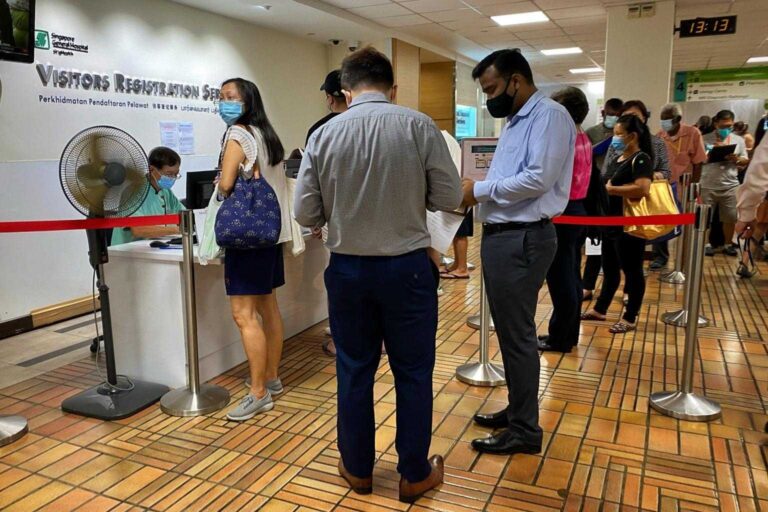
In a busy general hospital in Johor, Malaysia, long queues at registration counters had become a daily challenge. Patients often waited 20 to 40 minutes just to complete basic check-in, creating frustration and placing heavy pressure on front-desk staff. The situation was even more difficult for elderly patients and individuals with disabilities, who struggled with both the waiting time and the complexity of manual processes.
To solve this, the hospital introduced a Patient Check-in Kiosk system, aiming to streamline registration, improve accessibility, and reduce reliance on manual operations. By combining self-service technology, simplified workflows, and inclusive design, the hospital successfully transformed its patient intake process—ultimately reducing waiting time by around 40% while delivering a more efficient and patient-friendly experience.
Background
This project took place in a general hospital in Johor, Malaysia, serving a large and diverse patient population from surrounding communities. As patient volumes increased, the hospital’s **registration process—fully dependent on manual service counters—**began to show clear limitations, especially during peak hours such as early mornings and pre-holiday periods.
On average, patients had to wait 20 to 40 minutes just to complete the basic check-in process. This not only extended the overall treatment journey but also negatively impacted the patient experience. For elderly patients, standing in long queues was physically demanding, while individuals with disabilities often faced additional challenges navigating crowded spaces and complex procedures. At the same time, front-desk staff were under constant pressure, handling repetitive tasks that increased the risk of errors and reduced overall service efficiency.
Hospital management recognized that simply adding more staff would not solve the root problem. Instead, a more sustainable approach was needed—one that could streamline workflows and reduce reliance on manual operations. As a result, the hospital defined three key objectives: to significantly improve registration efficiency, to enhance the patient experience (especially for vulnerable groups), and to reduce the workload on frontline staff while optimizing operational resources for long-term performance.
Solution Overview
To address the inefficiencies of manual registration, the hospital introduced a Patient Check-in Kiosk system, transforming the traditional workflow into a more automated and user-friendly process. Instead of relying solely on service counters, patients can now complete registration independently within minutes, significantly improving overall operational efficiency.
The kiosks were strategically deployed in high-traffic areas, including the hospital entrance and the registration hall. This placement ensures that patients can begin the check-in process immediately upon arrival, effectively reducing congestion at the front desk and enabling better crowd distribution during peak hours.
In terms of functionality, the system is designed to simplify and accelerate the registration process. Patients can complete check-in through QR code scanning (e.g., appointment confirmations) or ID verification, allowing for fast and accurate data capture without manual input. Once registered, the system automatically assigns patients to the appropriate department through an integrated queue and triage system, minimizing confusion and streamlining patient flow.
To accommodate the hospital’s diverse patient base, the kiosks also support multiple languages, including English, Malay, and Chinese. This ensures that users from different backgrounds can easily navigate the interface without assistance, reducing dependency on staff while enhancing accessibility.
Overall, the introduction of the Patient Check-in Kiosk creates a more efficient, scalable, and patient-centric registration experience, laying the foundation for further digital transformation within the hospital.
Accessibility Design
One of the key highlights of this project is its strong focus on accessibility and inclusive design, ensuring that the Patient Check-in Kiosk can be used comfortably by people of all ages and abilities. Rather than treating accessibility as an add-on, the hospital made it a core design priority, aligning with widely recognized standards such as ADA compliant kiosk design, which ensures that self-service systems are usable for people of all abilities.
For elderly users, the interface features large fonts and high-contrast visuals, making it easier to read and navigate. The workflow is simplified so that registration can be completed in just 3 to 4 steps, reducing confusion and cognitive load. In addition, voice prompts guide users through each stage, providing clear instructions and reassurance throughout the process.
A practical example helps illustrate this. An elderly patient with slight hand tremors may struggle to tap small buttons accurately on a touchscreen. To address this, the system uses larger touch targets, simplified confirmation steps, and clear visual cues to minimize errors and frustration, making the interaction smoother and more intuitive.
For patients with disabilities, the kiosk is designed to meet wheelchair accessibility standards, including appropriate screen height and sufficient clear space for easy approach. The system also supports audio guidance with headphone connectivity, enabling visually impaired users to complete tasks independently.
By combining these features, the hospital significantly improves both usability and inclusiveness, ensuring a more equitable and efficient experience for all patients.
Deployment
The successful rollout of the Patient Check-in Kiosk was not a one-step implementation, but a carefully planned and phased deployment process. The hospital began with in-depth requirement analysis, focusing on patient demographics and behavior patterns. This included evaluating the proportion of elderly users, language preferences, peak-hour traffic, and common pain points in the existing registration workflow. These insights ensured that the solution was designed around real user needs rather than assumptions.
Based on this research, the team moved on to customizing the UI and workflow. Instead of applying a generic interface, the kiosk system was tailored to match local usage habits. This included simplifying navigation, optimizing screen flow, and integrating multilingual support (English, Malay, and Chinese) in a way that felt natural and intuitive for patients in Johor.
A critical step in the deployment was system integration with the hospital’s HIS (Hospital Information System). This allowed real-time data synchronization, ensuring that patient registration, queue management, and department allocation were seamlessly connected with backend operations. Without this integration, the kiosk would function as an isolated tool rather than a fully embedded part of the hospital’s digital ecosystem.
To minimize risk, the hospital adopted a phased deployment strategy. The kiosks were first introduced in a pilot area, where performance, user feedback, and system stability were closely monitored. After initial optimization, the solution was gradually expanded to other high-traffic zones, ensuring a smooth and scalable implementation across the entire facility.
Results
Following the deployment of the Patient Check-in Kiosk, the hospital achieved a series of measurable improvements across both operational efficiency and patient experience. The most significant outcome was a reduction in average waiting time by approximately 40%, particularly during peak hours. By allowing patients to complete registration independently, long queues at the front desk were effectively reduced, leading to a smoother overall workflow.
At the same time, the pressure on manual service counters decreased noticeably. Staff who were previously occupied with repetitive registration tasks were able to shift their focus to more complex and value-added responsibilities, such as patient assistance and exception handling. This not only improved internal efficiency but also enhanced the quality of service provided.
From the patient’s perspective, the introduction of self-service kiosks led to a clear increase in satisfaction levels. Patients experienced shorter wait times, more control over the check-in process, and less dependency on staff. The availability of multilingual interfaces and simplified workflows further contributed to a more comfortable and accessible experience.
In addition, the hospital observed a steady rise in self-service adoption rates. As more patients became familiar with the system, usage naturally increased over time, reinforcing the effectiveness of the deployment. This growing adoption also indicates strong user acceptance, which is critical for the long-term success of any digital healthcare solution.
Overall, these results demonstrate how a well-designed kiosk system can deliver both immediate operational gains and sustainable long-term value.
Takeaways
This case highlights several practical and replicable insights for healthcare providers planning to deploy self-service kiosks. First, usability should always come before feature complexity. A kiosk overloaded with functions may look advanced, but if patients struggle to complete basic tasks, it ultimately fails its purpose. In medical environments, where users vary widely in age and digital literacy, simplicity and clarity are far more valuable than excessive features.
Second, accessibility and inclusive design are not optional—they are essential. Features such as large fonts, clear navigation, voice guidance, and wheelchair-friendly hardware significantly expand the usable audience. In fact, these elements directly impact adoption rates and patient satisfaction, making them a core requirement rather than a bonus.
Another key takeaway is that kiosk placement directly affects usage. Deploying devices at entry points and high-traffic areas allows patients to engage with the system naturally as part of their arrival process. Poor placement, on the other hand, can result in underutilized equipment regardless of how well the system is designed.
Equally important is seamless integration with the hospital’s HIS system. Without real-time data synchronization, kiosks cannot fully automate workflows or deliver meaningful efficiency gains. Integration ensures that registration, queue management, and backend operations function as one unified system.
For healthcare providers looking to implement similar solutions, working with an experienced kiosk OEM/ODM manufacturer like Ikinor can make a significant difference. From custom hardware design to software integration and accessibility optimization, a tailored approach ensures the kiosk truly fits your operational needs and delivers long-term value.




