
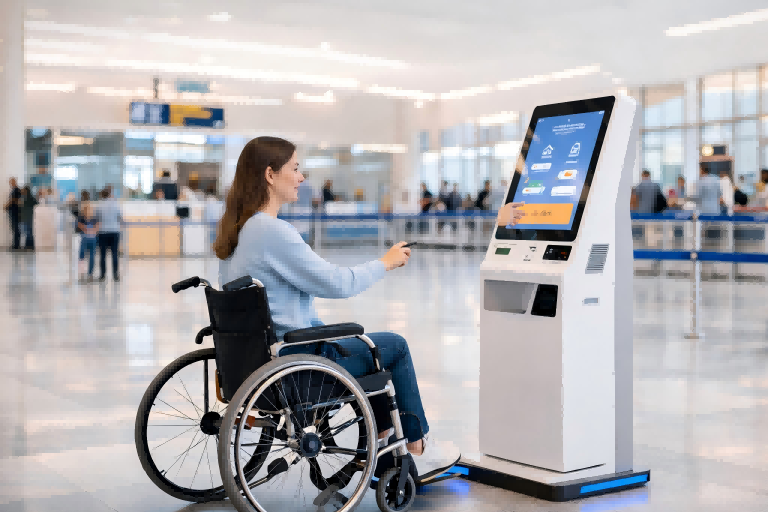
At a busy airport check-in area, a traveler using a wheelchair approaches a self-service kiosk. Instead of struggling to reach the screen or asking for help, they easily navigate the process—thanks to an accessible height, clear interface, and optional audio guidance. This simple interaction highlights a bigger shift in how kiosks are designed today.
An ADA compliant kiosk is more than just a machine that performs tasks—it is a system built to ensure everyone can use it independently. Rooted in the Americans with Disabilities Act, these kiosks are designed to remove barriers and create equal access for users with different abilities.
From physical design to interface experience, every element is optimized for inclusivity. But what exactly makes a kiosk truly ADA compliant—and how can businesses get it right?
What Is an ADA Compliant Kiosk?
An ADA compliant kiosk is a self-service terminal designed to be accessible and usable for people of all abilities, including those with physical, visual, hearing, or cognitive disabilities. The concept is rooted in the Americans with Disabilities Act, which requires public technologies and services to be inclusive and barrier-free. In simple terms, an ADA kiosk is not just a machine that works—it is a system that works for everyone.
The key idea behind ADA compliance is “accessible for all.” This means users should be able to interact with the kiosk regardless of whether they are standing, seated in a wheelchair, visually impaired, or have limited mobility. Accessibility is built into both the physical design and the user interface, ensuring that no group is excluded from completing tasks independently.
To better understand this, consider the difference between a standard kiosk and an ADA compliant one. A typical kiosk may have a high-mounted screen, small text, and rely entirely on touch input. In contrast, an ADA compliant kiosk features an accessible height, clear and readable interface, and multiple interaction options such as audio guidance or alternative input methods. The experience is not just functional—it is inclusive and user-friendly.
Understanding the concept is just the first step—what actually makes a kiosk ADA compliant?
Key ADA Accessibility Requirements for Kiosks
To comply with the Americans with Disabilities Act, a kiosk must be designed around one core principle: can every user complete the task independently and comfortably? This shifts the focus from individual features to the overall user experience.
First, physical accessibility ensures that all users, including those in wheelchairs, can reach and operate the kiosk. This includes proper screen height, unobstructed floor space, and ergonomic positioning.
Second, kiosks must support multiple input methods. Relying solely on touchscreens is not sufficient—accessible kiosks provide alternative ways to interact, such as physical buttons or assistive devices, enabling users with limited mobility to navigate effectively.
Third, multi-channel output is essential. Information should not be limited to visual display; audio guidance allows visually impaired users to follow instructions, while clear visual cues support those with hearing limitations.
In addition, interface readability plays a critical role. High contrast, larger fonts, and simple layouts make content easier to understand for users with low vision or cognitive challenges, reflecting the value of thoughtful Kiosk UI Design in improving overall accessibility.
Finally, error tolerance and timing flexibility ensure a stress-free experience. Users should have enough time to complete tasks, receive clear error messages, and easily recover from mistakes.
Together, these requirements highlight a key idea: ADA compliance is not about adding isolated features, but about enabling multi-channel interaction that adapts to different users.
Standard vs ADA Compliant Kiosk (Enhanced Comparison)
| Aspect | Standard Kiosk | ADA Compliant Kiosk |
|---|---|---|
| User Focus | General users | Inclusive for all users |
| Physical Access | Fixed, often limited | Wheelchair-accessible design |
| Input Methods | Touch only | Touch + alternative inputs |
| Output Methods | Visual only | Visual + audio support |
| Interface Design | Basic UI | High contrast, readable UI |
| Usability | May require assistance | Independent operation |
| Error Handling | Limited feedback | Clear guidance & recovery |
| Experience Goal | Functional | Accessible & inclusive |
Why ADA Compliance Matters for Modern Kiosks
ADA compliance is no longer just a regulatory checkbox—it has become a strategic advantage for businesses deploying self-service kiosks. Under the Americans with Disabilities Act, failure to provide accessible technology can lead to legal risks, including lawsuits, fines, and forced redesigns. For companies operating in the U.S. market, compliance is essential to avoid costly disruptions.
Beyond legal protection, ADA compliance significantly expands your customer base. Millions of people, including those with disabilities and aging populations, rely on accessible interfaces to complete everyday tasks. By ensuring kiosks are usable for everyone, businesses can increase engagement, improve conversion rates, and reduce customer drop-off.
Leading brands have already recognized this shift. Companies like McDonald’s have introduced accessible self-order kiosks with simplified interfaces and improved reach design. Walmart has enhanced self-checkout systems with clearer visuals and more intuitive workflows. In the financial sector, Bank of America has deployed ATMs with audio guidance and tactile keypads to ensure privacy and accessibility for visually impaired users. These examples show how accessibility directly improves real-world usability.
At the same time, ADA-compliant kiosks enable true self-service adoption. When systems are accessible, fewer users require staff assistance, reducing operational costs and improving efficiency. This is especially critical in high-traffic environments such as airports, hospitals, and retail chains.
Finally, ADA compliance is often a prerequisite for government and enterprise projects, making it essential for scaling deployments and entering new markets.
Accessibility is not just a requirement—it must be built into how kiosks function in real environments.
Use Cases of ADA Compliant Kiosks
ADA compliant kiosks are best understood through real-world scenarios, where accessibility features directly shape how users interact with services. In airports, for example, self-service check-in kiosks are designed so that wheelchair users can easily reach the screen and complete the process independently. With audio guidance available through headphones, visually impaired users can follow step-by-step instructions without assistance, making the experience both efficient and inclusive.
In retail environments, accessibility often benefits a broader audience. An older customer using a self-checkout kiosk may rely on larger text, high-contrast visuals, and simplified workflows to complete a purchase comfortably. These elements, while designed for accessibility, also enhance usability for everyday users in fast-paced settings.
In healthcare settings, accessibility becomes even more critical. Hospital registration kiosks allow visually impaired patients to navigate the process using audio prompts, reducing reliance on staff while maintaining privacy. Clear instructions and intuitive interfaces help minimize confusion during stressful situations.
Similarly, in banking environments, ATMs and kiosks equipped with audio output and tactile keypads enable users to securely complete transactions. This ensures both accessibility and data privacy, especially for those who cannot rely on visual input alone.
Across all these scenarios, audio, visual, and touch interactions work together seamlessly. The ultimate goal is consistent: to enable every user to complete tasks independently and confidently.
So how can manufacturers design kiosks that truly meet these expectations?
How to Choose and Design an ADA Compliant Kiosk Solution
Choosing an ADA compliant kiosk solution is not just about checking specifications—it’s about making sure the kiosk actually works in real-world situations.
Start with your use scenario. For example, a kiosk placed in a busy airport needs to handle high traffic, quick interactions, and diverse users, while a hospital kiosk must focus more on clarity, guidance, and privacy. Outdoor kiosks may require brighter screens and more durable materials, while indoor kiosks can prioritize user comfort and interface simplicity. In other words, where and how the kiosk is used should guide every decision.
Next, look beyond single features and focus on the complete user experience. Ask simple but important questions:
- Can a wheelchair user comfortably reach the screen?
- Can someone with poor eyesight read the content without difficulty?
- Can a first-time user finish the process without asking for help?
These practical checks are often more valuable than technical specifications.
Hardware design should also be evaluated in real terms. The screen shouldn’t be too high or too vertical, and buttons or touch areas should be easy to reach. Meanwhile, software design should feel simple and flexible—clear steps, readable text, and support for different languages can make a huge difference in usability.
It’s also important to choose a solution that has been tested in real environments, not just designed on paper. Vendors with actual deployment experience are more likely to understand real user challenges.
Ultimately, it’s not just about choosing the right kiosk—it’s about thinking differently about how people interact with it. A truly ADA compliant kiosk doesn’t just meet standards—it makes the experience easier, more inclusive, and more practical from the very first use. And as technology continues to evolve, accessibility is becoming a natural part of better design—not just a requirement to follow.
Future Trends of ADA Compliant Kiosk Technology
The future of ADA compliant kiosks is becoming more practical and user-driven, with improvements that users can clearly notice during everyday use.
One clear trend is the shift toward touchless interaction in real environments. Instead of tapping the screen, a user at an airport kiosk might scan a QR code to transfer the process to their phone, complete check-in there, and return only to print a boarding pass. In a hospital, patients could use voice commands like “next” or “confirm” to move through registration without touching the screen. These small changes reduce physical barriers while also improving speed and hygiene in high-traffic areas.
Another trend is the use of smarter default settings. Rather than asking users to adjust accessibility options manually, kiosks will begin to respond automatically. For example, a screen placed in direct sunlight may increase contrast and brightness on its own, while plugging in headphones could instantly activate audio guidance. This removes extra steps and makes the experience smoother, especially for first-time users.
We can also expect simpler and more guided interfaces. A retail self-checkout kiosk, for instance, may show one action per screen, with large buttons and clear instructions like “Scan item” or “Tap to pay.” This reduces confusion and helps users complete tasks quickly without assistance.
These trends show a clear shift: accessibility is becoming a built-in part of everyday interactions, evolving from a compliance requirement into a key driver of product innovation and competitive advantage.
ADA Compliance & Buyer Checklist for Kiosk Manufacturers
Choosing an ADA compliant kiosk is not just about meeting regulatory standards—it’s about ensuring the solution performs effectively in real-world environments and delivers a smooth, inclusive user experience. Use this checklist to evaluate both compliance and overall product quality.
Accessibility & Compliance Essentials
- Meets core requirements of the Americans with Disabilities Act
- Operable height and reach range suitable for wheelchair users
- Supports multiple interaction methods (touch, audio, alternative input)
- Provides both visual and audio output
- Interface follows accessibility best practices (contrast, readability, clarity)
Focus: Not just compliant, but truly usable
Real-World Usability
- Can users complete tasks independently without assistance?
- Is the workflow simple and intuitive for first-time users?
- Are instructions clear and easy to follow?
- Does the system minimize errors and confusion?
Focus: Can users complete tasks smoothly
Hardware Design & Ergonomics
- Screen height and angle are comfortable for different users
- Supports both standing and wheelchair interaction
- Durable design for high-traffic environments
- Suitable for indoor or outdoor deployment
Focus: Designed for real-world use
Software Flexibility & Customization
- UI supports adjustable font size and contrast
- Multi-language options available
- Workflow can be customized for different use cases
- Easy integration with existing systems
Focus: Adaptable to different business needs
Technology & Interaction Capability
- Reliable audio guidance (e.g., Text-to-Speech)
- Supports alternative input methods when needed
- Ready for future upgrades (e.g., touchless, AI interaction)
Focus: Built for long-term evolution
Deployment & Maintenance
- Supports remote management and updates
- Easy to maintain and troubleshoot
- Stable performance under continuous use
- Vendor provides responsive technical support
Focus: Lower long-term operational costs
Vendor Experience & Project Capability
- Proven experience with ADA-compliant deployments
- Case studies across industries (retail, healthcare, transportation)
- Ability to deliver both hardware and software as a complete solution
- Strong understanding of accessibility standards and real-world implementation
For example, manufacturers like Ikinor focus on integrating accessibility into both hardware and software design, ensuring that kiosks are not only compliant but also practical and scalable across different scenarios.
FAQs
An ADA compliant kiosk is designed so people with disabilities can use it independently. It typically includes accessible reach ranges, clear floor space, usable controls, and features that support visual, auditory, and mobility needs.
Common requirements include a clear approach space of about 30 by 48 inches, accessible control heights, and components placed within reachable limits for seated and standing users. Operable parts should not require tight grasping, pinching, or twisting.
Kiosks can support visually impaired users with voice guidance, audio prompts, screen reader compatibility, braille labels, and high-contrast displays. These features help users navigate the kiosk without relying only on the touchscreen.
Accessible kiosks place screens, card readers, and other interactive elements at heights that are reachable from a seated position. They also provide enough clear space in front of the kiosk for wheelchair approach and maneuvering.
Useful solutions include tactile buttons, audio jack support, voice recognition, adjustable interfaces, and alternative input methods. These tools give users more than one way to complete a task, which improves independence and usability.
ADA compliance helps ensure that disabled users can access services fairly and without assistance. It also reduces legal risk, improves customer experience, and makes the kiosk usable for a broader audience.




