
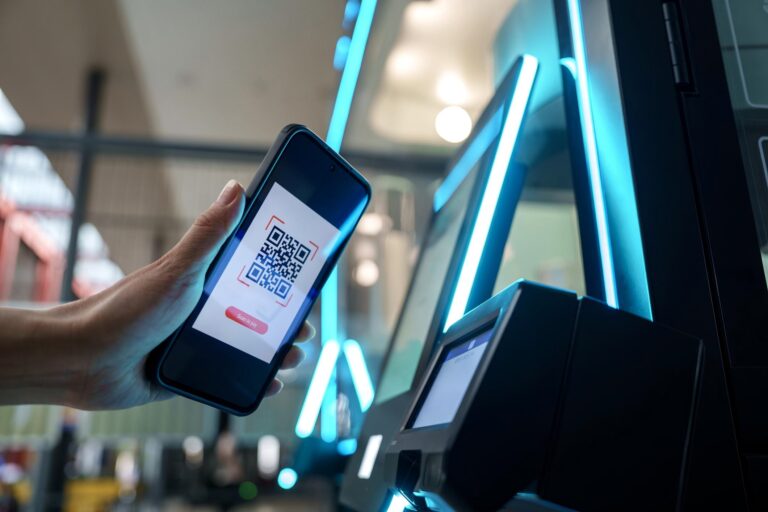
In today’s fast-paced environments, businesses are under increasing pressure to handle large volumes of users quickly and accurately. Whether it’s patient check-in, parcel pickup, or visitor registration, traditional processes that rely on manual input are becoming inefficient and difficult to scale. Even small delays or data entry errors can impact both user experience and operational efficiency.
This is where scanning kiosks are making a difference. By replacing manual steps with instant data capture, they simplify interactions and reduce friction at key service points. Instead of typing or filling out forms, users can simply scan and move forward.
As organizations continue to digitize their operations, scanning kiosks are emerging as a practical and scalable solution for faster, smarter service delivery.
What Is a Scanning Kiosk and Why It Matters
Think about the last time you had to wait in line to fill out forms at a hospital, repeatedly show your ID at an airport, or manually type in an order number at a pickup station. These steps feel routine, but they are often slow, repetitive, and prone to human error. For businesses handling large volumes of users every day, this inefficiency quickly becomes a bottleneck.
This is exactly where a Scanning Kiosk comes in. In simple terms, it acts as a bridge between the physical world and digital systems. Instead of asking users to input information manually, the kiosk captures it instantly—turning documents, IDs, or codes into usable digital data within seconds.
A Scanning Kiosk is a self-service terminal equipped with technologies such as QR/barcode scanning, ID recognition (OCR), and document digitization. These capabilities allow users to complete tasks like identity verification, form submission, or order retrieval without staff assistance.
The key difference from a traditional kiosk lies in how information is handled. A standard kiosk depends on manual input, which takes time and increases the risk of mistakes. A scanning kiosk, on the other hand, relies on auto capture and recognition, making the process faster, more accurate, and more consistent.
For businesses, this shift is more than just convenience. It represents a crucial step toward paperless operations and workflow automation, where data can move seamlessly from user interaction into backend systems without delay or re-entry.
Core Features That Define a Scanning Kiosk
What makes a scanning kiosk powerful is not a single feature, but a combination of capabilities working together as one system. Instead of acting like a simple scanner, it functions as a complete data processing station.
At the input level, the kiosk is designed to capture different types of real-world information quickly and accurately. This includes QR and barcode scanning for tickets, orders, or memberships, ID and passport recognition using OCR to automatically extract user data, and document scanning to convert paper forms into digital files. These features eliminate the need for manual typing and reduce errors from the start.
At the processing level, the system goes beyond capturing images. It uses OCR technology to recognize and structure text data, turning scanned content into usable information. In more advanced scenarios, facial recognition can be added to verify identity, especially in environments that require higher security, such as airports or financial services.
The real value appears at the output level, where the kiosk connects directly with business systems. Scanned data can be automatically uploaded to databases, synchronized with platforms like ERP, HIS, or PMS, and used to trigger next-step actions such as printing receipts, approving access, or updating records in real time.
In simple terms, a scanning kiosk is not just capturing data—it is moving data into action.
| Comparison | Scanning Kiosk | Traditional Kiosk |
|---|---|---|
| Data Input Method | Automatic capture (QR, barcode, ID, documents) | Manual input (typing, selecting options) |
| Speed & Efficiency | Fast, completed in seconds | Slower, depends on user operation |
| Accuracy | High (reduces human errors) | Lower (prone to typing mistakes) |
| User Experience | Simple, minimal steps | More steps, higher effort |
| Business Value | Automation + efficiency + data accuracy | Convenience + reduced staff workload |
Where Scanning Kiosks Deliver the Most Business Value
The real value of a scanning kiosk is best understood through how it replaces manual steps with automatic actions in everyday scenarios.
In healthcare, a patient arrives and simply scans their ID. The system immediately pulls up their appointment and completes registration. No forms, no repeated questions. This makes the process faster for patients and reduces pressure on front desk staff while also improving data privacy.
In retail and e-commerce, especially for order pickup, the process becomes even more direct. A customer scans a QR code, the system matches the order instantly, and the item is released. There’s no need to type anything or wait for staff assistance, which leads to shorter queues and higher efficiency, especially during peak hours.
In the hospitality sector, guests can check in by scanning their passport. The system auto-fills their details and issues a room card within seconds. This creates a smooth, self-service experience without delays at the reception desk.
In logistics, staff scan package barcodes and the system automatically records and updates shipment status. This reduces human error and keeps tracking data accurate in real time.
In government and corporate environments, visitors scan their ID, complete registration, and receive access permissions. The entire process becomes more secure, faster, and easier to manage.
Scanning kiosks work best anywhere that requires quick identification and automatic data entry without manual input.
Why Scanning Kiosks Are Becoming Essential
Scanning kiosks are no longer just tools for convenience. They are becoming a critical part of how businesses collect, process, and use data in real time.
One of the biggest shifts is speed. Instead of asking users to type information step by step, scanning kiosks allow them to scan and move on within seconds. This shortens the entire interaction process and significantly improves efficiency, especially in high-traffic environments.
Another key factor is accuracy. Manual input often leads to mistakes—misspelled names, incorrect ID numbers, or incomplete forms. By using automatic data capture, scanning kiosks reduce these errors and ensure that information enters the system correctly from the start.
More importantly, scanning kiosks are driving automation. Once data is captured, it doesn’t just sit there—it can immediately trigger actions such as registration, payment processing, access approval, or record updates. This turns a simple interaction into a fully connected workflow, without the need for manual intervention.
From a broader perspective, scanning kiosks are becoming the first step in digital transformation. They act as the entry point where real-world information enters business systems, making it possible to build faster, smarter, and more connected operations.
As scanning kiosks become a core part of digital infrastructure, choosing the right solution is no longer just a technical decision—it’s a strategic one.
What Businesses Should Consider Before Choosing a Scanning Kiosk
Choosing a scanning kiosk starts with one simple question: what problem are you trying to solve? Different scenarios require different technologies. For example, a hospital needs OCR-based ID recognition to accurately read patient information, while a retail pickup station relies more on fast QR or barcode scanning. If the technology doesn’t match the use case, the kiosk won’t deliver real value.
Another critical factor is speed and accuracy. In high-traffic environments like airports or large stores, even a few extra seconds per user can create long queues. If scans fail or take too long, users quickly become frustrated and may abandon the process altogether. A reliable kiosk should complete tasks quickly and consistently.
Equally important is system integration. A kiosk that only scans but cannot connect to your backend is essentially just a standalone device. The real benefit comes when scanned data can automatically sync with systems like ERP, HIS, or CRM, triggering actions such as registration, order release, or access control without manual input.
Security is another key consideration, especially when handling sensitive data. In many cases, this is where a Security Kiosk becomes essential—designed specifically to protect user information and control access. Features like data encryption, user authentication, and compliance with industry standards are critical, particularly in sectors such as healthcare and finance.
You also need to think about where and how the kiosk will be used. Placing a kiosk at the wrong location—such as away from the main user flow—can limit its effectiveness, no matter how advanced the device is.
For businesses planning large-scale deployment, working with an experienced OEM/ODM partner can simplify the process. Ikinor, as a professional self-service kiosk manufacturer, provides end-to-end solutions tailored to real-world workflows, ensuring reliability, scalability, and seamless integration across different industries.
FAQs
A scanning kiosk is a self-service station that captures information from documents, IDs, barcodes, QR codes, or other media. It is commonly used to speed up check-in, verification, and data entry tasks.
Scanning kiosks are widely used in airports, healthcare, retail, government offices, visitor management, and logistics. They help automate tasks such as ID verification, document submission, ticket scanning, and package tracking.
Useful features include barcode and QR scanning, OCR document capture, ID reading, fast processing, and an intuitive touchscreen interface. Many systems also support audio prompts, image preview, and secure file transfer.
Scanning kiosks can connect to software platforms through APIs, network connections, or middleware. This allows scanned data to sync with databases, CRM tools, access control systems, or workflow applications.
Yes, many scanning kiosks can process IDs, passports, checks, forms, tickets, and other documents. Some models use specialized scanners for better accuracy with machine-readable zones, barcodes, and double-sided documents.
Businesses should review scan speed, document compatibility, physical footprint, security requirements, and integration needs. It is also important to choose hardware and software that can handle high-volume use reliably.




