
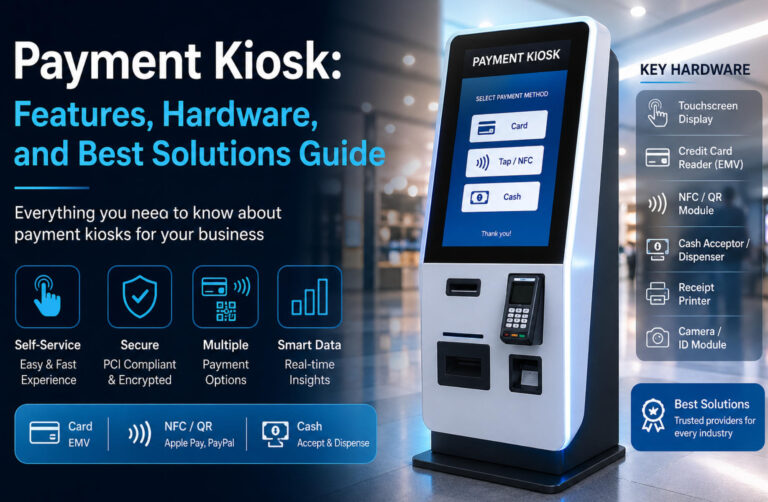
Cuando paseas por un centro comercial o pagas en una tienda, probablemente hayas notado que... Los quioscos de pago de autoservicio están por todas partes.. Estas máquinas permiten realizar transacciones por cuenta propia, sin necesidad de cajero. Desde tiendas minoristas y restaurantes hasta oficinas gubernamentales tradicionalmente conservadoras, los quioscos de pago se están convirtiendo rápidamente en el nuevo estándar para un servicio más rápido y conveniente.
En esta guía, exploraremos qué son los quioscos de pago, cómo funcionan y por qué se utilizan tanto en diversos sectores. Además, si está pensando en adquirir uno, le presentaremos las configuraciones clave y algunos de los mejores proveedores de soluciones para ayudarle a elegir el sistema ideal para su negocio.
¿Qué es un quiosco de pago?
A quiosco de pago es un terminal de autoservicio que permite a los clientes completar transacciones sin necesidad de un cajero. En lugar de esperar en la fila, los usuarios pueden simplemente interactuar con una pantalla táctil, seguir los pasos guiados y finalizar su pago en segundos. En muchos entornos, un quiosco de pago esencialmente reemplaza un mostrador de caja tradicional, funcionando como un solución de pago de autoservicio que funciona de forma continua.
En esencia, un quiosco de pago se construye en torno a dos componentes clave: un interfaz de pantalla táctil y un integrado sistema de pago. La pantalla táctil proporciona una experiencia sencilla y fácil de usar, guiando a los usuarios a través de cada paso de la transacción. En cuanto al pago, los quioscos admiten múltiples métodos, incluyendo: Tarjetas de crédito y débito, pagos NFC sin contacto y efectivo., lo que garantiza flexibilidad para las diferentes preferencias de los usuarios.
En sistemas más avanzados, los quioscos de pago también pueden incluir tecnologías biométricas como el reconocimiento facial o el escaneo del iris, mejoran tanto la seguridad como la comodidad del usuario. Estas funciones son especialmente útiles en entornos de alta seguridad o de alta frecuencia.
Además de procesar pagos, estos quioscos actúan como registradores de ventas automatizados, capturando cada transacción y sincronizando los datos con los sistemas backend para el monitoreo en tiempo real. Al mismo tiempo, la pantalla puede mostrar promociones o instrucciones, convirtiendo el quiosco en un herramienta de comunicación digital.
En resumen, un quiosco de pago es un Solución de pago de autoservicio que combina automatización, flexibilidad e inteligencia de datos en un único sistema..
Cómo funcionan los quioscos de pago
Los quioscos de pago están diseñados en torno a un Flujo de trabajo simple y automatizado que permite a los usuarios completar transacciones rápidamente sin ayuda. El proceso normalmente comienza con entrada del usuario. Según el caso de uso, los clientes pueden escanear el código de barras de un producto, seleccionar artículos en la pantalla o ingresar un número de cuenta para pagar facturas. La interfaz táctil guía cada paso con claridad, minimizando la confusión y reduciendo la curva de aprendizaje.
A continuación viene selección de pago. Los usuarios pueden elegir entre múltiples métodos de pago, incluyendo: Tarjetas de crédito o débito, pagos NFC sin contacto como Apple Pay, monederos móviles como PayPal y, en algunos casos, efectivo.. Esta flexibilidad garantiza que el quiosco pueda satisfacer una amplia gama de preferencias de los clientes en diferentes entornos.
Una vez seleccionado el método de pago, el sistema pasa a... procesamiento seguro. Transactions are handled through encrypted payment gateways and comply with industry standards such as PCI, ensuring that sensitive financial data is protected at all times. This step happens almost instantly, making the experience both safe and efficient.
Finalmente, el quiosco completa el proceso mediante emitir un recibo, ya sea impreso o digital. Al mismo tiempo, los datos de la transacción se registran automáticamente y se sincronizan con los sistemas de back-end.
En general, todo el flujo de trabajo enfatiza Velocidad, simplicidad y automatización, lo que permite a los usuarios pasar de la introducción de datos a la finalización del pago en tan solo unos pocos pasos intuitivos.
Configuración de hardware de quioscos de pago
Al evaluar un quiosco de pago, la pregunta más importante que se hacen los compradores es: ¿Qué hardware se requiere para completar una transacción completa? En la práctica, un quiosco de pago debe cumplir tres funciones básicas: interacción con el usuario, procesamiento de pagos y salida/registro. Esto se logra mediante una combinación de módulos de hardware esenciales.
| Módulo de hardware | Función | Por qué es importante |
|---|---|---|
| Pantalla táctil | Interfaz de usuario para navegar, introducir datos y realizar transacciones. | Afecta directamente a la experiencia del usuario y a la facilidad de uso. |
| Lector de tarjetas de crédito (EMV) | Admite pagos con tarjeta con chip, banda magnética y sin contacto. | Componente principal de pago; garantiza transacciones seguras |
| Módulo NFC/QR | Permite pagos móviles (Apple Pay, Google Pay, código QR). | Imprescindible para las tendencias de pago sin efectivo y sin contacto. |
| Aceptador/dispensador de efectivo | Acepta billetes y devuelve el cambio. | Importante para regiones o industrias que aún dependen del efectivo. |
| Impresora de recibos | Imprime recibos o confirmaciones de transacciones. | Genera confianza y proporciona comprobante de pago. |
| Cámara / Módulo de identificación | Admite la verificación de identidad y la monitorización de seguridad. | Mejora la seguridad y habilita funciones avanzadas (biometría). |
El pantalla táctil Es el centro de interacción. Permite a los usuarios explorar opciones, ingresar información y seguir instrucciones paso a paso. Una interfaz clara y con buena capacidad de respuesta influye directamente en la usabilidad y la velocidad de las transacciones.
En el núcleo del sistema se encuentra el lector de tarjetas de crédito (EMV), que permite pagos seguros con chip, banda magnética y sin contacto. Esta es la base de cualquier quiosco moderno y se relaciona directamente con el término de búsqueda clave: Lector de tarjetas de crédito para quiosco con pantalla táctil.
Para respaldar las tendencias sin efectivo, el Módulo NFC/QR Es igualmente importante. Permite a los usuarios pagar mediante monederos móviles como Apple Pay o sistemas basados en códigos QR, lo que hace que las transacciones sean más rápidas y cómodas.
Para entornos donde el efectivo todavía se usa ampliamente, un aceptador y dispensador de efectivo Es obligatorio. Este módulo permite la inserción de facturas y la devolución de cambios, funciones que se utilizan habitualmente en escenarios de pago gubernamentales o de servicios públicos.
El impresora de recibos proporciona un registro físico o transaccional, que es esencial para la confianza y el cumplimiento del usuario. Mientras tanto, los quioscos avanzados pueden incluir un cámara o módulo de identificación para verificación de identidad, monitoreo de seguridad o funciones biométricas.
En resumen, un quiosco de pago completo combina Interacción táctil + módulos de pago (tarjeta/NFC/efectivo) + sistemas de salida, conformando una solución de transacciones totalmente automatizada.
Cómo elegir el quiosco de pago adecuado
Elegir el quiosco de pago adecuado no se trata solo del hardware, sino de seleccionar una solución que se ajuste a sus necesidades. modelo de negocio, flujo de pagos y entorno de implementación. Varios factores clave deben guiar su decisión.
Primero, considere métodos de pago. Un quiosco moderno debería admitir múltiples opciones, incluyendo: Tarjetas de crédito/débito, pagos NFC (Apple Pay, Google Pay), pagos con código QR y, opcionalmente, efectivo.. En muchas regiones e industrias, brindar soporte tanto a las transacciones en efectivo como a las transacciones sin efectivo es esencial para atender a todos los usuarios.
Segundo, seguridad es fundamental. Busque sistemas que cumplan con estándares PCI, Utilizamos procesamiento de pagos cifrado e incorporamos hardware a prueba de manipulaciones. Esto garantiza tanto la protección de los datos del cliente como el cumplimiento normativo.
En tercer lugar, evaluar el entorno de despliegue. Los quioscos para interiores priorizan el diseño y la experiencia del usuario, mientras que los quioscos para exteriores requieren pantallas de alto brillo, estructuras resistentes a la intemperie y sistemas de control de temperatura. Elegir el tipo incorrecto puede ocasionar problemas de rendimiento o mayores costos de mantenimiento.
Otro factor clave es integración de sistemas. Un buen quiosco de pago debería conectarse sin problemas con su Sistemas de punto de venta, ERP o facturación, lo que permite el seguimiento de las transacciones en tiempo real y la eficiencia operativa.
Por último, y lo más importante, considere Capacidad de personalización (OEM/ODM). Different industries have very different payment logic. For example, restaurants focus on ordering + payment flow, shopping malls require multi-service transactions, and government institutions often involve account-based or bill payment systems. For transportation and tourism projects, payment can also be configured as part of a broader Quiosco de Transporte y Turismo solution, combining ticket purchase, fare inquiry, QR code scanning, receipt printing, check-in, and map navigation within one self-service system.
Debido a estas diferencias, elegir un proveedor que brinde soporte Personalización completa del quiosco Es fundamental. Garantiza que el sistema se ajuste a su flujo de trabajo específico, en lugar de obligar a su empresa a adaptarse a una solución genérica.
Mejores soluciones y proveedores de quioscos de pago
| Proveedor de soluciones | Descripción general | Puntos fuertes clave | Sitio web |
|---|---|---|---|
| DynaTouch | Proporciona quioscos de pago de facturas centrados en servicios públicos y de pago, especialmente para usuarios con acceso limitado a estos servicios. |
Sólidos en soluciones de pago de facturas Diseñado para usuarios sin acceso a servicios bancarios o con acceso limitado a ellos. Experiencia en el sector público y de servicios públicos |
Visita el sitio web |
| Innovaciones en el pago de grúas (CPI) | Proveedor global de tecnología de pagos que ofrece módulos de pago integrados para quioscos y sistemas de autoservicio. |
Hardware de pago avanzado (efectivo + pago sin efectivo) Automatización de transacciones de alta frecuencia Fuerte presencia global |
Visita el sitio web |
| Quioscos avanzados | Ofrece quioscos seguros de autoservicio para el pago de facturas en organismos gubernamentales, empresas de servicios públicos y espacios públicos. |
Seguridad y cumplimiento estrictos (PCI) Admite pagos en efectivo, con tarjeta y con cheque. Múltiples configuraciones de hardware |
Visita el sitio web |
| Sistemas de información KIOSK | Ofrece soluciones integrales de quioscos de pago, que incluyen pago de facturas, transferencia de dinero y servicios financieros minoristas. |
Soluciones integrales para quioscos Experiencia en transacciones financieras Implementación escalable para empresas |
Visita el sitio web |
| Soluciones Euna | Se centra en los quioscos de pago gubernamentales para mejorar el acceso de los ciudadanos y agilizar los servicios públicos. |
Soluciones centradas en el gobierno Mejora la accesibilidad al servicio Reduce los tiempos de espera en los sectores públicos. |
Visita el sitio web |
| Ikinor | Fabricante chino de quioscos interactivos OEM/ODM con capacidad completa para el desarrollo de hardware y software. |
Personalización completa (OEM/ODM) Configuraciones flexibles de quioscos de pago Adecuado para proyectos globales e integradores de sistemas. |
Visita el sitio web |




