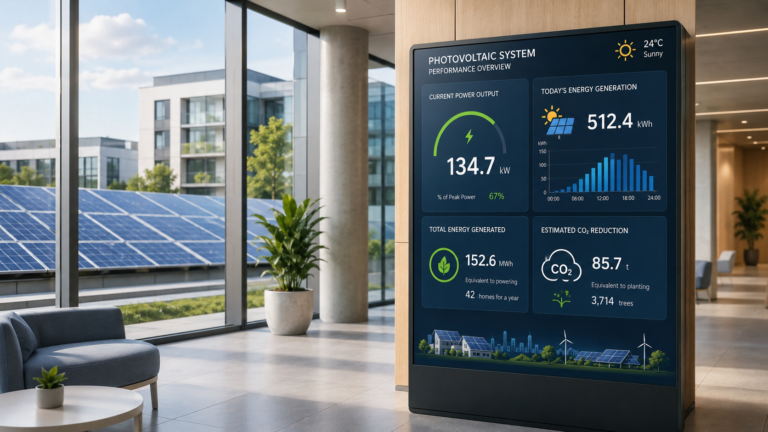
In a school lobby, a shopping mall, or the entrance of a factory, solar panels are often working silently on the roof. But for visitors, employees, or students, the value of that system is not always easy to see. A Photovoltaic Display makes solar energy generation data visible by showing information such as current power output, total energy produced, and estimated environmental contribution on a screen. Instead of keeping PV performance hidden inside a monitoring platform, it turns the data into a clear public message. For commercial buildings, government projects, campuses, and renewable energy demonstration sites, this kind of display helps communicate sustainability, improve project visibility, and make solar performance easier for non-technical audiences to understand.
What Is a Photovoltaic Display?
A Photovoltaic Display is a digital screen or display system used to show information from a solar photovoltaic system. In simple terms, it helps make solar energy generation visible. Instead of keeping PV performance data only inside a monitoring platform, inverter dashboard, or technical report, a photovoltaic display presents that information in a clear visual format for visitors, employees, students, customers, or project stakeholders.
A photovoltaic display is not the same as a solar panel. A solar panel converts sunlight into electricity, while a photovoltaic display shows solar PV generation data or related content. The display itself usually does not generate electricity unless it is specifically designed as a solar-powered display. In most projects, it works as a communication and visualization tool rather than an energy-generating device.
Depending on the project, a photovoltaic display can appear in different forms, such as:
- Digital screen: used in lobbies, offices, schools, and public buildings to show solar energy data.
- Solar PV display kiosk: a freestanding terminal that may combine data display, interactive content, and project information.
- Wall-mounted display: suitable for corridors, reception areas, control rooms, and education spaces.
- Outdoor signage display: used in public areas, solar parks, commercial entrances, or renewable energy demonstration sites.
- Public energy dashboard: a visual interface that shows power output, total energy production, estimated carbon reduction, or sustainability messages.
For example, a school may install a solar PV display in the lobby to show students how much electricity the rooftop PV system generates during the day. A factory may use a solar generation display near the entrance to communicate its renewable energy efforts to visitors and business partners. A shopping mall may use a solar energy display to show real-time or cumulative PV performance as part of its sustainability communication.
The main purpose of a photovoltaic display is to turn technical solar data into information that ordinary people can understand. It helps solar projects become more visible, educational, and communicative. For overseas buyers, it is especially useful in commercial buildings, campuses, factories, government facilities, and public renewable energy projects where solar performance needs to be seen, not just recorded.
How Does a Photovoltaic Display Work?
A photovoltaic display works by receiving solar energy generation data from a PV system and presenting it on a screen in a visual, easy-to-read format. The display itself usually does not collect all the data directly from the solar panels. Instead, it normally depends on the inverter, meter, monitoring device, or solar monitoring platform to provide the information.
A simple photovoltaic display system usually follows this data flow:
- PV panels generate electricity
Solar panels convert sunlight into direct current electricity. This is the starting point of the solar generation process. - The inverter or meter collects system data
The inverter converts DC electricity into AC electricity for building or grid use. At the same time, the inverter, smart meter, or monitoring device may record data such as current power output, total energy generated, system status, and operating performance. - The monitoring platform processes the data
The data may be sent to a local server, cloud platform, or solar monitoring software. Some systems use LAN, WiFi, API connection, or other data communication methods, depending on the project design and equipment. - The display screen presents the information
The photovoltaic display then shows the processed data through dashboards, charts, numbers, slides, animations, or public information pages. This helps visitors and non-technical users understand the value of the solar PV system.
For example, a commercial building may have rooftop solar panels connected to an inverter and monitoring platform. The solar PV data display in the lobby can show how much energy the rooftop system is producing today, how much electricity has been generated this month, and what the estimated environmental contribution is. Visitors do not need to open a technical monitoring dashboard; they can simply read the information from the display.
Some photovoltaic displays can show near real-time data, but this depends on the data source, refresh rate, network connection, software platform, and integration method. Not every display automatically supports live data. In some projects, the screen may show updated dashboard information. In others, it may display scheduled content, such as project introductions, sustainability messages, or educational slides.
Whether the display needs internet also depends on the system design. A cloud-based PV monitoring display usually needs a stable network connection. A local display system may use LAN or local data access. For public buildings, factories, schools, and solar demonstration projects, the most important point is to confirm how the PV data will be collected, processed, and delivered to the display before installation.
What Information Can a Photovoltaic Display Show?
What can people actually see on a photovoltaic display? In most projects, the screen is used to turn solar PV system data into simple visual information. It may show current power generation, accumulated energy output, estimated environmental contribution, system status, or public-facing sustainability content. Some systems work mainly as a data dashboard, while others combine solar information with images, videos, slides, brand messages, or project introductions.
| Information Type | What It Means | Why It Matters |
|---|---|---|
| Real-Time Power Generation | Shows how much electricity the PV system is producing at the moment, such as “Today’s current output.” | Helps visitors and building users see that the solar system is actively working. |
| Daily, Monthly, or Total Energy Output | Displays accumulated solar energy generation over a selected period, such as daily production, monthly output, or lifetime generation. | Makes long-term PV performance easier to understand and communicate. |
| Estimated CO₂ Reduction | Shows an estimated environmental contribution based on the amount of solar energy generated. | Useful for sustainability communication, but the calculation method should be clearly defined. |
| System Status | May show whether the PV system is operating normally, under maintenance, or not generating due to weather or system conditions. | Helps facility managers and viewers understand the basic operating condition. |
| Weather or Sunlight Information | Some displays may include weather, sunlight, or temperature-related information if the system supports it. | Helps explain why solar generation changes throughout the day. |
| Educational Content | The screen can show simple explanations about solar energy, renewable power, or how photovoltaic systems work. | Useful for schools, universities, museums, and public demonstration projects. |
| Project Introduction | The display may include information about the building’s solar project, system purpose, installation background, or sustainability goals. | Helps visitors understand why the PV system was installed. |
| Brand or Public Message | The display can show company branding, ESG messages, public service content, or renewable energy announcements. | Turns the solar power display screen into a communication tool, not just a technical dashboard. |
For example, a school may use a solar energy generation display to show “Today’s generation” and simple solar education slides. A factory may use a PV data visualization display to show monthly power output and sustainability messages for visitors. A shopping mall may use a renewable energy display to combine solar data with brand content, public announcements, and environmental communication.
The exact information depends on the PV monitoring platform, data source, software design, and display content system. Before using a photovoltaic display, buyers should confirm whether they need live data, periodic updates, static presentation content, or a mix of all three.
Where Are Photovoltaic Displays Used?
Photovoltaic displays are used wherever solar energy generation needs to be seen, explained, or communicated to a wider audience. They are not only for solar farms or technical control rooms. In many projects, a solar PV display works as a public-facing communication tool, helping buildings, organizations, and project owners show their renewable energy efforts in a clear and visible way.
| Application Scenario | How Photovoltaic Displays Are Used | Why Buyers Use Them |
|---|---|---|
| Schools and Universities | A display can be installed in a lobby, hallway, science building, or energy education area to show solar generation data and simple educational content. | It helps students understand renewable energy through real project data instead of only textbook explanations. |
| Government Buildings | A public solar display may be placed near the entrance, reception area, or public service hall. | It helps communicate sustainability initiatives and makes public renewable energy projects more transparent. |
| Factories and Industrial Parks | A photovoltaic display can show rooftop solar production, energy-saving messages, or project information near the entrance, office area, or visitor route. | It supports ESG communication, visitor reception, and corporate sustainability presentation. |
| Corporate Offices | Companies can use a renewable energy display in lobbies, meeting areas, or showrooms. | It helps communicate environmental responsibility to clients, employees, investors, and business partners. |
| Shopping Malls and Commercial Buildings | A solar PV display can be placed in public walkways, atriums, or information areas. | It turns solar energy generation into visible public content and can support green building communication. |
| Airports and Transportation Hubs | Displays may be used in terminal buildings, waiting areas, or sustainability exhibition zones. | They help large public facilities show renewable energy performance to high-volume visitor traffic. |
| Solar Farms and Energy Demonstration Projects | A display can present solar generation data, project background, and system performance in visitor centers or control areas. | It helps explain the project to visitors, partners, students, or local communities. |
| Public Service Buildings | Hospitals, libraries, museums, community centers, and public halls can use an energy monitoring display kiosk or wall-mounted screen. | It helps connect renewable energy investment with public education and community awareness. |
For buyers, the value of a photovoltaic display depends heavily on the project environment. A school may need an easy-to-understand educational display. A factory may prefer a professional solar generation dashboard for visitors and partners. A government building may focus more on public visibility and sustainability communication. A shopping mall may combine solar data with digital signage content, announcements, or brand messages.
In each case, the purpose is not only to monitor the PV system. A photovoltaic display helps turn energy data into a visible story. It allows non-technical audiences to understand that the building or project is actively using solar energy. This is why photovoltaic displays are often used in places where renewable energy performance needs to be displayed, explained, and trusted by the public.
Indoor vs Outdoor Photovoltaic Displays
Indoor and outdoor photovoltaic displays may show similar solar PV data, but their hardware requirements are very different. An indoor solar PV display is usually installed in a lobby, hallway, showroom, classroom, or control room, where the environment is relatively stable. An outdoor photovoltaic display must work in more challenging conditions, such as strong sunlight, rain, dust, temperature changes, and public exposure.
| Comparison Item | Indoor Photovoltaic Display | Outdoor Photovoltaic Display |
|---|---|---|
| Installation Location | Used in building lobbies, corridors, offices, classrooms, visitor centers, and exhibition areas. | Used at building entrances, solar farms, public squares, parking areas, campuses, and outdoor demonstration sites. |
| Brightness | Standard indoor brightness is usually enough because the screen is not exposed to direct sunlight. | Higher brightness is often needed so the screen remains readable under strong daylight or semi-outdoor conditions. |
| Screen Visibility | Focuses on clear image quality, comfortable viewing distance, and clean dashboard design. | Requires better sunlight readability, anti-glare treatment, and stable visibility from different viewing angles. |
| Enclosure and Protection | The housing can be lighter and more design-focused because it is protected by the building environment. | The enclosure should be stronger and more weather-resistant, depending on the project environment and protection requirements. |
| Screen Protection | Usually focuses on daily use, cleaning, and basic safety. | May require stronger glass, vandal-resistant design, or additional protection for public areas. |
| Operating Hours | Often used during building opening hours or scheduled display periods. | May need longer operating time, stronger heat management, and more stable long-term operation. |
| Connectivity | WiFi, LAN, or local content update methods may be enough for many indoor projects. | Network planning may be more complex because outdoor locations may have weaker signal, longer cable runs, or special installation limits. |
| Maintenance | Easier to access, clean, update, and inspect. | Maintenance planning is more important because outdoor units may be harder to access and more exposed to environmental wear. |
| Cost Consideration | Usually more cost-effective when the project only needs lobby or indoor data visualization. | Usually requires a higher budget because of brightness, enclosure, protection, cooling, and installation requirements. |
For a school lobby, office reception area, or indoor visitor center, an indoor photovoltaic display is often enough. It can show solar energy generation data clearly in a controlled environment and can also support slides, educational content, or sustainability messages.
For outdoor entrances, solar parks, public buildings, and renewable energy demonstration areas, an outdoor photovoltaic display is usually a better fit. Buyers should pay close attention to screen brightness, weather protection, installation structure, cooling design, and maintenance access.
The key point is not simply choosing a larger solar power display screen. Buyers should first confirm where the display will be installed and how people will view it. For outdoor projects, brightness and enclosure requirements should be confirmed before production.
Photovoltaic Display vs PV Monitoring vs Solar-Powered Display
A common mistake is to use “photovoltaic display,” “PV monitoring,” and “solar-powered display” as if they mean the same thing. They are related to solar energy, but they serve different purposes. For buyers, understanding the difference is important before choosing hardware, software, or an integration method.
| Term | Meaning | Example | Buyer Note |
|---|---|---|---|
| Photovoltaic Display | A screen or display system that visualizes solar PV data, project information, or sustainability content. | A lobby screen showing today’s solar generation, total energy output, and environmental messages. | It is mainly a communication and visualization tool. It may receive data from a monitoring platform, but it is not the same as the monitoring system itself. |
| PV Monitoring System | A system that tracks, records, and analyzes the performance of a solar PV system. | Software or a platform that collects data from inverters, meters, or monitoring devices. | It focuses on system operation, performance tracking, alerts, and technical analysis. A display may use data from this system. |
| PV Monitoring Display | A display screen connected to PV monitoring data and used to present performance information visually. | A factory entrance display showing current power output and monthly solar generation from the monitoring platform. | This term is often used when the display is specifically connected to monitoring data. Compatibility should be confirmed before purchase. |
| Solar-Powered Display | A display device that is powered partly or fully by solar energy. | An outdoor information screen powered by a solar panel and battery system. | This describes the power source of the display, not necessarily what content it shows. It may or may not display solar generation data. |
| Transparent Photovoltaic Glass | A glass material designed to generate electricity while allowing some light transmission. | Solar glass used in building-integrated photovoltaic applications. | This is a different technology from a standard photovoltaic display screen and should not be confused with a solar data display. |
In simple terms, a photovoltaic display shows solar-related information. A PV monitoring system collects and manages performance data. A solar-powered display describes how the display is powered. These three can work together in one project, but they are not automatically the same product.
For example, a university may use a PV monitoring system to collect data from its rooftop solar installation. A photovoltaic display in the lobby can then present selected data to students and visitors. If the lobby display is connected to the building’s regular power supply, it is not a solar-powered display. If an outdoor screen is powered by a solar panel and battery, it can be called a solar-powered display, even if it shows maps, notices, or advertising instead of PV data.
Buyers should be clear about the project goal before sending an inquiry. If the goal is to display solar energy generation, the key questions are about data source, software connection, dashboard content, and screen format. If the goal is to power the screen using solar energy, the discussion should also include solar panels, batteries, charging control, and outdoor power design.
How to Choose the Right Photovoltaic Display for Your Project
Choosing the right photovoltaic display starts with one practical question: what do you want people to see, where will they see it, and how will the solar PV data reach the screen? For overseas buyers, the best solution is not always the largest screen or the most complex system. It should match the project environment, data source, content needs, and long-term operation plan.
| What to Check | Why It Matters | Buyer Question |
|---|---|---|
| Project Scenario | A school, factory, shopping mall, government building, and solar farm may all need different display formats. | Will the display be used for education, public communication, ESG reporting, visitor engagement, or technical monitoring? |
| Installation Location | The location affects screen type, brightness, enclosure, mounting method, and viewing distance. | Will it be installed in a lobby, corridor, entrance, outdoor area, visitor center, or control room? |
| Indoor or Outdoor Use | Indoor displays focus more on image quality and design, while outdoor displays need stronger brightness, weather protection, and durability. | Is the screen exposed to sunlight, rain, dust, heat, or public touch? |
| Screen Size and Form | A small wall-mounted screen may suit a hallway, while a floor-standing kiosk or large digital signage screen may work better in a public area. | Do you need a wall-mounted display, floor-standing display, kiosk, outdoor signage, or custom structure? |
| Brightness and Visibility | Solar energy data is only useful if people can read it clearly. Outdoor or semi-outdoor spaces may need higher brightness and anti-glare design. | Can viewers read the screen clearly from the expected distance and lighting condition? |
| Touch or Non-Touch Function | A non-touch screen is enough for simple data display, while touch interaction may be useful for education, project introduction, or multi-page dashboards. | Do users only need to view information, or do they need to interact with the display? |
| Data Source Compatibility | The display may need to receive data from an inverter, meter, monitoring platform, API, cloud dashboard, or local system. | Where will the solar PV data come from, and can it be connected to the display software? |
| CMS or Dashboard Software | Some projects need a live dashboard, while others need scheduled slides, videos, or mixed content. | Do you need real-time solar data, manually updated content, or a combination of both? |
| Network Method | WiFi, LAN, cloud access, or local update methods can affect reliability and maintenance. | Is the installation site able to provide stable internet or local network access? |
| Branding and Content Design | A photovoltaic display often represents a sustainability project, so the interface should be clear, branded, and easy to understand. | Do you need logo placement, custom UI, project introduction pages, or multilingual content? |
| Maintenance and Operation | Long-term use depends on easy content updates, stable hardware, and accessible maintenance. | Who will update the content, check the system, and handle future maintenance? |
| Supplier Support | A good photovoltaic display supplier should understand both display hardware and project-based customization requirements. | Can the supplier support screen form, hardware configuration, software coordination, and branding needs? |
For a basic lobby project, a wall-mounted indoor solar PV display may be enough to show daily generation, total output, and sustainability messages. For a public outdoor solar demonstration site, buyers may need a brighter outdoor photovoltaic display with a stronger enclosure and more careful installation planning. For schools or visitor centers, an interactive energy monitoring display kiosk may be more suitable because it can combine solar data with educational content. When the project needs a public-facing terminal instead of a simple wall-mounted screen, this Kiosk Displays for PV Monitoring guide can help buyers compare touchscreen or non-touch kiosk formats, data source connection, CMS updates, branding options, and long-term operation needs.
Buyers should also avoid assuming that every screen can automatically show live PV data. The display hardware, software, and data source need to work together. Before purchasing, confirm whether the solar monitoring platform can provide usable data, whether the display software can present it clearly, and whether the network environment supports regular updates.
For OEM/ODM projects, manufacturers such as Ikinor can be considered when buyers need customized display forms, screen sizes, hardware configurations, branding design, or project-based solutions. The key is to provide clear project information, including installation location, expected screen size, indoor or outdoor environment, data source, content type, and customization needs. This allows the supplier to recommend a more suitable solar PV display solution instead of offering a generic screen.
How to Set Up a Photovoltaic Display System Step by Step
Setting up a photovoltaic display system is not only about installing a screen. Buyers need to confirm the project purpose, data source, display location, software connection, and content layout before the system can present solar PV information clearly. A practical setup process helps avoid confusion between the solar equipment, monitoring platform, and display interface.
Step 1: Define the Display Purpose
Start by deciding what the photovoltaic display should achieve. Some projects need a simple public screen to show solar energy generation. Others need an educational display, visitor information kiosk, ESG communication screen, or technical dashboard. The purpose will affect the screen size, content style, software requirements, and whether touch interaction is needed.
Step 2: Confirm the PV Data Source
Before choosing the display, confirm where the solar PV data will come from. The data may come from an inverter, smart meter, monitoring device, cloud platform, or local monitoring system. Buyers should ask the solar system provider or integrator whether the data can be exported, shared, or connected to display software. This step is important because the display cannot show accurate generation data without a usable data source.
Step 3: Choose the Installation Location
The installation location affects almost every hardware decision. A lobby display, wall-mounted corridor screen, outdoor kiosk, factory entrance display, or visitor center dashboard will have different requirements. Buyers should check viewing distance, lighting condition, available space, power access, network access, and maintenance convenience before confirming the display type.
Step 4: Select the Display Hardware
After confirming the location, choose a suitable screen format. Options may include a wall-mounted solar PV display, floor-standing digital signage, interactive kiosk, outdoor display, or customized enclosure. For indoor projects, image clarity and design may be more important. For outdoor projects, brightness, screen protection, heat management, and enclosure durability should be reviewed carefully.
Step 5: Confirm Network and Software Connection
A photovoltaic display setup may use WiFi, LAN, cloud access, USB update, local server connection, or API-based data delivery, depending on the system design. Buyers should confirm whether the display needs live data, periodic updates, or manually scheduled content. The software should be able to present solar PV data in a clean and understandable format.
Step 6: Design the Dashboard or Content Layout
The screen layout should be simple enough for non-technical audiences. Common content may include today’s generation, total energy output, estimated environmental contribution, project introduction, images, videos, or educational slides. Avoid making the dashboard too crowded. A good solar PV display system should make the key information easy to read within a few seconds.
Step 7: Test Data Accuracy and Display Performance
Before final use, test whether the numbers shown on the display match the monitoring source. Check the refresh frequency, chart display, text readability, network stability, and screen visibility. If the display is installed in a public area, test it under the actual lighting and viewing conditions.
Step 8: Train Operators and Plan Maintenance
The project team should know how to update content, restart the display, check network status, and report problems. For long-term operation, buyers should also plan regular screen cleaning, software updates, dashboard review, and hardware inspection.
Before requesting a quotation, prepare your data source, installation environment, screen size, content needs, and network conditions. This will help the supplier or system integrator recommend a more suitable photovoltaic display solution.
Common Mistakes to Avoid When Buying a Photovoltaic Display
Buying a photovoltaic display without checking the project details can lead to poor visibility, data connection problems, or a display that does not match the installation environment. For overseas buyers, the goal is not just to purchase a screen, but to make sure the solar PV data can be displayed clearly, reliably, and in a way that supports the project purpose.
- Choosing indoor hardware for outdoor use
An indoor screen may look suitable in photos, but it may not perform well under sunlight, rain, dust, heat, or public exposure. Outdoor photovoltaic display projects usually need stronger brightness, enclosure protection, screen protection, and better heat management. - Ignoring data source compatibility
A display cannot automatically show solar energy generation data unless it can receive usable information from the inverter, meter, monitoring platform, cloud system, or local data source. Buyers should confirm PV monitoring display compatibility before ordering. - Only focusing on screen size
A larger screen is not always the better choice. Viewing distance, installation height, content layout, brightness, and available space are often more important than size alone. - Overlooking brightness and readability
If the screen is installed near windows, entrances, semi-outdoor areas, or outdoor locations, poor brightness can make the content difficult to read. A solar PV display should be selected according to the real lighting condition. - Not confirming the content update method
Some projects need live dashboards, while others only need scheduled slides, images, videos, or periodic updates. Buyers should confirm whether content will be updated through CMS, cloud platform, local network, USB, or another method. - Assuming real-time data without integration
Real-time data depends on the monitoring system, network, software connection, and data refresh method. Without proper integration, the screen may only show static or manually updated information. - Skipping final testing before deployment
Before public use, buyers should test data accuracy, screen visibility, network stability, dashboard layout, and content readability. This is especially important for public buildings, factories, schools, and outdoor demonstration projects.
A good photovoltaic display buying guide should help buyers confirm practical details before placing a bulk order or project order. By checking compatibility, environment, visibility, content management, and after-sales support early, buyers can reduce project risk and choose a display solution that works in real conditions.
Conclusion: Turning Solar Data into Visible Value
A Photovoltaic Display helps turn solar energy generation data into information that people can actually see, read, and understand. Instead of keeping PV performance hidden in technical software or monitoring reports, it presents key information such as energy output, system performance, environmental contribution, and project messages in a public and visual way.
For schools, factories, commercial buildings, government facilities, solar farms, and renewable energy demonstration projects, a solar PV display solution can support education, sustainability communication, visitor engagement, and project visibility. The most suitable display depends on the installation environment, screen size, brightness, data source, software connection, content format, and long-term maintenance needs.
Before choosing a display, buyers should be clear about one thing: do they need to display solar energy generation for public communication, technical monitoring, education, or branding? Once the purpose is clear, it becomes easier to select the right hardware and content solution.
If you are planning a solar display project, prepare your installation location, data source, preferred screen size, indoor or outdoor requirements, and customization needs before contacting a supplier. This will help you get a more accurate recommendation for your photovoltaic display project.
FAQs
A Photovoltaic Display is a screen or display system used to show information from a solar PV system. It can present solar energy generation data, system performance, environmental contribution, project messages, or educational content. It is commonly used in schools, factories, public buildings, commercial spaces, and renewable energy demonstration projects.
No. A solar panel converts sunlight into electricity, while a photovoltaic display shows solar-related information on a screen. The display usually does not generate electricity by itself unless it is specifically designed as a solar-powered display. Its main role is to make solar PV data visible and easier to understand.
Yes, a photovoltaic display can show real-time or near real-time solar energy generation if it is properly connected to a compatible data source. This may include an inverter, smart meter, monitoring platform, cloud system, or local software. Buyers should confirm data compatibility and refresh frequency before purchasing.
It depends on the system design. A cloud-based solar PV display usually needs internet to receive updated data. Some systems may use LAN, local servers, USB updates, or other offline methods. If live data is required, buyers should confirm network conditions and software connection methods before installation.
Start with the project scenario. Confirm the installation location, indoor or outdoor environment, screen size, brightness, touch function, data source, software connection, network method, content update method, and maintenance needs. A good solar energy generation display should match both the physical environment and the data visualization goal.
Yes, many photovoltaic displays can be customized based on project requirements. Customization may include screen size, enclosure design, wall-mounted or floor-standing form, branding, interface layout, touch function, software content, and indoor or outdoor configuration. Buyers should provide installation details and data source information before requesting a solution.