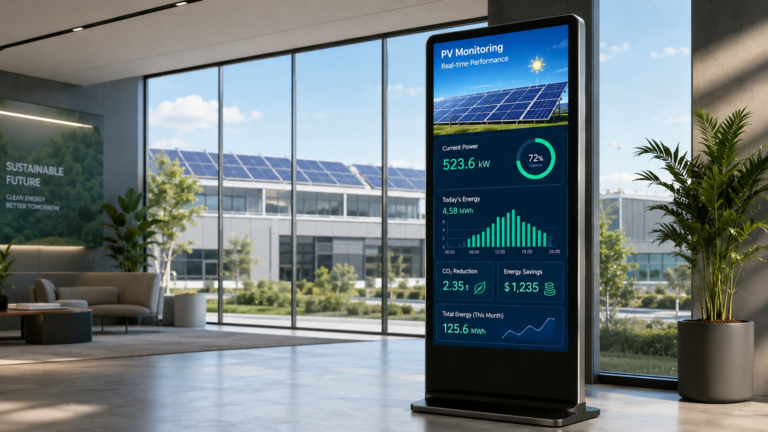
As solar PV projects become more common in factories, corporate buildings, schools, and public facilities, many organizations face the same problem: the system is generating clean energy, but most people cannot see what is happening. The real-time power output, energy savings, and environmental impact often remain inside backend monitoring platforms or engineering dashboards. Kiosk Displays for PV Monitoring help solve this gap by turning solar energy data into clear, public-facing visual information. Placed in a corporate lobby, factory reception area, school hallway, or ESG exhibition space, a solar PV monitoring display can help visitors, employees, students, and customers understand the value of a renewable energy project at a glance. This article explains what it is, how it works, where it is used, and how buyers can choose the right solution.
What Are Kiosk Displays for PV Monitoring?
Kiosk Displays for PV Monitoring are display terminals used to present solar photovoltaic system data in a clear and visual way. Here, PV means Photovoltaic, which refers to solar power generation. “Monitoring” means tracking the performance of the solar system, and “kiosk display” refers to a screen-based terminal that can be installed in a public or semi-public space.
In simple terms, a PV Monitoring Kiosk is a screen that helps people see how a solar energy system is performing. It can be a touchscreen kiosk, a non-touch digital display, a wall-mounted screen, or a floor-standing display terminal. Unlike a basic advertising screen, a Solar PV Monitoring Display is usually connected to solar data sources such as a monitoring platform, energy dashboard, or project information system.
A typical PV monitoring kiosk may display:
- Real-time solar power generation
- Daily, monthly, or yearly energy output
- System performance information
- Energy savings
- CO₂ reduction
- Environmental impact messages
- Project introduction and company branding
For example, a company may install a solar data display in its lobby to show visitors how much clean energy its rooftop PV system is producing. A school may use it to help students understand renewable energy. A public building may use it to communicate sustainability efforts to citizens.
Therefore, Kiosk Displays for PV Monitoring are not just screens. They are also data visualization tools, ESG communication tools, and public education tools. Their main purpose is to turn technical solar energy data into simple, visible, and meaningful information for visitors, employees, students, customers, and project stakeholders.
How Does a Solar PV Monitoring Display Work?
A Solar PV Monitoring Display does not create solar data by itself. It works as the visual presentation layer of a solar monitoring system. The real data usually comes from the solar inverter, an inverter monitoring platform, an energy management system, a cloud portal, or a connected API. The display terminal simply collects or receives this information and presents it in a public, easy-to-read format.
A typical working process can be understood in four layers:
- Data Source
The solar PV system generates performance data through components such as inverters, meters, sensors, or energy management systems. This data may include current power output, total energy generation, system status, and environmental impact. - Data Connection
The data is transferred through Wi-Fi, Ethernet, a local network, or a cloud-based solar monitoring platform. For public display projects, stable internet access is important because the screen may need to refresh data regularly. - Display Interface
The information is then shown through a browser page, web dashboard, digital signage CMS, kiosk mode, or a customized user interface. Some projects use a simple full-screen browser view, while others use a branded dashboard with charts, logos, project images, and ESG messages. - Kiosk Screen
Finally, the data appears on the kiosk display. The screen may be installed in a lobby, factory reception area, classroom, exhibition hall, or energy control room. In many cases, the terminal is set to full-screen read-only mode, so visitors can view the information without changing system settings.
For example, a factory with rooftop solar panels may use an inverter monitoring platform to generate a solar dashboard. That dashboard can then be displayed full-screen on a lobby kiosk, allowing visitors and employees to see real-time power generation and energy savings.
The key point is that an Energy Monitoring Display Kiosk depends on three things: a reliable data source, stable network connection, and a clear display interface. It does not always require fully customized software, but the selected display method should match the project’s data platform, viewing environment, and communication goals.
What Data Can a PV Monitoring Kiosk Display?
A PV monitoring kiosk can display different types of solar energy data, depending on the project goal, data source, and audience. For public areas such as corporate lobbies, schools, exhibition halls, and factory reception areas, the content should be simple, visual, and easy to understand. For operation teams, the display may include more technical information such as inverter status or system alerts.
A good Solar Energy Data Display usually combines real-time data, historical performance, environmental value, and project branding.
| Data Type | What It Shows | Why It Matters |
|---|---|---|
| Real-time power output | Current solar power production from the PV system | Helps viewers see that the system is actively generating clean energy |
| Daily energy generation | Total power generated today | Useful for simple public display and daily performance tracking |
| Monthly or yearly generation | Accumulated solar energy output over a longer period | Shows the long-term value of the solar project |
| Historical generation trends | Charts showing energy production over time | Helps users understand seasonal changes and system performance |
| CO₂ reduction | Estimated carbon emissions avoided by using solar power | Makes the environmental impact easier for visitors and stakeholders to understand |
| Environmental equivalencies | Comparisons such as trees planted or fossil energy reduced | Turns technical data into simple sustainability messages |
| Energy savings | Estimated electricity savings or energy contribution | Helps companies communicate the business value of the PV project |
| Weather and irradiance data | Sunlight level, temperature, or weather conditions | Explains why solar output may change during the day |
| Inverter or system status | Basic running status, fault alerts, or system availability | More useful for facility managers or operation teams |
| Project introduction | PV project location, installation purpose, capacity overview, or project images | Helps visitors understand the background of the solar project |
| Corporate logo and ESG message | Brand identity, sustainability slogan, or green energy commitment | Supports ESG communication and corporate branding |
For example, a factory may use a PV data display kiosk in its reception area to show current solar generation, yearly energy output, and CO₂ reduction. A school may focus more on educational content, such as how solar panels work and how much clean energy has been generated. A corporate ESG showroom may combine a solar energy dashboard with project images, company branding, and sustainability messages.
In general, public-facing content should be simple and visual, while technical data should be reserved for facility managers, engineers, or internal operation teams. This balance helps the renewable energy data display stay useful, attractive, and easy to understand.
PV Monitoring Kiosk vs Digital Signage vs Solar Kiosk
These terms are related, but they do not mean exactly the same thing. A PV monitoring kiosk is not just a normal advertising screen, and a solar kiosk is not always used for PV monitoring. Understanding the difference helps buyers choose the right keyword, product type, and supplier.
| Term | What It Usually Means | Main Purpose | Typical Example |
|---|---|---|---|
| PV Monitoring Kiosk | A display terminal used to show solar PV system data | Solar data visualization and project communication | A lobby screen showing real-time solar generation and CO₂ reduction |
| Digital Signage | A commercial display used to play images, videos, ads, notices, or brand content | Advertising, information display, and content broadcasting | A shopping mall screen playing promotional videos |
| Solar Kiosk | A kiosk that may be powered by solar energy or used in solar-related applications | Public service, charging, information, or energy access | A solar-powered outdoor kiosk with USB charging or Wi-Fi |
| Energy Dashboard | A software interface that shows energy data, charts, and system performance | Data analysis and monitoring | A web dashboard showing energy generation and consumption |
| Renewable Energy Display Kiosk | A display kiosk used to present renewable energy information and ESG messages | Sustainability education and public communication | An ESG showroom display showing solar, wind, and carbon reduction data |
The main difference is the content and purpose. Digital signage can play general media content, but it does not necessarily connect to solar data. A Solar Monitoring Kiosk focuses on solar system performance, such as power generation, energy savings, and environmental impact. It is designed to make PV data visible to visitors, employees, students, or stakeholders. For buyers who are still comparing broader display terms and product forms, this Photovoltaic Display guide explains how solar energy generation data can be shown through digital screens, wall-mounted displays, outdoor signage, public energy dashboards, and PV monitoring display systems.
A solar kiosk can be confusing because the word may describe a kiosk powered by solar panels, not a kiosk that displays solar performance data. For example, an outdoor kiosk with solar panels on top may provide lighting, charging, or public information services, but it may not show any PV monitoring data.
An energy dashboard is usually the software layer. It may appear on a laptop, control room screen, or kiosk display. The Energy Monitoring Display Kiosk is the physical screen or terminal that presents that dashboard in a public or semi-public location.
For buyers, the best keyword depends on the project goal. Use PV Monitoring Kiosk or Solar PV Monitoring Display when the focus is solar data visualization. Use digital signage when the focus is general media playback. Use solar kiosk carefully, especially if the product is solar-powered rather than designed for PV monitoring.
Where Are Kiosk Displays for PV Monitoring Most Commonly Used?
From a practical adoption and business value perspective, Kiosk Displays for PV Monitoring are most suitable for commercial buildings, industrial parks, and factories with rooftop solar projects. These locations usually have real solar PV systems, regular visitors, ESG communication needs, and enough public space to install a display terminal. The kiosk is not only used to show solar data, but also to make the renewable energy project visible to employees, customers, partners, and visitors.
For commercial buildings and corporate lobbies, a PV monitoring kiosk can be placed near the reception area, entrance hall, or ESG exhibition wall. It helps companies show real-time solar generation, energy savings, and carbon reduction in a simple visual format. This is especially useful for companies that want to communicate sustainability efforts to clients, investors, employees, or government visitors.
For factories and industrial parks, a solar monitoring display is often even more practical. Many factories have large rooftops that can support solar PV systems. A display in the factory reception area or visitor route can show how the company uses clean energy in daily operations. For manufacturers, this can support messages such as green production, lower energy consumption, and sustainable supply chain development.
For schools and universities, the value is more educational. A PV monitoring kiosk can help students understand how solar energy works, how much electricity is generated, and how renewable energy contributes to the campus. In this case, the screen should be simple, visual, and easy for non-technical users to understand.
For public buildings, such as libraries, government offices, transport facilities, or community centers, a renewable energy display kiosk can support public education. The goal is not only to monitor the PV system, but also to show citizens that the building is using clean energy.
For exhibition halls and ESG showrooms, the kiosk can become part of a larger storytelling system. It may combine solar data, project images, videos, company branding, and environmental messages. This type of setup is useful for renewable energy companies, EPC contractors, green building projects, and corporate sustainability exhibitions.
For solar power plants, the need is different. Large PV plants usually rely more on backend monitoring systems, control rooms, and operation platforms. A public-facing kiosk may still be used in a visitor center or project exhibition area, but it is not always necessary for daily operation.
Residential solar projects are usually less suitable for commercial kiosk displays. Homeowners often use mobile apps, small screens, or web dashboards instead of large public displays.
Before choosing a PV monitoring kiosk for commercial buildings, factories, schools, or public spaces, buyers should first confirm the installation location, target audience, and display purpose. A lobby display, an education screen, and an operation monitoring display may all show solar data, but their design priorities can be very different.
Buyer Checklist: How to Choose the Right PV Monitoring Display Kiosk
Choosing the wrong PV Monitoring Display Kiosk can lead to poor visibility, unstable data display, difficult maintenance, or a screen that does not match the real installation environment. Before contacting a supplier, buyers should clearly define where the kiosk will be installed, what data it needs to show, who will view it, and how the content will be updated. A solar data display solution should not be selected only by screen size or price. It should match the project scenario, software environment, and long-term operation needs.
| What to Check | Why It Matters | Buyer Notes |
|---|---|---|
| Application scenario | A lobby, school, factory, exhibition hall, and outdoor area may require different display designs. | Define whether the screen is for public display, ESG communication, education, or operation monitoring. |
| Installation location | Indoor, outdoor, semi-outdoor, and window-facing locations have different requirements. | Check sunlight exposure, viewing distance, space, power supply, and network availability. |
| Screen size | The screen should be large enough for viewers to read solar data clearly. | A small wall-mounted display may work for classrooms, while a large kiosk may suit lobbies or exhibition areas. |
| Brightness | A screen in a bright lobby or near a window may need higher brightness than a standard indoor display. | Do not choose brightness blindly. Match it to the real lighting environment. |
| Touch or non-touch | Not every solar display needs touchscreen interaction. | Use non-touch for simple public dashboards; choose touch if users need to explore charts, time periods, or project information. |
| Network connection | Live solar data usually requires stable connectivity. | Confirm whether the project will use Wi-Fi, Ethernet, local network, or optional 4G. |
| Data source | The kiosk must display data from an existing solar monitoring platform or energy system. | Confirm whether the data comes from an inverter platform, EMS, web dashboard, cloud portal, or API. |
| Display method | The interface may run through browser kiosk mode, CMS, full-screen dashboard, or custom UI. | Ask whether the display needs a simple web page, remote content management, or a branded dashboard. |
| Kiosk mode | Public screens should usually prevent users from exiting the display interface. | Full-screen read-only mode is useful for lobbies, schools, and public buildings. |
| CMS or remote update | Some projects need to update images, ESG messages, videos, or company information remotely. | A digital signage CMS can help if the screen also displays corporate content. |
| Outdoor enclosure | Outdoor or semi-outdoor kiosks need stronger protection than indoor displays. | Consider weather resistance, dust protection, heat, humidity, ventilation, and cooling. |
| Branding and UI customization | The display often supports ESG communication and company image. | Prepare logo, brand colors, project photos, language requirements, and preferred dashboard style. |
| Maintenance and after-sales support | Long-term public display requires stable hardware and practical support. | Ask about remote troubleshooting, spare parts, warranty terms, and technical documentation. |
For example, a factory planning to install a Solar PV Monitoring Display in its reception area should prepare several basic details before sending an inquiry: screen size, installation position, data source, network method, whether touch is needed, and whether the interface should include company branding. If the same project requires an outdoor display near a solar demonstration area, the buyer should also discuss enclosure design, brightness, cooling, and protection requirements.
A good Energy Monitoring Display Kiosk should make solar data easy to view, not create extra technical problems. Buyers should avoid assuming that any commercial screen can display PV data smoothly. The hardware, software, network, and content design must work together.
Before requesting a quotation, prepare a simple requirement sheet with your installation location, target audience, display content, data platform, screen size, network condition, and customization needs. This will help suppliers recommend a more suitable PV monitoring display kiosk instead of offering a generic screen.
How to Choose a Reliable Kiosk Display Supplier for PV Monitoring Projects
Choosing a reliable kiosk display supplier is not only about buying a screen. A PV monitoring display project usually involves hardware, installation environment, software display method, branding, and long-term operation. Buyers should evaluate whether the supplier understands both commercial display hardware and project-based customization.
A good supplier should be able to support different display forms, such as wall-mounted screens, floor-standing kiosks, indoor commercial displays, and outdoor enclosure solutions. This matters because a lobby display, factory reception kiosk, school hallway screen, and outdoor renewable energy display may require different structures, screen sizes, cooling designs, and installation methods.
Buyers should also check whether the supplier can work with the customer’s existing software environment. In many projects, the solar data may come from a web dashboard, inverter monitoring platform, digital signage CMS, or custom interface. The supplier does not always need to build the solar monitoring software, but the display hardware should be able to present the required dashboard smoothly and reliably.
In addition to the display terminal itself, some projects may also involve electronic components and hardware supply chain management. For companies developing customized display systems, working with reliable semiconductor suppliers can help ensure stable component sourcing for controllers, drivers, power management devices, and other electronic modules used in commercial hardware solutions. Semiconductor distributors such as China Chip Depot focus on component supply, while display manufacturers focus on terminal design, integration, and customization.
When comparing suppliers, pay attention to these points:
Commercial display experience: Can they provide stable screens for long-hour operation?
Kiosk structure options: Do they support wall-mounted, floor-standing, and outdoor designs?
Software cooperation: Can their hardware work with browser-based dashboards, kiosk mode, CMS pages, or custom UI?
Customization ability: Can they support logo, appearance, color, interface, system, and hardware module customization?
Project communication: Can they confirm drawings, samples, packaging, and technical details before bulk production?
Export support: Do they understand overseas project communication, shipping, documentation, and after-sales needs?
For example, a solar EPC company may need a customized solar monitoring display for a factory client’s lobby. In this case, the supplier should not only provide a screen, but also understand the installation position, viewing distance, branding requirements, and how the solar dashboard will be displayed.
For buyers looking for an OEM ODM kiosk display partner, Ikinor can be considered as a customized display terminal manufacturer for commercial buildings, industrial parks, and solar project integrators. The focus should be on matching the display form, installation environment, and content presentation needs of each project.
If you are planning a PV monitoring display project, prepare your screen size, installation location, data source, display method, and customization requirements before contacting a supplier. This will help you receive a more accurate solution instead of a generic quotation.
Conclusion: Turning Solar Energy Data into Visible Business Value
Kiosk Displays for PV Monitoring help turn solar energy data into visible business value. Instead of keeping PV performance information inside a backend platform, these displays make real-time power generation, ESG progress, public education, and project achievements easier for people to see and understand.
They are especially useful in commercial buildings, factory parks, schools, public buildings, and ESG exhibition spaces. In these environments, a Solar PV Monitoring Display does more than show numbers. It helps organizations communicate clean energy investment, sustainability goals, and the practical impact of renewable energy projects.
Before choosing a renewable energy display kiosk, buyers should first confirm the application scenario, data source, installation location, screen type, network condition, and customization needs. With clear project requirements, it becomes easier to discuss the right display form, software display method, branding options, and long-term support with a supplier. A well-planned PV monitoring kiosk can make a solar project more visible, understandable, and valuable to every audience.
FAQs
A kiosk display for PV monitoring is a screen-based terminal used to show solar photovoltaic system data. It can display real-time power generation, energy output, system performance, energy savings, CO₂ reduction, and project information. It is commonly installed in lobbies, factories, schools, public buildings, and ESG exhibition spaces to make solar energy data easier to see and understand.
A solar PV monitoring display can show real-time power output, daily energy generation, monthly or yearly energy output, historical trends, CO₂ reduction, energy savings, environmental impact, weather information, and system status. It can also display project images, company logos, ESG messages, and basic explanations of how the solar energy system works.
In many projects, yes, the display needs data from an inverter monitoring platform, energy management system, cloud portal, web dashboard, or API. The kiosk itself does not usually create solar data. It presents data from the solar system in a public-facing format. Buyers should confirm the available data source before choosing the display hardware or software method.
Choose a supplier that understands commercial display hardware, kiosk structure, installation environments, and project customization. The supplier should be able to support the required screen type, installation method, data display method, branding needs, and long-term operation requirements. Before requesting a quotation, prepare your screen size, installation location, data source, network condition, and customization requirements.