
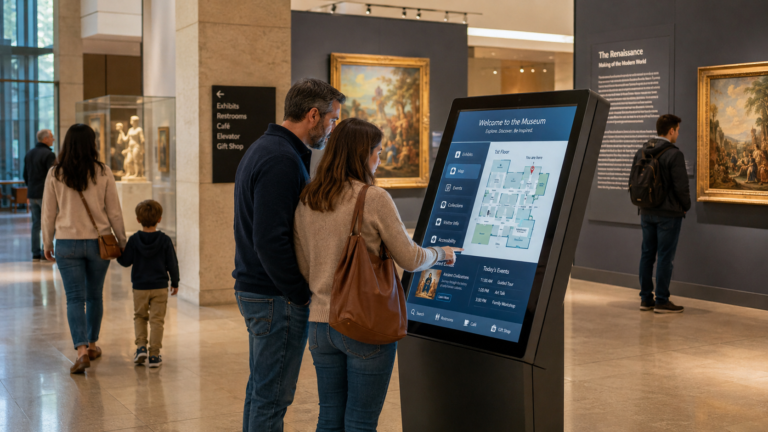
A visitor enters a museum with curiosity, but curiosity alone is not always enough. They may want to understand the story behind an artifact, find the next gallery, choose a language they understand, buy a ticket for a special exhibition, or leave feedback after the visit. A Museum Kiosk helps turn these moments into a smoother, more interactive experience. Instead of relying only on printed labels, paper maps, or staff assistance, museums can use self-service kiosks to provide exhibit information, multimedia storytelling, wayfinding, ticketing, event promotion, accessibility support, and visitor feedback. For museum operators, exhibition companies, and cultural tourism projects, museum kiosks are becoming practical digital touchpoints that improve visitor engagement while making content updates and large-scale deployment easier to manage.
What Is a Museum Kiosk?
A Museum Kiosk is an interactive self-service terminal used in museums, galleries, exhibition halls, cultural centers, and heritage spaces. It helps visitors access information, explore exhibits, find directions, buy tickets, view multimedia content, and interact with museum services through a touchscreen interface.
In simple terms, a museum kiosk works like a digital information point inside the museum. Instead of reading only printed labels or asking staff for help, visitors can use the kiosk to learn more about artworks, artifacts, historical timelines, exhibition themes, events, and facilities. A Museum Information Kiosk may be placed near the entrance, inside a gallery, beside a special exhibition, close to a ticketing area, or near important visitor routes.
A museum kiosk is not the same as a normal poster, printed sign, or basic digital signage screen. Traditional signs usually display fixed information. A kiosk, however, allows visitors to interact with the content. They can tap the screen, choose a language, search for a topic, zoom in on images, watch videos, listen to audio guides, follow a museum map, or complete a self-service task.
| Type of Display | Main Purpose | Visitor Interaction |
|---|---|---|
| Printed Label | Shows basic exhibit information | No interaction |
| Poster / Signage | Displays announcements, directions, or promotion | No or very limited interaction |
| Digital Signage Screen | Plays images, videos, notices, or schedules | Usually limited interaction |
| Museum Kiosk | Provides interactive information, wayfinding, ticketing, and visitor services | High interaction through touchscreen, software, and content system |
A typical touchscreen museum kiosk may include hardware and software working together. The hardware can include a touchscreen display, tablet enclosure, floor-standing kiosk, wall-mounted screen, speaker, camera, printer, or QR code scanner. The software may include multimedia content, exhibit pages, digital maps, multilingual interfaces, content management system, wayfinding tools, and visitor feedback forms.
For example, an exhibit information kiosk can show detailed background stories, videos, and high-resolution images of an artifact. A wayfinding kiosk can help visitors find galleries, restrooms, elevators, cafes, or exits. A ticketing kiosk can support admission tickets, special exhibition bookings, or event registration.
Because of these functions, a museum kiosk should be understood as more than a screen. It is a visitor-facing digital service point that connects museum content, navigation, self-service, and visitor engagement in one system.
Main Types of Museum Kiosks
Museum kiosks are not a single fixed product type. Different museums, exhibition halls, cultural centers, and temporary exhibition projects may need different kiosk designs depending on visitor flow, exhibit content, service process, and operational goals. Some kiosks focus on exhibit information, while others support wayfinding, ticketing, visitor feedback, donations, or event promotion. For buyers, understanding the main types of museum kiosks can help match the right solution with the right museum scenario.
| Kiosk Type | Common Location | Main Function | Best For |
|---|---|---|---|
| Exhibit Information Kiosk | Inside galleries, beside exhibits, special exhibition areas | Displays artifact details, artwork background, historical context, images, videos, and audio guides | Museums that need richer exhibit storytelling and multimedia content |
| Wayfinding Kiosk | Museum entrance, lobby, floor intersections, near elevators | Provides floor maps, gallery routes, restroom locations, exits, cafés, and facility directions | Large museums, complex venues, and multi-floor exhibition spaces |
| Ticketing Kiosk | Entrance area, ticketing zone, near service counters | Supports self-service ticket purchase, reservation confirmation, QR ticket collection, and receipt printing | Museums with high visitor traffic and queue pressure |
| Feedback Kiosk | Exit area, rest area, interactive zones | Collects visitor comments, satisfaction surveys, and exhibition feedback | Museums that want to understand visitor experience and improve operations |
| Donation Kiosk | Exit area, membership area, public welfare exhibition zones | Supports donations, membership registration, and public project introductions | Non-profit museums, cultural institutions, and charity-related exhibitions |
| Event Promotion Kiosk | Lobby, temporary exhibition area, event entrance | Displays lectures, family programs, special exhibitions, membership events, and activity schedules | Museums that frequently organize events and temporary exhibitions |
| Tablet-Based Kiosk | Small galleries, desktop displays, temporary exhibitions, interactive corners | Provides lightweight information search and interactive visitor experiences through tablets | Small spaces, lower-budget projects, mobile exhibitions, and temporary setups |
For example, a museum wayfinding kiosk near the entrance can help visitors quickly find galleries, restrooms, elevators, cafés, and exits. A Museum Information Kiosk placed beside an exhibit can provide deeper historical background, high-resolution images, video explanations, and multilingual content. A museum ticketing kiosk near a temporary exhibition can support reservation confirmation, QR code verification, or special exhibition ticket purchase.
For B2B buyers, choosing a Museum Self Service Kiosk should not be based only on appearance or screen size. The first question should be: what problem does the kiosk need to solve? If the goal is to improve exhibit understanding, an exhibit information kiosk may be the best choice. If visitors often get lost, a wayfinding kiosk is more useful. If long queues are the main issue, a ticketing kiosk may create more value. These different types can be used separately or combined into a complete museum digital service system.
Common Applications of Museum Kiosks
In real museum projects, a Museum Kiosk is not only used for “checking information.” It can be placed in entrance halls, exhibition galleries, temporary exhibition areas, ticketing zones, exit areas, and public rest spaces to support different service functions. For visitors, it helps them better understand exhibits, find directions, buy tickets, choose a language, or leave feedback. For museum operators, it can reduce staff workload and make content updates, event promotion, and visitor management more efficient.
Common applications of Museum Kiosks include:
- Digital Labels and Exhibit Information: Replace traditional paper labels with richer content, such as exhibit background, artist introduction, historical timeline, high-resolution images, and restoration process.
- Multimedia Storytelling: Use images, videos, audio, animation, or interactive content to help visitors understand complex historical, artistic, or scientific topics.
- Interactive Timelines and 3D Displays: Suitable for history museums, science museums, and natural history museums, helping visitors explore content in a more visual way.
- Indoor Wayfinding and Route Planning: Help visitors find galleries, restrooms, elevators, exits, cafés, gift shops, or children’s exhibition areas.
- Self-Service Ticketing and Reservation Confirmation: Support general admission tickets, temporary exhibitions, lectures, family programs, or member events.
- Event Promotion and Membership Sign-Up: Display upcoming exhibitions, education programs, lectures, volunteer projects, membership benefits, and registration links.
- Visitor Feedback and Donations: Collect satisfaction ratings, open-ended feedback, donations, public project introductions, or membership interest.
- Multilingual and Accessibility Support: Provide a more user-friendly information experience for international visitors, hearing-impaired visitors, seniors, and children.
| Application | Common Scenario | How It Helps Visitors | How It Helps Museum Staff |
|---|---|---|---|
| Digital Labels | Beside exhibits, special exhibition areas | Provides more detailed exhibit information | Reduces the cost and effort of updating printed labels |
| Exhibit Information | Inside galleries | Explains historical background, artistic value, and cultural stories | Improves exhibit interpretation efficiency |
| Multimedia Storytelling | Interactive zones, education spaces | Supports deeper learning through video, audio, and images | Makes exhibition content more engaging |
| Wayfinding | Entrance halls, floor intersections | Helps visitors quickly find galleries, facilities, and exits | Reduces repeated direction-related questions |
| Ticket Sales | Entrance areas, ticketing zones | Supports self-service ticket purchase, ticket collection, and reservation confirmation | Reduces queue pressure during peak hours |
| Event Promotion | Lobbies, temporary exhibition areas | Shows lectures, family programs, and special exhibitions | Increases event visibility and registration opportunities |
| Visitor Feedback | Exit areas, rest spaces | Allows visitors to submit feedback quickly | Helps collect useful suggestions for improvement |
| Donation / Membership | Exit areas, membership service zones | Introduces donation programs and membership benefits | Supports donation conversion and membership growth |
| Multilingual Support | Entrances, galleries, visitor service areas | Allows visitors to browse content in a familiar language | Serves international visitors and reduces translation workload |
For example, a visitor standing beside an artifact can use a museum exhibit kiosk to view its origin, production process, historical background, and related videos. A family entering a large museum can use a museum wayfinding kiosk to find the children’s gallery, restroom, and café. International visitors can use a museum information kiosk to choose English, Spanish, Arabic, or another language for clearer guidance.
Therefore, the value of a museum kiosk is not limited to content display. It connects visitor education, navigation, ticketing, event promotion, accessibility, and feedback collection into one digital service point. It improves the visitor experience while helping museum staff reduce repetitive inquiries and manage operations in a more digital and sustainable way.
Key Benefits of Museum Kiosks for Visitors and Operators
Museums do not use Museum Kiosks only to make exhibition spaces look more “digital.” Their real value is that they improve both the visitor experience and museum operations. Traditional printed labels, staff-based inquiries, and fixed guide maps are often difficult to update and may not meet the needs of visitors with different ages, languages, accessibility requirements, or learning styles. A museum digital kiosk can bring information display, interactive learning, wayfinding, content updates, and visitor services into one self-service system.
A simple comparison helps explain the value. Printed labels can only show limited text. Once the content changes, the museum may need to redesign, print, and replace the labels. A digital kiosk, however, can update exhibit descriptions, event information, map routes, and multilingual content through a backend system. This flexibility is especially useful for museums that frequently change exhibitions, host public events, or welcome international visitors.
| Stakeholder | Key Benefits | Practical Value |
|---|---|---|
| Visitors | Better engagement, self-paced learning, multilingual access, accessibility support | Visitors can explore exhibit information, videos, audio guides, maps, and event content at their own pace |
| Museum Staff | Fewer repeated inquiries, lower service pressure, better service efficiency | Staff can spend less time answering repeated questions about routes, opening hours, and event information |
| Operators | Easier content updates, centralized device management, visitor feedback, basic analytics | Management teams can update content through CMS and understand which content or locations receive more attention |
| Exhibition Teams | Multimedia storytelling, temporary exhibition updates, event promotion | Curators can use images, videos, interactive timelines, and digital content to enrich exhibition storytelling |
From the visitor’s perspective, a museum self service kiosk makes the visit more active and flexible. Visitors do not need to rely only on docents, printed maps, or wall labels. They can tap the screen to view exhibit background, choose a preferred language, zoom in on high-resolution images, watch short videos, or use a digital map to find the next gallery. This is useful for families, students, international tourists, seniors, and younger visitors who prefer self-guided exploration.
From the operator’s perspective, kiosks help museums manage information more efficiently. Exhibit descriptions, event notices, temporary announcements, membership information, and route maps can be updated through a centralized backend system. If several kiosks are deployed across different galleries, staff do not need to update each device manually. A CMS can make content management easier for large museums, temporary exhibitions, cultural tourism projects, and multi-site venues.
Museum kiosks can also support 24/7 information access, visitor feedback collection, event promotion, and basic content analytics. For example, a feedback kiosk near the exit can collect visitor comments. An event promotion kiosk in the lobby can show upcoming lectures, family programs, or special exhibitions. Interaction data can also help operators understand which exhibits, topics, or kiosk locations attract more attention.
Therefore, the benefit of a museum kiosk is not limited to “displaying information.” It helps museums build a more flexible, efficient, and visitor-centered digital service system. For B2B buyers, evaluating a kiosk solution should not only focus on price or appearance. It is also important to check whether the solution can support long-term content updates, visitor services, operational management, and large-scale deployment.
Core Features and System Components of a Museum Kiosk
A Museum Kiosk is not just a touchscreen placed inside an exhibition hall. For B2B buyers, it is better to understand it as a complete digital self-service solution that combines hardware, software, content, and management tools. The screen is only the front-end interface that visitors can see. What truly affects user experience and long-term operation is whether the whole system is stable, easy to update, interactive, and suitable for different museum scenarios.
A museum kiosk solution can usually be divided into three layers:
| System Layer | What It Includes | Why It Matters |
|---|---|---|
| Hardware Layer | Touchscreen display, tablet or all-in-one display, enclosure, stand, camera, speaker, microphone, printer if needed | Determines whether the kiosk is durable, suitable for the exhibition space, and able to support required functions |
| Software Layer | CMS, multimedia player, wayfinding software, language selection, analytics, remote management, accessibility settings | Determines whether content is easy to update, visitor operation is smooth, and devices are easy to manage |
| Content & Management Layer | Text, images, videos, audio, maps, interactive timelines, 3D models, exhibition content management | Determines what visitors can experience and whether the museum can maintain and update content over time |
From the hardware side, common museum kiosk hardware may include a touchscreen display, tablet kiosk, all-in-one display, floor-standing enclosure, wall-mounted structure, speaker, camera, and microphone. If the kiosk is used for ticketing, reservation confirmation, or voucher printing, it may also need a printer, QR code scanner, or card reader. For museums, the enclosure design also matters because the kiosk should match the exhibition style, museum branding, and public-space safety requirements.
From the software side, museum kiosk software determines whether visitors can use the device smoothly. A basic information kiosk may only display exhibit descriptions, images, and videos. A more complete museum touchscreen kiosk may support multilingual content, interactive maps, gallery navigation, visitor feedback, event promotion, and content search. For large museums or multi-kiosk projects, a backend CMS is especially important. With a museum kiosk CMS, staff can update exhibit descriptions, temporary notices, event information, and multilingual content from one platform instead of editing each device manually.
From the content and management side, a museum kiosk can support different content formats, such as:
- Text: exhibit descriptions, historical background, explanatory content
- Images: high-resolution artifact images, before-and-after restoration comparisons, close-up artwork details
- Video: exhibition introductions, expert explanations, historical reconstruction clips
- Audio: audio guides, multilingual narration, accessibility audio descriptions
- Maps: museum maps, route guidance, floor directions
- Interactive Timelines: historical timelines, artist biographies, event development processes
- 3D Models / AR Content: suitable for selected immersive exhibitions or science-related museum projects, depending on budget and project needs
A simple Museum Information Kiosk may only display exhibit text, images, and basic maps. An interactive multimedia kiosk, however, can combine video, audio, maps, language selection, interactive questions, and data analytics. Both may look like “screens,” but their cost, software complexity, content requirements, and maintenance methods can be very different.
Therefore, when buying a Museum Kiosk, buyers should not only ask about screen size or price. More important questions include: Is the hardware stable? Is the software easy to use? Is the CMS easy to update? What content formats are supported? Can it support multilingual and accessibility features? Is long-term maintenance convenient?
A mature museum kiosk solution should combine hardware, software, content, and management systems instead of simply providing a display device.
Museum Kiosk Deployment Planning: From One Exhibit to Large-Scale Rollout
Deploying a Museum Kiosk is not simply about placing a touchscreen inside an exhibition hall. For museums, exhibition companies, cultural tourism projects, and system integrators, a successful deployment requires careful planning around content, installation location, hardware selection, software setup, visitor flow, maintenance, and future expansion. Without proper planning, even a high-quality device may suffer from low usage, difficult content updates, inconvenient maintenance, or poor integration with the overall museum experience.
Museum kiosk deployment can be planned through the following steps:
Step 1: Define the Kiosk Purpose
The first step is to clarify the main purpose of the kiosk. Different goals will affect hardware, software, and content configuration.
Common purposes include:
- Displaying exhibit information
- Providing indoor wayfinding
- Supporting self-service ticketing
- Promoting temporary exhibitions and events
- Collecting visitor feedback
- Offering multilingual guidance
- Providing membership registration or donation access
For example, a small art exhibition may only need a Museum Information Kiosk to display artwork descriptions and videos. A large museum may need several museum self service kiosks for wayfinding, ticketing, event promotion, and visitor feedback.
Step 2: Choose the Right Location
Location determines whether the kiosk will actually be used. Common installation locations include:
- Museum entrance hall
- Ticketing area or near the service counter
- Main gallery entrance
- Beside important exhibits
- Temporary exhibition area
- Floor intersections or near elevators
- Exit area and rest spaces
When choosing a location, consider visitor flow, visibility, operation space, power and network access, wheelchair accessibility, and whether the kiosk affects traffic movement. If the kiosk is placed in a corner or away from the main route, even good content may receive little attention.
Step 3: Prepare Content Before Installation
Many projects fail not because of device quality, but because the content is not ready. Before installation, museums should prepare:
- Exhibit descriptions
- Images and videos
- Audio guide content
- Multilingual content
- Maps and route information
- Event and ticketing information
- Feedback forms or membership sign-up content
Content should be clear, concise, and suitable for touchscreen reading. Long exhibition text should not be copied directly onto the screen, because visitors need quick and easy information access.
Step 4: Select Suitable Hardware
Hardware should be selected according to the application scenario. A small gallery may use a tablet kiosk or wall-mounted display. A lobby or wayfinding area may need a floor-standing kiosk. If the kiosk supports ticketing, reservations, or voucher printing, it may also require a printer, QR code scanner, or payment module.
| Project Type | Recommended Configuration |
|---|---|
| Small Museum / Single Exhibit | Tablet kiosk, simple touchscreen, basic CMS, image and text content |
| Medium Exhibition Hall | Floor-standing kiosk, multimedia content, map navigation, multilingual support |
| Large Museum / Multi-Zone Project | Multiple kiosks, centralized CMS, wayfinding, analytics, remote management, ticketing or booking integration |
Step 5: Set Up Software and CMS
The software system determines how easy the kiosk is to maintain after deployment. A mature museum kiosk solution usually needs CMS, content management permissions, device status monitoring, multilingual switching, map navigation, and remote update functions. For multi-kiosk projects, CMS is especially important because staff can update exhibition information, temporary notices, event content, and map routes from one platform.
Step 6: Test Visitor Usability
Before launch, museums should test whether visitors can use the kiosk easily. Key points include:
- Is the homepage clear?
- Is the font large enough?
- Are the buttons easy to tap?
- Is language selection easy to find?
- Are map routes easy to understand?
- Can children, seniors, and wheelchair users operate it comfortably?
- Is content loading stable and fast enough?
This step helps project teams find problems before public opening and reduce modification costs later.
Step 7: Plan Maintenance and Updates
A Museum Kiosk is a long-term operating device, not a one-time installation product. Buyers should confirm whether the screen, motherboard, enclosure, stand, printer, scanner, and other parts are easy to maintain and replace. They should also plan how often content will be updated, especially for temporary exhibitions, holiday events, ticketing information, and map changes.
Step 8: Scale to Multiple Kiosks If Needed
When expanding from one exhibit to the whole museum, the deployment strategy must also scale. Multiple kiosks need a unified visual style, centralized content management, clear permission control, and defined roles for each location. This helps avoid inconsistent interfaces, confusing content, and high maintenance costs.
Overall, museum kiosk deployment should start with the project goal, not the device model. For customized projects, buyers can work with a kiosk manufacturer to confirm screen size, enclosure design, software system, content update method, and installation environment. This ensures the final solution fits the current exhibition while also supporting future expansion.
How to Choose the Right Museum Kiosk Solution
When choosing a museum kiosk solution, buyers should not focus only on screen size, appearance, or unit price. A museum kiosk is usually installed in a public space for long-term use, serving visitors with different ages, languages, accessibility needs, and visiting habits. A suitable solution should consider the application scenario, hardware quality, software flexibility, content management, accessibility, customization ability, and supplier support.
For museums, exhibition companies, system integrators, and cultural tourism projects, the following buyer checklist can help with the selection process:
| What to Check | Why It Matters |
|---|---|
| Application Scenario | Confirm whether the kiosk is used for exhibit information, wayfinding, ticketing, event promotion, visitor feedback, or multiple services. Different scenarios require different configurations. |
| Installation Location | Entrance halls, galleries, temporary exhibition areas, ticketing zones, exits, and rest areas may require different kiosk forms, sizes, and installation methods. |
| Screen Size and Form | Small galleries may use tablet kiosks or wall-mounted kiosks, while lobbies and wayfinding areas may need floor-standing kiosks. |
| Touch Quality | Smooth and accurate touch response directly affects the visitor experience, especially for children, seniors, and international visitors. |
| Enclosure Design | The enclosure should match the museum environment while providing stability, safety, and easy maintenance. |
| CMS and Content Updates | Museum content changes frequently, so the CMS should make it easy to update exhibit descriptions, event information, maps, and multilingual content. |
| Multimedia Support | Check whether the system supports text, images, videos, audio, maps, interactive timelines, and 3D models if needed. |
| Multilingual Support | For museums serving international visitors, multilingual interfaces can reduce staff workload and improve the visitor experience. |
| Accessibility Design | Consider wheelchair users, seniors, children, visually impaired visitors, and hearing-impaired visitors. Screen height, font size, audio guidance, and interface design all matter. |
| Integration Ability | If the kiosk needs to connect with ticketing, membership, map, payment, or third-party content systems, the supplier must support integration. |
| Analytics and Feedback | Visitor clicks, content views, feedback forms, and usage frequency can help museums improve exhibitions and operations. |
| Maintenance and Spare Parts | Screens, mainboards, stands, enclosures, printers, and scanners should be easy to maintain and replace. |
| OEM/ODM Customization | Projects that need branded design, special sizes, custom enclosures, software UI, or functional modules should choose a supplier with customization ability. |
| Sample-to-Bulk Consistency | After sample approval, bulk products should remain consistent in appearance, configuration, software, and performance. |
When comparing different museum kiosk manufacturers, buyers can ask these practical questions:
- What museum scenario is this kiosk best suited for?
- Can it be customized as a Museum Information Kiosk, wayfinding kiosk, ticketing kiosk, or all-in-one service kiosk?
- Can the screen size, installation method, enclosure color, and brand logo be customized?
- Does the software support CMS, multilingual content, map navigation, video playback, and remote updates?
- Can it integrate with ticketing, payment, membership, or third-party content systems?
- Is sample confirmation available before bulk production?
- Can the supplier provide technical support, spare parts, and maintenance guidance after delivery?
For small museums, the selection process may focus more on content display, basic CMS, ease of use, and cost control. For large museums, themed exhibition halls, or cultural tourism projects, buyers should pay more attention to multi-kiosk deployment, centralized content management, system integration, accessibility design, and long-term maintenance.
For projects that require stronger customization, such as special screen sizes, branded enclosures, Android or Windows configuration, multimedia content display, QR code scanning modules, printer modules, or multilingual interfaces, working with an OEM/ODM kiosk manufacturer can be more suitable. For museums, exhibition companies, system integrators, and cultural tourism projects, a customized museum kiosk solution can be configured according to screen size, enclosure design, software system, brand identity, and deployment needs.
In short, the right custom museum kiosk is not only about looking modern or premium. It should match the museum’s exhibition content, visitor flow, operating process, and future expansion plan. Before making a decision, buyers should evaluate the device, software system, content management capability, and the supplier’s long-term service support together.
Common Mistakes to Avoid When Buying Museum Kiosks
When buying a Museum Kiosk, many project problems do not come from the device itself, but from incomplete planning before purchase. For museums, exhibition companies, and cultural tourism projects, focusing only on price, screen size, or appearance can easily lead buyers to overlook content management, visitor experience, maintenance, and future expansion. The following common mistakes can reduce the real value of a museum kiosk solution.
| Common Mistake | Better Approach |
|---|---|
| 1. Choosing Only by Screen Size | Do not only ask, “How large is the screen?” Choose a tablet kiosk, wall-mounted kiosk, or floor-standing kiosk based on installation location, viewing distance, interaction method, and visitor flow. |
| 2. Ignoring the CMS | Without a user-friendly CMS, updating exhibit descriptions, event information, maps, and multilingual content can become difficult. Check whether content can be updated remotely, managed in batches, and controlled by different user roles. |
| 3. Using Poor-Quality Content | Even good hardware needs good content. Avoid copying long exhibition text directly onto the screen. Prepare touchscreen-friendly text, images, videos, audio, and map content. |
| 4. Forgetting Accessibility | A Museum Self Service Kiosk serves public visitors. Consider seniors, children, wheelchair users, hearing-impaired visitors, and visually impaired visitors. Screen height, font size, audio guidance, and operation area all matter. |
| 5. No Maintenance Plan | A museum kiosk is a long-term operating device. Before purchasing, confirm whether the screen, motherboard, enclosure, stand, printer, scanner, and other parts are easy to maintain and replace. |
| 6. No Sample Testing | Avoid moving directly into bulk purchase. Sample testing helps check touch experience, software flow, content display, installation structure, and visitor usability. |
| 7. No Plan for Future Exhibitions | Museum exhibitions often change. If the system cannot support new content, new languages, new maps, or new event pages, future expansion will be limited. |
For example, some buyers may choose a low-cost screen at the beginning, only to find after installation that content cannot be updated remotely. Every temporary exhibition update then requires manual technical support. Other projects may choose a beautiful enclosure but ignore wheelchair-accessible operation height, which weakens the public service experience.
Therefore, buying a Museum Kiosk should not be treated as simply buying one device. It is about choosing a digital service system suitable for long-term use. Buyers should evaluate hardware stability, museum kiosk software, CMS management, content quality, accessibility design, sample testing, and after-sales maintenance together. This helps reduce project risk and ensures the kiosk truly supports visitor experience and museum operations.
Future Trends in Museum Kiosks
As museum digital experiences continue to evolve, Museum Kiosks are no longer just simple information terminals. Future museum kiosk trends are likely to move toward more personalized, connected, accessible, immersive, and energy-efficient systems. For B2B buyers, understanding these trends is not about chasing every new technology. It is about planning a kiosk solution with enough flexibility to remain useful for the next several years.
| Trend | Possible Future Application | Buyer Consideration |
|---|---|---|
| AI-Assisted Content Recommendation | The system may recommend related exhibits, routes, or content based on a visitor’s selected topic, language, or browsing behavior. | Not every project needs AI, but a clear content structure and data foundation can support future upgrades. |
| Touchless Interaction | Visitors may use gestures, voice commands, or mobile QR codes for some operations. | Useful for high-traffic venues, hygiene-sensitive spaces, or accessibility-focused projects. |
| Mobile Integration | Visitors can scan a QR code to save exhibit information, map routes, or event pages to their phones. | Helps extend the museum experience beyond the kiosk screen. |
| Multilingual Content Upgrade | Kiosks can support more language versions, audio guides, subtitles, and easier language switching. | Valuable for museums, cultural tourism projects, and large exhibitions serving international visitors. |
| Accessibility Improvements | Larger fonts, audio descriptions, captions, voice prompts, and simpler interfaces can improve usability. | Accessibility should be considered during early planning, not added as a last-minute fix. |
| Immersive Multimedia | Video, audio, animation, interactive timelines, 3D models, or AR content can enrich exhibit storytelling. | Best suited for key exhibits, science museums, history museums, and experience-driven exhibitions. |
| Energy-Efficient Hardware | Low-power mainboards, smart brightness control, and efficient displays can reduce long-term operating costs. | Important for museums planning multi-kiosk or long-hour operation. |
| Remote Content Management | Staff can update content, monitor device status, and manage multiple kiosks from one backend system. | Especially useful for large museums, multi-gallery projects, and cultural venue networks. |
The future of the interactive museum kiosk is not only about adding more functions. It is about creating a smoother and more connected digital museum experience. For example, some future projects may allow visitors to choose a topic on the kiosk and continue exploring related exhibit routes on their phones. Large exhibitions may also use multilingual audio, subtitles, and image descriptions to make content easier to understand for visitors from different backgrounds.
However, buyers should remain practical. AI, AR, 3D models, and touchless interaction are not standard requirements for every museum project. For many small and medium-sized museums, stable touch performance, clear content structure, a user-friendly CMS, multilingual support, and easy maintenance may be more important than advanced features.
Therefore, future museum kiosk purchasing should focus on system scalability. A kiosk does not need every advanced function from the beginning, but it should support future content upgrades, software updates, multilingual expansion, remote management, and multi-device deployment. In this way, a museum kiosk can grow from a single display device into long-term digital infrastructure for museum operations and visitor engagement.
FAQs
A Museum Kiosk is an interactive self-service terminal used in museums, galleries, exhibition halls, and cultural spaces. It helps visitors access exhibit information, maps, videos, audio guides, ticketing services, event details, and feedback forms through a touchscreen interface. A museum kiosk can improve both visitor learning and daily museum operations.
Digital signage usually displays fixed or scheduled content, such as videos, announcements, or promotional messages. A Museum Information Kiosk is more interactive. Visitors can tap the screen, choose a language, search for exhibit details, view maps, watch videos, submit feedback, or complete self-service actions such as ticketing or reservation confirmation.
Museum kiosks are commonly placed at entrance halls, ticketing areas, exhibition galleries, temporary exhibition zones, floor intersections, elevators, rest areas, and exits. For example, a kiosk near the entrance may provide maps and wayfinding, while a kiosk beside an exhibit may show artwork details, historical background, videos, or multilingual explanations.
A good museum kiosk may include a touchscreen display, durable enclosure, CMS, multimedia player, map navigation, multilingual interface, accessibility settings, remote content updates, and visitor feedback tools. Depending on the project, it may also include a printer, QR code scanner, camera, speaker, microphone, ticketing system, or donation function.
Choose a provider based on project experience, hardware quality, software flexibility, CMS usability, customization ability, accessibility support, and after-sales service. Buyers should also check whether the supplier can support screen size options, enclosure design, multilingual content, remote updates, ticketing or map integration, sample testing, and long-term spare parts supply.




