
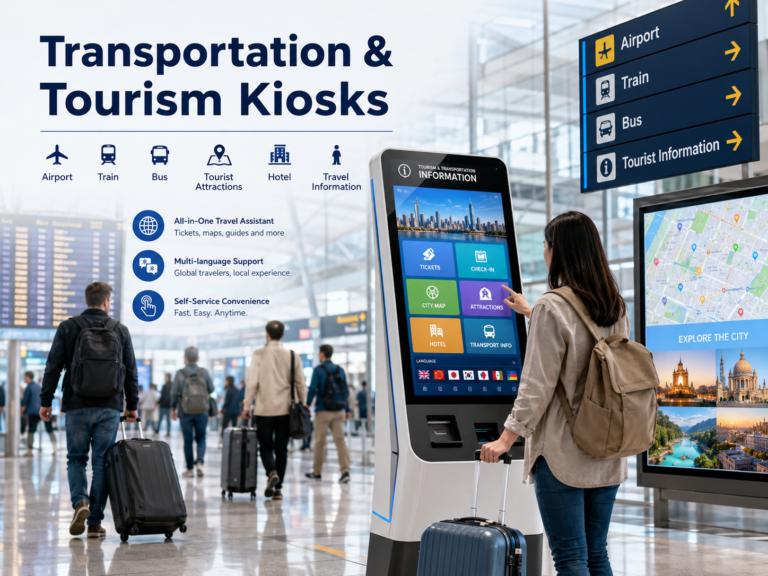
Transportation and tourism environments are becoming busier, faster, and more service-driven. Airports, railway stations, metro systems, bus terminals, scenic areas, hotels, and visitor centers all need to handle large numbers of travelers with different languages, schedules, and service needs. Transportation & Tourism Kiosks help solve these high-frequency passenger needs through self-service technology. They allow users to complete tasks such as check-in, ticket purchase, boarding pass printing, baggage tag printing, fare inquiry, route search, payment, map navigation, and local information access without waiting at a service counter. For operators, these kiosks reduce queue pressure, improve service efficiency, and support 24/7 public service. This article explains their applications, components, deployment requirements, and recommended providers for B2B projects.
What Are Transportation & Tourism Kiosks and Why Are They Needed?
Transportation & Tourism Kiosks are interactive self-service terminals designed for public travel environments. They are commonly used in airports, railway stations, metro systems, bus terminals, tourist attractions, hotels, visitor centers, museums, and smart city public spaces. Their main purpose is to help travelers and tourists complete basic services by themselves, such as ticketing, check-in, route search, wayfinding, payment, local information search, and digital guidance.
Unlike a normal digital signage screen, a transportation and tourism kiosk is not only used to display information. It is usually an integrated self-service system that combines hardware, software, and service functions into one public access point.
| Core Component | Typical Role |
|---|---|
| Touchscreen Display | Allows users to search, select, book, pay, and navigate |
| Ticketing or Booking Software | Supports transport tickets, attraction tickets, reservations, or check-in |
| Payment Module | Enables card payment, NFC payment, QR code payment, or mobile payment |
| Printer Module | Prints tickets, boarding passes, receipts, vouchers, maps, or queue numbers |
| QR Code / Barcode Scanner | Reads e-tickets, booking codes, membership codes, or mobile check-in codes |
| Multilingual Interface | Helps international travelers use services without staff assistance |
| Map and Wayfinding System | Guides users to gates, platforms, exits, attractions, hotels, or facilities |
| CMS and Remote Management | Allows operators to update content, monitor devices, and manage advertising remotely |
The reason these kiosks are increasingly used in transportation and tourism is simple: these industries deal with high passenger flow, frequent information requests, multilingual service needs, long queues, and many standardized processes. Travelers often need fast access to services, especially during peak hours, holidays, exhibitions, and tourist seasons.
For example, a traveler may need to:
- Buy or print a ticket
- Check in or confirm a reservation
- Search for a route or transfer option
- Find a gate, platform, exit, or attraction
- Scan a QR code or make a payment
- Access local travel information in another language
If every task depends on a service counter, operators may face higher labor pressure, slower service speed, longer queues, and a weaker visitor experience. A well-designed kiosk helps move these repetitive tasks into a self-service workflow, allowing staff to focus on more complex questions and special assistance.
| Stakeholder | Main Value |
|---|---|
| Travelers and Tourists | Faster ticketing, check-in, route search, payment, wayfinding, and local information access |
| Operators | Lower service pressure, better queue control, fewer repetitive manual tasks, and 24/7 self-service capability |
| Destinations and Cities | Better visitor experience, stronger digital service image, advertising opportunities, and basic usage data collection |
For this reason, transportation and tourism kiosks are now used not only as service tools, but also as digital touchpoints for smart airports, public transport systems, tourist destinations, hotels, museums, and smart city projects. They improve service efficiency, support self-service convenience, and create a more connected travel experience for both local users and international visitors.
Main Applications in Transportation and Tourism
After understanding what Transportation & Tourism Kiosks are, the next question is: where are they most commonly used? In real projects, these kiosks are not limited to one fixed form. Their design and functions usually change according to the location, user flow, service process, and management needs.
For example, an airport kiosk may focus on check-in and boarding pass printing, while a tourist information kiosk may focus more on city maps, attraction guides, and multilingual travel information. A public transport kiosk may need strong ticketing and payment functions, while a smart city kiosk may combine public notices, advertising, emergency information, and local service guidance.
| Application Scenario | Common Locations | Typical Functions |
|---|---|---|
| Airport Self-Service Kiosk | Airports | Check-in, seat selection, boarding pass printing, baggage tag printing, passport scanning |
| Public Transport Ticketing Kiosk | Metro stations, railway stations, bus terminals | Ticket purchase, transport card top-up, fare inquiry, route search, receipt printing |
| Tourist Information Kiosk | Visitor centers, scenic spots, hotels | Attraction guide, city map, local events, restaurant information, hotel information |
| Wayfinding Kiosk | Airports, stations, museums, malls | Indoor navigation, route planning, floor map, gate directions, platform directions |
| Attraction Ticketing Kiosk | Theme parks, museums, scenic areas | Ticket booking, QR ticket printing, payment, reservation confirmation |
| Smart City Information Kiosk | Public squares, transport hubs, tourist districts | City guide, public notices, maps, advertising, emergency information |
Among these applications, airport check-in kiosks and public transport ticketing kiosks are usually the most widely adopted because they handle high-frequency and standardized passenger services. Travelers need to complete these actions quickly, and operators also need to reduce pressure at service counters during peak hours.
From a project planning perspective, different application scenarios require different configurations. A simple tourist information kiosk may only need a touchscreen, CMS, map interface, and multilingual content. However, a transport ticketing kiosk may require payment terminals, receipt printers, QR code scanners, ticketing system integration, and stronger security design. For outdoor tourist areas or public squares, the kiosk also needs higher brightness, weather protection, and a more durable enclosure.
This is why buyers should not choose a kiosk only by screen size or appearance. The right solution should match the real service scenario, including user behavior, installation environment, required modules, software integration, and long-term maintenance needs. A kiosk used in a hotel lobby and a kiosk used at a metro station may look similar, but their system requirements can be very different.
Core Functions and System Components
A Transportation & Tourism Kiosk is not just a touchscreen placed in a public area. It is a complete self-service system that combines user functions, hardware modules, software platforms, and remote management tools. For B2B buyers, this section is important because different projects may require very different configurations.
For example, an airport kiosk may need passport scanning, boarding pass printing, and baggage tag printing, while a tourist information kiosk may only need map navigation, multilingual content, CMS, and QR code guidance.
| System Layer | What It Includes | Why It Matters |
|---|---|---|
| User-Facing Functions | Ticketing, check-in, route search, payment, printing, map navigation | Directly affects traveler experience and service efficiency |
| Hardware Components | Touchscreen, printer, scanner, payment terminal, camera, enclosure | Determines whether the kiosk can support the required service process |
| Software & Management System | CMS, remote monitoring, ticketing integration, API, data analytics | Helps operators manage content, devices, payments, and system connections |
User-Facing Functions
From the user side, the kiosk should make common travel tasks faster and easier. Typical functions include:
- Ticketing: buying transport tickets, attraction tickets, or event tickets
- Check-in: airport check-in, hotel check-in, or reservation confirmation
- Route Search: finding train lines, metro routes, bus routes, or walking directions
- Map Navigation: guiding users to gates, platforms, exits, attractions, or service counters
- Hotel and Attraction Information: showing nearby hotels, restaurants, scenic spots, and local events
- Multilingual Support: helping international visitors use the kiosk independently
- Payment: supporting card payment, NFC, QR code payment, or mobile payment
- Printing: printing receipts, tickets, boarding passes, vouchers, or maps
- QR Code Scanning: reading e-tickets, booking codes, membership codes, or check-in codes
Hardware Components
The hardware configuration should match the real application scenario. Common components include:
| Hardware Component | Common Use |
|---|---|
| Touchscreen Display | User interaction, information search, ticketing, navigation |
| Industrial PC or Android Motherboard | Runs the kiosk system and connected applications |
| Thermal Printer / Ticket Printer | Prints receipts, tickets, boarding passes, or vouchers |
| QR Code / Barcode Scanner | Reads e-tickets, mobile bookings, and reservation codes |
| Payment Terminal | Supports credit card, NFC, QR code, or mobile payment |
| Camera | Used for video support, identity capture, or service assistance |
| Passport / ID Reader | Useful for airport, hotel, or secure travel service scenarios |
| Speaker and Microphone | Supports audio guidance, voice prompts, or remote support |
| Metal Enclosure | Protects internal components in public environments |
| Cooling System | Helps the kiosk operate stably for long hours |
| Secure Maintenance Door | Allows staff to access internal modules safely and quickly |
Software and Management System
The software layer is what turns a kiosk from “hardware” into a real service solution. It may include:
- CMS for updating travel information, maps, notices, and promotional content
- Remote Device Monitoring for checking device status, errors, temperature, and connectivity
- Ticketing Platform Integration for transport tickets, attraction tickets, and reservations
- Payment Gateway Integration for secure online or offline payment processing
- Wayfinding Software for indoor navigation, route planning, and location guidance
- Booking System Integration for hotels, museums, events, and tourist attractions
- Advertising Content Management for local promotions and commercial display
- API Connection for connecting with third-party platforms
- Data Analytics for understanding usage frequency, popular routes, and visitor behavior
- Security and Access Control for protecting system settings, user data, and payment processes
In short, a good kiosk solution is not only about the screen. It must combine hardware, software, content management, payment, system integration, and long-term operation support. This is especially important for transportation and tourism projects, where devices must serve many users every day and remain stable in public environments.
Deployment Requirements: Indoor, Outdoor, and Public Environments
The deployment environment has a direct impact on the design, configuration, and long-term reliability of a Transportation & Tourism Kiosk. A kiosk installed in a hotel lobby does not face the same challenges as one placed at a bus stop, scenic area entrance, or outdoor public square. For B2B buyers, the key is to match the kiosk structure with the real operating environment.
| Deployment Type | Common Locations | Key Requirements |
|---|---|---|
| Indoor Kiosk | Airports, stations, hotels, visitor centers | Slim design, stable touch, printer/payment integration, easy maintenance |
| Semi-Outdoor Kiosk | Station entrances, covered tourist areas, semi-open terminals | Higher brightness, anti-glare glass, stronger enclosure, ventilation |
| Outdoor Kiosk | Bus stops, public squares, scenic entrances, tourist streets | Weatherproof enclosure, IP rating, sunlight-readable display, vandal resistance, cooling/heating system |
For indoor kiosks, appearance and user experience are usually more important. These kiosks are often placed in airports, railway stations, hotels, museums, and visitor centers, where they need to match the surrounding space. Buyers should focus on stable touch performance, smooth software operation, printer or payment module integration, and easy access for maintenance. Since indoor environments are more controlled, the kiosk may not need very high waterproof protection, but it still needs reliable components for long operating hours.
For semi-outdoor kiosks, the design requirements become more demanding. They may be installed near station entrances, covered bus terminals, scenic ticket areas, or sheltered tourist zones. These locations may face sunlight, dust, humidity, temperature changes, and heavier public traffic. Buyers should pay attention to higher screen brightness, anti-glare glass, stronger enclosure design, ventilation, and better cable protection.
For outdoor kiosks, durability becomes the priority. A kiosk used at a bus stop, scenic entrance, public square, or smart city service point must handle weather, sunlight, dust, rain, and possible vandalism. Important requirements include weatherproof enclosure, waterproof and dustproof rating, sunlight-readable display, anti-vandal structure, secure locks, protected payment modules, and a stable cooling or heating system.
B2B buyers should also check the following details before confirming a project:
- Screen brightness: indoor screens and outdoor screens require different brightness levels.
- Touch accuracy: the touchscreen should remain stable during frequent public use.
- Enclosure strength: the structure should protect internal components from impact and damage.
- Waterproof and dustproof rating: especially important for outdoor and semi-outdoor projects.
- Payment module protection: card readers, QR scanners, and NFC modules must be securely installed.
- Cable management: power cables and network cables should be hidden, protected, and easy to maintain.
- Accessibility design: screen height, viewing angle, and operation area should support different users.
- Maintenance access: staff should be able to replace printers, scanners, and internal parts efficiently.
- Spare parts replacement: long-term projects need stable supply of screens, printers, boards, and modules.
- Long operating hours: public kiosks often need to run for many hours every day, sometimes 24/7.
In short, deployment planning should come before product selection. A transportation and tourism kiosk should not be chosen only by screen size, appearance, or price. It should be selected based on the real location, user flow, environmental exposure, service process, maintenance plan, and expected operating hours. This is especially important for projects in airports, public transport hubs, scenic attractions, and smart city spaces, where the kiosk must remain stable, accessible, and safe for daily public use.
How to Choose the Right Transportation & Tourism Kiosk Provider
Choosing the right Transportation & Tourism Kiosk provider is not only about price or screen size. Since these kiosks are often used in airports, stations, hotels, tourist attractions, and smart city spaces, buyers should evaluate the supplier’s project experience, customization ability, integration support, hardware reliability, and after-sales service.
| What to Check | Why It Matters |
|---|---|
| Industry Experience | Airport, station, tourism, hotel, and smart city projects have different user flows and technical needs. |
| Customization Ability | Screen size, enclosure design, logo, color, modules, language, and software may need project-specific customization. |
| Integration Capability | The kiosk may need to connect with ticketing, payment, map, booking, CMS, or API systems. |
| Hardware Reliability | Public kiosks must support high-frequency use, stable touch performance, and long operating hours. |
| Outdoor Engineering Ability | Outdoor projects require weatherproof design, anti-glare glass, secure locks, cooling, and ventilation. |
| Compliance Awareness | Accessibility, electrical safety, payment security, and data protection may be required in different markets. |
| Remote Management Support | Operators need to update content, monitor device status, manage ads, and reduce maintenance costs. |
| Sample-to-Bulk Consistency | The final bulk order should match the approved sample in design, modules, and performance. |
| After-Sales and Spare Parts | Long-term operation depends on maintenance support and stable spare parts supply. |
Buyers should also ask practical questions before confirming a supplier:
- Has the provider worked on transportation, tourism, hotel, or smart city kiosk projects?
- Can the kiosk support Android, Windows, or Linux?
- Can the supplier customize the screen size, enclosure, branding, module layout, and language interface?
- Can it integrate with ticketing, payment, booking, map, or CMS platforms?
- Are spare parts such as screens, printers, scanners, mainboards, and payment module brackets available for long-term maintenance?
For customized B2B projects, working with an OEM/ODM kiosk manufacturer such as Ikinor can be helpful when buyers need flexible screen sizes, branded enclosure design, Android or Windows configuration, payment/scanner/printer module integration, and stable bulk production support.
In short, the best provider is not always the cheapest one. A reliable supplier should understand the real application scenario, support customization and integration, and help buyers reduce risks during installation, operation, and maintenance.
Recommended Transportation & Tourism Kiosk Providers
The following list is based on publicly available online information and is presented for buyer reference, not as an official ranking.
1. KIOSK Information Systems
| Category | Information |
|---|---|
| Company Name | KIOSK Information Systems |
| Company History & Biography | Custom self-service kiosk manufacturer and solution provider with experience across transportation, tourism, retail, healthcare, hospitality, government, gaming, and self-storage. Transportation & tourism solutions cover customs clearance, indoor/outdoor transit ticketing, airport bag tagging, cruise line services, and related passenger self-service use cases. Official contact page lists Louisville, Colorado, as the address. |
| Product Range | Custom kiosk machines, information kiosks, transactional kiosks, transportation & tourism kiosks, airport bag tagging kiosks, transit ticketing kiosks, cruise line kiosks, software development, remote monitoring, installation, field service, spare parts, and managed services. |
| Location | Louisville, Colorado, USA. |
| Contact | https://kiosk.com |
2. PopShap
| Category | Information |
|---|---|
| Company Name | PopShap |
| Company History & Biography | Founded in 2017 to serve the growing demand for digital touch solutions and interactive touchscreen kiosks. Directory focus includes all-in-one digital signage solutions that combine hardware and software for digital engagement. |
| Product Range | Interactive kiosks, touchscreen maps, travel and transportation kiosks, digital signage, LED video walls, interactive wayfinding, event displays, and all-in-one digital engagement solutions. Travel/transportation applications include maps, navigation, airport/bus/train terminal guidance, and transportation check-in support. |
| Location | South Hackensack, New Jersey, USA, according to LinkedIn company profile. |
| Contact | https://popshap.com |
3. Olea Kiosks Inc.
| Category | Information |
|---|---|
| Company Name | Olea Kiosks Inc. |
| Company History & Biography | Self-service kiosk design and manufacturing company with roots going back to 1975. Olea’s first kiosk was built in 1983 for the Los Angeles County Fair. Kiosk division became a core focus in later years, with in-house design and manufacturing in Los Angeles. |
| Product Range | Off-the-shelf kiosks, fully custom kiosk solutions, self-service kiosks for attractions, entertainment, healthcare, hospitality, travel, government, and enterprise environments. |
| Location | Los Angeles, California, USA. |
| Contact | https://www.olea.com |
4. XIPHIAS Software Technologies Private Limited
| Category | Information |
|---|---|
| Company Name | XIPHIAS Software Technologies Private Limited |
| Company History & Biography | Incorporated in Karnataka in 2005. Focus areas include self-service kiosk manufacturing, enterprise software solutions, ERP/CRM/CMS, smart solutions, IoT, automation, cybersecurity, and digital transformation. |
| Product Range | AI-powered touchscreen tourism kiosks, information kiosks, visitor/vendor management kiosks, self food ordering kiosks, exhibition kiosks, education kiosks, healthcare kiosks, retail kiosks, bill payment kiosks, e-governance kiosks, self check-in/out kiosks, telecom kiosks, and enterprise software solutions. |
| Location | Bangalore, Karnataka, India. |
| Contact | https://www.xiphiastec.com |
5. Advanced Kiosks
| Category | Information |
|---|---|
| Company Name | Advanced Kiosks |
| Company History & Biography | Self-service kiosk provider with close to 20 years of experience deploying thousands of kiosks across multiple industries. Operates as a DBA of H32 Design and Development LLC. Transportation use cases include flight check-in, baggage ticketing, passport reading, car rentals, train ticketing, and ride sharing. |
| Product Range | Freestanding kiosks, tower kiosks, ticketing kiosks, transit kiosks, airport self-service kiosks, government kiosks, bill payment kiosks, tribute stations, self-storage kiosks, and custom self-service kiosk solutions. |
| Location | United States. |
| Contact | https://advancedkiosks.com |
6. E-Star Kiosk
| Category | Information |
|---|---|
| Company Name | E-Star Kiosk / Shenzhen E-Star Information Technology Co., Ltd. |
| Company History & Biography | Founded in 2009. Fully integrated self-service kiosk manufacturer and national high-tech enterprise focused on customizable self-service solutions. Website states ISO9001:2015 and ISO14001:2015 certifications, independent import/export rights, 15+ years of industry experience, 180,000+ deployed devices, 3,000+ m² factory area, and 200+ employees. |
| Product Range | Custom kiosks, indoor kiosks, outdoor kiosks, self-service kiosks, information kiosks, financial kiosks, healthcare kiosks, hotel check-in kiosks, parking management kiosks, retail kiosks, storage/postal kiosks, transportation & tourism kiosks, payment ticket kiosks, ticket dispensing systems, and cashless payment terminals. |
| Location | Shenzhen, China. |
| Contact | https://www.estarkiosk.com |
7. Qtenboard Global
| Category | Information |
|---|---|
| Company Name | Qtenboard Global |
| Company History & Biography | Professional manufacturer and solution supplier for digital signage, interactive displays, and kiosk products. Website lists 2005 as the founding year, 33,000㎡ manufacturing base, 1,000+ employees, sales to 100+ countries, flexible OEM/ODM services, and full life-cycle support. |
| Product Range | Digital signage, kiosks, payment order kiosks, queue kiosks, information kiosks, self-service ticketing kiosks, LCD video walls, CCTV LCD video walls, advertising LCD video walls, interactive whiteboards, smart boards, Stand By Me TV, CMS/software-related display solutions. |
| Location | Hong Kong listed on contact page; manufacturing base stated on website. |
| Contact | https://www.qtenboardglobal.com |
8. Meridian Kiosks
| Category | Information |
|---|---|
| Company Name | Meridian Kiosks |
| Company History & Biography | Established in 1999. American-made kiosk manufacturer with headquarters in Aberdeen, North Carolina. The 13-acre headquarters includes administrative buildings, design and engineering studios, fabrication, assembly, integration, shipping, and R&D facilities. |
| Product Range | Travel and tourism kiosks, indoor and outdoor kiosks, smart lockers, interactive digital signage, self-service software, wayfinding kiosks, event and business promotion kiosks, advertising/revenue-generation kiosk solutions. |
| Location | Aberdeen, North Carolina, USA. |
| Contact | https://www.meridiankiosks.com |
9. TDDTEC / TDD GROUP LIMITED
| Category | Information |
|---|---|
| Company Name | TDDTEC / TDD GROUP LIMITED |
| Company History & Biography | Shenzhen-based provider of iPad kiosks, kiosks, digital signage displays, custom displays, light boxes, outdoor enclosures, and parking equipment. Service scope covers solution design, manufacturing, field services, design, fabrication, assembly, development, and integration of self-service terminals. |
| Product Range | iPad kiosks, kiosks, digital signage displays, custom displays, light boxes, outdoor enclosures, parking equipment, disinfection cabinets, ticketing solutions, bill payment solutions, self-ordering, outdoor payment, EV charging, custom displays, and outdoor enclosures. |
| Location | Shenzhen, China. |
| Contact | https://tddtec.com |
10. TrueOmni
| Category | Information |
|---|---|
| Company Name | TrueOmni |
| Company History & Biography | Omnichannel self-service solution provider focused on kiosk, digital signage, mobile marketing, customer experience, data analytics, productivity, and revenue. Travel and tourism solutions connect interactive kiosks, digital signage, and mobile devices for visitor engagement. |
| Product Range | Interactive kiosks, digital signage, mobile engagement tools, cloud-based platform, mapping, bookings, advertising, ticketing, indoor kiosks, outdoor kiosks, self-service check-in, visitor experience kiosks, and destination engagement solutions. |
| Location | Global offices listed as United States, Mexico, London, and Singapore. |
| Contact | https://trueomni.com |
FAQs
A Transportation & Tourism Kiosk is a self-service terminal used in airports, railway stations, metro systems, bus terminals, hotels, visitor centers, scenic areas, and smart city spaces. It helps travelers complete tasks such as ticketing, check-in, payment, route search, map navigation, QR code scanning, and local information search.
They are commonly used in airports, train stations, metro stations, bus terminals, tourist attractions, museums, hotels, visitor centers, public squares, and transport hubs. Different locations require different functions. For example, airports may need check-in and baggage tag printing, while tourist areas may need maps, attraction guides, and multilingual content.
Buyers should check the provider’s industry experience, customization ability, integration capability, hardware reliability, outdoor engineering ability, compliance awareness, remote management support, sample-to-bulk consistency, and after-sales service. The right provider should match the real application scenario, not just offer a standard screen product.




