
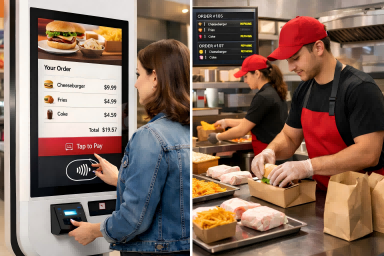
Today, touchscreen kiosks are increasingly appearing in commercial and public spaces, perfectly aligning with the fast-paced nature of modern life. Businesses are adopting these self-service solutions to improve efficiency, reduce labor costs, and enhance customer experience. However, many decision-makers tend to focus more on hardware while overlooking a critical factor—the software behind it. In reality, touchscreen kiosk software determines how smoothly the system operates, how easily users interact with it, and how effectively it supports business goals. Whether you are running a restaurant, hospital, or hotel, choosing the right software can directly impact service speed, operational costs, and customer satisfaction. In this article, we will explore the key features, software options, and practical selection strategies to help you make a smarter investment.
What Is Touchscreen Kiosk Software and Why It Matters
Touchscreen kiosk software is the core system that turns a “cold” hardware device into an interactive, intelligent terminal. Without software, a kiosk is just a screen. With the right software, it becomes a tool that can guide users, process actions, and deliver real business value.
This software typically consists of three main components. First, the user interface (UI)—the part users directly interact with for tasks like ordering, checking information, or making payments. Second, the content management system (CMS), which allows businesses to update content, manage devices, and control functions remotely. Third, the data and logic layer, responsible for handling orders, tracking user behavior, and generating analytics.
At its core, touchscreen kiosk software solves one key problem: allowing users to complete tasks without staff assistance. For example, imagine walking into a fast-food restaurant. You tap the screen, browse the menu, select items, pay, and wait for your order. This entire process is powered by kiosk software—from displaying options to processing payments and syncing orders with backend systems.
Many businesses assume hardware is the most important part of a kiosk. However, software is what truly determines success. A well-designed system delivers fast response, simple navigation, stable performance, and valuable data insights. On the other hand, poor software leads to confusion, slower service, and reduced efficiency.
In today’s self-service environment, touchscreen kiosk software is not optional—it is the key factor that defines user experience, operational efficiency, and overall ROI.
Key Features of Touchscreen Kiosk Software
When evaluating touchscreen kiosk software, the most important question is not how many features it includes, but whether those features are practical, easy to use, and suitable for real customer interactions. Unlike regular computer software, kiosk software is built for the general public, so simplicity and usability always come first.
A user-friendly touch interface is the foundation of a good kiosk experience. Large buttons, clear navigation, and intuitive screen layouts help users of all ages complete tasks quickly without needing guidance. This reduces learning time and increases usage rates, especially in busy environments such as restaurants, hospitals, and shopping malls.
A strong content management system (CMS) is another essential feature. It allows businesses to remotely update menus, promotions, service information, or announcements, while also managing multiple kiosk devices from one central platform. This improves efficiency and saves time for daily operations.
For public-facing locations, multi-language support is also important. It helps businesses serve users from different language backgrounds and improves accessibility in international or multicultural environments. At the same time, payment integration enables kiosks to accept QR codes, card payments, and NFC, making transactions faster and more convenient.
In addition, data analytics and reporting help businesses understand user behavior, order trends, and system performance. These insights can be used to improve services and support smarter decisions. Finally, security and access control protect the system by limiting unauthorized access and preventing misuse.
In short, kiosk software is designed as a simple, high-efficiency system for everyone, not just for trained users.
Software Requirements by Industry: Hospital vs Restaurant vs Hotel
While software types define functionality, industry requirements determine how that functionality is applied in real-world environments. Each sector has different priorities, workflows, and user expectations, which directly influence software configuration and complexity.
In healthcare, medical kiosk software must support structured, multi-step processes. Patients often need to complete registration, identity verification, payment, and document printing in a single session. Accuracy and data privacy are critical, and integration with hospital systems like HIS or EMR is often required. The focus here is reliability, compliance, and process clarity.
In the restaurant industry, self-service ordering software is designed for speed and efficiency, similar to modern restaurant self-ordering kiosks. The interface must be simple and intuitive, allowing customers to place orders within seconds. Features like menu customization, upselling suggestions, and fast payment integration are key. The system must also handle high traffic during peak hours without performance issues.
For hotels, self check-in kiosk software emphasizes convenience. Guests expect a smooth and visually appealing interface that supports quick check-in, identity verification, and room assignment. Integration with property management systems (PMS) ensures real-time data synchronization.
Museums and cultural venues have another type of public-facing workflow: a Museum Kiosk solution may need software for exhibit information, multimedia storytelling, gallery wayfinding, multilingual guidance, ticketing, visitor feedback, and CMS-based content updates within one interactive visitor system.
These differences show that even with the same software foundation, implementation varies significantly by industry. More complex workflows and integrations often lead to higher system requirements, which can impact both hardware configuration and overall kiosk machine cost.
Compatibility and Integration: The Key to Long-Term Success
When choosing touchscreen kiosk software, compatibility is often overlooked—but it is one of the most critical factors for long-term success. A system that works well today but cannot adapt tomorrow will quickly lead to higher costs and operational issues.
First, hardware compatibility is essential. Your kiosk software should support different screen sizes, operating systems such as Android and Windows, and modular hardware like OPS computers, printers, scanners, and payment devices. Flexible compatibility ensures that you can upgrade or adjust your hardware without needing to rebuild the entire system.
Second, strong system integration capability is key. In real-world applications, kiosks must connect with existing business systems such as POS (point of sale), PMS (property management systems), or healthcare systems. Without smooth integration, data cannot sync properly, leading to delays, errors, and poor user experience.
Another important factor is API compatibility. Open and flexible APIs allow your kiosk software to connect with third-party platforms, enabling future expansion such as loyalty programs, mobile apps, or cloud services. This makes your system more scalable and future-proof.
In addition, centralized device management is crucial for businesses with multiple locations. A strong system should allow you to control, monitor, and update all kiosks remotely across different stores or regions, improving efficiency and reducing maintenance workload. After choosing the right software, businesses also need a practical kiosk deployment plan that covers installation, power and network readiness, remote management, maintenance routines, security, and multi-location scaling.
Simply put: poor compatibility leads to higher long-term costs—including system conflicts, redevelopment, and upgrade challenges.
Choosing the right software from the beginning ensures smoother operations, easier expansion, and a better return on investment over time.
How to Choose the Right Kiosk Software for Your Business
Choosing the right touchscreen kiosk software is not about selecting the most advanced solution—it’s about finding the one that best fits your business goals and daily operations.
The first step is to clearly define your application scenario. Different industries have very different requirements. For example, hospitals need structured workflows and system integration, restaurants focus on speed and simplicity, while hotels prioritize user experience and smooth check-in processes. Understanding your use case helps you avoid choosing unsuitable software.
Next, evaluate the balance between features and cost. More features do not always mean better performance. Overly complex systems can increase costs, slow down operations, and confuse users. Focus on features that directly improve efficiency and customer experience.
Another important factor is whether the software supports customization (OEM/ODM). If your business has unique workflows or branding requirements, customizable solutions allow you to tailor the system to your exact needs instead of adapting your operations to the software.
You should also consider scalability. A good kiosk system should support future upgrades, such as adding new features, integrating with additional platforms, or expanding to multiple locations. This ensures your investment remains valuable over time.
Finally, evaluate the supplier’s technical support and long-term service capability. Reliable partners provide ongoing updates, maintenance, and fast support when issues arise.
At Ikinor, we help businesses simplify this process by offering:
- Professional kiosk type selection
- Practical hardware configuration recommendations
- Flexible software solutions (standard or customized)
- Full OEM & ODM customization services
- Competitive factory pricing for bulk orders
By choosing the right software and partner, you can build a kiosk solution that delivers real, long-term business value.
FAQs
Touchscreen kiosk software is used to enable self-service interactions in various industries. It allows users to complete tasks such as ordering food, checking in at hotels, registering in hospitals, or finding directions in malls—without needing staff assistance.
Key features include a user-friendly interface, CMS for remote management, payment integration, multi-language support, and data analytics. These features ensure smooth operation, better user experience, and easier system management.
Start by defining your use case, such as wayfinding, self-service, product browsing, or engagement displays. Then compare ease of use, platform compatibility, security, remote support, scalability, and how well the software fits your budget and staff resources.
Yes, most modern solutions support integration with systems like POS, PMS, or healthcare systems through APIs. This allows real-time data synchronization and improves operational efficiency.
Standard software is faster to deploy and more cost-effective, while customized (OEM/ODM) solutions are better for businesses with unique workflows or branding needs. The right choice depends on your business scale and requirements.
Look for a supplier that offers reliable technical support, customization options, scalability, and long-term service. A strong partner like Ikinor can help you match hardware and software while optimizing cost and performance.




