
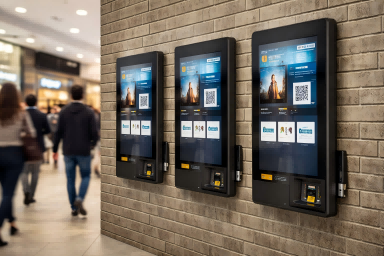
Wall mounted kiosks are becoming an increasingly common sight in modern commercial environments, from retail stores and hospitals to office buildings and public spaces. Unlike traditional floor-standing units, these kiosks are designed to integrate directly into the physical layout, offering a more streamlined and efficient way to deliver self-service interactions.
As businesses face growing pressure to optimize space, improve user flow, and enhance customer experience, wall mounted solutions provide a practical alternative that fits naturally into high-traffic environments. However, choosing the right kiosk is not just about design—it also involves understanding functionality, deployment conditions, and long-term usability.
In this guide, we’ll explore how wall mounted kiosks work, where they are used, and how to select the right solution for your business.
Why Wall Mounted Kiosks Exist: Beyond Traditional Floor-Standing Designs
For many years, self-service kiosks were primarily designed as floor-standing units. These systems are flexible and can integrate multiple functions, but their physical structure also makes them relatively large and space-consuming. In open areas, this is rarely an issue. However, in more constrained environments, their size becomes a limitation rather than an advantage.
In real-world commercial settings, space is often a critical constraint. Retail stores need to maximize product display areas, hospitals must keep corridors clear for patients and staff, and office entrances are typically designed for smooth, uninterrupted traffic flow. In these situations, placing a freestanding kiosk can disrupt movement or simply not fit within the available layout. This creates a clear gap between traditional kiosk design and modern spatial requirements.
At the same time, many use cases do not require complex, full-featured machines. Instead, businesses increasingly need simple, fixed interaction points—for example, a quick check-in station, an information lookup screen, or a digital directory. These tasks are repetitive, location-specific, and designed for fast user interaction.
This is where wall mounted kiosks come in. Rather than acting as standalone machines, they are designed as integrated touchpoints within a physical environment. Their role is not to replace all kiosk types, but to serve as lightweight service nodes—installed exactly where interaction is needed, without altering the surrounding layout. In essence, wall mounted kiosks exist to align self-service technology with the spatial and operational realities of modern businesses.
Key Benefits of Wall Mounted Kiosks
Wall mounted kiosks offer a range of practical advantages that make them a preferred choice in many modern environments, especially where layout efficiency and streamlined operations matter.
One of the most noticeable benefits is their space-efficient design. Because the unit is installed directly onto a wall, it does not occupy any floor space. This allows businesses to preserve valuable ground area for customer movement, product displays, or essential operations. In locations where every square meter counts, this design approach helps maintain a clean and organized environment.
Another key advantage is installation flexibility. Wall mounted kiosks can be deployed in a variety of locations, including walls, columns, entrances, and narrow passageways. This makes it easier to position the device exactly where user interaction is needed, rather than adjusting the environment to fit the equipment.
From a cost perspective, these kiosks are often more economical than larger, freestanding systems. Their simpler structure and reduced material requirements typically result in lower manufacturing, shipping, and installation costs, making them a practical option for projects with budget considerations.
Maintenance is also more straightforward thanks to their modular design. Components such as the display or internal system can be accessed and serviced more efficiently, minimizing downtime and reducing long-term operational effort.
In addition, wall mounted kiosks contribute to better traffic flow by keeping walkways clear and reducing physical obstacles. This helps prevent congestion, especially in high-traffic areas. Finally, their sleek and minimal appearance supports a cleaner, more modern layout, enhancing the overall visual impression of the space.
Common Use Cases Across Different Industries
Wall mounted kiosks are widely used across industries where quick, location-based interactions are required. Their deployment typically focuses on performing a specific function at a fixed point within a space.
In retail environments, wall mounted kiosks are commonly used for product lookup or self-ordering. They are usually installed on walls near store entrances, within aisles, or beside product sections. Customers can quickly check product details, availability, or place orders without needing staff assistance.
In healthcare settings, these kiosks are used for patient check-in and queue management. They are typically placed at hospital entrances, reception areas, or along corridors. Patients can register, confirm appointments, or receive queue numbers before proceeding further inside the facility.
In office environments, wall mounted kiosks are often designed for visitor registration. They are installed at building entrances or reception walls, allowing guests to check in, input their information, and notify the host without requiring a staffed front desk.
In public spaces such as transportation hubs or government buildings, wall mounted kiosks are used for ticketing and wayfinding. These units are positioned along walls in high-traffic areas, near entrances, or at key navigation points to help users purchase tickets or find directions.
Across all these applications, several common characteristics stand out: the kiosk is installed in a fixed position, often in space-limited areas, designed for high-frequency use, and built to support simple, fast interactions.
Wall Mounted vs Floor Standing Kiosk: Which Should You Choose?
Once you understand how wall mounted kiosks are used across different industries, the next step is to determine whether a wall mounted solution or a floor standing kiosk better fits your business environment. The decision is not about which option is “better,” but which one aligns with your available space, required functionality, and user flow.
Wall mounted kiosks are typically chosen for fixed, task-specific interactions. In scenarios like retail product lookup, hospital check-in, or office visitor registration, the goal is to provide a quick and simple touchpoint at a clearly defined location. These kiosks are installed directly onto walls, making them suitable for areas where space is limited and movement needs to remain smooth.
In contrast, floor standing kiosks are designed for complete, multi-step interactions. They are often equipped with additional hardware such as payment terminals, printers, or scanners, allowing users to complete an entire process—such as checkout or ticket purchase—at a single station. This makes them more suitable for scenarios where functionality is more important than spatial efficiency.
| Feature | Wall Mounted Kiosk | Floor Standing Kiosk |
|---|---|---|
| Installation | Fixed on wall | Freestanding unit |
| Space Requirement | Minimal | Requires floor space |
| Functionality | Task-focused | Multi-function (payment, printing) |
| Mobility | Fixed | Flexible |
| Cost | Lower | Higher |
How to Decide
- Limited space + simple interaction → wall mounted kiosk
- Complex workflow (payment, printing, scanning) → floor standing kiosk
- High traffic areas needing clear pathways → wall mounted kiosk
By aligning your choice with real operational needs, you can ensure the kiosk integrates naturally into your environment.
Buying Guide: What to Consider Before Purchasing
After deciding whether a wall mounted kiosk is the right fit for your environment, the next step is to evaluate the key factors that will impact performance, usability, and long-term value. A well-informed decision at this stage can help avoid unnecessary costs, reduce deployment risks, and ensure that the kiosk integrates smoothly into your daily operations.
In many cases, consulting a professional smart kiosk OEM/ODM manufacturer can help you address most of these challenges, from hardware selection to software compatibility and customization.
Installation Conditions: Can Your Space Support It?
Before selecting specifications, assess whether your space can properly support a wall mounted kiosk. Wall strength is critical—concrete or brick walls can usually handle most units, while drywall may require reinforcement or custom brackets to ensure safety and stability.
Power supply and network access should also be confirmed early. Check whether the installation point already has accessible outlets and LAN connections, or if additional wiring is needed. Poor planning can increase installation costs and create visible cable issues that affect the overall appearance.
Placement matters for both usability and efficiency. For example, hospital corridors often require slim, lightweight designs to avoid obstructing movement, while shopping mall entrances may need more durable enclosures due to higher foot traffic. By evaluating these conditions in advance, you can ensure a smoother installation process and long-term reliability.
Screen Size & Mounting Height: Optimize User Experience
Choosing the right screen size and mounting height is essential for a comfortable user experience. Since wall mounted kiosks are typically used while standing, the display should be positioned at a natural eye level to avoid discomfort during interaction.
Common sizes include 21.5″, 32″, and 43″, with the ideal option depending on viewing distance and usage type. Smaller screens are suitable for close-range tasks like check-in or product lookup, while larger screens work better for displaying more content or attracting attention from a distance.
Brightness is another key factor. Standard indoor environments require moderate brightness, but areas with strong ambient light—such as glass-front stores or entrances—may need higher brightness levels for visibility.
For example, a retail product lookup kiosk may only need a 21.5″ or 32″ screen, while a promotional display benefits from a larger size. Aligning screen size, height, and brightness with real usage conditions significantly improves usability.
Touch Technology: IR vs PCAP
Touch technology plays a major role in how users interact with the kiosk. The two most common options are infrared (IR) and projected capacitive (PCAP), each suited to different use cases.
IR touch is more cost-effective and works well for basic interactions such as browsing information or navigating menus. It is also durable and can function even if users are wearing gloves, making it suitable for practical environments.
PCAP touch offers a smoother and more responsive experience, similar to smartphones and tablets. It supports multi-touch gestures and provides higher precision, which is especially useful in premium retail or branded environments where user experience is important.
Function Expansion: What Features Do You Really Need?
While wall mounted kiosks can support additional features, it’s important to determine which ones are truly necessary. Common modules include QR or barcode scanners, payment systems such as NFC or card readers, and printers for receipts or tickets.
However, adding too many features can increase complexity, cost, and maintenance requirements. Wall mounted kiosks are generally designed for focused, lightweight interactions, so overloading them with functions may reduce efficiency and reliability.
For example, a product lookup kiosk may only require a touchscreen interface, while a ticketing kiosk might need a scanner or printer. The goal is to match features with actual user needs rather than adding unnecessary components.
System & Connectivity: Ensure Long-Term Compatibility
System and connectivity are not just technical details—they directly determine how reliable and scalable your kiosk will be over time. A modern kiosk is no longer a standalone device, but a network-dependent terminal that relies on stable connections for data synchronization, system updates, and real-time interaction.
When choosing a system, options such as Android, Windows, or dual OS should be aligned with your software requirements. Android is often preferred for its simplicity and cost efficiency, while Windows provides better compatibility with enterprise systems. For more complex deployments, a dual OS setup can offer additional flexibility.
Connectivity is even more critical. A stable network ensures smooth operation, especially in scenarios involving payments or high user traffic. Wired Ethernet is generally the most reliable option, offering strong stability and low latency. Wi-Fi provides flexibility but may be affected by interference in crowded environments, while 4G/5G is useful for remote or outdoor locations where wired infrastructure is unavailable.
Beyond basic connectivity, cloud integration is becoming increasingly important. By connecting kiosks to a centralized CMS platform, businesses can remotely update content, monitor device status, and perform system upgrades without on-site maintenance. This is especially valuable for multi-location deployments, where managing devices individually would be inefficient.
For example, a retail chain can use cloud-based management to update promotions across all kiosks simultaneously, while also tracking performance in real time. Choosing the right combination of system and connectivity ensures your kiosk remains reliable, manageable, and ready to scale with your business.
Customization & Supplier Capability: Choosing the Right Partner
Beyond specifications, the supplier you choose is critical to the success of your project. A reliable manufacturer should offer OEM/ODM customization, including branding, hardware adjustments, and system integration.
It’s also important to consider industry experience. Suppliers familiar with retail, healthcare, or office environments can provide more practical recommendations based on real-world use cases. Certifications such as CE, FCC, and RoHS indicate compliance with international standards.
Working directly with an experienced manufacturer like Ikinor can simplify the process. With strong capabilities in customization, integration, and production, Ikinor helps businesses develop tailored wall mounted kiosk solutions.
Choosing the right partner ensures your kiosk is not only functional but also aligned with your long-term business needs.
FAQs
A wall mounted kiosk is an interactive digital display or self-service terminal fixed directly to a wall. It is commonly used for check-ins, wayfinding, ordering, ticketing, and information sharing in places where floor space is limited.
The biggest benefits are space savings, improved efficiency, and a cleaner layout. Wall mounted kiosks can also reduce wait times, support self-service, and create a more modern customer experience.
They are often used in retail stores, restaurants, hospitals, hotels, offices, schools, airports, and public venues. Common applications include visitor registration, room booking, product browsing, digital signage, and navigation.
They let users complete tasks quickly without waiting for staff, which makes service faster and more convenient. They can also provide multilingual support, clear instructions, and 24/7 access to basic information.
Focus on screen size, durability, mounting security, touchscreen responsiveness, software compatibility, and accessibility height. You should also think about the environment it will be used in, such as indoor retail, healthcare, or high-traffic public spaces.
Not always, but they are usually better when floor space is tight or when you want a streamlined, secure installation. Freestanding kiosks may be better if you need more flexibility in placement or a larger enclosure.




