
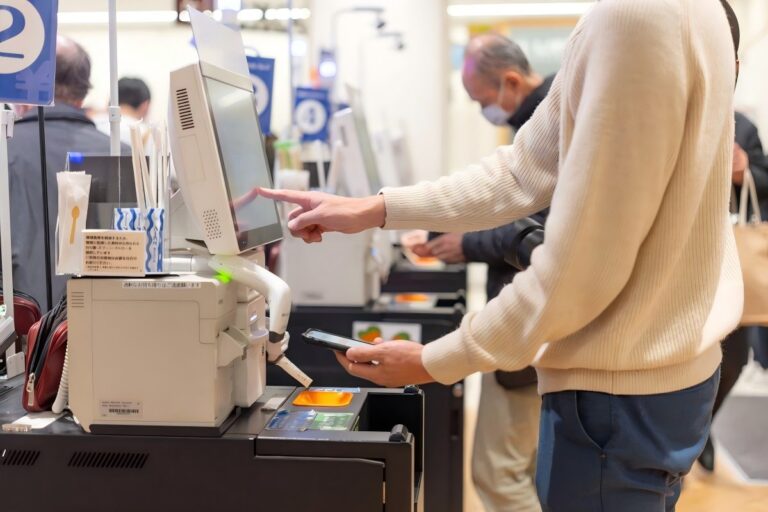
Walk into any modern retail store, airport, or public space today, and you’ll likely notice something changing—fewer service counters, and more interactive screens guiding users through tasks. Instead of relying entirely on staff, people are increasingly comfortable completing actions on their own, whether it’s checking in, making a payment, or accessing information.
This shift is not just about technology—it reflects a broader move toward efficiency, automation, and user-driven experiences. Behind these changes are computer kiosk stations, quietly becoming a core part of how businesses operate.
In this article, we’ll break down what these systems are, explore their different types, and understand the key features that make them so effective in real-world environments.
What Is a Computer Kiosk Station and What Is It Used For?
A computer kiosk station is a self-service system that combines a computer, touchscreen, and dedicated software into one purpose-built unit designed for specific tasks. Unlike a regular computer, it is not meant for open-ended use. Instead, it guides users through a simple, focused process—whether that’s placing an order, checking in, or accessing information.
From a user’s perspective, the value is immediate and practical. Instead of waiting in line or relying on staff, users can search, order, pay, or register within seconds. The experience is designed to be intuitive, even for first-time users. For example, imagine walking into a busy fast-food restaurant during lunch hour. Rather than standing in a long queue, you walk up to a kiosk, tap through a few options, customize your meal, and complete payment in under a minute. That seamless interaction is exactly what kiosk stations are built to deliver.
Compared to traditional service models, kiosks offer clear advantages. They enable faster service, reduce the risk of human error, and operate 24/7 without interruption. This consistency is especially valuable in high-traffic environments where efficiency directly impacts customer satisfaction and revenue.
Businesses are increasingly adopting computer kiosk stations not just to reduce labor costs, but to streamline operations and enhance customer experience. In addition, kiosks generate valuable data—such as user preferences and peak usage times—which helps companies optimize workflows and make smarter decisions over time.
Types of Computer Kiosk Stations
Computer kiosk stations come in different physical formats, each designed to match specific environments and user flows. Choosing the right form factor is essential, as it directly affects how users interact with the device and how efficiently it fits into a space.
Freestanding kiosks are the most common type. These floor-standing units are typically placed in open areas such as shopping malls, retail stores, and restaurant entrances. Their visibility makes them ideal for handling large volumes of users. For example, fast-food chains often install multiple freestanding kiosks near the entrance to manage peak-hour traffic and reduce crowding at the counter.
Wall-mounted kiosks are designed for locations where space is limited. By being fixed directly onto walls, they keep walkways clear and organized. This makes them especially suitable for hospitals, office buildings, and corridors. A common example is hospital check-in screens mounted along walls, allowing patients to quickly register without blocking the flow of people.
Countertop kiosks are compact units placed on desks or counters. They are ideal for environments where quick interactions happen at close range, such as cafés, retail checkout areas, or reception desks. For instance, a coffee shop may use a countertop kiosk to let customers place orders and complete payments directly at the counter.
Outdoor kiosks are built for external environments and must withstand weather conditions. They are commonly installed in parking lots, transportation hubs, and public spaces. Parking payment kiosks are a typical example, remaining visible and usable under bright sunlight or rain.
Ultimately, choosing the right kiosk type is not about features, but about how well it fits your space and customer journey.
Key Features That Define Modern Kiosk Stations
What makes modern kiosk stations powerful is not any single feature, but the combination of multiple capabilities working seamlessly together. It is this integration that transforms a simple device into a reliable self-service solution.
At the foundation is the touchscreen and display. A responsive touch panel paired with clear, high-resolution visuals directly shapes the user experience. Even a slight delay or poor visibility can frustrate users and lead to abandonment, making performance and clarity non-negotiable.
Equally important are integrated modules, which form the core value of a kiosk. Functions such as scanning, payment processing, printing, and camera recognition are no longer separate components—they are unified into a closed-loop system. For example, a typical workflow can move smoothly from input to transaction to output without interruption, creating a frictionless experience.
The operating system plays a supporting but essential role. Android offers flexibility and cost efficiency, making it ideal for scalable deployments, while Windows enables deeper integration with enterprise systems and more complex software environments.
Often overlooked, connectivity is critical to overall performance. Whether through WiFi, Ethernet, or 4G/5G, stable network access ensures continuous operation. A brief connection failure can halt transactions entirely, directly impacting revenue and user trust.
Finally, cloud management is what truly sets modern kiosks apart. Remote updates, real-time monitoring, and data analytics allow businesses to manage large-scale deployments efficiently and respond quickly to changing needs.
In the end, the real value of a kiosk lies not in individual features, but in how these elements work together to deliver a fast, reliable, and consistent user experience.
Common Use Cases Across Industries
Today, computer kiosk stations are widely used across industries as a key part of digital transformation strategies. Rather than simply replacing manual tasks, they help businesses optimize workflows, improve user experience, and enable data-driven operations.
In retail, kiosks empower customers to take control of their shopping journey—from product discovery to checkout—without relying on staff. This shift not only reduces queues but also creates opportunities for guided selling and upselling. More importantly, kiosks act as data collection points, helping retailers understand customer behavior and refine strategies to boost conversion rates and overall efficiency .
In healthcare, the value goes beyond convenience. Kiosks play a critical role in streamlining patient flow and operational coordination. By automating registration, check-in, and queue management, hospitals can handle higher patient volumes while maintaining organized workflows. This contributes to shorter waiting times, better resource allocation, and a more structured patient journey .
In the hospitality sector, kiosks enhance service accessibility and consistency. Guests can complete essential processes independently, especially during peak or off-hours, reducing reliance on front-desk staff while maintaining service quality. This leads to a smoother, more flexible customer experience.
For transportation, kiosks are essential for managing large-scale passenger movement. By decentralizing services like ticketing and navigation, they reduce congestion and improve flow efficiency, ensuring that high-traffic environments operate more smoothly.
In corporate and government settings, kiosks support standardized processes such as visitor registration and public service access. This not only improves operational consistency but also strengthens security tracking and record management.
Across industries, kiosk stations are evolving from simple machines into essential infrastructure for efficiency, automation, and smarter decision-making.
FAQs
A computer kiosk station is a self-service terminal that lets people access information, complete tasks, or interact with services through a locked-down computer interface. These stations are commonly designed for public use and usually include a touchscreen, secure enclosure, and specialized software.
Common types include self-service kiosks, payment kiosks, wayfinding kiosks, information kiosks, ticketing kiosks, and interactive kiosks. Some are built for specific industries, such as healthcare check-in, retail ordering, hotel guest services, or transportation ticketing.
Typical features include a touchscreen interface, custom kiosk-mode software, a durable tamper-resistant enclosure, and support for peripherals like printers, barcode scanners, and card readers. Many kiosks also include secure networking and session controls to protect user data between uses.
Businesses use kiosk stations to speed up service, reduce queue times, and let customers handle simple tasks themselves. They are often used for ordering, check-in, payment, product browsing, and visitor management.
Industries that benefit most include retail, healthcare, hospitality, transportation, education, and government services. These environments use kiosks for check-in, directions, self-service ordering, ticketing, and public information access.
A kiosk station is built for a specific task, so it is easier to use, more secure, and better suited for unattended public spaces. Unlike a regular computer, it limits access to approved functions and can be configured to reset sessions automatically for the next user.




