
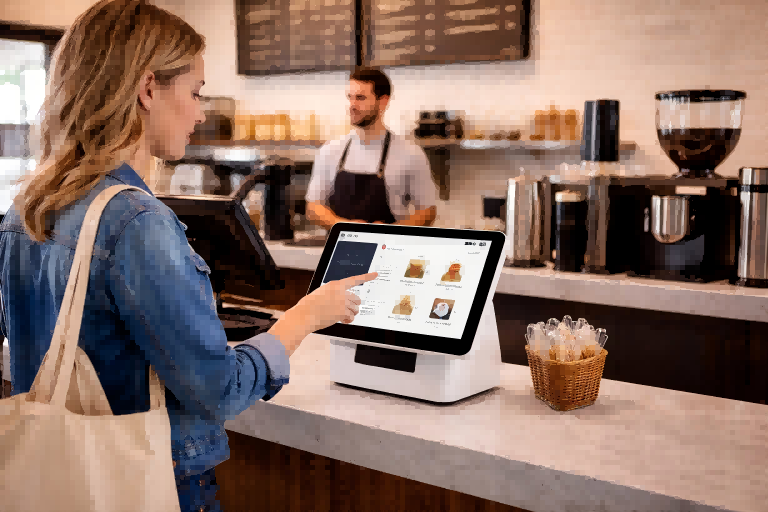
In a busy café during the morning rush, customers line up at the counter, waiting to place orders and make payments. To speed things up, a small touchscreen device sits right beside the cashier, allowing customers to order, scan, and pay within seconds. This is a typical example of how a countertop kiosk works in real business environments—compact, efficient, and placed exactly where interaction happens.
As businesses look for ways to improve efficiency without expanding space or increasing labor costs, countertop kiosks are becoming an increasingly popular solution. In this article, we’ll explore what they are, why they’re growing in demand, and how to deploy and choose the right one for your business.
What Is a Countertop Kiosk?
A countertop kiosk is a small self-service device designed to sit on a counter, checkout desk, or reception table. It is commonly used for payments, check-ins, and quick information access in places where space is limited but service speed still matters. Simply put, it’s like a commercial-grade computer combined with a business system, built for real-world operations rather than personal use.
Most countertop kiosks feature 10 to 22 inch screens, making them ideal for compact environments. Despite their small size, they can integrate multiple functions such as touch interaction, QR code scanning, card payment, and receipt printing. They are also designed for long hours of stable operation, which is essential in busy retail stores, restaurants, clinics, and front desks.
To better understand their positioning, it helps to compare them with other common kiosk types:
| Type | Size and Placement | Best For | Main Advantage |
|---|---|---|---|
| Countertop Kiosk | Small, placed on counters or desks | Payment, registration, quick inquiry | Space-saving, flexible, easy to deploy |
| Freestanding Kiosk | Large, floor-standing unit | Wayfinding, ticketing, full-service interaction | High visibility, supports complex functions |
| Wall Mounted Kiosk | Fixed on walls, medium size | Check-in, information display, guided interaction | Saves floor space, more permanent setup |
Compared to freestanding kiosks, countertop kiosks are more compact and lightweight, making them ideal for high-frequency, fast interactions. Compared to wall-mounted kiosks, they are more flexible and easier to install, since they don’t require fixed mounting or structural adjustments.
In essence, a countertop kiosk is not designed to replace large display systems. Instead, it acts as a high-frequency interaction entry point, placed exactly where users need to take action—making it a practical and efficient solution for modern business environments.
Why Countertop Kiosks Are Growing in Popularity
As businesses continue to adopt self-service solutions, compact formats like countertop kiosks are becoming increasingly common across different industries. This shift is not случай—it reflects several important changes in how businesses operate and how customers interact with services.
First, the rise of self-service is accelerating. Businesses are looking for ways to reduce reliance on staff and control operating costs. This is especially visible in restaurants, where customers can place orders and complete payments on their own, and in retail stores, where quick self-checkout or product lookup reduces the need for manual assistance.
At the same time, commercial spaces are becoming more limited. Many retail shops, cafés, and reception areas simply don’t have room for large equipment. For example, a small café counter or a hotel front desk needs to handle transactions efficiently without adding bulky systems. This creates a strong demand for compact and lightweight solutions that can fit into tight spaces.
Another important factor is the change in user behavior. Customers are now more comfortable with digital interfaces and prefer fast, self-service, and contactless interactions. In a clinic or hospital, for instance, patients increasingly expect to register or check in quickly without waiting in line, while office visitors prefer a simple self-service check-in at reception.
In addition, digital transformation is pushing more everyday processes toward automation. Across industries—from food service to healthcare—businesses are redesigning workflows to include self-service touchpoints.
Overall, these changes are driving the demand for smaller, faster, and more flexible kiosk solutions, making countertop kiosks a natural fit for modern business environments.
Key Benefits of Countertop Kiosks
One of the most immediate benefits is space efficiency. Countertop kiosks are specifically designed for small counters and limited environments, allowing businesses to add self-service functionality without occupying valuable floor space or disrupting the main service area.
Another key advantage is cost efficiency. Compared to larger kiosk systems, countertop models have a simpler structure and lower initial investment, making them easier to adopt. This also makes them ideal for scaling across multiple locations, especially for chain stores that need consistent deployment at a controlled cost.
In terms of setup, countertop kiosks offer easy deployment. Most systems follow a plug-and-play approach, which means businesses can install and start using them quickly without complex construction or technical setup. This significantly reduces both deployment time and operational disruption.
They also contribute directly to operational efficiency. By handling repetitive tasks such as ordering, payments, or check-ins, countertop kiosks help reduce staff workload and shorten waiting times, leading to a smoother customer experience.
Finally, countertop kiosks provide strong integration capabilities. They can connect seamlessly with POS systems, payment gateways, and backend platforms, allowing businesses to integrate them into existing workflows without major system changes.
For businesses with limited space but high interaction needs, a countertop kiosk offers a cost-effective and scalable solution that improves efficiency while supporting long-term growth.
Countertop Kiosk Deployment: What to Consider
While countertop kiosks offer clear advantages, their real impact depends on how they are used in practice. A well-placed device can improve efficiency immediately, while poor placement may limit its effectiveness.
First, consider counter space and placement height, as these directly affect usability. The screen should be positioned at a natural viewing angle so users can interact comfortably without bending or stretching. For example, many quick-service restaurants place kiosks at a height of 100–120 cm, which has been shown to improve interaction speed and reduce user hesitation.
Next is power and network layout. Poor cable management not only looks unprofessional but can also create safety risks. Businesses often choose hidden wiring or built-in cable routing, especially in retail counters where aesthetics matter.
Equally important is customer flow design. A poorly positioned kiosk can disrupt the main service process. In a busy café, placing the kiosk too close to the pickup area can create congestion, while a well-placed device near the entrance can help distribute traffic and reduce queue pressure.
Device stability and security should not be overlooked, as countertop kiosks are often placed in open, high-traffic areas like retail counters or reception desks, making them vulnerable to movement or theft. Businesses typically use anti-slip bases, lockable stands, or fixed mounts to keep devices stable. In higher-risk environments, additional measures such as Kensington locks, tamper-resistant screws, and concealed cables help prevent unauthorized access. Some deployments also include alarm systems or remote monitoring for added protection. These combined solutions ensure the kiosk remains secure, reliable, and professional in daily operation.
Finally, think about single-location versus multi-location deployment. For chain businesses, standardized setup across stores can significantly reduce maintenance complexity and training costs.
In practice, businesses that optimize kiosk deployment can see queue times reduced by up to 30%, while improving overall service efficiency. A well-planned kiosk deployment ensures not only smooth operation, but also long-term reliability and lower operational costs.
The Role of Kiosk Software in Compact Systems
While proper deployment ensures that a countertop kiosk is accessible and functional, the real user experience is defined by the software behind it. In compact systems, where screen space and interaction time are limited, software plays an even more critical role.
First, UI design must be optimized for small screens. This means clear layouts, large touch-friendly buttons, and minimal distractions. A well-designed interface allows users to navigate naturally, even on a 10–22 inch display, without confusion or hesitation.
Just as important is the interaction flow. Effective kiosk software simplifies processes like ordering, payment, or check-in into just a few steps, often within 3–5 actions. This not only improves user satisfaction but also increases completion rates, especially in high-traffic environments.
Beyond the front-end experience, strong system integration is essential. Kiosk software should connect seamlessly with POS, ERP, and payment systems, ensuring real-time synchronization of orders, pricing, and inventory. This creates a smooth, automated workflow and reduces manual errors.
Modern systems also rely on cloud-based CMS platforms, allowing businesses to manage content, pricing, and promotions across multiple kiosks remotely. Instead of updating each device manually, changes can be deployed instantly, which is especially valuable for chain operations.
Finally, data analytics turns kiosks into powerful business tools. By tracking user behavior and sales patterns, businesses can optimize layouts, improve offerings, and increase conversion rates.
In the end, kiosk software transforms a compact device into a scalable, data-driven system—making it not just functional, but truly efficient and profitable.
How to Choose the Right Countertop Kiosk
After understanding how deployment and software affect performance, the next step is choosing a countertop kiosk that fits your counter space, workflow, and interaction needs. Unlike larger kiosks, countertop models are designed for limited space and high-frequency use, so the selection criteria are more focused.
First, define your specific use scenario at the counter. In retail, the kiosk is often used for quick checkout or product lookup; in reception areas, it supports fast check-in; while in healthcare, it handles registration and queue management. Since countertop kiosks are typically used for short, task-focused interactions, the goal is always speed and simplicity.
Next, choose the right functional modules based on counter usage. For example, a café or store counter may require payment and receipt printing, while a reception desk may only need QR scanning or ID input. Avoid overloading the device with unnecessary features that take up space or complicate the workflow.
You should also ensure hardware and software compatibility, especially when integrating with POS or backend systems already used at the counter. A smooth connection ensures faster processing and fewer operational issues.
When it comes to budget, focus on long-term ROI rather than just initial cost. A well-matched countertop kiosk can reduce staff workload and improve service speed significantly, making it more valuable over time.
Finally, consider a supplier that supports OEM/ODM customization, especially for counter-specific designs such as adjustable stands, branding, and compact layouts. For example, Ikinor helps businesses create tailored countertop kiosk solutions that fit both space constraints and operational needs.
FAQs
A countertop kiosk is a compact self-service terminal designed to sit on a counter, desk, or reception surface. It is commonly used for check-ins, product information, ordering, and visitor assistance in smaller spaces.
The main benefits are a small footprint, easy installation, and lower space requirements than larger kiosk types. It also helps improve service speed, reduce staff workload, and keep the customer area organized.
They are often used in retail stores, hotel lobbies, clinics, offices, restaurants, and reception areas. They work well anywhere customers or visitors need quick access to information or self-service options.
Yes, a countertop kiosk is often a smart choice for small businesses because it provides self-service without needing a large floor setup. It can make a front desk or checkout area more efficient while keeping costs and space usage manageable.
You should consider screen size, stability, touchscreen quality, software compatibility, and the amount of counter space available. It is also important to think about how easy it will be for customers to reach and use.
A countertop kiosk is a strong option if you want a compact, affordable, and flexible self-service solution. It is best suited for environments where space is limited but customer interaction is still important.




